

Bank Statement Engine
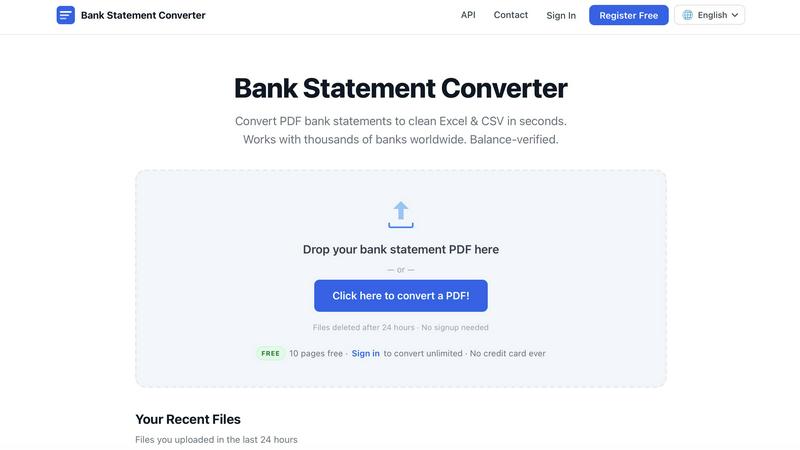
Bank Statement Engine rips your PDF bank data into Excel, CSV, or JSON instantly with zero signup, zero limits, and total privacy.
About Bank Statement Engine
Bank Statement Engine is the ultimate, no-BS tool that shreds the hassle of manual data entry and turns your messy PDF bank statements into clean, structured data in seconds. This isn't your grandpa's clunky converter. It's a blazing-fast, free, and secure platform that takes any PDF from over 10,000 banks worldwide including heavy hitters like Chase, Barclays, HDFC, SBI, and RBC and spits out perfectly formatted Excel, CSV, JSON, QBO, OFX, or QIF files. No account needed, no page limits, no hidden fees, ever. It even handles scanned PDFs with built-in OCR and cracks open password-protected statements like a pro. Built for accountants drowning in spreadsheets, bookkeepers who value their time, small business owners who need to see the cash flow, and developers who want to automate the grind, Bank Statement Engine is the secret weapon for anyone who needs transaction data fast. Your files are auto-deleted after 24 hours so your financial privacy stays locked down tight. With a REST API for the tech-savvy and a dead-simple drag-and-drop interface for everyone else, this tool turns a soul-crushing chore into a three-second victory. Stop copying numbers by hand and let the engine do the heavy lifting.
Features of Bank Statement Engine
Instant Multi-Format Export
Stop being held hostage by PDFs. Bank Statement Engine lets you download your cleaned data in six different formats: Excel (XLSX) for your spreadsheets, CSV for importing into Xero or Zoho Books, JSON for your dev projects, QBO for QuickBooks, OFX for financial software, and QIF for legacy systems. Just upload, click, and walk away with the exact file your workflow demands. No conversion headaches, no format guessing games.
Built-in OCR for Scanned PDFs
Got a physical bank statement you scanned into a PDF? No problem. The engine packs a powerful Optical Character Recognition (OCR) system that reads text from images and fuzzy scans with scary accuracy. It transforms blurry, pixelated documents into clean, structured transaction data. This means you can digitize old paper statements, receipts, or any printed financial document without breaking a sweat. It just works.
Global Bank Compatibility
Bank Statement Engine doesn't play favorites. It works with statements from over 10,000 banks across the USA, India, UK, Europe, Australia, the Middle East, Africa, and beyond. Whether you are dealing with a major institution like Chase or a local credit union in rural Japan, the engine recognizes the layout and extracts the data correctly. It's built to handle the wild variety of statement formats the world throws at it, so you never hit a dead end.
Enterprise-Grade Security and Privacy
Your financial data is sacred, and Bank Statement Engine treats it like a vault. All files are processed on secure servers with full HTTPS encryption. Your statements are automatically and permanently deleted from the system after 24 hours. There is no storage, no sharing, no prying eyes. You can upload sensitive documents without a second thought. Plus, you don't even need to create an account to get started, keeping your identity completely anonymous.
Use Cases of Bank Statement Engine
Automating Monthly Bookkeeping for Accountants
Accountants and bookkeepers who deal with dozens of client statements every month can kiss manual data entry goodbye. Instead of spending hours typing transaction dates, descriptions, and amounts into a spreadsheet, they simply drag and drop the PDFs into Bank Statement Engine. The tool extracts everything perfectly and exports it to Excel or CSV. This cuts a four-hour job down to ten minutes, freeing up time for actual analysis and client advisory work. It is a productivity cheat code for any accounting firm.
Reconciling Business Bank Accounts for Small Business Owners
Small business owners often struggle to keep their books straight because they dread reconciling their bank statements. Bank Statement Engine makes it stupidly simple. Upload your monthly PDF, download the CSV, and import it directly into your accounting software like Xero or QuickBooks. You can instantly see every transaction, match it against your records, and spot discrepancies. No more guessing where your money went or chasing down missing receipts. It gives you real-time control over your cash flow.
Integrating Financial Data for Developers
Developers building fintech apps, expense trackers, or financial dashboards need clean, structured data to work with. Bank Statement Engine offers a robust REST API that lets you automate the entire bank statement processing pipeline. Your application can send a PDF, receive a JSON object with all the transaction data, and integrate it directly into your database. This eliminates the need to build your own OCR and parsing logic from scratch. It is a plug-and-play solution that accelerates your development timeline by weeks.
Digitizing Historical Financial Records for Auditors
Auditors and compliance officers often need to review years of historical bank statements stored as scanned PDFs. Bank Statement Engine's OCR capabilities turn these dusty archives into searchable, editable digital files. You can convert a stack of old paper statements into a single Excel workbook, run analysis, and flag anomalies in minutes. This transforms a tedious manual audit into a fast, data-driven process. It is the perfect tool for anyone who needs to dig through the past without losing their mind.
Frequently Asked Questions
How do I convert a PDF bank statement to Excel?
It is ridiculously easy. Go to the Bank Statement Engine website, drag and drop your PDF file onto the upload area, or click to browse and select it. The tool will process the statement instantly. Once it is done, you will see a preview of the extracted data. Click the "Download Excel" button, and you are done. You get a clean, formatted XLSX file with all your transactions, balances, and dates. No sign-up, no payment, no waiting.
Which banks are supported?
Bank Statement Engine supports over 10,000 banks from all over the world. This includes major players like Chase, Bank of America, Barclays, HSBC, HDFC, SBI, RBC, and many more. It also works with smaller regional banks and credit unions. The system is continually updated to handle new statement formats. If you upload a statement from a bank that is not yet supported, you can contact the team, and they will work to add compatibility.
Is my bank statement data secure?
Absolutely. Security is a top priority. All files are transmitted over HTTPS encrypted connections. Once your file is processed, it is stored on secure servers for a maximum of 24 hours. After that time, the file and all extracted data are permanently deleted from the system. Your data is never shared, sold, or used for any other purpose. You can even use the tool without creating an account to remain completely anonymous.
Can I convert a scanned bank statement?
Yes, you can. Bank Statement Engine includes a built-in OCR (Optical Character Recognition) engine that can read text from scanned images and photos. If you have a physical paper statement that you scanned into a PDF, the tool will still extract the transaction data accurately. Just upload the scanned file as you would any other PDF. The OCR works automatically, so you do not need to toggle any settings. It just works.
What do I get in the downloaded file?
You get a complete, structured dataset of your bank statement. The file includes columns for the transaction date, description, debit amount, credit amount, and running balance. The data is cleaned and formatted so it is ready to be imported into your accounting software or spreadsheet. For Excel files, the formatting is applied automatically, making it easy to read and sort. For CSV files, the data is delimited properly for seamless imports.
Is there an API for developers?
Yes, there is a fully documented REST API available for developers who need to automate bank statement processing. The API allows you to send PDF files programmatically and receive structured JSON data in return. This is perfect for integrating into fintech applications, accounting software, or any custom workflow. You can find the full API documentation on the Bank Statement Engine website under the "API" section. It is built for speed and reliability.
Explore more in this category:
Similar to Bank Statement Engine


BankBridge
Let your AI agent answer questions about your real bank data. Read-only access, $5/mo per connected bank, cancel any time.

Statement2QBO
Bank statement PDF to QBO, Excel and Xero. Runs in your browser; three pages a day are free.

LaunchIntel
Your AI agent picks relevant directories, submits your product in your browser and tracks every step. One-time purchase.


ToolVerified
A hand-tested directory of new AI tools and SaaS apps. Real people check every link, and community votes decide the daily charts.

Easemic
Free open-source Android comic & manga cloud reader streaming encrypted libraries from S3, WebDAV & OPDS.

CloneWebsite
Clone any webpage pixel-perfect, export HTML/CSS/ZIP or React/Vue components.