

AskFormulas
AskFormulas creates and validates flawless Excel and Sheets formulas from plain English, saving you from debugging.
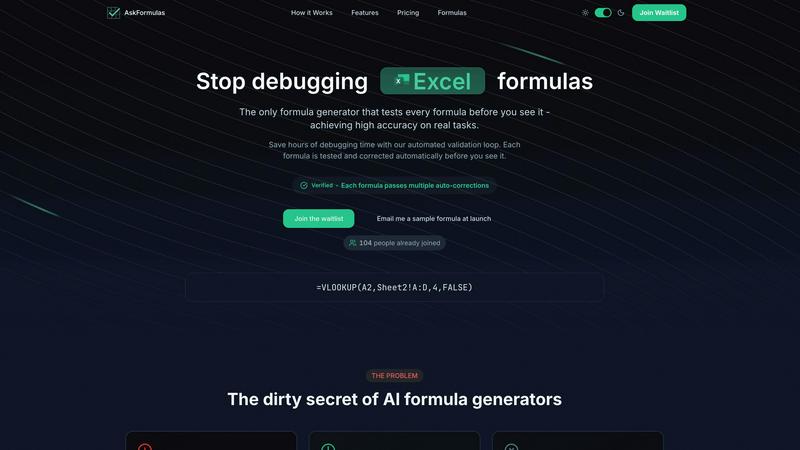
About AskFormulas
Are you drowning in a sea of convoluted Excel formulas? Say hello to AskFormulas, the ultimate weapon in your spreadsheet arsenal! This cutting-edge tool harnesses the power of advanced AI to generate, validate, and deliver flawless formulas that actually work. Designed for financial analysts, revenue managers, and small business owners who would rather pull their hair out than debug errors, AskFormulas takes the stress out of formula creation. With a staggering error reduction rate, where traditional AI generators fail 40-60% of the time, AskFormulas guarantees that every formula is rigorously tested before it reaches you. Imagine typing "Sum of sales in column B" and receiving a verified formula in mere seconds! This isn't just a simple generator; it's a revolutionary tool that boosts your productivity and wipes out spreadsheet chaos. Get ready to transform your workflow and reclaim your time with AskFormulas.
Features of AskFormulas
Natural Language Input
Forget complicated syntax! With AskFormulas, you can describe your formula needs in plain English. No more headaches trying to remember complex Excel language. Just type your request, like "Sum all values in column B where column A contains the word Sales," and let the AI do the heavy lifting.
Three-Step Validation Process
Every formula goes through a rigorous three-step validation process. First, your natural language request is converted into formula syntax. Next, the formula is auto-tested on synthetic data in a secure sandbox. Finally, any errors are automatically corrected until the formula is verified, ensuring high accuracy every time.
Instant Validated Output
You’ll see your formula pop up instantly with a shiny green "Verified" badge. This means it has passed all validation tests and is ready for action. No more waiting or second-guessing; just straightforward, working formulas that you can copy and paste directly into your spreadsheet.
Formula History and Smart Error Detection
Never lose a formula again! AskFormulas saves your last 10 generated formulas automatically, creating a personal formula library at your fingertips. Plus, if your formula has issues, the smart error detection feature identifies and fixes them in real-time, so you can avoid those dreaded #REF! and #VALUE! errors.
Use Cases of AskFormulas
Financial Reporting
Imagine you need to summarize sales data for a report. Just type your requirement in natural language, and AskFormulas will generate the exact formula you need, saving you precious time and effort. No more digging through spreadsheets to find the right calculations!
Budget Planning
When planning your annual budget, you need accurate formulas to predict expenses and revenues. With AskFormulas, simply describe what you need, and get validated formulas that help you make informed financial decisions without the hassle of formula errors.
Data Analysis
For analysts sifting through complex datasets, AskFormulas simplifies the process. Whether you need to create conditional sums or lookups, just describe your request and get instant, verified formulas that enhance your analysis workflow.
Team Collaboration
In a collaborative environment, teams often struggle with Excel formulas. AskFormulas allows team members to generate and share validated formulas quickly, ensuring everyone is on the same page and reducing the risk of errors in shared spreadsheets.
Frequently Asked Questions
How accurate are the generated formulas?
AskFormulas boasts a high accuracy rate, with every formula undergoing a three-step validation process before you see it. Unlike other generators that fail 40-60% of the time, AskFormulas ensures that every formula is tested and verified to work seamlessly.
Does it work with both Excel and Google Sheets?
Absolutely! AskFormulas seamlessly integrates with both Excel and Google Sheets. You can toggle between the two platforms effortlessly, and the system automatically adjusts the formula syntax for you.
How many formulas can I generate?
The number of formulas you can generate depends on your subscription plan. For example, the Starter plan allows up to 500 formulas a month, while the Pro plan offers 2,000 formulas, catering to users with varying needs.
What support options are available?
AskFormulas offers various support options depending on your plan. All users have access to email support, while higher-tier plans, like Pro and Team, enjoy priority support and additional features, ensuring you get the help you need when you need it.
Explore more in this category:
Similar to AskFormulas

@fuck.it - email with attitude
Private email. Pure. Secure. Exclusive. No ads, no tracking, no data selling. GDPR compliant, EU-hosted.

xfiles
PDFs, images and audio. No uploads. No account. No added watermarks.

FreeVideoGenerator
Free AI video generator: turn text prompts and photos into video clips with Sora 2, Veo 3.1, Wan and more. Free starter credits, no watermark download


VidhyaGen - Image Converter
All-in-one web platform for fast image conversion, compression, editing, and essential digital file utilities in one easy interface.

Posy
A link-in-bio page that looks hand-made. Pick a look, add your links and publish in a minute. Free, open source, and your AI can edit it for you.

Flip a Coin
Free online coin flip, yes/no, dice, spin wheel & random number tools. No signup, truly random, works instantly on any device.

sakuttoAI
A free suite of online tools for everyday tasks like PDF compression, image conversion, text diff and CSV to Excel.