

AsciiArt
Turn your text or images into retro ASCII art instantly with 50+ FIGlet fonts, no server needed.
About AsciiArt
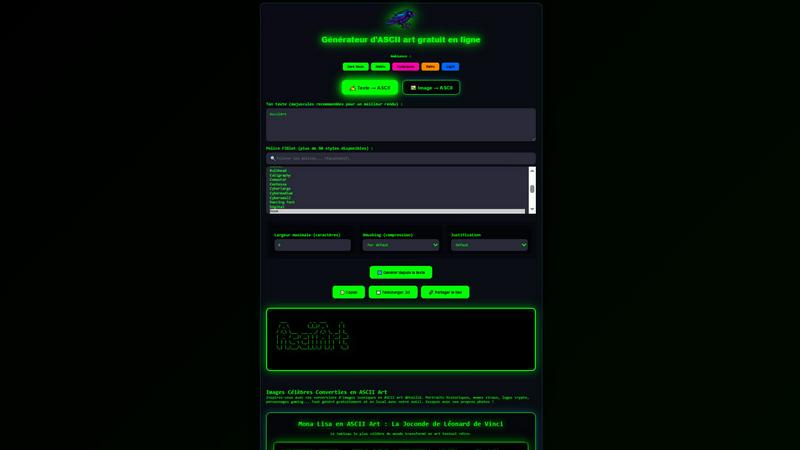
AsciiArt is a raw, no-nonsense, browser-based generator that lets you convert text or images into instant ASCII art with zero friction. No servers, no signups, no tracking—just pure, local magic. Whether you want to turn your favorite quote into a retro masterpiece using over 50 FIGlet fonts or transform any JPG, PNG, or WebP image into a detailed text-based sculpture, this tool does it all right in your browser. It’s built for the underground: developers sprucing up README files, Discord warriors flexing custom banners, forum legends dropping vintage vibes, email signature artists, and retro gaming project heads who live for that old-school terminal aesthetic. You get full control over width, smushing (compression style), and alignment—default, left, center, right, or justified. Once you’ve crafted your piece, copy it, download it as a .txt file, or share a unique link. The vibe is pure cyberpunk, dark neon, Matrix green, or retro—pick your poison. With an edgy, bold interface and a community gallery featuring iconic conversions like the Mona Lisa and viral memes, AsciiArt is the ultimate weapon for turning plain text and pixels into gritty, expressive art. It’s free, it’s fast, and it’s yours. No strings attached.
Features of AsciiArt
Text to ASCII with 50+ FIGlet Fonts
Unleash your creativity with a massive library of over 50 FIGlet fonts, ranging from classic block styles like 3-D and Banner to edgy designs like Cyberlarge, Star Wars, and Graffiti. Just type your text (uppercase recommended for maximum impact), pick your font, and watch it transform instantly. You can tweak the maximum width in characters to fit any space, and choose from four smushing modes—Default, Full, Kerning, Smush, or None—to control how tightly characters compress. Alignment options (left, center, right, justified) let you position your art perfectly. This feature is a beast for customizing everything from retro logos to terminal headers.
Image to ASCII Conversion
Drop any image (JPG, PNG, or WebP) into the tool and get a detailed, high-contrast ASCII art version in seconds. The conversion engine analyzes pixel brightness and maps it to a set of characters, creating stunning text-based portraits of famous artworks, memes, or your own photos. You can adjust the output’s width and smushing to control detail level—tight for intricate pieces, loose for blocky retro vibes. The tool processes everything locally in your browser, so your images never leave your machine. Perfect for turning your favorite gaming screenshot or historical painting into a shareable, text-only masterpiece.
Instant Copy, Download, and Share
Once your ASCII art is generated, you’ve got three slick options to use it. Hit the copy button to grab it to your clipboard instantly—paste it into Discord, forums, or email signatures without formatting issues. Download it as a .txt file for offline use, archiving, or embedding in README files. Or generate a unique shareable link that lets anyone view your creation directly in their browser. No accounts, no logins, just raw functionality. This feature makes AsciiArt the go-to for quick, viral-ready content that spreads like wildfire.
Local Processing with Zero Tracking
AsciiArt is built on a privacy-first philosophy. All conversions—text or image—happen entirely in your browser using client-side JavaScript. No data is sent to any server, no cookies are dropped, and no analytics track your moves. You can generate ASCII art from sensitive images or personal text without worrying about leaks or surveillance. The tool even works offline after the initial load, making it a reliable companion for hackers, privacy enthusiasts, and anyone who values digital sovereignty. It’s fast, secure, and completely free.
Use Cases of AsciiArt
Level Up Your README Files
Developers and open-source contributors can inject serious personality into their project documentation. Instead of boring plain text headers, use AsciiArt to create custom logos, project names, or section dividers using fonts like Big, Banner, or Star Wars. The ASCII art renders perfectly in any terminal or markdown viewer, giving your repo a retro, hacker-cool aesthetic that stands out on GitHub. Copy the output directly into your README.md, and you’ve got a header that screams “this project is legit.” It’s a small touch that makes a massive first impression.
Dominate Discord and Forum Threads
Stand out in crowded Discord servers or old-school forums with unique ASCII signatures and banners. Use the text-to-ASCII feature with edgy fonts like Cyberlarge or Graffiti to craft a custom username banner or a killer quote that grabs attention. For image-to-ASCII, convert your favorite meme or profile pic into text art and drop it in chat—instant nostalgia and street cred. The copy function works seamlessly across platforms, and the shareable link lets you flex your creations without clogging up the message feed.
Craft Retro Email Signatures
Ditch the boring “Sent from my iPhone” tag and replace it with a custom ASCII art signature that screams personality. Use a simple font like Standard or Slant to spell out your name, job title, or a cheeky tagline. The compact output fits neatly at the bottom of any email client, adding a touch of retro flair to professional or casual correspondence. It’s a conversation starter that shows you’re not just another corporate drone—you’re a digital artist with a terminal soul.
Build Vintage Gaming Project Assets
Retro game developers and modders can use AsciiArt to generate pixel-style title screens, level headers, or in-game text elements without firing up a graphics editor. The image-to-ASCII feature is perfect for converting sprite mockups or concept art into text-based representations that can be embedded directly into code. Fonts like 3-D and Banner give a classic arcade feel, while smushing options let you control the density for different resolutions. It’s a fast, lightweight way to prototype visuals or add a pure-text mode to your indie game.
Frequently Asked Questions
How does AsciiArt process images without a server?
AsciiArt runs entirely in your browser using client-side JavaScript. When you upload an image, it’s read locally via the File API, converted to pixel data, and then mapped to ASCII characters—all without sending a single byte to any server. This means your images stay private, and the conversion happens instantly, even offline after the initial page load. No tracking, no data leaks, just pure local computation.
Can I use AsciiArt for commercial projects?
Absolutely. All ASCII art generated with AsciiArt is yours to use however you want—commercial or personal. There are no licenses, no watermarks, and no restrictions. Whether you’re embedding it in a paid game, using it in a corporate presentation, or slapping it on merchandise, go wild. The tool is free and open for any purpose, so you can create and profit without worrying about legal headaches.
What is “smushing” and how do I choose the right mode?
Smushing controls how ASCII characters are compressed together when they overlap. Default uses a balanced approach, Full smushes aggressively for tighter art, Kerning adjusts spacing based on character shapes, Smush merges overlapping characters, and None keeps them separate. For detailed image conversions, Full or Smush works best. For text, Default or Kerning gives cleaner readability. Experiment with different modes to find the vibe you’re after—each one changes the texture of your final piece.
Why are uppercase letters recommended for text conversion?
Uppercase letters generally have more consistent shapes and thicker strokes, which translates into better-looking ASCII art—especially with detailed FIGlet fonts. Lowercase letters can look thin or uneven, reducing the impact of your design. For maximum retro coolness and readability, type your text in all caps. The tool works with any case, but uppercase gives you that bold, blocky, terminal-era aesthetic that ASCII art is famous for.
Pricing of AsciiArt
AsciiArt is completely free to use with no hidden costs, no premium tiers, and no paywalls. All features—text to ASCII with 50+ fonts, image to ASCII conversion, copy, download, and share functionality—are available to everyone without any signup or subscription. There are no ads, no tracking, and no data collection. The tool is supported independently and will remain free forever. Use it as much as you want, for any project, commercial or personal. Zero cost, maximum creativity.
Explore more in this category:
Similar to AsciiArt

ImageGPT
ImageGPT is an all-in-one AI creative platform for generating, editing and transforming images and videos using AI.

AI Album Cover Maker
Create release-ready album covers from a prompt or photo. Generate, refine, and export art for singles, EPs, mixtapes, and playlists.

Remove Background Online
Free background remover that runs entirely in your browser — zero uploads, full resolution, no watermark. Your photos never leave your device.

Sprite Sheet Maker
A free browser-based toolkit for creating, cutting, converting, and previewing sprite sheet animations.

Sprite Sheet Maker
Create pixel-art sprite sheets from text with AI, preview animations, and export PNG assets for game prototypes.

Reduce Image Quality
Free browser-based tool that lowers image quality and shrinks JPG, PNG and WebP files. No upload, no signup, no watermark.


Image to Layers AI
用 AI 把任意一张平面图片拆成可编辑的透明图层(PNG/PSD)