

AI ImageEditor
Edit photos, generate images, and upscale visuals instantly in your browser with this all-in-one AI editor that needs zero design skills.
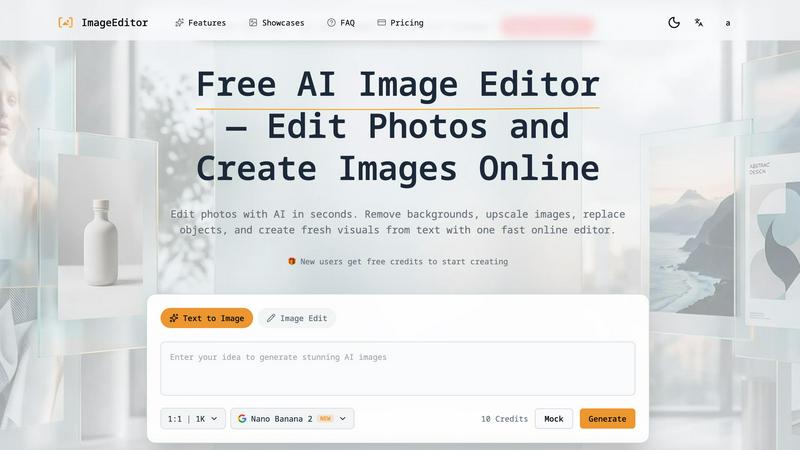
About AI ImageEditor
AI ImageEditor is the ultimate browser-based creative powerhouse that shatters the boundaries between imagination and reality. This isn't your grandma's clunky photo editor. It is a full-throttle AI image generation and editing platform engineered for creators, marketers, designers, and businesses who demand professional-grade visuals without the soul-crushing complexity of traditional software. Imagine having a hyper-intelligent design studio living in your browser, ready to blast out photorealistic images from a simple text prompt, strip backgrounds with surgical precision, swap out objects like they were never there, and upscale your work to glorious 4K resolution. That is exactly what ImageEditor.net delivers.
Built on the bleeding edge of AI technology, this platform combines a suite of powerful tools into one seamless, lightning-fast workflow. Whether you are a social media manager needing a fresh batch of eye-catching graphics, an e-commerce entrepreneur polishing product shots, or a digital artist exploring new styles, AI ImageEditor makes the impossible feel effortless. It understands complex natural language, so you can describe a "cozy coffee shop in geometric art style" and watch it appear in seconds. It also crushes benchmarks, ranking number one in AI image quality. No design skills? No problem. No expensive subscriptions? Forget about it. This tool is about raw creative freedom, speed, and results that slap. From generating brand new visuals to enhancing existing ones, AI ImageEditor is your all-in-one ticket to visual domination.
Features of AI ImageEditor
Text to Image Generation
Unleash your wildest ideas with a state-of-the-art text-to-image engine that turns your words into stunning, photorealistic visuals. Our advanced AI deciphers complex natural language descriptions, capturing nuanced details, lighting, and composition to produce outputs that look like they were shot on a high-end camera. Whether you need a "laughing man driving a vintage car" or an "AI research era infographic," this feature delivers professional quality with flash speed. It is the core engine that makes creating visuals as easy as typing a sentence, offering endless creative possibilities for any project.
Background Removal
Kill the clutter and isolate your subjects with AI-powered precision that is faster than a barista on espresso. This tool instantly detects and removes backgrounds from any image, leaving you with a clean, professional cutout perfect for product photos, portraits, or transparent PNGs. No more tedious manual masking or spending hours with a lasso tool. The AI handles complex edges like hair and fur with scary accuracy, giving you a flawless result in seconds. It is an absolute game-changer for e-commerce listings, social media graphics, and any project where your subject needs to stand out.
Image Upscaling
Take your visuals from blurry to brilliant with our cutting-edge upscaling technology that enhances resolution without sacrificing a single pixel of detail. Whether you are working with a low-res meme or a vintage photo, this feature intelligently reconstructs missing information to boost your image up to 2K or 4K. The result is crisp, sharp, and ready for professional marketing materials, high-quality prints, or massive billboards. It breathes new life into old files and ensures your final output always looks premium, no matter the source.
Image to Image Enhancement
Upload any photo and watch the AI work its magic, transforming it with enhanced quality and creative modifications while preserving the original composition. This feature is perfect for applying style transfers, fixing lighting issues, or completely reimagining a scene. Want to turn a standard portrait into a Kodak Portra 400 lifestyle grid? Or give your product shot a cinematic glow? The AI understands your intent and applies intelligent enhancements that elevate the visual without losing its core identity. It is the ultimate tool for creative experimentation and rapid iteration.
Use Cases of AI ImageEditor
Rapid Content Creation for Social Media
Social media managers and content creators can use AI ImageEditor to generate a firestorm of unique, high-quality visuals in minutes. Instead of hunting for stock photos or spending hours in complex software, you can type a prompt like "F1 Race Day with Champagne" and get a ready-to-post image. Use background removal to create slick product mockups for Instagram, or upscale a low-res meme for a billboard. This tool lets you keep your feed fresh, engaging, and ahead of the curve without breaking a sweat.
E-commerce Product Photography
Online sellers and e-commerce businesses can revolutionize their product listings with professional-grade images that convert. Use the background remover to isolate products against a clean white backdrop, or generate stunning lifestyle shots with text-to-image. Need a high-res version of a product detail? The upscaler has you covered. This platform eliminates the need for expensive photoshoots, allowing you to create consistent, polished visuals that make your products pop and drive sales.
Professional Portrait and ID Photo Editing
For photographers, HR departments, and anyone needing polished portraits, AI ImageEditor is a lifesaver. Generate professional ID photo grids with perfect lighting and composition, or enhance a casual snapshot into a Kodak Portra 400 lifestyle masterpiece. The background removal tool ensures clean, compliant headshots, while the image enhancement features smooth out skin tones and adjust lighting. It turns a basic photo into a portfolio-worthy piece in seconds.
Marketing and Advertising Campaigns
Marketers and agencies can use AI ImageEditor to rapidly prototype and produce campaign visuals that demand attention. Generate concept art for a new ad series, create infographics for thought leadership pieces, or apply style transfers to unify a brand's visual identity across platforms. The batch processing feature allows you to edit multiple images at once, saving crucial time during tight campaign deadlines. It is the secret weapon for producing high-impact, customized visuals at scale.
Frequently Asked Questions
Do I need any design experience to use AI ImageEditor?
Absolutely not. The entire platform is built for simplicity and speed. You can generate stunning images from a simple text description, remove backgrounds with one click, and upscale photos without touching a single complex setting. The AI handles all the heavy lifting, so whether you are a seasoned designer or a complete beginner, you can create professional-quality visuals in seconds. No tutorials, no stress, just pure creative power.
Is there a free version or a trial available?
Yes, you can start creating instantly. The platform offers free credits for your first generation, allowing you to test the text-to-image engine, background remover, and other tools without any upfront commitment. Simply visit the website, enter your prompt, and start editing. For users who need more credits and advanced features like higher resolutions and batch processing, there are flexible paid plans available.
What kind of images can I create with the Text to Image feature?
The possibilities are virtually endless. You can generate photorealistic portraits, stunning landscapes, geometric art, cozy interior scenes, cinematic action shots, professional infographics, and much more. The AI understands complex natural language, so you can get very specific with your prompts, like "Camera Angle Study: Rally Scene" or "Professional ID Photo Grid." It is designed to handle a wide range of styles and subjects for any creative project.
Can I use the images I create for commercial purposes?
Yes, all images created using AI ImageEditor come with a commercial license. This means you have full rights to use your generated and edited visuals for marketing campaigns, social media, product listings, presentations, merchandise, and any other commercial project. You own the output, so you can monetize your creativity without worrying about copyright issues.
Pricing of AI ImageEditor
AI ImageEditor offers a flexible credit-based pricing model designed for everyone from casual creators to power users. You start with free credits to test the platform, allowing you to generate and edit images without any initial payment. For users who need more power, premium plans unlock higher resolution outputs (up to 4K), faster processing speeds, priority access to new features like GPT-Image-2, and larger batch processing capabilities. The exact credit costs per action vary depending on the tool used and the output resolution selected, ensuring you only pay for what you need. This transparent, pay-as-you-go approach makes professional AI image editing accessible and scalable for any budget.
Explore more in this category:
Similar to AI ImageEditor

ImageGPT
ImageGPT is an all-in-one AI creative platform for generating, editing and transforming images and videos using AI.

AI Album Cover Maker
Create release-ready album covers from a prompt or photo. Generate, refine, and export art for singles, EPs, mixtapes, and playlists.

Remove Background Online
Free background remover that runs entirely in your browser — zero uploads, full resolution, no watermark. Your photos never leave your device.

Sprite Sheet Maker
A free browser-based toolkit for creating, cutting, converting, and previewing sprite sheet animations.

Sprite Sheet Maker
Create pixel-art sprite sheets from text with AI, preview animations, and export PNG assets for game prototypes.

Reduce Image Quality
Free browser-based tool that lowers image quality and shrinks JPG, PNG and WebP files. No upload, no signup, no watermark.


Image to Layers AI
用 AI 把任意一张平面图片拆成可编辑的透明图层(PNG/PSD)