

AI Architecture Generator
Turn prompts or sketches into photorealistic architecture renders in 30 seconds with AI-powered precision.
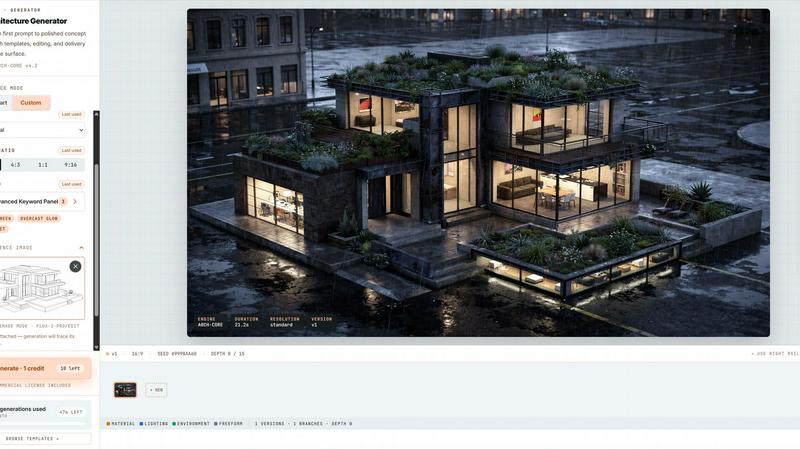
About AI Architecture Generator
AI Architecture Generator is a browser-based powerhouse that obliterates the gap between a raw idea and a polished concept render. No more sinking hours into a single, overworked visualization. This tool lets architects, interior designers, realtors, and students rapidly explore multiple visual directions, test styles, and whip up presentation-ready drafts in seconds. It supports architecture concept rendering, interior design generation, AI virtual staging for empty rooms, and early floor plan ideation. The core value proposition is simple: turn a sketch, a photo, or a text prompt into an Enhanced HD photorealistic render in about 30 seconds. You can iterate edits, export a 3D mesh, and ship it to clients without ever leaving your browser. With 3 free generations per day and no signup required, it's the ultimate low-friction entry point for anyone who needs to visualize spaces fast. Whether you are a pro craving full prompt control or a realtor needing a one-click staged photo, this tool bends to your workflow. It is built for client presentations, real estate listings, design studies, renovation previews, and architecture school projects. The platform offers two distinct modes: Pro Mode for unlimited freedom with advanced keyword panels and workflow exports, and Template Mode for zero learning curve with curated presets and virtual staging. Both modes live in the same app, letting you switch on the fly. The result? Smarter prompts, better renders, and a whole lot less waiting.
Features of AI Architecture Generator
Sketch to Render AI
Upload a rough sketch, a line drawing, or an axonometric study, and let the AI anchor your composition. The tool processes your input and generates a full, photorealistic render in under 30 seconds. It cycles between input and output seamlessly, showing you the transformation from raw concept to polished visual. This feature is a game-changer for early design exploration, letting you test massing, form, and style without building a 3D model from scratch.
Pro Mode with Unlimited Freedom
For architects and interior designers who refuse to be boxed in, Pro Mode offers a 2000-character free-form text input with no template lock-in. You can use technical jargon like BIM, parametric, or passive house, and fine-tune every parameter using an advanced keyword panel for materials, lighting, environment, and camera. Workflow exports include Enhanced HD renders and GLB preview meshes that open in any glTF viewer like Blender, SketchUp, or AR Quick Look. Batch iteration with a version tree keeps your design history intact.
Template Mode for Zero Learning Curve
Realtors, students, and quick-turn users can skip the prompt-writing entirely. Template Mode offers a curated library of 50+ hand-tuned prompts, browsable by style, room, or use case. One click on "Use this" and you are generating. The virtual staging flagship tool lets you upload an empty room, pick a style, and get a staged photo in 30 seconds with zero prompt needed. Style presets like Scandinavian, Modern, Industrial, and Luxury are baked in, and guided prompts fill in the blanks for you.
Enhanced HD Export and 3D Mesh
Every render can be exported in Enhanced HD resolution, making it suitable for client presentations and real estate listings. But the real power move is the GLB preview mesh export. This allows you to take your AI-generated design into any 3D software for further refinement, collaboration, or AR viewing. The tool supports automatic 16:9 crop for listing-ready output, and watermark-free exports are available on the Pro plan. Save $20-45 per photo compared to traditional virtual staging services.
Use Cases of AI Architecture Generator
Client Presentations and Design Studies
Architects and designers can rapidly generate multiple visual directions for a single project. Instead of spending hours on one render, you can explore modern, brutalist, Scandinavian, and Japanese styles in minutes. Show clients a range of options, iterate based on feedback, and deliver a final concept that aligns with their vision. The tool's ability to process sketches and reference photos makes it ideal for early-stage design studies where speed and flexibility are paramount.
Real Estate Listings and Virtual Staging
Realtors can upload photos of empty rooms and use the virtual staging feature to furnish them in 30 seconds. Pick a style like Luxury, Scandinavian, or Mid-Century, and the AI generates a fully staged, MLS-compliant photo. No need to hire a traditional stager at $20-45 per photo. The auto 16:9 crop and watermark-free output on Pro make these images ready for immediate listing. This feature dramatically increases the appeal of vacant properties without any physical furniture.
Architecture School Projects and Rapid Prototyping
Students can use the tool to quickly visualize their design concepts for critiques and presentations. Upload a hand-drawn sketch, describe the style, and generate a render that communicates your idea clearly. The tool's ability to handle technical jargon like parametric or passive house means you can stay true to your design language. The free tier offers 3 generations per day, making it accessible for multiple iterations and experimentation without breaking the bank.
Renovation Previews and Interior Design Planning
Homeowners and designers can use the tool to preview renovation outcomes before committing to construction. Upload a photo of an existing room, describe the desired style, and see a realistic render of the transformed space. This is perfect for kitchen remodels, bathroom overhauls, or living room refreshes. The AI handles lighting, materials, and furniture placement, giving you a clear visual roadmap for your project. Iterate on different styles until you find the perfect match.
Frequently Asked Questions
How does the AI Architecture Generator work?
You start by describing your design in a text prompt (up to 2000 characters) or by uploading a sketch or reference photo. The AI uses its NODE ARCH-CORE v4.2 engine to process your input and generate a photorealistic render in about 30 seconds. You can choose from 10+ architectural styles like Modern, Brutalist, or Scandinavian, or use one of the 50+ curated templates. The tool supports both Pro Mode for full prompt control and Template Mode for one-click generation.
Can I use the tool for free?
Yes, you get 3 free generations per day with no signup required. To track your daily quota and save your generations, you need to sign in. The free tier is perfect for testing the tool and exploring its capabilities. For unlimited generations and watermark-free exports, you can upgrade to a Pro plan. Pricing details are available on the website.
What file formats are supported for upload and export?
For uploads, the tool accepts JPG, PNG, and WebP files up to 10MB. You can upload sketches, line drawings, axonometric studies, massing studies, or reference photos. For exports, you get Enhanced HD renders and GLB preview meshes. The GLB file opens in any glTF viewer like Blender, SketchUp, model-viewer, or AR Quick Look, allowing you to further refine your design in 3D software.
What is the difference between Pro Mode and Template Mode?
Pro Mode is designed for architects and interior designers who need unlimited freedom. It offers free-form prompts up to 2000 characters, an advanced keyword panel for materials, lighting, and environment, and workflow exports including Enhanced HD and GLB meshes. Template Mode is for realtors, students, and quick users. It provides a curated library of 50+ templates, virtual staging for empty rooms, and guided prompts. Both modes live in the same app, and you can switch between them on the fly.
Explore more in this category:
Similar to AI Architecture Generator

ImageGPT
ImageGPT is an all-in-one AI creative platform for generating, editing and transforming images and videos using AI.

AI Album Cover Maker
Create release-ready album covers from a prompt or photo. Generate, refine, and export art for singles, EPs, mixtapes, and playlists.

Remove Background Online
Free background remover that runs entirely in your browser — zero uploads, full resolution, no watermark. Your photos never leave your device.

Sprite Sheet Maker
A free browser-based toolkit for creating, cutting, converting, and previewing sprite sheet animations.


Sprite Sheet Maker
Create pixel-art sprite sheets from text with AI, preview animations, and export PNG assets for game prototypes.

Reduce Image Quality
Free browser-based tool that lowers image quality and shrinks JPG, PNG and WebP files. No upload, no signup, no watermark.
