Siftly vs Zovo
Side-by-side comparison to help you choose the right AI tool.

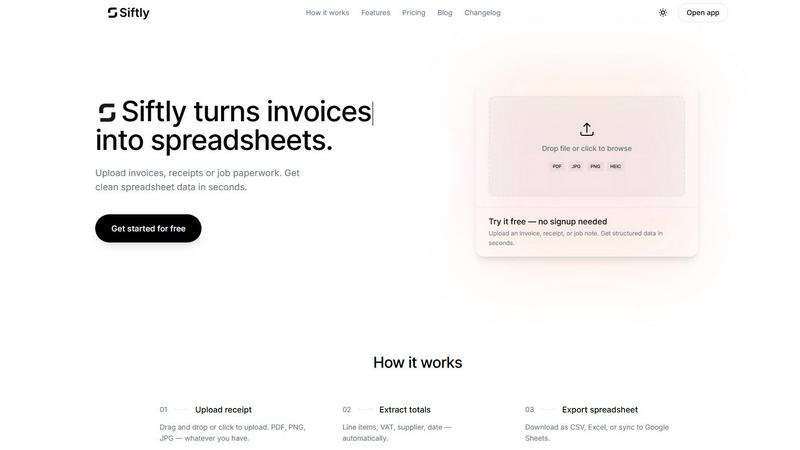
Siftly instantly turns your messy invoices into clean, structured spreadsheets using AI.
Last updated: March 11, 2026

Zovo delivers 20 privacy-first Chrome extensions for developers and writers, all for one low price—no data mining, just.
Last updated: February 28, 2026
Visual Comparison
Siftly
Zovo

Feature Comparison
Siftly
Universal Document Goblin
Siftly is a format-agnostic monster that devours whatever you throw at it. PDFs, JPGs, PNGs, even HEIC files from your iPhone—it doesn't care. Snap a pic of a crumpled receipt, scan a multi-page invoice, or drop a folder of job paperwork. If you can photograph or save it, Siftly can structure it. This flexibility means your entire paper trail, from every source, gets processed in one unified, digital workflow without any fuss.
Lightning-Fast AI Extraction
Watch in awe as our AI works its magic at ludicrous speed. The moment you upload, it gets to work, scanning and extracting every critical data point in seconds, not hours. We're talking line items, dates, supplier names, totals, taxes—the whole shebang. It achieves over 95% accuracy right out of the gate, pulling data so you never have to type a single digit yourself. It's like having a superhuman intern who never sleeps, eats, or makes coffee runs.
Click-to-Edit Control Freak Mode
Siftly gives you the power, always. The extracted data isn't locked behind some black box. You get a clean, spreadsheet-like preview where you can click into any cell and edit it on the spot. Spotted a weird total? Fix it. Need to rename a supplier? Go for it. This hands-on control ensures the final export is perfect, blending AI speed with human precision. You're the final boss of your data.
Bulk Upload & Multi-Format Exodus
Got a backlog? Crush it. Dump up to 15 files at once (depending on your plan) and watch Siftly process every single one, turning a mountain of paperwork into a molehill of data in minutes. Then, export your way. Need a simple CSV? Done. A formatted Excel (.xlsx) file? Easy. Want it syncing live to Google Sheets automatically? Pro users get that golden ticket. Your data, your rules, your preferred platform.
Zovo
BeLikeNative
BeLikeNative is your secret weapon for flawless writing. With a single keystroke, this extension instantly rewrites your text to sound like a native speaker, across 80 languages. It’s like having a personal editor in your pocket, ready to elevate your written communication whenever you need it. Perfect for students, professionals, and anyone who wants to impress with their language skills.
Tab Suspender Pro
Say goodbye to sluggish browsers! Tab Suspender Pro automatically suspends inactive tabs, freeing up your memory and boosting performance. This smart tool tracks your tab usage, ensuring you only keep the ones you need active. It's ideal for multitaskers who juggle numerous tabs but want to maintain a smooth browsing experience without draining resources.
Clipboard History Pro
Never lose your copied text again with Clipboard History Pro! This extension stores up to 10,000 clips, allowing you to search and paste your copied content instantly. Whether you're compiling research or drafting content, this tool is crucial for anyone who needs to manage multiple snippets of information effortlessly.
JSON Formatter Pro
Transform your JSON data into a readable format with JSON Formatter Pro! This extension not only beautifies and validates your JSON but also offers a tree explorer for easy navigation. It’s an absolute must-have for developers and data analysts who work with API responses and need to make sense of complex data structures in real-time.
Use Cases
Siftly
Freelancer Finance Un-F*cking
Freelancers drowning in expense receipts from Uber, coffee shops, and software subscriptions can finally breathe. Weekly, just dump all your receipt photos into Siftly. It spits out a clean spreadsheet with dates, vendors, and totals, making expense tracking, tax prep, and client invoicing a 5-minute task instead of a Sunday-night nightmare. Reclaim your weekends.
Small Business Bookkeeping Bliss
For small business owners, managing supplier invoices and sales receipts is a constant drain. Siftly automates the worst part. Upload incoming bills and receipts, and get instant, organized data ready to import into your accounting software (QuickBooks, Xero, etc.). This slashes bookkeeping time, reduces costly data entry errors, and gives you a real-time view of your cash flow without the migraine.
Accountant & Bookkeeper Turbo-Boost
Accounting pros can scale their services without scaling their headaches. Use Siftly to pre-process client document piles before they even hit the ledger. Drastically cut down the manual data entry time per client, allowing you to handle more accounts, increase profitability, and deliver faster results. It's a force multiplier that makes you look like a wizard.
Field Service & Trade Job Paperwork
Tradespeople and field service teams drowning in job sheets, material lists, and on-site receipts can finally get organized. Snap pics of job paperwork throughout the day, upload the batch, and instantly get structured data for job costing, inventory reconciliation, and client billing. No more lost slips or late-night admin marathons. Get paid faster and keep the job site running smooth.
Zovo
Academic Writing
Students and researchers can leverage BeLikeNative to refine their academic papers, ensuring their writing is polished and coherent. With instant rewrites, it's easier than ever to communicate complex ideas clearly and convincingly, making a significant impact in the academic world.
Web Development
Web developers can utilize JSON Formatter Pro to debug and visualize complex JSON data effortlessly. By transforming messy data into structured formats, they can streamline their workflow and enhance productivity, making it easier to develop and test APIs.
Content Creation
Content creators can benefit from Clipboard History Pro by gathering and organizing snippets of inspiration or research material. This tool allows them to compile valuable content easily, making the writing process smoother and more efficient.
Browser Performance Optimization
For heavy internet users, Tab Suspender Pro is a game-changer. It helps optimize browser performance by suspending unnecessary tabs, allowing users to maintain a fast and responsive browsing experience. Perfect for those who conduct extensive research or manage multiple projects simultaneously.
Overview
About Siftly
Tired of drowning in a paper prison of invoices, receipts, and job notes? Siftly is your digital jailbreak. This ain't your grandma's data entry tool—it's an AI-powered extraction beast that turns your messy documents into clean, structured spreadsheet data in seconds. Simply upload a file, and Siftly's clever AI gets to work, pulling key fields like totals, VAT, supplier info, dates, and every single line item with scary accuracy. Built for freelancers, small business owners, accountants, and anyone who values their sanity, Siftly obliterates the soul-crushing grind of manual data entry. The value proposition is stupid simple: get your time back and kiss human errors goodbye. Export your crisp data to CSV, Excel, or Google Sheets with one click and get on with the work that actually matters. No more deciphering scribbles or hunting for totals. Siftly automates the boring stuff so you can focus on the big picture.
About Zovo
Zovo is a powerhouse suite of 16 Chrome extensions crafted by a solo developer with over a decade of experience and an impressive $400K earned on Upwork—100% success rate, baby! This is not just another corporate tool; it’s the real deal. Zovo’s flagship extension, BeLikeNative, empowers more than 3,300 users to write like a native speaker in just one keystroke, supporting a staggering 80 languages. But that’s just scratching the surface. The entire suite includes must-have tools like Tab Suspender Pro, JSON Formatter Pro, and Clipboard History Pro, each designed with a privacy-first philosophy—your data never leaves your device, no shady data harvesting here. Zovo democratizes tool development; users vote on features and shape the roadmap, meaning you get what you actually need. With new extensions dropping every month, Zovo is a treasure trove for anyone looking to boost their browser’s capabilities without compromising privacy or performance.
Frequently Asked Questions
Siftly FAQ
What types of documents can Siftly extract?
Siftly is built to handle your standard business chaos. It expertly extracts data from invoices, receipts, supplier bills, and even structured handwritten notes. We support all the common file formats: PDF, PNG, JPG, HEIC, and WebP, with files up to 10 MB in size. If you can save it or shoot it, we can likely sift it.
How accurate is the extraction?
Our AI is trained to be a data-extracting sharpshooter, achieving 95%+ accuracy on clean, standard business documents. But we're not arrogant—we know perfection is a journey. That's why we built the click-to-edit preview. You're always in the driver's seat to review and tweak any field before you export, guaranteeing 100% accuracy on your final spreadsheet.
What export formats are available?
Your export power grows with your plan. Free users can download their data as a versatile CSV file. Upgrade to Plus, and you unlock CSV plus properly formatted Excel (.xlsx) files. Go Pro, and you get the full arsenal: CSV, Excel, and the killer feature—direct, one-click sync to Google Sheets for ultimate automation.
Is my data secure?
Hell yes. We take security seriously. Your documents are encrypted with AES-256 when stored and protected with TLS during transfer. The best part? We automatically delete your files after extraction. We don't hoard your data. We process it, give you the goods, and then we wipe it. Your data is yours, full stop.
Zovo FAQ
What is Zovo?
Zovo is a suite of 16 privacy-first Chrome extensions developed by a solo developer. It focuses on enhancing browser functionality while ensuring user data remains private and secure.
How do I request new features?
You can submit feature requests directly through the Zovo website. The developer personally reviews all requests, and the most popular features get prioritized for development.
Is my data safe with Zovo extensions?
Absolutely! Zovo prioritizes user privacy, ensuring that no data is harvested or stored outside your device. All processing happens locally, so your information remains yours.
How often are new extensions released?
Zovo releases new extensions every month! Members get early access, typically 1-2 weeks before the public release, allowing them to enjoy the latest tools first.
Alternatives
Siftly Alternatives
Siftly is your AI-powered sidekick in the world of productivity and automation, specifically designed to slay the tedious beast of manual data entry. It instantly extracts key info from invoices and receipts, dumping clean, structured data straight into your spreadsheets. It’s a total game-changer for anyone drowning in paperwork. So why would anyone look elsewhere? Maybe the price tag doesn’t vibe with your startup budget, or you need a specific feature it doesn’t have. Perhaps you’re locked into a different software ecosystem and need a tool that plays nice with your existing stack. It’s all about finding the perfect fit for your workflow and wallet. When hunting for a different solution, keep your eyes on the prize. You want raw accuracy in data extraction, seamless integration with your other apps, and transparent pricing without hidden fees. Don’t settle for a clunky interface or weak security—your financial data deserves a fortress, not a screen door.
Zovo Alternatives
Zovo is a powerhouse suite of privacy-first Chrome extensions for developers and writers. It's the ultimate productivity hack, bundling tools for writing, tab management, and data handling into one slick package. This isn't just software; it's a curated toolkit built by a proven solo dev who gets what power users actually need. So why look elsewhere? Maybe the all-in-one bundle isn't your vibe, or you need tools for a different browser. Budget can be a factor, or perhaps you're hunting for one hyper-specialized feature that a broader suite doesn't cover. It's all about finding the perfect fit for your specific workflow chaos. When scouting for other options, keep your non-negotiables front and center. Privacy should be non-negotiable—ask where your data lives. Check if the tool's roadmap aligns with your needs, and see if it plays nice with your other apps. Performance is key; you want a speed boost, not more bloat. Ultimately, you need a setup that feels like an extension of your brain, not a burden.