Perkoon vs Who Fixed It
Side-by-side comparison to help you choose the right AI tool.

Transfer files freely and easily with Perkoon, the unlimited peer-to-peer service that keeps your data yours.
Last updated: March 4, 2026

Who Fixed It
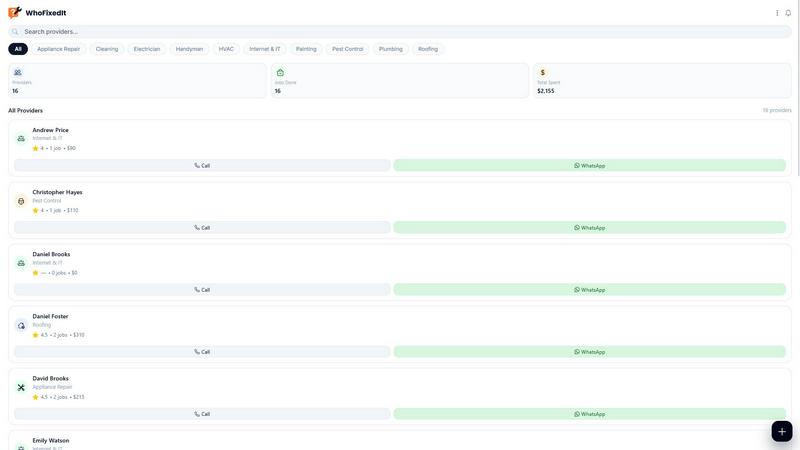
WhoFixedIt is your go-to app for tracking repairs, saving trusted pros, and ensuring every fix sticks for good.
Last updated: February 28, 2026
Visual Comparison
Perkoon

Who Fixed It
Feature Comparison
Perkoon
Peer-to-Peer (P2P) File Transfer
Perkoon’s flagship feature allows you to send files directly between browsers, cutting out the middleman entirely. Enjoy limitless file sizes and total privacy, as your data never touches a central server. It’s free forever because it costs Perkoon nothing to run.
Encrypted Cloud Storage
When your recipient is offline, Perkoon has you covered with a secure cloud storage option. This paid feature ensures that your files are encrypted and safely held on our servers until the other party is ready to access them, ensuring peace of mind.
AI Integration
Perkoon is designed for the age of AI. With its built-in tools, your AI agents can interact with the service directly, eliminating the need for clunky screen-scraping. This means smoother operations and faster file transfers, making it easier for machines to manage their tasks.
Referral Program
Why pay big tech for storage when you can earn it? Perkoon’s referral program rewards you for sharing your unique link. When your friends sign up and start transferring files, you both unlock bonus storage. It’s a win-win, creating a network of users who benefit together.
Who Fixed It
Effortless Issue Logging
Logging an issue has never been easier. With Who Fixed It, you can create a detailed entry in mere seconds, complete with context like screenshots and links, ensuring that every problem is captured comprehensively.
Smart Categorization
No one likes to sift through a mess, and Who Fixed It gets that. This feature automatically categorizes issues, suggesting relevant tags and identifying the most likely responsible team or area, streamlining your workflow.
Status Tracking & Timelines
Stay in the loop with real-time updates. Who Fixed It allows you to track the status of each issue, outlining timelines and dependencies so you know exactly where things stand, keeping everyone accountable.
Historical Resolution Storage
Never forget how a problem was solved again. With Who Fixed It, you can store final resolution details for each issue, creating a searchable knowledge base that’s perfect for future reference and training purposes.
Use Cases
Perkoon
Seamless Collaboration
Imagine you're working on a group project with teammates across the globe. Perkoon allows you to send large files to each other in real-time without worrying about size limits or accounts. Just send the link, and you’re good to go.
Freelance File Sharing
As a freelancer, sending large design files or video content can be a headache. With Perkoon, you can send massive files to clients instantly, ensuring they receive their assets quickly without any fuss.
Secure Personal Transfers
Need to share sensitive documents like tax returns or personal info? Perkoon’s P2P transfer keeps your data private and secure, ensuring only the intended recipient has access, without any corporate eyes watching.
AI Automation
If you’re a developer or a tech enthusiast, you can utilize Perkoon’s built-in AI tools to automate file transfers. This makes it easier to integrate file sharing into your workflows, enhancing productivity without the usual tech headaches.
Who Fixed It
Streamlining Team Communication
Imagine a scenario where team members repeatedly miss important updates. With Who Fixed It, you can ensure that every issue is logged, tracked, and assigned, creating a seamless flow of communication that keeps everyone on the same page.
Personal Logbook for Service Providers
Whether you're a homeowner or a renter, Who Fixed It can serve as your trusty logbook for service providers. Track jobs, store notes, and keep a reliable list of who to call when something breaks down.
Reducing Repeated Problems
How many times have you dealt with the same issue over and over again? With the historical resolution feature, you can see how past problems were fixed, drastically reducing the chances of repeating them in the future.
Efficient Handoffs Between Teams
In a world where collaboration is key, Who Fixed It makes handoffs between teams as smooth as butter. Assign issues with clarity, discuss details openly, and track the progress until everything is resolved without any lost info.
Overview
About Perkoon
Perkoon is not just another file transfer service; it's your go-to solution for hassle-free, limitless file sharing. Designed for those who’ve grown weary of traditional file services bogged down by artificial limits, mandatory sign-ups, and invasive data practices, Perkoon strips away the nonsense and gets back to the essentials: moving your files from point A to point B without a hitch. Whether you're a student sharing a project, a freelancer sending large assets, or just someone wanting to send files without the corporate fluff, Perkoon has your back. Its core offering is split into two smart paths for file transfer. The first is a revolutionary free peer-to-peer (P2P) transfer that operates directly between browsers when both parties are online, ensuring no size limits and total privacy. The second option is a paid encrypted cloud storage feature that kicks in when your recipient is offline. What really sets Perkoon apart is its intuitive design, tailored for the AI era, featuring built-in automation tools and a simple CLI tool for seamless integration. In a world where your data often gets sold, Perkoon keeps your files yours, forever.
About Who Fixed It
Who Fixed It is your ultimate AI-assisted sidekick in the chaotic world of issue tracking and accountability. Designed for teams and individuals alike, this slick tool allows you to capture problems faster than you can say "fix it!" With just a few taps, you can log an issue, add juicy context like screenshots and notes, and watch Who Fixed It work its magic. The software categorizes your problems, suggests relevant tags, and points you to the right team or individual responsible for the fix. It’s like having a personal assistant dedicated to making sure nothing slips through the cracks. By focusing on “who fixed it” and “what changed,” you can enjoy a clear workflow that encapsulates assignment, discussion, fixing, and verification. With features that track status, timelines, and dependencies, you’ll build a clean and searchable history of updates and resolutions. So, if you want fewer headaches from repeated problems and faster handoffs, Who Fixed It is your go-to solution for reliable follow-through.
Frequently Asked Questions
Perkoon FAQ
Why is Perkoon free?
Perkoon’s P2P transfer is free because it operates without central servers, meaning it costs Perkoon nothing to run. The cloud storage feature incurs costs, which is why it’s a paid option.
Can Perkoon see my files?
Absolutely not! With P2P transfers, your files go directly from your browser to the recipient's browser. Perkoon literally has no access to what you’re sending.
Which browsers work with Perkoon?
Perkoon is fully compatible with Chrome, Edge, and Brave, ensuring no limits on file transfers. Firefox and Safari users may encounter some restrictions due to browser limitations.
What happens if my recipient is offline?
If the recipient is offline, Perkoon will securely hold the file in encrypted cloud storage until they come online. This feature is part of the paid service, ensuring your file is safe and accessible later.
Who Fixed It FAQ
What is Who Fixed It?
Who Fixed It is an AI-assisted issue tracking tool designed to help teams and individuals capture problems, assign responsibilities, and maintain a clean history of resolutions.
How can I log an issue?
Logging an issue is a breeze! Just access the app, enter the details of your issue, add context like screenshots or links, and Who Fixed It will handle the rest, routing it to the right person.
Can I track multiple issues at once?
Absolutely! Who Fixed It is built for efficiency, allowing you to track multiple issues simultaneously, keeping everything organized and easy to manage.
Is my data secure with Who Fixed It?
Yes! Who Fixed It prioritizes your privacy and data security. All your logged issues and personal information are protected to ensure confidentiality and peace of mind.
Alternatives
Perkoon Alternatives
Perkoon is your go-to solution for hassle-free file transfers, redefining how we share data in a world cluttered with limitations and sign-ups. As a peer-to-peer file transfer service, it stands out in the productivity and management category by allowing users to send files directly between browsers without the middleman. This straightforward approach eliminates the annoying barriers that most platforms impose, making it a favorite among those who value privacy and efficiency. Users often seek alternatives for various reasons, like pricing structures, feature sets, or the platforms they need to integrate with. Some might want additional functionalities or enhanced security measures, while others could be exploring options that cater specifically to their workflow or device compatibility. When searching for an alternative, it's crucial to look for a service that maintains the essence of simplicity, privacy, and reliability, ensuring a seamless transfer experience without unnecessary frills.
Who Fixed It Alternatives
Who Fixed It is your AI-powered sidekick in the productivity and issue-tracking arena. It’s the slick tool that turns chaotic problems into organized, actionable tickets, ensuring nothing slips through the cracks and every fix has a clear owner. It’s for anyone tired of playing blame-game detective when things break. People hunt for alternatives for all sorts of reasons. Maybe the budget’s tight and they need a different pricing model, or their team lives on a platform Who Fixed It doesn’t play with yet. Sometimes they crave a specific niche feature or a different vibe altogether. It’s all about finding the right fit for your crew’s workflow and wallet. When you’re scoping out other options, keep your non-negotiables front and center. Think about must-have features like real-time status pings, how easily it captures context (screenshots are life), and whether it builds a searchable knowledge base so you’re not solving the same mystery twice. The goal is a tool that makes accountability effortless, not a chore.