Seedance 2 AI Video Generator vs Video2Docs
Side-by-side comparison to help you choose the right AI tool.

Seedance 2 AI Video Generator
Transform text, images, and clips into stunning cinematic videos fast with Seedance 2 AI Video Generator.
Last updated: March 1, 2026
Video2Docs
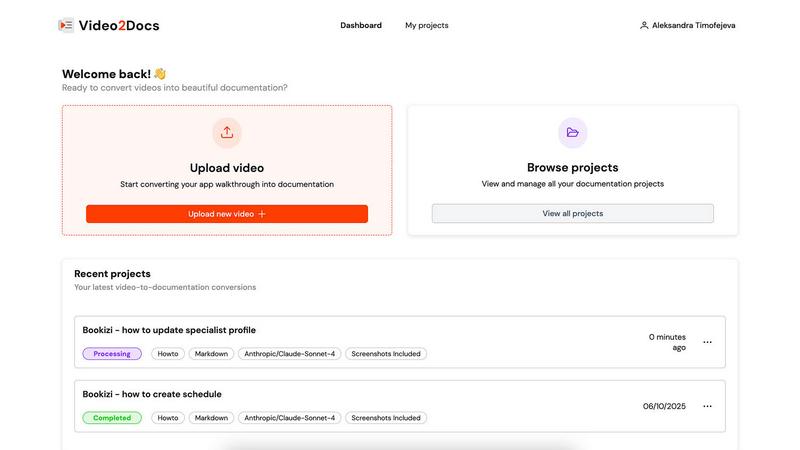
Transform your app walkthrough videos into sleek documentation in minutes, no audio or extra tools needed.
Last updated: February 26, 2026
Visual Comparison
Seedance 2 AI Video Generator

Video2Docs
Feature Comparison
Seedance 2 AI Video Generator
Text to Video
With the text-to-video feature, you can effortlessly create dynamic videos from written prompts. Seedance 2 intelligently interprets your text, turning words into vivid visuals that resonate with your audience. This feature allows for high levels of prompt control, ensuring that your vision is translated accurately onto the screen.
Image to Video
The image-to-video capability enhances your storytelling by allowing you to turn still images into animated sequences. Seedance 2 maintains style consistency and visual coherence, making your videos pop while preserving the essence of your original images. This feature is perfect for brands looking to animate their visual assets without starting from scratch.
Video-to-Video
Transform existing footage into fresh, stylized clips with the video-to-video feature. Seedance 2 enables you to restyle and enhance your videos, adding a new layer of creativity and flair. Whether you’re looking to adapt a scene or generate variations for different platforms, this feature offers unparalleled control over the output.
Rapid Iteration and Output
Seedance 2 is built for speed. With rapid iteration capabilities, you can generate multiple versions of a video quickly while ensuring smooth motion and coherent scenes. This is a game changer for marketers and agencies who need to produce content efficiently for ads, social media, or product demos.
Video2Docs
Works Without Audio Narration
Forget about needing a microphone or voice-over talent. Video2Docs analyzes your visual content, UI actions, and screen changes without relying on audio, making it easier than ever to create comprehensive documentation from any video.
Auto-Detects UI Actions
Video2Docs doesn't just watch your video; it understands it! This feature automatically identifies clicks, navigation, tooltips, and user flows, ensuring your documentation is thorough and reflects the actual user experience.
Multiple Language Model Options
Why settle for one when you can have five? Choose from a variety of powerful language models tailored to your needs. As we expand, you’ll have even more options to ensure your documentation fits seamlessly into your workflow.
Export in Various Formats
Need your documentation in Markdown, HTML, or a professionally formatted PDF? No problem! Video2Docs allows you to export your docs in multiple formats, giving you the flexibility to share and present your work in whatever way suits your audience best.
Use Cases
Seedance 2 AI Video Generator
Advertising Campaigns
In the fast-paced world of advertising, Seedance 2 allows marketers to generate eye-catching video ads quickly. By utilizing text prompts or existing assets, you can create multiple variations that cater to different audiences, ensuring your message is seen and resonates.
Social Media Content
Content creators can leverage Seedance 2 to crank out engaging videos for social media platforms. From dynamic storytelling to animated visuals, the tool’s versatility makes it easy to keep your feed fresh and appealing, boosting engagement and visibility.
Product Demos
Seedance 2 is ideal for creating product demo videos that showcase features and benefits effectively. With the ability to animate images or convert text descriptions into engaging visuals, brands can educate their audience while maintaining a polished, professional look.
Educational Videos
For educators and trainers, Seedance 2 can transform complex concepts into easy-to-understand videos. By converting text explanations or diagrams into animated sequences, learning becomes more interactive and enjoyable, enhancing the overall educational experience.
Video2Docs
Create Training Materials
Transform your training videos into easy-to-follow guides that streamline onboarding processes. Video2Docs helps you create structured training materials that can be shared with new hires in just minutes.
Document New Features
Launching a new feature? Use Video2Docs to quickly turn your product demos into tutorials that highlight all the important aspects. Ensure your users know exactly how to take advantage of your latest offerings without the hassle of manual documentation.
Produce Quickstarts for Users
Need to provide your users with quick and effective starting points? Video2Docs allows you to generate concise quickstarts from your videos, ensuring that users can dive into your software without confusion.
Enhance Team Collaboration
Stop wasting time on back-and-forth emails about documentation. With Video2Docs, your team can easily generate and share comprehensive documentation, allowing everyone to stay aligned and focused on building great products together.
Overview
About Seedance 2 AI Video Generator
Welcome to the future of video creation with Seedance 2 AI Video Generator! This cutting-edge tool transforms your creative vision into stunning cinematic videos in a snap. Whether you're a content creator, marketer, or agency, Seedance 2.0 is designed to meet your fast-paced needs without the cumbersome editing overhead. Imagine converting text prompts, reference images, or existing footage into polished clips with just a few clicks. The platform is all about efficiency and quality, providing a seamless workflow that delivers consistent, high-quality results. With features like prompt control and reference-driven workflows, Seedance 2 empowers you to iterate rapidly and produce visually captivating content that grabs attention across all platforms. The possibilities are endless, and with a focus on creativity and speed, Seedance 2 is a game changer in the world of AI video generation.
About Video2Docs
Welcome to the revolution in documentation with Video2Docs, your go-to tool for transforming video walkthroughs into slick, high-quality markdown documentation in a flash. Designed for developers, product managers, and anyone in the tech sphere creating software tutorials, Video2Docs leverages advanced LLM models to analyze your videos, making documentation not just easy, but fun. Say goodbye to the tedious grind of manual typing and formatting. With a few clicks, you can convert any app walkthrough into professional-looking tutorials, how-tos, or quickstarts—no audio needed! In just minutes, you can produce structured documentation that captures every click and screen change, allowing you to showcase new features or train your team efficiently. Embrace the future of documentation and focus on what you do best—building amazing products—while Video2Docs takes care of the writing for you!
Frequently Asked Questions
Seedance 2 AI Video Generator FAQ
How does Seedance 2 handle audio generation?
Seedance 2 offers joint audio-video generation, synchronizing sound with visuals in a single pass. This feature streamlines the production process by ensuring that audio elements like background music, sound effects, and voiceovers are perfectly aligned with the video output.
What types of input does Seedance 2 accept?
Seedance 2 supports multiple input modes, including text, images, and existing video footage. This versatility allows users to choose the most effective way to create their videos, making it a flexible tool for various creative needs.
Can I customize the aspect ratio and resolution of my videos?
Absolutely! Seedance 2 allows you to customize the aspect ratio (16:9, 9:16, 1:1) and select resolutions up to 1080p. This ensures your videos are optimized for any platform, whether it's YouTube, Instagram, or TikTok.
What sets Seedance 2 apart from other AI video generators?
Seedance 2 stands out due to its focus on controllable AI video generation, offering reference-driven results, superior motion quality, and rapid iteration. This combination of features ensures that users can produce high-quality, cinematic videos faster than ever before.
Video2Docs FAQ
How does Video2Docs save me time and effort?
Video2Docs eliminates the tedious task of manual documentation by automatically generating structured markdown from your video walkthroughs. You just upload your video, and it does the rest, saving you hours of typing.
What kinds of videos can I upload?
You can upload any video that showcases your product, such as feature walkthroughs, training clips, or demo videos. The tool works effectively with videos that have no audio, making it versatile for various use cases.
What does the output look like?
The output is clean, structured markdown documentation that can be easily edited, shared, or exported in different formats like HTML and PDF. It captures every essential detail from your video, ensuring nothing is overlooked.
Do I need a credit card to start using Video2Docs?
Nope! You can start using Video2Docs with 10 free credits without needing a credit card. This allows you to test the tool and see how it can enhance your documentation process before making any financial commitments.
Alternatives
Seedance 2 AI Video Generator Alternatives
Step into the world of cinematic creation with Seedance 2 AI Video Generator, a powerhouse tool that transforms text, images, and clips into stunning videos in a flash. This sleek, all-in-one video generator is designed for creators who crave efficiency and artistry, making it a top pick in the video category. But let’s face it—sometimes, the fit just isn’t right. Users often seek alternatives due to factors like pricing, specific feature sets, or platform compatibility, hoping to find that perfect match that ticks all the boxes. When hunting for a Seedance 2 alternative, keep a sharp eye out for key features that matter to you. Consider what types of content you’ll be creating, how intuitive the interface is, and whether the pricing aligns with your budget. A killer alternative should not only replicate the magic of Seedance 2 but also elevate your creative game to new heights.
Video2Docs Alternatives
Video2Docs is your ultimate sidekick in the realm of documentation, transforming app walkthrough videos into slick, structured markdown docs in record time. Positioned in the knowledge management category, it caters to developers, product managers, and anyone who’s knee-deep in creating software tutorials. This tool taps into advanced LLM models to analyze your videos, making documentation as easy as pie. Users often find themselves on the hunt for alternatives due to factors like pricing, feature sets, or specific platform needs that Video2Docs may not fully meet. When searching for an alternative, consider the ease of use, integration capabilities, and the depth of features offered. The perfect match will not only streamline your documentation process but also enhance your overall productivity.