
ExpenseManager vs Tradepal
Side-by-side comparison to help you choose the right AI tool.

ExpenseManager
Take charge of your finances with ExpenseManager, the ultimate app to track expenses, split bills, and forecast cash.
Last updated: February 28, 2026

Tradepal
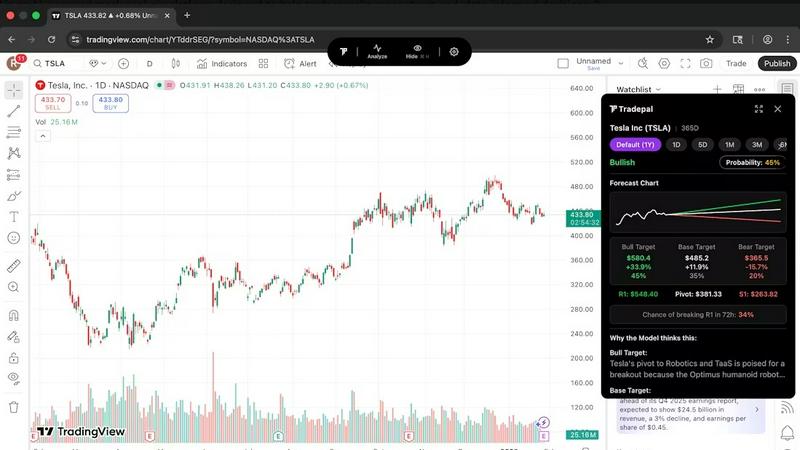
Tradepal transforms your stock charts into AI-driven insights, revealing trends and targets to supercharge your trading.
Last updated: February 28, 2026
Visual Comparison
ExpenseManager

Tradepal
Feature Comparison
ExpenseManager
Receipt Scanning with AI-Powered OCR
Snap a photo of your receipt and let our cutting-edge AI do the heavy lifting. The OCR technology extracts the amount, category, and merchant details instantly, saving you time and hassle while keeping your finances organized.
Customizable Budget Alerts
Stay ahead of your spending game with customizable budget alerts. Set thresholds at 50%, 75%, and 90% so you can keep your budget in check and avoid overspending. Never wake up to financial surprises again.
Flexible Cost Splitting
Whether you are sharing a meal with friends or splitting bills with your partner, ExpenseManager allows for easy cost division. Choose from equal, percentage, or custom splits and enjoy automatic debt settlement to keep everyone on the same page.
Multi-Currency Support
Traveling abroad? No problem! ExpenseManager supports over 30 currencies, allowing you to manage expenses seamlessly, no matter where your adventures take you. It's the perfect travel companion for the modern explorer.
Tradepal
In-Depth AI Stock Analysis
Unleash the power of AI to analyze stock charts right before your eyes. Tradepal provides real-time sentiment, forecasts price trajectories, and delivers thorough research and analysis, ensuring you stay ahead of the game.
AI Forecasts
Experience intraday forecasts that reveal potential ranges, reversals, and volatility. Built from an advanced AI ensemble that updates in real time, Tradepal helps you spot risks before they manifest in price movements.
Price Cone Projections
Visualize future price movements with precision! Tradepal allows you to view forward price cones directly on your chart, offering a sleek and intuitive layout that you can personalize to match your trading style.
Breakout Signals
Stay ahead with early signals of strength or weakness. Tradepal scans live sentiment streams, order flow hints, and momentum shifts, giving you the edge to capitalize on market movements before the crowd catches on.
Use Cases
ExpenseManager
Couples Managing Household Costs
Couples can finally put an end to money-related squabbles. With ExpenseManager, both partners can easily track who paid what, ensuring that everything is fair and transparent when it comes to household expenses.
Roommates Sharing Rent and Bills
For roommates, managing shared costs can get tricky. ExpenseManager simplifies the process by allowing users to log expenses and automatically calculate what each person owes, eliminating confusion and fostering harmony in shared living spaces.
Travelers Tracking Multi-Currency Expenses
Globetrotters can manage their expenses without breaking a sweat! ExpenseManager's multi-currency support lets users track spending across different currencies, making it easy to see where their money goes during international trips.
Individuals Seeking Financial Clarity
Individuals looking to take control of their finances can benefit greatly from ExpenseManager. By tracking spending habits and setting budgets, users gain valuable insights that help them save more and make informed financial decisions.
Tradepal
Validating Trading Ideas
Before you commit to a trade, use Tradepal to validate your ideas with AI-driven insights. This feature helps you refine your strategy, reducing emotional biases and leading to more confident trading decisions.
Real-Time Trend Monitoring
Keep your finger on the pulse with Tradepal’s ability to monitor trends in real time. Whether you're a day trader or a swing trader, this feature lets you adjust your strategy dynamically as market conditions evolve.
Risk Management
Tradepal equips you with the tools needed for effective risk management. Use its forecasts and breakout signals to identify potential risks and adjust your position sizes accordingly, ensuring you stay protected.
Creating Smart Watchlists
Stay organized and alert with Tradepal's watchlist feature. Create customized alerts for unusual activity, risk stress events, and optimal sizing, allowing you to prepare without being glued to your screen all day.
Overview
About ExpenseManager
ExpenseManager is the ultimate game-changer in personal finance management, combining budgeting and shared expense tracking like no other app on the market. Say goodbye to the days of financial confusion and awkward conversations about money. This sleek app is designed for everyone – whether you're a couple sharing household expenses, roommates splitting bills, or travelers managing multi-currency costs. ExpenseManager takes the hassle out of budgeting by allowing you to snap a photo of your receipts, and voila! The AI-powered OCR technology extracts all the necessary details such as amounts, categories, and merchants in a flash. With budget alerts set at 50%, 75%, and 90%, you'll never overspend again. Plus, the app makes splitting costs a breeze with options for equal, percentage, or custom splits, ensuring that everyone knows what they owe. ExpenseManager is more than just an app; it's your financial clarity companion.
About Tradepal
Tradepal is your ultimate AI-powered trading assistant, meticulously crafted for the active trader and savvy investor who craves speed and precision in chart analysis, without the clutter of guesswork. Picture this: you're eyeing a U.S.-listed stock chart, and with a simple click of the "Analyze" button or an upload of a screenshot, Tradepal springs into action. It dissects the chart, pinpointing critical technical patterns, support and resistance levels, trend strength, and momentum. The result? Clear, actionable insights that break down bull, base, and bear scenarios, complete with confidence scores and price targets that make decision-making a breeze.
Unlike traditional trading platforms that dive headfirst into executing trades, Tradepal takes a step back, serving as your second pair of eyes. This dynamic tool helps you validate your trading ideas, cuts through emotional biases, and empowers you to make informed choices. It seamlessly integrates into your existing workflow, supporting popular charting platforms while ensuring a lightweight and rapid experience tailored for traders. Tradepal is designed for those who want AI assistance that fits naturally into their trading habits, enhancing their strategy without disrupting their flow.
Frequently Asked Questions
ExpenseManager FAQ
What is the Founding Member offer?
The Founding Member offer allows the first 100 users to enjoy lifetime access to all premium features of ExpenseManager for free. This is a limited-time opportunity to secure your spot and benefit from top-tier tools.
What happens if I don't stay active?
If you don’t engage with the app regularly, your account may be considered inactive after a certain period. However, as a Founding Member, you can maintain access to premium features as long as you use the app occasionally.
Is my financial data secure?
Absolutely! ExpenseManager employs AES-256 bank-grade encryption to ensure your financial data is kept safe and secure. Your privacy and security are our top priorities.
What platforms are supported?
ExpenseManager is designed to be user-friendly across multiple platforms, including iOS and Android, so you can manage your expenses anytime, anywhere. Enjoy seamless access whether you're on your phone or tablet.
Tradepal FAQ
How do I use Tradepal?
After signing up, download Tradepal for macOS or Windows, where it remains accessible while you trade. View a U.S.-listed stock chart on any platform, click "Analyze," and Tradepal will generate instant insights based on your chart.
Is Tradepal financial advice?
Tradepal is designed to assist and enhance your trading decisions but is not a substitute for professional financial advice. It provides analysis and forecasts, but you should always conduct your own research.
What charts are compatible with Tradepal?
Tradepal supports any U.S.-listed stock chart, regardless of the platform you're using. It's built to integrate seamlessly, ensuring you get the insights you need no matter where you trade.
Do I need trading experience to use Tradepal?
Not at all! Tradepal is user-friendly and caters to traders of all experience levels. Whether you're a seasoned pro or just starting, you'll find valuable insights and tools to enhance your trading game.
Alternatives
ExpenseManager Alternatives
ExpenseManager is your go-to app for mastering personal finance, allowing users to track expenses, split bills, and forecast cash flow with ease. As a top-tier finance management tool, it caters to a variety of users—from couples juggling household budgets to travelers managing expenses in multiple currencies. However, some users start searching for alternatives due to factors like pricing, feature sets that may not meet their needs, or compatibility with different platforms. When hunting for an alternative, it’s essential to consider what aspects are most critical to your financial management style. Look for apps that offer intuitive receipt scanning, customizable budget alerts, and flexible cost-splitting options. Prioritizing user-friendly interfaces and robust security measures can also make a significant difference in your experience, ensuring that you can maintain financial clarity without the headaches.
Tradepal Alternatives
Tradepal is your AI chart-reading sidekick, a tool that supercharges your trading by transforming stock charts into clear, actionable insights. It lives in the fast-paced world of trading tech, designed for traders who want to cut through the noise and validate their moves with machine-speed analysis. So why look elsewhere? Maybe the price tag doesn't fit your current grind, or you need deeper integration with a specific broker. Perhaps you're hunting for a different feature set or a platform that vibes with your unique workflow. It's all about finding the right tool that matches your trading rhythm and budget. When scouting for a different option, keep your eyes on the prize. Look for something that delivers the analytical firepower you need without the bloat. Prioritize speed, clarity, and how seamlessly it plugs into your existing setup. The goal is to find a tool that elevates your game, not one that forces you to learn a whole new playbook.