SupaSidebar vs SureThing.io
Side-by-side comparison to help you choose the right AI tool.

SupaSidebar
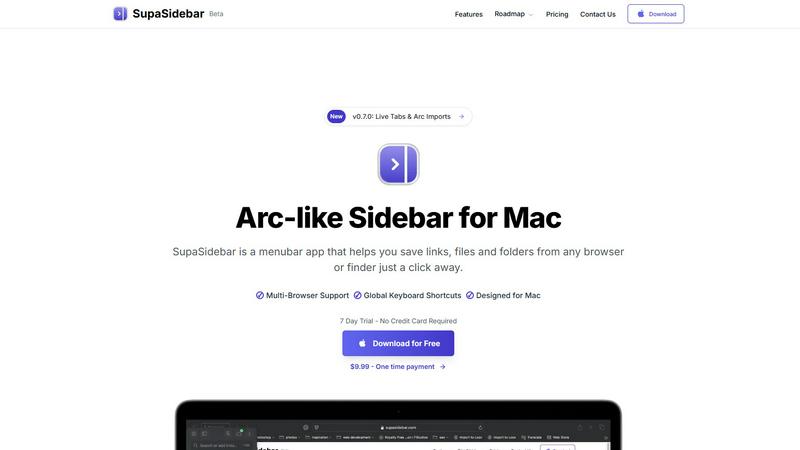
SupaSidebar turns your Mac into a powerful command hub, saving links and files with a click for instant access.
Last updated: February 26, 2026

SureThing.io
SureThing.io is your autonomous business partner that learns your style and grinds 24/7.
Last updated: March 19, 2026
Visual Comparison
SupaSidebar
SureThing.io

Feature Comparison
SupaSidebar
Instant Saving with Keyboard Shortcuts
Saving your favorite links or files has never been easier. With SupaSidebar, use the CMD CTRL S shortcut to save anything instantly, or press CMD CTRL C to copy the current website link straight to your sidebar. This feature streamlines your workflow, allowing you to focus on what truly matters—creating and innovating without distractions.
Real-Time Live Tabs
Lost in a sea of tabs? SupaSidebar's Live Tabs feature acts as your guiding light, letting you find your work in a snap. The Recents function tracks every website you've visited in the last 48 hours, making retrieval effortless. No more endless scrolling through browser histories; your most recent activity is always at your fingertips.
Fast Search Functionality
Switching between apps can kill your vibe. SupaSidebar addresses this with a lightning-fast search feature. Just hit CMD CTRL K, type in what you're looking for, and watch as it pulls up any file, folder, website, or app in milliseconds. This feature enhances your productivity, ensuring you never waste time searching again.
Pinned Favorites for Quick Access
Keep your essentials close with SupaSidebar's pinned items feature. Your favorite links and files are always displayed at the top of the list, allowing for quick access whenever you need them. Say goodbye to repetitive searches; your most-used resources are just a click away.
SureThing.io
Proactive Autonomous Operation
This agent doesn't wait for an invitation. It operates on a 24/7 loop, actively monitoring your digital environment and taking pre-authorized actions. It scans your inbox for priority signals, manages calendar conflicts before they happen, and follows up on pending tasks across connected apps, ensuring momentum never dies because you stepped away.
State-of-the-Art Agentic Memory
The game-changer. SureThing's memory is persistent and deep. It remembers your communication style, your project goals, your preferences for certain contacts, and the context of past conversations across weeks and months. The longer you work together, the smarter it gets, requiring less instruction and making fewer mistakes.
Enterprise-Grade Security & Compliance
This isn't a toy. SureThing is built on a foundation of trust, achieving SOC 2 certification and Google CASA Tier 2 compliance. Your data and your workflows are locked down with enterprise-level security protocols, so you can delegate sensitive tasks without a second thought.
Cross-App Action & Integration
SureThing works where you work. It seamlessly connects to your core apps (like Gmail, calendar, and project tools) to take meaningful action. It can draft and send emails, adjust meetings, update project statuses, and more, creating a cohesive, automated workflow ecosystem on your behalf.
Use Cases
SupaSidebar
Streamlining Research Projects
If you're deep in research, SupaSidebar is your best ally. You can save articles, papers, and web pages directly into your sidebar, allowing you to organize and access your resources effortlessly. No more tab clutter—just a clean, organized interface that keeps your focus sharp.
Enhancing Creative Workflows
For creators, time is everything. SupaSidebar allows you to save inspirations, links, and files as you browse, ensuring that your creative process is uninterrupted. With instant access to your favorite tools and resources, you can let your creativity flow without the hassle of searching through a mountain of tabs.
Simplifying Development Tasks
Developers can significantly benefit from SupaSidebar's features. Store documentation, tutorials, and critical links in one accessible location. The fast search function lets you quickly find the resources you need, making coding sessions smoother and more efficient.
Daily Productivity Boost
Multitaskers will appreciate SupaSidebar's ability to streamline daily tasks. Whether you're managing projects, attending meetings, or just browsing for information, having all your links and files organized in one sidebar lets you focus on getting things done faster and with less stress.
SureThing.io
The Solo Founder's Force Multiplier
Launching a go-to-market strategy alone? SureThing acts as your entire support team. It manages inbound lead emails, schedules founder demos, follows up with potential customers, and keeps project timelines on track, enabling one person to execute like a small army.
The Executive's Chief of Staff
For overwhelmed leaders, SureThing becomes a digital chief of staff. It triages the executive inbox, drafts preliminary responses, prepares daily briefs by summarizing key communications, and manages complex scheduling across multiple time zones, reclaiming hours of focused work time.
The Project Manager's Silent Partner
Keep complex projects flowing without micromanagement. SureThing monitors task progress across platforms, sends automated, context-aware reminders to team members, updates project dashboards, and flags potential blockers before they derail your timeline.
The Creative's Administrative Shield
Writers, developers, and creatives can offload the administrative drag. SureThing handles client communication, invoices, meeting scheduling, and research follow-ups, building a protective wall around your deep work sessions so you can stay in the zone.
Overview
About SupaSidebar
Tired of the chaos that comes with juggling multiple tabs, endless bookmarks, and a cluttered digital workspace? Say hello to SupaSidebar, your new digital command center designed specifically for Mac users. This isn’t just another app; it's a beautifully crafted sidebar that draws inspiration from the sleek aesthetics of Arc. Whether you're a researcher, creator, developer, or multitasker, SupaSidebar is built to cater to your fast-paced lifestyle, providing instant access to everything you need without disrupting your flow. Nestled quietly in your menubar, it only makes its presence known when you summon it with a slick keyboard shortcut. Its core superpower? Unifying your entire digital workspace into one gorgeous, distraction-free sidebar. Save links, files, and folders from any browser or Finder in seconds, and effortlessly access them from any major browser, including Safari, Chrome, Firefox, and Brave. SupaSidebar is lightweight, native, and ensures that all your data remains securely on your Mac. Ditch the chaos and embrace the command of your workflow with SupaSidebar.
About SureThing.io
Forget the chatbots that just sit there, waiting for you to do all the thinking. SureThing.io is your autonomous digital wingman, an AI agent with a memory that actually sticks. It's built for the movers and shakers, the solo founders, the overwhelmed executives, and anyone who's tired of being the bottleneck in their own workflow. This isn't a reactive tool; it's a proactive partner. It learns your voice, understands your goals, and gets to work 24/7 across your connected apps. While you're crushing your day (or finally getting some sleep), SureThing is in the trenches: monitoring your inbox, drafting replies that sound like you, managing your chaotic schedule, and tracking projects to keep everything moving. Its killer feature? Persistent, state-of-the-art memory. It remembers your preferences, your patterns, your past decisions, and your contacts across every single interaction. It learns from mistakes and adapts to how you actually work, not how a manual says you should. Built with enterprise-grade, SOC 2 certified and Google CASA Tier 2 compliant security, SureThing is engineered for real-world reliability, not just flashy demos. This is the agent you can actually trust with your real work.
Frequently Asked Questions
SupaSidebar FAQ
Is SupaSidebar a browser extension?
No, SupaSidebar is a standalone menubar application designed for Mac. It operates independently of your browser, allowing seamless integration with multiple browsers like Safari, Chrome, and Firefox.
Which browsers does SupaSidebar work with?
SupaSidebar supports all major browsers, including Safari, Chrome, Firefox, Arc, and Brave. You can save links and files from any of these browsers directly into your sidebar.
What macOS version do I need?
SupaSidebar requires macOS 13 or newer to ensure optimal performance and compatibility. Always keep your system updated for the best experience.
Where is my data stored?
All data saved with SupaSidebar remains securely on your Mac. The app is designed to prioritize your privacy, ensuring that nothing leaves your device without your permission.
SureThing.io FAQ
How is SureThing different from a chatbot like ChatGPT?
Chatbots are reactive tools you query for answers. SureThing is an autonomous, proactive agent. It has long-term memory, works across your apps, and takes action on your behalf without you needing to prompt it constantly. It's a teammate, not a search engine.
What does "remembers you" actually mean?
It means SureThing builds a persistent profile of your work style. It learns your email tone, your scheduling preferences, which contacts are high-priority, and the goals of your ongoing projects. This context carries over forever, so you don't have to re-explain yourself every day.
Is it safe to let an AI agent access my email and calendar?
Absolutely. Security is our bedrock. SureThing is SOC 2 certified and Google CASA Tier 2 compliant, meeting rigorous enterprise security standards. We use strict access controls and encryption. You remain in full control, approving its key actions and access permissions.
Can I control what actions SureThing takes?
Yes, you're always in the driver's seat. You set the guardrails, permissions, and approval levels. SureThing operates within the boundaries you define and can be configured to seek approval for significant actions, like sending certain emails or scheduling high-stakes meetings.
Alternatives
SupaSidebar Alternatives
SupaSidebar is your all-in-one digital command center for Mac, designed to streamline your workflow by providing instant access to your links, files, and folders. As a productivity and management tool, it creates a sleek, distraction-free sidebar that integrates seamlessly with your macOS experience. This beautiful, Arc-inspired interface is perfect for anyone who juggles multiple tasks and needs a fast, efficient way to organize their digital life. However, users often seek alternatives to SupaSidebar for various reasons. Some may find themselves drawn to different pricing structures, while others might be looking for specific features that align more closely with their workflow needs. When searching for an alternative, it's crucial to consider compatibility with your preferred platforms, the ease of use, and the ability to integrate with your existing tools to ensure a smooth transition and continued productivity.
SureThing.io Alternatives
SureThing.io is the autonomous business management agent that works for you 24/7. It's not another chatbot you have to babysit; it's a proactive, memory-powered sidekick in the productivity and management space. It learns your style, handles your grunt work across apps, and gets smarter with every interaction. People hunt for alternatives for all the usual reasons. Maybe the price tag doesn't fit their startup budget, or they need specific integrations SureThing hasn't baked in yet. Some teams just vibe better with a different interface or need a tool hyper-focused on one task, like only email or only scheduling. When you're scouting for a different ride, don't just chase shiny features. Ask if it's built for real work or just flashy demos. Look for something with legit security credentials that won't ghost you when things get complex. The goal is finding an agent that actually earns your trust, not just your attention.