Proofapp vs SimpleDraw
Side-by-side comparison to help you choose the right AI tool.

Proofapp
Stop endless email chains by pinning visual feedback directly on your live website.
Last updated: March 4, 2026

SimpleDraw
Effortlessly create precise floor plans and layouts online with SimpleDraw's powerful and user-friendly drawing tool.
Last updated: February 26, 2026
Visual Comparison
Proofapp

SimpleDraw
Feature Comparison
Proofapp
Visual Commenting
Forget describing where something is with "top left, under the nav, next to the blue thing." Proofapp's visual commenting lets you and your reviewers click directly on the live screenshot to drop a pin and leave feedback. It's context on steroids. Every comment is visually anchored to the exact pixel, eliminating all guesswork and turning vague notes into crystal-clear, actionable tasks. Threaded replies keep the conversation organized right where it matters.
Multi-Breakpoint Testing
Your site needs to look fire on every device. Proofapp gets this. The moment you paste a URL, it automatically captures crisp screenshots at both desktop and mobile breakpoints. Reviewers can seamlessly switch between views to leave feedback specific to each layout. This means you catch responsive design issues early, ensuring your client doesn't text you a blurry mobile screenshot with a sad face emoji after launch.
Secure, Account-Free Sharing
Chasing clients to create yet another account is a vibe-killer. With Proofapp, you just generate a secure, shareable link and send it. Your clients click, review, and comment—no login, no password, no friction. You can even set links to expire for extra security. It’s professional, polished, and removes every barrier to getting the feedback you need, fast.
Real-Time Collaboration & Notifications
Watch feedback roll in live, like a group chat for your project. When a teammate or client drops a comment, you see it instantly—no refreshing the page needed. Get pinged with real-time notifications and stay in the loop with Slack integration. Reply, resolve threads, and track progress together in a single source of truth. It turns slow, staggered email loops into a dynamic, synchronous conversation.
SimpleDraw
Accurate Measurements & Scale Drawing
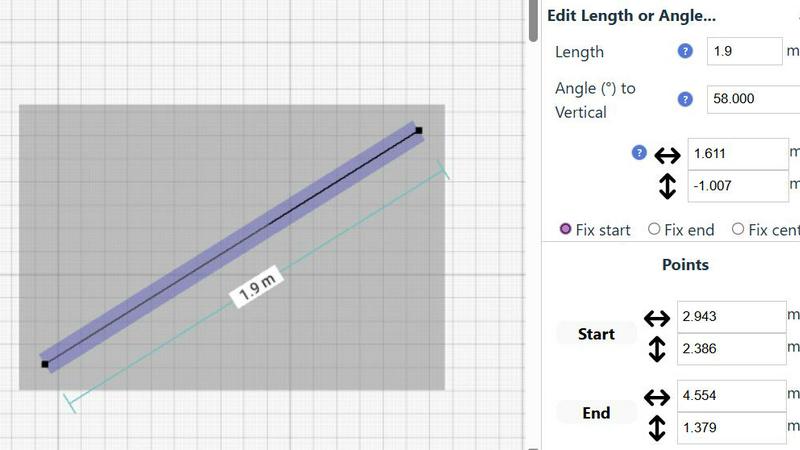
With SimpleDraw, precision is the name of the game. Get ready to create scale drawings that are spot on, thanks to accurate measurements and smart alignment tools. No more guessing—just pure, unadulterated accuracy at your fingertips!
Specialized Floor Plan Creator
Dive into the dedicated Floor Plan Mode, where the magic really happens! Design intricate floor plans complete with walls, doors, and windows in just a click. Watch as measurements update in real-time, making the planning process smoother than ever.
Smart Alignment System
Tired of frustrating placements? SimpleDraw's Smart Alignment System is here to save the day! It intuitively positions your points and lines exactly where you want them, ensuring your designs are sharp and precise. Plus, zoom in for that granular control when you need it!
Comprehensive Measurement System
Customize your precision with a comprehensive measurement system that offers fine control over displayed metrics. Whether you prefer metric or standard US units, SimpleDraw has you covered. Dynamic contextual measurements keep you informed as you create, making sure everything is just right.
Use Cases
Proofapp
Freelancers Managing Client Approvals
As a freelancer, your time is money, and looking pro is everything. Proofapp lets you ditch the messy email chains and shared Google Docs full of confusing notes. Send a clean Proofapp link to your client for feedback. They click to comment visually, which saves hours of back-and-forth decoding. You get precise, actionable feedback that makes revisions a breeze, helping you deliver faster and look like a total rockstar.
Design Teams Iterating on UI/UX
Internal design reviews can get messy with opinions flying everywhere. Proofapp gives your design team a centralized, visual hub for critique. Pin feedback directly on the latest mockup or live prototype. Discuss in threaded comments, attach inspiration files, and resolve issues as you go. It streamlines the iteration process, ensuring everyone is literally on the same page and reducing revision rounds dramatically.
Development Teams Handling QA & Bug Reports
Trying to describe a visual bug in a ticket is the worst. "The button is misaligned on mobile" is not helpful. With Proofapp, QA testers or product managers can capture the live site and pin comments directly on the glitch. They can attach console logs or videos. Developers get a perfect visual bug report with exact location and context, slashing the time spent reproducing issues and fixing them.
Marketing Agencies Reviewing Campaign Pages
When launching a new campaign, feedback comes from all directions: copy, design, CRO, the client. Proofapp consolidates this chaos. Share the landing page link with the entire team and client. Everyone can leave targeted feedback on specific elements—hero image, CTA button, form layout—in one organized place. It ensures the final page is polished and on-brand before it ever hits the public.
SimpleDraw
Kitchen & Bathroom Renovations
Planning a kitchen or bathroom overhaul? SimpleDraw lets you visualize your renovations with accurate measurements, ensuring your design flows beautifully before the first hammer strikes!
Room Layouts & Furniture Planning
Transform any room into a masterpiece with SimpleDraw! Design bedroom layouts or office spaces, and see how furniture fits seamlessly into your vision—no more awkward purchases!
House & Apartment Plans
Create detailed floor plans for your home or rental listings quickly and easily. SimpleDraw is perfect for space planning, helping you maximize every square inch of your property!
Community-Driven Feedback
Join a community that evolves with you! SimpleDraw encourages user feedback to shape future features, making it not just a tool, but a collaborative experience that grows based on real needs.
Overview
About Proofapp
Proofapp is the visual feedback platform that slays the chaos of website reviews. It's built for designers, developers, freelancers, and agencies who are tired of playing endless games of screenshot tennis over email. You know the drill: vague "can you move that thing?" notes, 20-email-deep chains, and feedback that gets totally lost in translation. Proofapp cuts through that noise. You simply drop in a URL, and it auto-magically captures desktop and mobile screenshots of your site. Then, anyone—clients, teammates, stakeholders—can click directly on those screenshots to pin comments, start threads, attach files, and resolve issues. No accounts needed for reviewers. It keeps everything visual, organized, and actionable in one sleek dashboard. With real-time collab, Slack integration, and a killer free tier, Proofapp transforms messy feedback loops into a streamlined, professional workflow. It's not just a tool; it's your secret weapon for shipping projects faster without the miscommunication headaches.
About SimpleDraw
Say goodbye to the headaches of complex design software and hello to SimpleDraw, the online tool that makes scale drawing feel like a walk in the park! Whether you're a DIY enthusiast dreaming up the perfect home or a seasoned renovator looking to visualize your next big project, SimpleDraw has your back. This free platform allows you to create precise floor plans and room layouts without the need for sign-ups or downloads—just jump into your browser and start crafting your vision. With an array of user-friendly tools, you can design everything from kitchen layouts to entire house plans with confidence and accuracy. The best part? You get the professional touch of CAD software wrapped in a sleek, easy-to-use interface. So, unleash your creativity and let SimpleDraw transform your ideas into stunning visual representations that pen and paper simply can't compete with.
Frequently Asked Questions
Proofapp FAQ
How do reviewers leave comments without an account?
It's stupid simple. You, as the project owner, create a review link in Proofapp. You send that link to anyone you want feedback from—clients, teammates, your grandma. They click the link, your website screenshots load, and they can immediately start clicking and commenting. No sign-up, no password, no barrier. They're in and giving feedback in under 10 seconds.
What happens after I resolve a comment?
When you mark a comment as "Resolved," it gets neatly tucked away in a resolved section, cleaning up your active feedback view. But it's not gone forever! You and your team can always go back to view the entire history of the conversation. This gives you a perfect audit trail of all decisions and changes, which is golden for onboarding new team members or justifying choices to a client later.
Can I use Proofapp on a local development site?
Yes, but with a quick workaround. Since Proofapp needs a public URL to capture screenshots, you'll need to use a local tunneling tool (like ngrok or LocalTunnel) that exposes your localhost to the internet with a temporary public URL. Paste that generated URL into Proofapp, and you're good to go! It's perfect for getting early feedback before you even push to staging.
Is there a limit on projects or comments?
The free tier is seriously generous, designed to let you truly test the workflow. You get a solid number of active projects and unlimited reviewers and comments. If you're a power user managing tons of concurrent projects for multiple clients, you'd look at the paid Solo plan. It lifts those limits, giving you unlimited active projects and more advanced features to scale your workflow.
SimpleDraw FAQ
Is SimpleDraw really free to use?
Absolutely! SimpleDraw is completely free, with no hidden costs or sign-ups required. Just jump in and start drawing!
Do I need any special software to use SimpleDraw?
Nope! SimpleDraw works directly in your browser, meaning you can access all its features without the hassle of downloads or installations.
Can I save my drawings?
While SimpleDraw allows you to create and edit your designs easily, make sure to download or take screenshots of your work, as it does not offer a cloud saving feature yet.
How can I give feedback or suggest new features?
We love hearing from our users! Join our Discord community to share your thoughts, suggestions, and feature requests, and help us shape the future of SimpleDraw together!
Alternatives
Proofapp Alternatives
Proofapp is your go-to design review sidekick, slashing through the chaos of client feedback. It lives in the design tools arena, letting teams and freelancers drop visual comments directly on live website screenshots. It’s all about killing vague email chains and making feedback pop, literally. But let’s be real, no single tool is everyone’s perfect match. You might be hunting for a different vibe—maybe the price tag doesn’t vibe with your budget, you need deeper integrations with your project management stack, or you’re craving more advanced features like video annotations or developer handoff. The search for an alternative is totally valid. When you’re scoping out the competition, keep your non-negotiables front and center. Think about your squad's workflow, the must-have features that’ll save you hours, and how much you’re willing to invest. The goal is to find a platform that feels like an extension of your team, not another annoying app to manage.
SimpleDraw Alternatives
SimpleDraw is a cutting-edge web-based tool that lets you create stunning and precise scale drawings and floor plans with ease. As part of the design tools category, it caters to everyone from DIY enthusiasts to professional renovators, making it a go-to platform for visualizing projects without the hassle of complicated software. However, users often seek alternatives for various reasons, including pricing, additional features, or specific platform compatibility. When searching for a new tool, it's crucial to consider factors like ease of use, the range of design features, and whether the platform aligns with your project needs. Finding the right fit can elevate your creative process and enhance your design experience.