Patrivox vs ScreenDemos
Side-by-side comparison to help you choose the right AI tool.

Patrivox
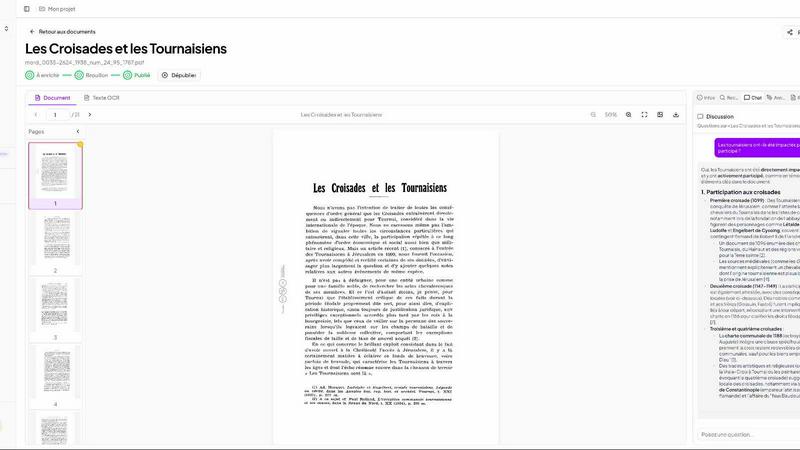
Transform your dusty archives into a searchable treasure trove with Patrivox's lightning-fast AI digitization.
Last updated: March 4, 2026

ScreenDemos
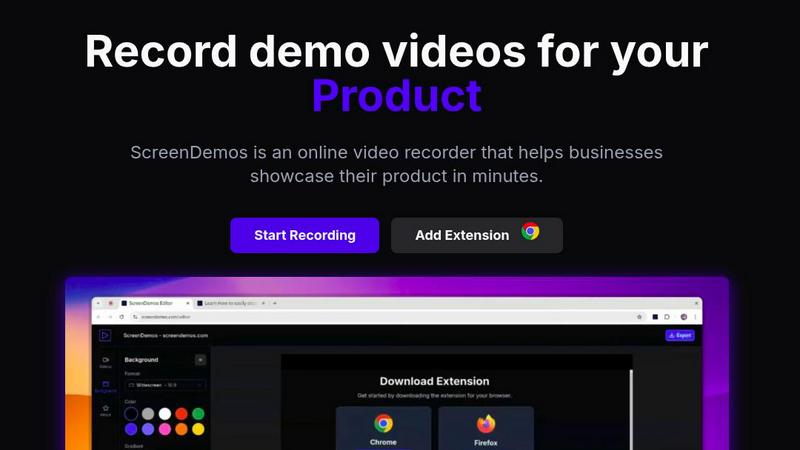
Create stunning product demos in minutes with ScreenDemos' automatic effects and seamless recording right from your.
Last updated: February 26, 2026
Visual Comparison
Patrivox
ScreenDemos
Feature Comparison
Patrivox
Automated Document Processing
Say goodbye to the cumbersome manual indexing! With Patrivox, you can drop your PDFs, and in minutes, Mistral AI reads, classifies, and connects them. This feature ensures that every page is analyzed automatically, turning your archives into a treasure trove of searchable data without lifting a finger.
Instant Search Capabilities
Ever spent hours searching for a single piece of information? With Patrivox, every word in your collection can be found in less than a second. Thanks to full-text search, typo tolerance, and filters by date or author, you can navigate through your archives like a pro. Plus, you can simply ask questions in plain language, and the AI will provide precise, sourced answers.
Interactive Knowledge Graph
Discover the unseen connections in your archives! Patrivox automatically identifies and links every person, place, and organization mentioned in your documents. This interactive knowledge graph allows users to explore relationships between entities, uncovering insights that may have gone unnoticed for years.
Shared Access and Collaboration
Collaboration is key! Patrivox supports unlimited readers and multiple administrators, making it the perfect solution for teams. Whether you're working with researchers, volunteers, or the public, everyone can access and explore your archives simultaneously, fostering a collaborative environment for discovery and learning.
ScreenDemos
Automatic Zoom Effects
Engage your audience like never before with ScreenDemos' automatic zoom effects. This feature produces smooth, cinematic zooms and pans that guide viewers' attention precisely where you want it. No more awkward cuts or clunky transitions; just seamless visuals that make your content pop.
Smooth Animated Cursor
Transform your videos into easy-to-follow guides with the smooth animated cursor feature. With a larger, fluidly moving cursor, viewers can effortlessly track your actions, enhancing their understanding of your content. It's like having a virtual tour guide for your demo videos.
Shortcuts Hints
Elevate the viewer experience by showcasing keyboard shortcuts onscreen. This feature not only improves comprehension but also empowers your audience to follow along effortlessly. It's perfect for teaching, demos, and presentations where every keystroke matters.
Custom Backgrounds
Personalize your videos to align perfectly with your brand identity using custom backgrounds. Whether you want a sleek corporate look or a fun, vibrant theme, this feature lets you tailor your video style to resonate with your audience, making your content uniquely yours.
Use Cases
Patrivox
Municipal Archives
Transform your municipal records into an accessible digital library! Patrivox helps digitize and showcase deliberations, registers, and correspondence, allowing citizens to explore their local history with ease.
Historical Societies
Historical societies can leverage Patrivox to make their bulletins and documentary collections searchable and explorable. This enhances public engagement and elevates the importance of local history in a digital era.
Heritage Libraries
Open your special collections to the world! Patrivox enables heritage libraries to digitize their archives, allowing researchers and the public to access valuable resources that were previously locked away.
Dioceses & Parishes
Preserve the sanctity of your ecclesiastical archives! Patrivox assists dioceses and parishes in indexing and preserving vital parish registers, ensuring that historical documents are available for future generations to explore.
ScreenDemos
Recording Product Demos
Need to showcase your product's features in a captivating way? ScreenDemos allows you to record professional-grade product demos that highlight what sets you apart from the competition. Perfect for onboarding new users or enticing potential customers.
Creating Onboarding Tutorials
Simplify user onboarding with quick and engaging tutorials. ScreenDemos empowers you to produce high-quality instructional videos that reduce the learning curve and get users up to speed in no time. Make your onboarding process as smooth as possible.
Announcing New Features
Got a hot new feature? Use ScreenDemos to create stunning announcement videos that inform and excite your audience. With automatic enhancements, your videos will look polished and professional, making every new feature feel like a blockbuster release.
Sharing on Social Media
Transform your social media presence with eye-catching video content. ScreenDemos lets you whip up short clips that grab attention and drive engagement, making it easier to connect with your audience and grow your following across platforms.
Overview
About Patrivox
Patrivox is the ultimate game-changer for organizations looking to breathe life into their dusty archives. This revolutionary European SaaS platform is crafted specifically for heritage institutions, municipal services, associations, and enterprises eager to convert their mountains of scanned documents into a vibrant, fully searchable knowledge base. With an intuitive drag-and-drop interface, Patrivox allows users to upload their PDFs effortlessly. In mere minutes, the powerhouse Mistral AI kicks into gear, utilizing cutting-edge optical character recognition (OCR) technology to capture every word. It's not just about finding documents; Patrivox identifies key entities—think people, places, organizations—and weaves them together in an interactive knowledge graph. Whether you're a researcher in a hurry or a curious citizen, Patrivox guarantees instant access to information with typo tolerance and natural language queries, all while delivering sourced answers. It's about making the once inaccessible knowledge accessible and shareable, paving the way for groundbreaking research and public engagement.
About ScreenDemos
Welcome to the future of video creation with ScreenDemos, the ultimate browser-based tool for crafting stunning video content in a flash. Say goodbye to the tedious, drawn-out processes that once defined video production. ScreenDemos is engineered for the go-getters—marketers, product managers, designers, and support teams—who crave efficiency without sacrificing quality. This all-in-one video studio transforms your screen into a captivating visual experience with zero technical know-how required. With a simple extension activation, you can start recording demos, tutorials, and social media clips, all enhanced with automatic professional effects like smooth zooms and animated cursor trails. Forget about spending days editing; with ScreenDemos, you can record, polish, and publish your content in mere minutes. It’s time to elevate your visual communication game and make your message hit harder than ever before.
Frequently Asked Questions
Patrivox FAQ
How does Patrivox ensure data security?
Patrivox is 100% hosted in Europe and is GDPR-native, ensuring that all data remains secure and compliant with European regulations. An audit log tracks activity, giving you peace of mind.
Can I try Patrivox before committing?
Absolutely! Patrivox offers a free trial where you can test the platform with 100 trial pages and explore its features without any credit card required.
What kind of support is available?
Patrivox provides tiered support options, including email support for all plans. The higher-tier plans also offer priority support, ensuring that you get help when you need it.
Is there a limit to the number of users?
Not at all! Patrivox allows unlimited readers across all plans, making it easy for your team or the public to access and engage with your digitized archives.
ScreenDemos FAQ
Is ScreenDemos privacy-friendly?
Absolutely! ScreenDemos prioritizes user privacy by never collecting or storing user data. All recordings are processed locally on your device, ensuring that you control your content. You can choose to save videos directly on your device or on the ScreenDemos website.
What devices are supported?
ScreenDemos is compatible with all major browsers that support extensions, including Chrome and Firefox. It works seamlessly across various operating systems, including Windows, macOS, and Linux, making it accessible to everyone.
Why do I need to give permission to the extension?
The ScreenDemos extension requires permission to access your screen in order to record videos. This is essential for the software to function properly, allowing you to create demo videos and tutorials without any hassle.
Can I edit my videos after recording?
Yes! After recording, you can preview and edit your videos directly within ScreenDemos. This makes it easy to fine-tune your content and ensure it meets your standards before sharing it with your audience.
Alternatives
Patrivox Alternatives
Patrivox is a revolutionary SaaS platform tailor-made for anyone with a treasure trove of scanned documents looking to make sense of their chaos. By leveraging advanced AI technology, Patrivox transforms these documents into a searchable goldmine, allowing users to drag and drop PDFs and watch the magic happen in mere minutes. This platform is a game-changer for heritage institutions, municipal services, and enterprises that crave streamlined access to information. But why do users often seek alternatives to Patrivox? It can boil down to factors like pricing, specific feature sets, or unique platform requirements. When hunting for an alternative, it’s crucial to consider aspects like ease of use, the depth of AI capabilities, document handling efficiency, and overall scalability to ensure you find the perfect fit for your needs.
ScreenDemos Alternatives
ScreenDemos is a revolutionary tool that falls into the realms of content creation and marketing, designed to help users craft stunning product demos and videos with ease. Forget about getting trapped in the labyrinth of tedious video editing; ScreenDemos empowers you to produce high-quality content at lightning speed right from your browser. As a go-to solution for marketers, designers, and support teams, it offers an incredible way to communicate effectively and showcase features without the tech headaches. However, not every user finds ScreenDemos to be the perfect fit. Whether it's due to pricing concerns, specific feature needs, or compatibility with different platforms, many are on the hunt for alternatives that align better with their unique requirements. When searching for a replacement, consider the ease of use, the range of features offered, and how well the tool integrates with your existing workflow. A solid alternative should not only provide the functionality you need but also enhance your content creation process without adding complexity.