
Dubvid vs ScreenDemos
Side-by-side comparison to help you choose the right AI tool.

Dubvid
Dubvid dubs your videos into any language with natural voices and optional lip-sync, no cap.
Last updated: February 27, 2026

ScreenDemos
Create stunning product demos in minutes with ScreenDemos' automatic effects and seamless recording right from your.
Last updated: February 26, 2026
Visual Comparison
Dubvid
ScreenDemos
Feature Comparison
Dubvid
Lightning-Fast, Multi-Language Dubbing
Ditch the slow, painful process of traditional localization. Dubvid's core superpower is its speed and scale. Upload a single video and select multiple target languages with a few clicks. Our advanced AI engine handles the heavy lifting—translation, voice synthesis, timing—delivering professional-grade dubbed versions in a fraction of the time. It's your express lane to a global audience, letting you produce localized content for different markets simultaneously.
Hyper-Natural AI Voices & Voice Cloning
Forget the robotic, cringe-worthy AI voices of the past. Dubvid delivers voices that sound authentically human, capturing the subtle nuances of emotion, emphasis, and pacing. Choose from a library of premium stock voices, or take it to the next level with our voice cloning feature. Clone your own unique vocal signature to maintain brand consistency and a personal connection with your audience across every language.
Optional AI-Powered Lip-Sync
Want to level up from great to mind-blowing? Activate our premium lip-sync feature. This isn't just basic timing; it's advanced AI that adjusts the dubbed audio to match the speaker's mouth movements, creating an incredibly realistic viewing experience. It's the secret sauce for talking-head videos, interviews, and any content where visual authenticity is non-negotiable for maximum engagement.
Simple, Transparent Credit System
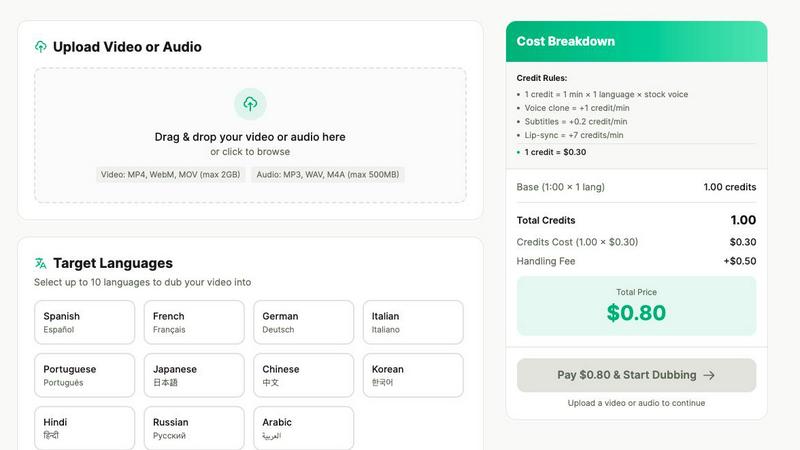
No confusing subscriptions, no hidden fees. Dubvid runs on a straightforward, usage-based credit system. One credit equals one minute of audio dubbed into one language with a stock voice. You only pay for what you use. The pricing calculator lets you play with options—adding voice clone, subtitles, or lip-sync—and see the exact cost in real-time. It's clean, fair, and built for creators who value transparency.
ScreenDemos
Automatic Zoom Effects
Engage your audience like never before with ScreenDemos' automatic zoom effects. This feature produces smooth, cinematic zooms and pans that guide viewers' attention precisely where you want it. No more awkward cuts or clunky transitions; just seamless visuals that make your content pop.
Smooth Animated Cursor
Transform your videos into easy-to-follow guides with the smooth animated cursor feature. With a larger, fluidly moving cursor, viewers can effortlessly track your actions, enhancing their understanding of your content. It's like having a virtual tour guide for your demo videos.
Shortcuts Hints
Elevate the viewer experience by showcasing keyboard shortcuts onscreen. This feature not only improves comprehension but also empowers your audience to follow along effortlessly. It's perfect for teaching, demos, and presentations where every keystroke matters.
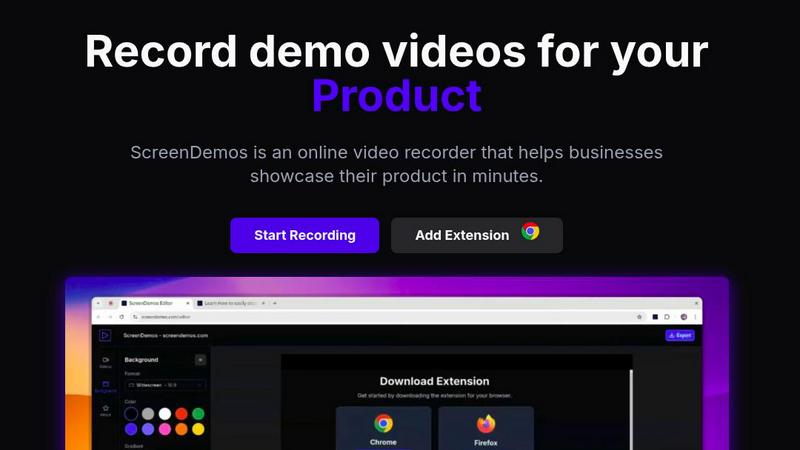
Custom Backgrounds
Personalize your videos to align perfectly with your brand identity using custom backgrounds. Whether you want a sleek corporate look or a fun, vibrant theme, this feature lets you tailor your video style to resonate with your audience, making your content uniquely yours.
Use Cases
Dubvid
Short-Form Content Domination
Multiply your views and virality by dubbing your Shorts, Reels, and TikToks. A single hit piece of content can explode in multiple markets overnight. Dubvid's fast turnaround and natural voices ensure your quick, engaging content resonates culturally, helping you tap into new trends and audiences before anyone else.
Global Course & Tutorial Creation
Unlock your knowledge for the world. Educators and course creators can translate lessons, tutorials, and webinars into dozens of languages effortlessly. This breaks down educational barriers, allows you to serve a global student base, and significantly scales the impact and revenue potential of your expertise without re-recording a single frame.
Localized Customer Support & Onboarding
Drastically reduce support tickets and improve user satisfaction. Localize your product demos, help center walkthroughs, and onboarding flows for every region you serve. When customers receive support in their native language, adoption soars and frustration plummets, building stronger brand loyalty from day one.
Podcast & Interview Globalization
Give your podcast wings. Release audio and video podcast episodes in new languages to capture untapped listener markets. Dubvid allows you to dub interviews, monologues, and discussions while preserving the original speaker's vocal character (especially with voice clone), expanding your community and influence without the logistical nightmare of re-recording.
ScreenDemos
Recording Product Demos
Need to showcase your product's features in a captivating way? ScreenDemos allows you to record professional-grade product demos that highlight what sets you apart from the competition. Perfect for onboarding new users or enticing potential customers.
Creating Onboarding Tutorials
Simplify user onboarding with quick and engaging tutorials. ScreenDemos empowers you to produce high-quality instructional videos that reduce the learning curve and get users up to speed in no time. Make your onboarding process as smooth as possible.
Announcing New Features
Got a hot new feature? Use ScreenDemos to create stunning announcement videos that inform and excite your audience. With automatic enhancements, your videos will look polished and professional, making every new feature feel like a blockbuster release.
Sharing on Social Media
Transform your social media presence with eye-catching video content. ScreenDemos lets you whip up short clips that grab attention and drive engagement, making it easier to connect with your audience and grow your following across platforms.
Overview
About Dubvid
Stop letting language barriers hold your content hostage. Dubvid is the game-changing AI platform that smashes those walls down, letting you dub your audio and video into any language in minutes, not weeks. This isn't your grandpa's clunky, studio-bound dubbing. We're talking about a sleek, powerful tool that uses cutting-edge AI to translate and recreate voices with scary-good natural tone, pacing, and emotion. Just upload your original video, pick your target languages from a global menu, and watch the magic happen. Built for the hustle of modern creators, educators, and teams, Dubvid eliminates the need for expensive voice actors, complex editing suites, and endless production timelines. Whether you're a YouTuber hungry for a global audience, an educator democratizing knowledge, or a marketing team launching a worldwide campaign, Dubvid is your secret weapon to scale your influence and connect with billions. With support for 10+ languages and features like optional lip-sync, it's time to go global without the grind.
About ScreenDemos
Welcome to the future of video creation with ScreenDemos, the ultimate browser-based tool for crafting stunning video content in a flash. Say goodbye to the tedious, drawn-out processes that once defined video production. ScreenDemos is engineered for the go-getters—marketers, product managers, designers, and support teams—who crave efficiency without sacrificing quality. This all-in-one video studio transforms your screen into a captivating visual experience with zero technical know-how required. With a simple extension activation, you can start recording demos, tutorials, and social media clips, all enhanced with automatic professional effects like smooth zooms and animated cursor trails. Forget about spending days editing; with ScreenDemos, you can record, polish, and publish your content in mere minutes. It’s time to elevate your visual communication game and make your message hit harder than ever before.
Frequently Asked Questions
Dubvid FAQ
How accurate and natural are the AI voices?
Dubvid uses state-of-the-art neural text-to-speech models that go far beyond basic synthesis. The AI is trained on massive datasets to capture human-like intonation, emotional range, and natural pauses. While perfection varies by language and content, the result is strikingly natural and constantly improving. You can test it yourself with our free 60-second trial to hear the quality.
What file formats and sizes do you support?
We keep it simple and flexible. You can upload common video formats like MP4, MOV, and WebM, or audio files like MP3 and WAV. The current maximum file size is 500MB, which is plenty for most standard-definition to HD videos. Just drag, drop, and you're ready to start dubbing.
What is your pricing model?
Dubvid uses a pay-as-you-go credit system. You purchase credits, and each project consumes a certain number based on: video length, number of target languages, and add-ons like voice clone or lip-sync. One base credit ($0.30) covers one minute dubbed into one language with a stock voice. There's also a small fixed handling fee per job. No subscriptions, no monthly commitments.
Is there a free trial?
Absolutely, and it's super easy. You can try Dubvid without even creating an account. We offer a free test that lets you dub up to 60 seconds of content to see the quality for yourself. No credit card is required upfront. We also give new users 2 free credits to get started properly. We want you to be convinced before you commit a single dollar.
ScreenDemos FAQ
Is ScreenDemos privacy-friendly?
Absolutely! ScreenDemos prioritizes user privacy by never collecting or storing user data. All recordings are processed locally on your device, ensuring that you control your content. You can choose to save videos directly on your device or on the ScreenDemos website.
What devices are supported?
ScreenDemos is compatible with all major browsers that support extensions, including Chrome and Firefox. It works seamlessly across various operating systems, including Windows, macOS, and Linux, making it accessible to everyone.
Why do I need to give permission to the extension?
The ScreenDemos extension requires permission to access your screen in order to record videos. This is essential for the software to function properly, allowing you to create demo videos and tutorials without any hassle.
Can I edit my videos after recording?
Yes! After recording, you can preview and edit your videos directly within ScreenDemos. This makes it easy to fine-tune your content and ensure it meets your standards before sharing it with your audience.
Alternatives
Dubvid Alternatives
Dubvid is your AI-powered hype man for global content, sitting in the slick category of automated dubbing and voice cloning tools. It’s the secret weapon for creators and brands who want to smash language barriers and connect with audiences worldwide in their own tongue. But let's keep it a buck—no single tool is the perfect fit for every squad. You might be hunting for alternatives because your budget’s tight, you need a specific feature Dubvid doesn’t have, or your workflow lives on a different platform. The search is real, and it’s all about finding what vibes with your unique creative process. When scoping out other options, you gotta weigh the essentials. Look at the quality of the AI voices—are they robotic or legitimately human-like? Check the language library and see if it covers your target markets. Don’t sleep on pricing models, integration capabilities, or that crucial lip-sync magic. The goal is to find a platform that doesn't just translate words, but captures the full energy of your original content.
ScreenDemos Alternatives
ScreenDemos is a revolutionary tool that falls into the realms of content creation and marketing, designed to help users craft stunning product demos and videos with ease. Forget about getting trapped in the labyrinth of tedious video editing; ScreenDemos empowers you to produce high-quality content at lightning speed right from your browser. As a go-to solution for marketers, designers, and support teams, it offers an incredible way to communicate effectively and showcase features without the tech headaches. However, not every user finds ScreenDemos to be the perfect fit. Whether it's due to pricing concerns, specific feature needs, or compatibility with different platforms, many are on the hunt for alternatives that align better with their unique requirements. When searching for a replacement, consider the ease of use, the range of features offered, and how well the tool integrates with your existing workflow. A solid alternative should not only provide the functionality you need but also enhance your content creation process without adding complexity.