Picoo vs Pixel Art Village
Side-by-side comparison to help you choose the right AI tool.

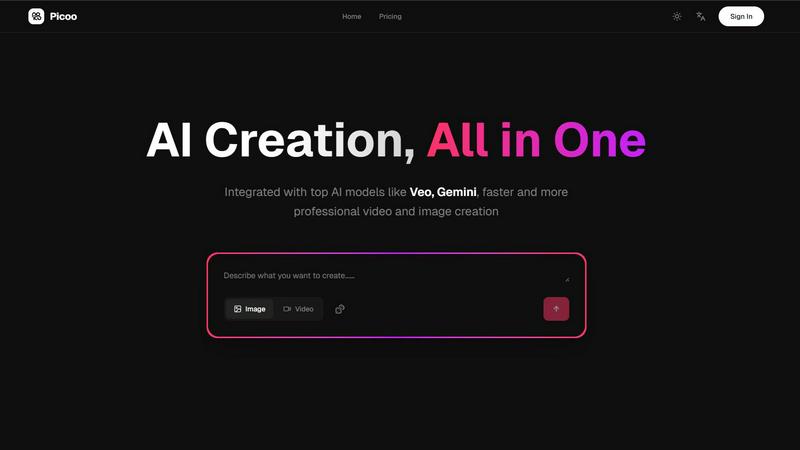
Picoo is your ultimate AI powerhouse for rapid, pro-level video and image creation, all in one sleek platform.
Last updated: February 26, 2026

Pixel Art Village
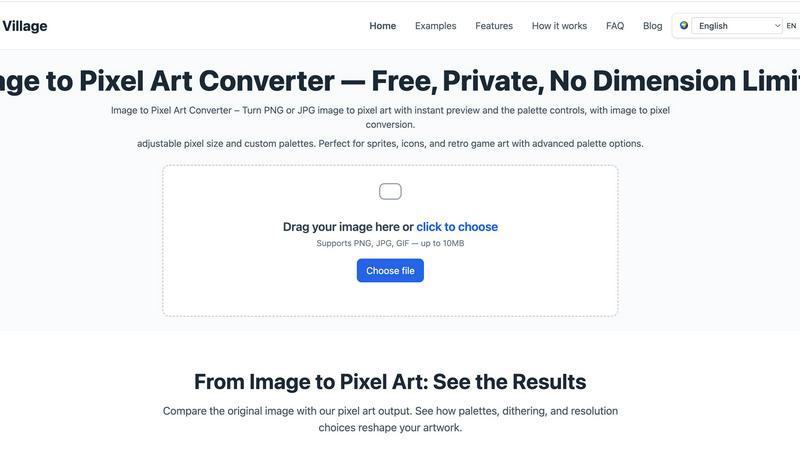
Transform your pics into retro pixel art masterpieces with live preview and total creative control, all in your browser.
Last updated: March 18, 2026
Visual Comparison
Picoo
Pixel Art Village
Feature Comparison
Picoo
Integrated AI Models
Picoo boasts a powerhouse lineup of AI models, including Veo, Gemini, and more! This means you get access to cutting-edge technology that enhances your video and image creation experience. No more switching between platforms; everything you need is right here!
Flexible Pricing Plans
With Picoo, you’re not locked into one size fits all. Our flexible pricing plans cater to individuals and businesses alike, offering everything from a free tier to premium options that scale with your needs. Choose a plan that fits your creative hustle without breaking the bank.
High-Quality Content Generation
Generate stunning, professional-grade visuals in a flash! Whether it's videos or images, Picoo’s advanced AI models ensure that your content not only looks great but also resonates with your audience. Create jaw-dropping visuals that grab attention and drive engagement.
Community Support
You're never alone on your creative journey! With Picoo, you gain access to a vibrant community and official support 24/7. Engage with fellow creators, share tips, and get your questions answered. We’re here to help you shine!
Pixel Art Village
Browser-Based & Private Processing
Your images go nowhere. Zero uploads, zero cloud storage, zero chance of your data being snooped. All the heavy computational lifting happens locally on your device inside your browser. This means blazing-fast conversions and ironclad privacy. You can pixelate that top-secret project sprite or your personal photos with absolute confidence that they're staying put.
Live Preview & Pixel Size Control
See your masterpiece evolve in real-time. The live preview window is your crystal ball, showing exactly how your image transforms with every adjustment. Dial the pixel size up for a chunky, abstract vibe or down for finer, more detailed artwork. This instant feedback loop lets you experiment fearlessly and nail the perfect look without any annoying guesswork or waiting.
Customizable & Curated Color Palettes
Ditch the bland, auto-generated colors. Take full command of your palette with advanced color management. Choose from a selection of curated retro palettes for instant authenticity, or go full artiste and customize every single hue. Reduce colors to get that true limited-palette, classic console feel, or tweak them to match your project's specific vibe perfectly.
Dedicated Workflow Tools
It's not a one-trick pony. Beyond the main editor, Pixel Art Village offers specialized tools for specific jobs. Jump directly to optimized converters for photos, PNGs, JPGs, GIFs, sprites, and 8-bit graphics. This streamlined approach cuts out the clutter and gets you from idea to perfect pixel asset in record time, making it a versatile hub for all things pixelated.
Use Cases
Picoo
Content Creation for Social Media
Transform your social media game with captivating visuals that stand out in crowded feeds. Use Picoo to generate eye-catching images and videos that drive likes, shares, and follows. Your followers won’t know what hit them!
Marketing Campaigns
Elevate your marketing strategies by producing professional-quality content that converts. Whether it’s promotional videos or creative images, Picoo makes it easy to create materials that resonate with your target audience, leading to higher engagement and sales.
Video Production for Creatives
Filmmakers and video creators can harness Picoo’s powerful tools to craft stunning video content without the hassle. From concept to creation, streamline your workflow and unleash your creativity with our integrated AI video models.
E-Learning and Educational Content
Educators can utilize Picoo to design engaging and informative content that captivates students. Create high-quality visuals and videos that enhance learning experiences, making complex topics easier to understand and more enjoyable to engage with.
Pixel Art Village
Indie Game Development
Forge the heart and soul of your indie game. Rapidly prototype and create character sprites, environment tiles, explosive effects, and iconic items. The ability to tweak pixel size and palettes on the fly makes it perfect for establishing a consistent and captivating retro visual style that makes your game stand out in a crowded marketplace.
Digital Art & Social Media Content
Make your social feeds pop with unique, eye-catching pixel art. Transform your photos into shareable artwork, create custom pixel portraits, or design avatars and banners with a nostalgic twist. It’s the perfect tool for artists and content creators looking to add a layer of edgy, retro-futuristic flair to their online presence.
Icon & Asset Design for Designers
UI/UX and graphic designers, listen up. Craft perfectly pixelated icons, logos, and interface elements for websites, apps, or presentations. The precision control ensures your assets are crisp at any size, while the custom palettes let you match your client's brand guidelines or personal design system with pinpoint accuracy.
Education & Creative Hobby Projects
A fantastic gateway into the world of digital art and game design fundamentals. Students and hobbyists can learn about color theory, resolution, and art styles by playing with real-time conversions. It's an engaging, low-barrier tool for school projects, DIY crafts, or just having fun transforming everyday images into something magical and pixelated.
Overview
About Picoo
Welcome to Picoo, where the future of content creation unfolds right before your eyes! This all-in-one AI creation platform is a game-changer for anyone looking to amp up their creative output. Whether you are a filmmaker dreaming of stunning visuals, a social media influencer with a thirst for eye-catching content, or a savvy marketer aiming to captivate audiences, Picoo is your ultimate toolkit. With an incredible integration of AI models like Veo and Gemini, you can whip up professional-quality videos and images faster than you can say "content overload." Say goodbye to the chaos of juggling multiple tools and hello to seamless creativity. Picoo caters to everyone—from solo entrepreneurs to massive corporations—empowering you to elevate your content strategy without emptying your wallet. Join the creative revolution and make your ideas come to life with Picoo!
About Pixel Art Village
Welcome to the digital atelier where your photos get a radical retro reboot. Pixel Art Village isn't just another filter; it's a full-blown, browser-based pixel forge. This powerhouse tool lets you instantly transmute your standard PNGs and JPGs into crispy, authentic pixel art. Forget clunky software or sketchy uploads—everything happens right in your browser, on your machine. Your images never leave your device, making privacy and speed its default superpowers. Whether you're a game dev crafting the next indie hit, a designer hunting for that perfect 8-bit aesthetic, or just an art enthusiast wanting to vaporwave your vacation pics, this is your command center. With sliders for pixel size, a whole arsenal of customizable color palettes, and a live preview that updates as you tweak, you have total creative dominion. It’s the ultimate tool for generating sprites, icons, and visual assets that scream retro cool without the archaic workflow.
Frequently Asked Questions
Picoo FAQ
What is Picoo?
Picoo is an all-in-one AI creation platform that combines top AI models like Veo and Gemini, making it easier for creators to generate professional-quality videos and images. It’s designed for everyone from individuals to businesses.
Is there a free trial?
Absolutely! Picoo offers a free plan that allows you to start creating without any upfront costs. You get 100 credits each month, so you can dive right into your creative projects.
How long does it take to generate content?
Content generation on Picoo is lightning-fast! With advanced AI models at your fingertips, you can create stunning visuals in just seconds, making it perfect for those tight deadlines or spontaneous creative bursts.
Can I use generated content commercially?
Yes! You can use your generated content commercially, giving you the freedom to create and monetize your work without restrictions. Whether it's for social media, marketing, or personal projects, your content is yours to use as you see fit.
Pixel Art Village FAQ
Is my image data kept private?
Absolutely, 100%. Pixel Art Village runs entirely in your browser. Your image file is processed locally on your computer or phone and is never uploaded to any server. Once you close the tab, the data is gone. Your privacy is the core architecture, not an afterthought.
What image formats does it support?
The tool is built to handle the most common formats. You can drag and drop or upload PNG, JPG, and GIF files. There's a size limit (up to 10MB) to ensure the browser-based processing remains swift and smooth, so your workflow never hits a lag spike.
Do I need to install any software?
Nope, zero installation required. Pixel Art Village is a web app that works directly in your modern browser (like Chrome, Firefox, or Edge). Just navigate to the site and start pixelating. It's all about instant access and no commitment.
Is Pixel Art Village really free to use?
Yes, the core image-to-pixel-art conversion tool is completely free to use with all its main features—live preview, pixel sizing, and palette customization. The site may use cookies for operation and, if enabled, to display ads, which you can manage or reject at any time.
Alternatives
Picoo Alternatives
Picoo is the ultimate game-changer in the world of content creation, blending cutting-edge AI technology with a user-friendly interface to help you generate stunning videos and images. As an all-in-one platform, it caters to everyone from budding creators to seasoned pros looking to elevate their visual storytelling. However, users often find themselves on the hunt for alternatives due to factors like pricing, specific feature sets, and platform compatibility that align better with their unique needs. When searching for an alternative to Picoo, consider what features are essential for your creative process. Look for platforms that offer similar advanced AI capabilities, ease of use, and versatility in image and video production. It’s also vital to assess the pricing structures to ensure they fit your budget while still delivering the quality and functionality you require. The right alternative will empower you to unleash your creativity without compromise.
Pixel Art Village Alternatives
Pixel Art Village is your go-to browser-based wizard for transforming any image into crisp, retro pixel art. It lives in the image-to-pixel-art converter category, a digital workshop for game devs and artists craving that classic 8-bit vibe. It’s the tool you hit when you need instant magic without the upload anxiety. But let's keep it a buck—no single app rules them all. People hunt for alternatives for all kinds of reasons. Maybe they need a desktop powerhouse, a different price tag, or a feature set that hits different. It’s all about matching the tool to your specific creative grind and workflow demands. When you're scoping out other options, you gotta know what's non-negotiable. Peep the core specs: does it process locally to keep your art secure? Can you tweak pixel size and crush the color palette? Nail down what you need, and you’ll find your perfect pixel-perfect sidekick.