Photomaxxer vs Prompt Builder
Side-by-side comparison to help you choose the right AI tool.

Photomaxxer
Elevate your dating game as AI selects your best photos to attract more matches and meaningful connections.
Last updated: February 26, 2026

Prompt Builder
Generate, optimize, test, and manage AI prompts in one place. Turn an idea into a ready-to-use prompt in seconds.
Visual Comparison
Photomaxxer
Prompt Builder
Overview
About Photomaxxer
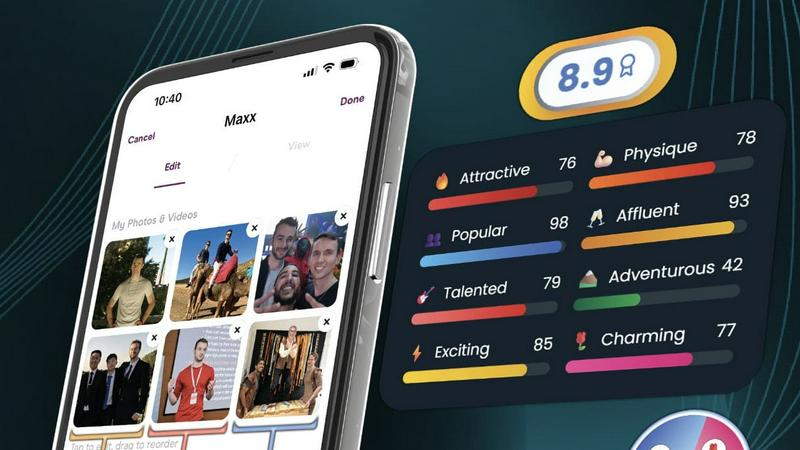
Photomaxxer is the ultimate game-changer in the world of online dating. This isn’t just another dating app; it’s a cutting-edge AI tool specifically designed to think like a woman and provide you with invaluable insights into your dating profile. If you’ve ever felt like your profile is a ghost ship in the vast ocean of swipes, you’re in good company. Photomaxxer leverages extensive real-life data from thousands of women to analyze your photos through the lens of 8 scientifically proven traits that can significantly impact your dating success. It’s like having your own personal dating consultant, critiquing your photos and offering tailored feedback to boost your appeal. With Photomaxxer, you can transform your overlooked profile into a magnetic one, increasing your chances of landing matches and securing those all-important dates. Say goodbye to guesswork and hello to data-driven decisions that lead to real connections.
About Prompt Builder
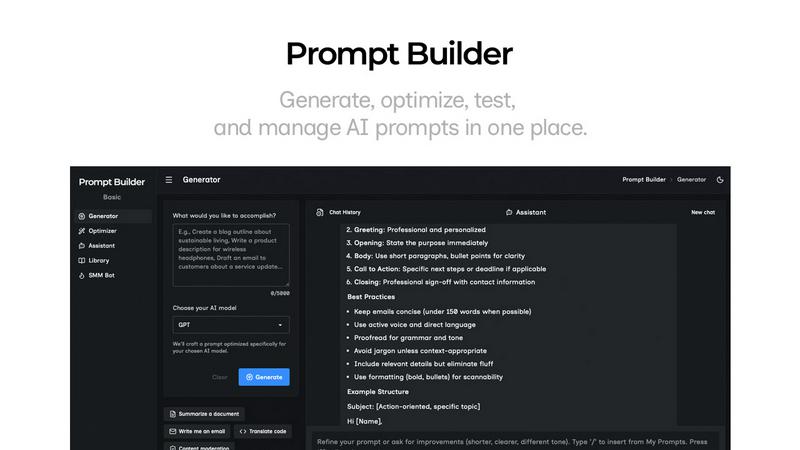
Prompt Builder is a prompt engineering workspace for writing, testing, and saving prompts. Describe the task in plain English, and it helps you create a prompt that matches the model you choose. Start with a draft, refine it in chat, save or pin versions, then run them when you are ready. It works with GPT, Claude, Gemini, Llama, Mistral, DeepSeek, Grok, Perplexity, and more. You also get an Optimizer, an assistant for quick tests, and a library of reusable prompts and templates from the community. Turn an idea into a ready-to-use prompt in seconds. Refine it in chat, save it to your Library, and run it anytime.