
OnStyle vs SparkPix.ai
Side-by-side comparison to help you choose the right AI tool.

OnStyle
OnStyle transforms your photos into breathtaking art in diverse styles with just one click, unleashing your creativity.
Last updated: February 26, 2026

SparkPix.ai
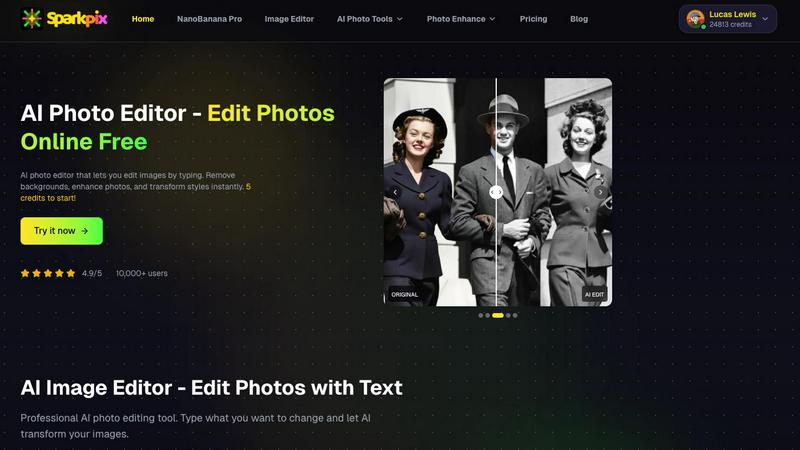
Transform your photos effortlessly with SparkPix, the AI editor that brings your vision to life by just typing your.
Last updated: February 28, 2026
Visual Comparison
OnStyle

SparkPix.ai
Feature Comparison
OnStyle
Massive Style Library
OnStyle boasts an impressive selection of artistic styles that cater to every taste, from classic art to modern trends. This continuously updated library ensures that you always have access to the freshest and most exciting styles, including animation, oil painting, and pixel art.
One-Click Generation
Transforming your images has never been easier. With OnStyle's one-click generation feature, you can turn ordinary photos into extraordinary artworks in seconds. Simply upload your image, select your desired style, and let the AI do the magic, giving you stunning results with minimal effort.
Customization Options
Unleash your creativity with OnStyle's personalized customization features. Not only can you select from a myriad of preset styles, but you can also adjust the style intensity and enter custom prompts to ensure your artistic creation is truly unique and reflective of your vision.
High-Definition Output
Quality matters, and OnStyle guarantees that your transformed images retain high definition and detail. You won't sacrifice clarity for creativity; instead, you'll have high-quality, expressive works that are perfect for printing, sharing, or showcasing in any format.
SparkPix.ai
Text-Based Editing
This feature is a game-changer for anyone tired of traditional editing. Just type what you want to change, like "make the sky blue," and watch as SparkPix's AI works its magic, delivering the results almost instantly. It's as easy as texting a friend.
Smart Removal & Cutout
Need to ditch unwanted elements from your photo? With just one click, you can remove passersby, unwanted watermarks, or even switch up the background entirely. This tool is perfect for creating clean, professional images without the fuss.
Old Photo Restoration
Bring your cherished memories back to life with SparkPix's old photo restoration feature. It expertly repairs damage and revitalizes black-and-white photos, adding natural colors and making them look as good as new. Perfect for family archives!
Style Transfer
Ever wanted your portrait to look like a masterpiece? With the style transfer feature, you can transform your images into stunning anime, oil paintings, or 3D cartoon styles. It’s a fun way to give your photos a unique flair that stands out.
Use Cases
OnStyle
Social Media Content Creation
Elevate your social media presence by transforming ordinary snapshots into eye-catching art pieces. OnStyle makes it easy to create stunning visuals that will captivate your audience and set your posts apart from the crowd.
Personalized Gifts
Looking for a unique gift idea? Use OnStyle to create custom artwork from cherished family photos or memorable moments. These personalized creations make for thoughtful, one-of-a-kind gifts that will be treasured forever.
Artistic Exploration
Whether you're an artist seeking inspiration or a hobbyist exploring your creative side, OnStyle provides a fun and engaging way to experiment with different styles and techniques, allowing you to push the boundaries of your artistic expression.
Marketing and Branding
Businesses can leverage OnStyle to create distinctive marketing materials that stand out. Transform product images or promotional graphics into artistic representations that resonate with your target audience and enhance brand identity.
SparkPix.ai
E-commerce Product Photography
SparkPix is a lifesaver for online sellers. Create professional-grade product images for platforms like Amazon without the need for an expensive studio setup. Just snap a pic, and let SparkPix enhance it with stunning backgrounds to drive conversions.
Social Media Content Creation
Make your social media profiles pop! Whether you're crafting eye-catching covers for TikTok or Instagram, SparkPix helps you generate unique visual effects that will capture your audience's attention and elevate your online presence.
Family Photo Restoration
Turn back time by restoring those old family photos that have seen better days. SparkPix can repair scratches and fading, allowing you to preserve your family's history in vibrant color, making it a must-have for sentimental keepsakes.
Quick Design Transformations
For graphic designers, SparkPix is the perfect tool to swiftly turn 2D sketches into 3D renders. This feature streamlines the design process, allowing you to focus on creativity while leaving the tedious editing to AI.
Overview
About OnStyle
OnStyle is revolutionizing the realm of AI Image Style Transfer, allowing users to morph everyday photos into spectacular pieces of art in just moments. Perfect for aspiring artists, social media influencers, or anyone with a creative spark, OnStyle transforms your images into visually stunning creations. With an expansive library of artistic styles, including vibrant 3D visuals, whimsical cartoons, nostalgic retro vibes, and edgy cyberpunk aesthetics, the options for creativity are virtually endless. This powerful AI tool is all about igniting your imagination and helping you express your unique artistic vision effortlessly. The user-friendly interface ensures that anyone can dive into the world of art with just a few clicks. Simply upload your image, choose a style, and watch as OnStyle turns your photo into a masterpiece, ready to be shared and admired. So, whether you're looking to impress your friends on social media or explore your artistic potential, OnStyle is your go-to solution for photo transformation that's as easy as it is extraordinary.
About SparkPix.ai
Welcome to SparkPix.ai, the ultimate AI-powered photo editing tool that transforms your ordinary images into stunning visuals with just a few keystrokes. Designed for both novice users and professional creatives, SparkPix lets you unleash your imagination without the hassle of complex software. Whether you want to restore old family photos, create eye-catching product images, or simply jazz up your social media feeds, SparkPix has your back. Its intelligent tools allow you to edit images by typing commands such as "change hair color to golden" or "remove the background," making it an intuitive choice for anyone looking to elevate their visual content. With SparkPix, you can achieve high-quality edits in mere seconds, saving you time and effort while delivering results that pop. Say goodbye to clunky software and hello to fast, efficient, and creative editing!
Frequently Asked Questions
OnStyle FAQ
What image formats does OnStyle support?
OnStyle currently supports common image formats, including JPG and PNG, ensuring that you can easily upload and transform your favorite pictures without any hassle.
How long does it take to generate an image?
With OnStyle's powerful AI engine, image generation takes mere seconds. You can expect instant results, allowing you to quickly create and share your artistic works without waiting around.
Can I customize the art styles?
Absolutely! OnStyle allows you to not only choose from a vast library of styles but also to customize parameters like style intensity to create a unique piece that reflects your individual creativity.
Is there a limit to how many images I can upload?
There is no strict limit to the number of images you can upload and transform with OnStyle. Feel free to explore and create as many artistic masterpieces as you desire, unleashing your creativity to the fullest!
SparkPix.ai FAQ
How does SparkPix.ai work?
SparkPix uses advanced artificial intelligence to interpret your text commands and apply them to your images. Simply upload a photo, type what you want to change, and let the AI do the rest.
Is there a learning curve to using SparkPix.ai?
Not at all! SparkPix is designed for everyone, from beginners to pros. If you can type, you can edit. The intuitive interface means you can start creating stunning images right away.
What kind of output quality can I expect?
Expect nothing less than high-quality results with rich details and natural lighting. SparkPix supports 4K output, so your images will look sharp and professional, no matter where you use them.
Are there any costs associated with using SparkPix.ai?
You can start with 5 free credits to explore SparkPix's features, and additional credits can be purchased as needed. No credit card is required for the initial trial, making it easy to test the waters!
Alternatives
OnStyle Alternatives
OnStyle is a revolutionary tool in the realm of AI Image Style Transfer, designed to unleash your creativity by transforming ordinary photos into extraordinary works of art. With a click of a button, users can explore a vibrant spectrum of styles, from captivating 3D visuals to whimsical cartoons and edgy cyberpunk aesthetics. This innovation belongs to the Image & Photo category and caters to anyone looking to elevate their visual content. However, as amazing as OnStyle is, users often seek alternatives for various reasons. These can include pricing concerns, specific features that may not be available, or platform compatibility needs. When hunting for an alternative, consider factors like ease of use, the variety of artistic styles offered, and the flexibility in editing options. Finding the right fit will ensure you can continue your creative journey without missing a beat.
SparkPix.ai Alternatives
SparkPix.ai is an innovative AI-powered photo editing tool that falls into the image and photo category. It’s designed to transform everyday photos into breathtaking visuals with minimal effort. Users are often on the hunt for alternatives due to various reasons, such as pricing structures, feature sets, or compatibility with different platforms. The desire for more tailored options, especially for specific editing needs or budget constraints, drives this search. When choosing an alternative to SparkPix, consider factors like the user interface, editing capabilities, speed, and the level of AI integration. Look for tools that offer intuitive editing processes, similar or enhanced features, and ensure they fit your workflow, whether you’re a casual user or a seasoned professional. The right choice can take your photo editing game to the next level.