OGimagen vs RemoveTexts
Side-by-side comparison to help you choose the right AI tool.

OGImagen instantly crafts stunning, platform-perfect social images and meta tags from your content with AI.
Last updated: March 11, 2026

RemoveTexts
RemoveTexts lets you zap unwanted text from images in seconds with a simple brush, delivering flawless results without any design skills needed.
Last updated: March 11, 2026
Visual Comparison
OGimagen
RemoveTexts

Feature Comparison
OGimagen
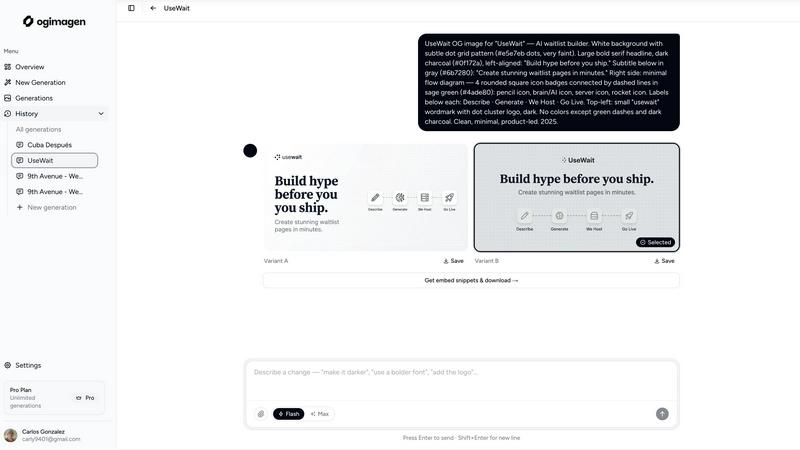
AI-Powered, Instant Generation
Ditch the blank canvas panic. Describe what you need with a title, description, and brand color, and let the AI work its magic. In seconds, it generates two unique, production-ready image variants (A & B) tailored for social sharing. No design skills, no templates, just pure AI creativity that gets your links looking fire immediately. It's the fastest way to go from an idea to a share-worthy visual.
Platform-Perfect Multi-Format Export
Why settle for one size when every social platform has its own specs? OGimagen is your one-stop shop. A single generation automatically outputs three perfectly optimized images: the standard 1200x630px OG Image for Facebook and Discord, a 1200x600px Twitter Card for X, and a 1200x627px LinkedIn Card. No more manual cropping or resizing. We handle the pixel-perfect details so your preview looks crisp everywhere.
Framework-Ready Meta Tag Snippets
The endgame is embedding, and OGimagen gets you there. After generation, you don't just get images; you get the code. Copy-paste framework-specific meta tag snippets directly into your project. Free users get HTML, while Pro unlocks Next.js (App and Pages Router), Astro, SvelteKit, Remix, and more. It's the seamless bridge from creation to implementation.
MCP Integration for Dev Workflow
Level up your developer experience. OGimagen's Pro plan offers MCP (Model Context Protocol) integration, letting you generate images and fetch snippets without ever leaving your editor. Connect it to Claude Code, Cursor, Windsurf, or any MCP-compatible tool and manage your OG images directly from your coding workflow. It's next-level efficiency for builders.
RemoveTexts
Paint to Remove
This feature empowers you with precision control. Simply brush over the specific areas of text you want to eliminate, and let the AI do the heavy lifting. It’s perfect for targeting specific words or phrases without affecting the surrounding elements, giving you complete creative freedom.
Auto Remove All
Why waste time on manual editing? With Auto Remove All, the AI automatically detects and removes every text element in your image. Whether it's a pesky watermark or an unwanted caption, this feature clears the slate in one click, saving you precious time and effort.
Edit & Replace Text
Want to change the text but keep the vibe? This feature allows you to replace existing text with new content while matching the original style. It’s ideal for those looking to customize their visuals without losing the essence of the original design.
Remove Objects
Sometimes, unwanted objects can clutter your images. With the Remove Objects feature, you can effortlessly erase logos, people, or any visual elements that detract from your message. The AI fills in the gaps seamlessly, ensuring your image stays professional and polished.
Use Cases
OGimagen
Launching a New Blog Post or Product
You've just poured your soul into a new article or built an awesome feature. Don't let it get lost with a lame link preview. Use OGimagen to craft a captivating, on-brand social card that teases the content and makes people need to click. Generate the image and drop the snippet into your CMS or framework in under a minute, ensuring your launch makes a stunning first impression everywhere it's shared.
Boosting Social Media Engagement
Tired of low click-through rates on your shared links? The preview image is your number one weapon. OGimagen lets you quickly A/B test different AI-generated styles and visuals to see what resonates with your audience. Create eye-catching, custom cards for every post that stop the scroll and drive traffic back to your site, turning casual scrollers into engaged visitors.
Streamlining Developer & Team Workflows
For dev teams, managing OG images can be a chore that breaks flow. With OGimagen's MCP integration and instant snippets, developers can generate and implement required social images during the build process without switching contexts or waiting on a designer. It standardizes quality and saves precious time across the entire development and content pipeline.
Maintaining Brand Consistency at Scale
When you're managing multiple websites, projects, or client accounts, keeping OG image quality consistent is a nightmare. OGimagen solves this by letting you attach brand logos and reference assets. Input your brand colors and style, and generate a suite of on-brand social cards in bulk, ensuring every single link shared across all your properties reinforces your professional visual identity.
RemoveTexts
E-commerce Enhancements
Online sellers can use RemoveTexts to clean up product images by removing distracting watermarks or text overlays. This makes listings more appealing and professional, ultimately driving sales and enhancing brand image.
Social Media Magic
Content creators can effortlessly remove unwanted text from their visuals for platforms like Instagram or TikTok. Whether it’s a meme caption or a date stamp, this tool ensures your posts look top-notch, maximizing engagement.
Legal Document Redaction
Legal professionals can utilize RemoveTexts for redacting sensitive information from images or documents. The AI ensures that no trace of the text remains, allowing for secure sharing of necessary visuals without compromising privacy.
Academic and Research Use
Students and researchers can leverage RemoveTexts to clean up images for presentations or papers. By removing distracting texts or watermarks, their visuals become clearer and more impactful, enhancing the overall quality of their work.
Overview
About OGimagen
Stop letting your links look basic and sad in the group chat. OGimagen is your AI-powered hype machine for Open Graph images, turning any URL into a visual magnet that demands clicks. This tool is for developers, marketers, and creators who are tired of wrestling with design tools or settling for generic social previews. It cuts through the noise by generating stunning, platform-perfect social cards (OG, Twitter, LinkedIn) in literal seconds. Just feed it your title and vibe, and its AI cooks up two designer-level variants. The real magic? It doesn't just give you pretty pictures; it hands you the exact meta tag snippets ready to copy-paste into your Next.js, Astro, Svelte, or plain HTML project. With deliverability powered by the Cloudflare CDN, your images load fast, everywhere. Whether you're shipping a side project or scaling a brand, OGimagen ensures your shared content always looks pro, boosting your cred and your click-through rates without the design headache.
About RemoveTexts
RemoveTexts is your ultimate sidekick for image editing, transforming the way you interact with visuals. Gone are the days of clunky software and tedious manual edits. This AI-powered tool lets you zap unwanted text, watermarks, and overlays from your images with just a flick of the brush. Whether you're a designer, marketer, or casual creator, RemoveTexts delivers clean, professional results in seconds. It’s as easy as uploading your image, painting over the text, and letting the magic happen. With advanced deep learning technology, it reconstructs backgrounds seamlessly, ensuring that the result looks pristine. Trusted by over 100,000 users globally, RemoveTexts is a game-changer for anyone who wants to keep their visuals sharp and clean, without breaking a sweat or learning complex software. Dive into a world of effortless editing and let your creativity shine without distractions.
Frequently Asked Questions
OGimagen FAQ
What exactly is an OG image?
An OG (Open Graph) image is the preview picture you see when you share a link on social media platforms like Facebook, LinkedIn, or in messaging apps like WhatsApp and Discord. It's a crucial piece of metadata that controls the visual first impression of your content. A great OG image dramatically increases the likelihood someone will click your link.
How does AI generation work?
You provide the core ingredients: a title, description, and choose a style preset or brand color. Our AI model then interprets this text and visual guidance to create two unique, original image compositions that visually represent your content. It's not just pulling from a template library; it's generating fresh, relevant artwork on the fly to match your vibe.
What's the difference between Starter, Growth, and Pro?
Starter and Growth are one-time packs for specific projects (10 and 25 generations, respectively). Pro is a monthly subscription for power users, offering 50 generations per month, permanent CDN hosting for your images, and the killer feature: MCP integration for your code editor. Pro is for teams and individuals who generate OG images regularly as part of their workflow.
What is MCP integration?
MCP (Model Context Protocol) is a protocol that lets AI tools and editors talk to external services. OGimagen's MCP integration means you can connect it directly to compatible code editors like Cursor or AI assistants like Claude Code. This allows you to generate images, list your past generations, and grab embed code snippets entirely from within your coding environment—no browser tab switching required.
RemoveTexts FAQ
How does RemoveTexts work?
RemoveTexts uses advanced AI and deep learning inpainting technology to intelligently analyze surrounding pixels. It reconstructs the background seamlessly after removing text, ensuring professional-grade results without any visible traces.
What image formats does RemoveTexts support?
You can upload images in JPG, PNG, and WebP formats, making it versatile for various use cases. Just ensure that your image is under 10 MB for optimal performance.
Can I remove watermarks from my images?
Yes, RemoveTexts is specifically designed to tackle watermarks, captions, and overlays. Just paint over the watermark, and the AI will take care of the rest, providing a clean finish.
Is there a limit to how many images I can process?
While there is no specified limit on the number of images you can process, each image must adhere to the size and format guidelines. Enjoy the freedom to clean as many images as you need without any hassle!
Alternatives
OGimagen Alternatives
OGimagen is your AI-powered wingman for crafting stunning Open Graph images that make your links pop on social feeds. It's a dev tool that automates the creation of those slick preview cards, saving you from design headaches and boosting your click game. But let's be real, the perfect tool for one project might not vibe with another. People hunt for alternatives for all sorts of reasons. Maybe the pricing model doesn't fit your startup's lean budget, or you need deeper integrations with a specific CMS. Perhaps you're craving more granular control over the AI's output, or you just want to explore what else is cooking in this space. It's all about finding the right fit for your stack and style. When you're scouting for other options, keep your non-negotiables front and center. Think about your must-have features, your comfort level with AI, and how seamlessly a new tool needs to plug into your existing workflow. Don't just chase shiny objects; find a solution that genuinely levels up your social presence without the extra drama.
RemoveTexts Alternatives
RemoveTexts is an AI-powered image editing tool that specializes in erasing unwanted text from images without the need for complex software like Photoshop. Users upload their images and, with just a click, they can remove watermarks, subtitles, and other text overlays, all while maintaining the integrity of the original background. This tool falls under the category of image and photo editing, catering to creators, marketers, and designers who want fast, efficient results. People often seek alternatives to RemoveTexts due to various factors such as pricing, specific feature sets, or platform compatibility. Some users might require different editing capabilities or prefer a tool that aligns better with their workflow. When searching for an alternative, consider aspects like ease of use, output quality, supported languages, and the ability to edit or replace text, ensuring it meets your specific needs and enhances your creative process.