OGimagen vs OnUml
Side-by-side comparison to help you choose the right AI tool.

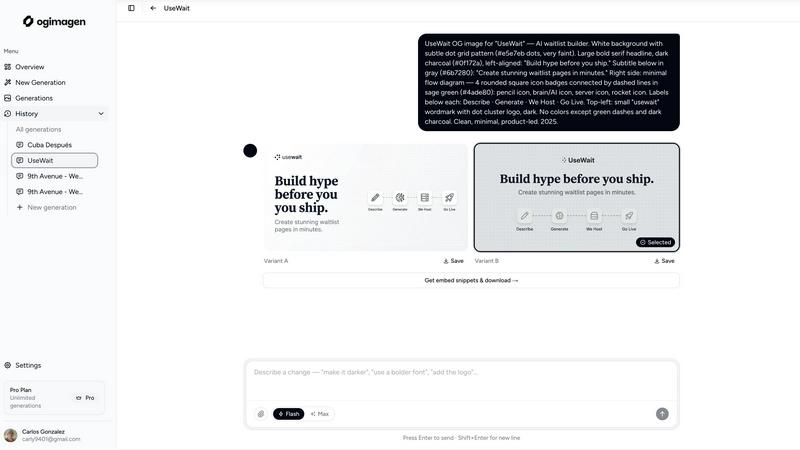
OGImagen instantly crafts stunning, platform-perfect social images and meta tags from your content with AI.
Last updated: March 11, 2026

OnUML is your AI-powered partner for quickly turning ideas into stunning UML diagrams and flowcharts with ease.
Last updated: February 26, 2026
Visual Comparison
OGimagen
OnUml

Feature Comparison
OGimagen
AI-Powered, Instant Generation
Ditch the blank canvas panic. Describe what you need with a title, description, and brand color, and let the AI work its magic. In seconds, it generates two unique, production-ready image variants (A & B) tailored for social sharing. No design skills, no templates, just pure AI creativity that gets your links looking fire immediately. It's the fastest way to go from an idea to a share-worthy visual.
Platform-Perfect Multi-Format Export
Why settle for one size when every social platform has its own specs? OGimagen is your one-stop shop. A single generation automatically outputs three perfectly optimized images: the standard 1200x630px OG Image for Facebook and Discord, a 1200x600px Twitter Card for X, and a 1200x627px LinkedIn Card. No more manual cropping or resizing. We handle the pixel-perfect details so your preview looks crisp everywhere.
Framework-Ready Meta Tag Snippets
The endgame is embedding, and OGimagen gets you there. After generation, you don't just get images; you get the code. Copy-paste framework-specific meta tag snippets directly into your project. Free users get HTML, while Pro unlocks Next.js (App and Pages Router), Astro, SvelteKit, Remix, and more. It's the seamless bridge from creation to implementation.
MCP Integration for Dev Workflow
Level up your developer experience. OGimagen's Pro plan offers MCP (Model Context Protocol) integration, letting you generate images and fetch snippets without ever leaving your editor. Connect it to Claude Code, Cursor, Windsurf, or any MCP-compatible tool and manage your OG images directly from your coding workflow. It's next-level efficiency for builders.
OnUml
AI Smart Chat
Engage with OnUml’s AI Smart Chat to describe your requirements in plain English, and watch as it instantly generates professional UML diagrams tailored to your needs. This feature eliminates the technical jargon barrier, making diagramming accessible for everyone.
Smart Suggestions
Harness the power of intuitive design recommendations with OnUml’s Smart Suggestions. As you create your diagrams, the platform offers intelligent type recommendations that enhance your workflow, ensuring you’re on the right track with your UML modeling.
Multi-Diagram Support
OnUml isn’t just a one-trick pony. It supports a variety of UML diagrams, from class to sequence diagrams, allowing you to generate different types of visual representations in one seamless experience. Each type comes with intelligent suggestions to make your life easier.
Real-Time Rendering
Experience the magic of real-time rendering with OnUml. As you tweak your designs, the WYSIWYG (What You See Is What You Get) interface updates instantly, giving you immediate feedback and ensuring your final diagrams are polished and professional.
Use Cases
OGimagen
Launching a New Blog Post or Product
You've just poured your soul into a new article or built an awesome feature. Don't let it get lost with a lame link preview. Use OGimagen to craft a captivating, on-brand social card that teases the content and makes people need to click. Generate the image and drop the snippet into your CMS or framework in under a minute, ensuring your launch makes a stunning first impression everywhere it's shared.
Boosting Social Media Engagement
Tired of low click-through rates on your shared links? The preview image is your number one weapon. OGimagen lets you quickly A/B test different AI-generated styles and visuals to see what resonates with your audience. Create eye-catching, custom cards for every post that stop the scroll and drive traffic back to your site, turning casual scrollers into engaged visitors.
Streamlining Developer & Team Workflows
For dev teams, managing OG images can be a chore that breaks flow. With OGimagen's MCP integration and instant snippets, developers can generate and implement required social images during the build process without switching contexts or waiting on a designer. It standardizes quality and saves precious time across the entire development and content pipeline.
Maintaining Brand Consistency at Scale
When you're managing multiple websites, projects, or client accounts, keeping OG image quality consistent is a nightmare. OGimagen solves this by letting you attach brand logos and reference assets. Input your brand colors and style, and generate a suite of on-brand social cards in bulk, ensuring every single link shared across all your properties reinforces your professional visual identity.
OnUml
Simplifying Software Architecture
For software architects, OnUml serves as a vital tool to simplify complex software architectures. By turning intricate system designs into clear diagrams, it helps stakeholders understand project scopes without the overwhelming technical jargon.
Enhancing Technical Documentation
Technical writers can leverage OnUml to create visual aids that accompany their written documentation. By generating UML diagrams that illustrate processes, writers can enhance clarity and comprehension, making their documents more effective.
Streamlining Agile Development
Agile teams can use OnUml to quickly visualize user stories and workflows. The ability to generate real-time diagrams fosters collaboration and ensures that all team members are aligned, improving sprint planning and execution.
Educating Students in Software Design
OnUml is a fantastic educational tool for students learning software design principles. With its user-friendly interface and AI assistance, students can easily create UML diagrams that reinforce their understanding of complex concepts.
Overview
About OGimagen
Stop letting your links look basic and sad in the group chat. OGimagen is your AI-powered hype machine for Open Graph images, turning any URL into a visual magnet that demands clicks. This tool is for developers, marketers, and creators who are tired of wrestling with design tools or settling for generic social previews. It cuts through the noise by generating stunning, platform-perfect social cards (OG, Twitter, LinkedIn) in literal seconds. Just feed it your title and vibe, and its AI cooks up two designer-level variants. The real magic? It doesn't just give you pretty pictures; it hands you the exact meta tag snippets ready to copy-paste into your Next.js, Astro, Svelte, or plain HTML project. With deliverability powered by the Cloudflare CDN, your images load fast, everywhere. Whether you're shipping a side project or scaling a brand, OGimagen ensures your shared content always looks pro, boosting your cred and your click-through rates without the design headache.
About OnUml
OnUml is not your run-of-the-mill diagramming tool; it's a game-changer, a slick, browser-based powerhouse that transforms your abstract thoughts into structured, eye-catching visuals. Designed for tech-savvy individuals like developers, technical writers, and software architects, OnUml leverages the robust capabilities of Mermaid.js, infused with the magic of AI to make crafting UML diagrams and flowcharts a breeze. Imagine effortlessly turning natural language prompts into stunning diagrams that evolve in real time, ensuring your documentation is not only up-to-date but also visually striking. Say goodbye to cumbersome software and hello to a seamless diagramming experience that empowers you to express complex ideas with clarity and style. With OnUml, you can create professional-grade UML diagrams without breaking a sweat, allowing you to focus on what really matters—your ideas.
Frequently Asked Questions
OGimagen FAQ
What exactly is an OG image?
An OG (Open Graph) image is the preview picture you see when you share a link on social media platforms like Facebook, LinkedIn, or in messaging apps like WhatsApp and Discord. It's a crucial piece of metadata that controls the visual first impression of your content. A great OG image dramatically increases the likelihood someone will click your link.
How does AI generation work?
You provide the core ingredients: a title, description, and choose a style preset or brand color. Our AI model then interprets this text and visual guidance to create two unique, original image compositions that visually represent your content. It's not just pulling from a template library; it's generating fresh, relevant artwork on the fly to match your vibe.
What's the difference between Starter, Growth, and Pro?
Starter and Growth are one-time packs for specific projects (10 and 25 generations, respectively). Pro is a monthly subscription for power users, offering 50 generations per month, permanent CDN hosting for your images, and the killer feature: MCP integration for your code editor. Pro is for teams and individuals who generate OG images regularly as part of their workflow.
What is MCP integration?
MCP (Model Context Protocol) is a protocol that lets AI tools and editors talk to external services. OGimagen's MCP integration means you can connect it directly to compatible code editors like Cursor or AI assistants like Claude Code. This allows you to generate images, list your past generations, and grab embed code snippets entirely from within your coding environment—no browser tab switching required.
OnUml FAQ
Will my chat content be used for AI training?
No, OnUml prioritizes your privacy. Your chat content is not used for AI training, ensuring that your information remains confidential and secure.
Are there any usage limits?
OnUml's free version offers generous functionality without registration required, but for more extensive features, users may want to explore premium options that come with additional benefits.
What types of UML diagrams are supported?
OnUml supports a wide range of UML diagrams, including class diagrams, sequence diagrams, flowcharts, and state diagrams, ensuring versatility for all your modeling needs.
How can I save my diagrams?
You can easily export your diagrams to various formats such as PNG and SVG for easy sharing and integration into your documentation, making it convenient to use your visuals anywhere.
Alternatives
OGimagen Alternatives
OGimagen is your AI-powered wingman for crafting stunning Open Graph images that make your links pop on social feeds. It's a dev tool that automates the creation of those slick preview cards, saving you from design headaches and boosting your click game. But let's be real, the perfect tool for one project might not vibe with another. People hunt for alternatives for all sorts of reasons. Maybe the pricing model doesn't fit your startup's lean budget, or you need deeper integrations with a specific CMS. Perhaps you're craving more granular control over the AI's output, or you just want to explore what else is cooking in this space. It's all about finding the right fit for your stack and style. When you're scouting for other options, keep your non-negotiables front and center. Think about your must-have features, your comfort level with AI, and how seamlessly a new tool needs to plug into your existing workflow. Don't just chase shiny objects; find a solution that genuinely levels up your social presence without the extra drama.
OnUml Alternatives
OnUml is your go-to AI-powered sidekick for crafting stunning UML diagrams and flowcharts with a breeze. As a cutting-edge design tool, it transforms your abstract thoughts into visual masterpieces, making it a favorite among developers, technical writers, and software architects. Users often seek alternatives due to factors like pricing, specific feature sets, or compatibility with their preferred platforms. When hunting for that perfect replacement, consider what's essential for your workflow, whether it’s ease of use, real-time rendering capabilities, or collaboration features that keep your team in sync.