Melograph vs Mp3ToMidi
Side-by-side comparison to help you choose the right AI tool.

Melograph
Transform your music into eye-catching videos in minutes with Melograph's customizable templates and audio-reactive.
Last updated: February 28, 2026

Mp3ToMidi
Unleash your audio's DNA with AI that turns MP3s into editable MIDI tracks instantly.
Last updated: March 4, 2026
Visual Comparison
Melograph

Mp3ToMidi
Feature Comparison
Melograph
Easy Template Selection
Melograph offers a diverse library of beautifully crafted templates designed specifically for music. Choose from minimalistic styles to vibrant retro vibes that perfectly align with the mood of your track. This feature eliminates the guesswork, enabling you to select visuals that resonate with your sound instantly.
Audio-Reactive Visuals
Experience the magic of audio-reactive waves that dance to your music. As soon as you upload your audio, Melograph visualizes the sound in real-time, creating a dynamic spectacle that draws in viewers. This feature ensures that your visuals are not just pretty but also tied to the rhythm and energy of your track.
Quick Export Options
Get your music videos ready for the world with Melograph's fast and efficient export process. You can generate high-quality MP4 files in 1080p resolution, perfectly formatted for all major platforms. Say goodbye to long upload times and hello to instant sharing with your audience.
Customizable Artist Branding
Make your visuals truly yours by customizing them with your artist name, song title, and even your logo or album cover. This feature not only enhances your branding but also maintains a professional look across all your releases, making it easy to build a recognizable identity.
Mp3ToMidi
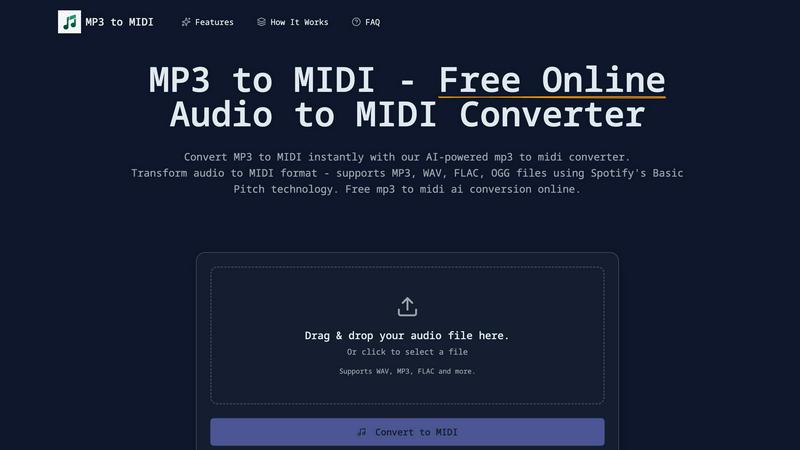
AI-Powered by Spotify's Basic Pitch
This isn't some basic algorithm. Under the hood, Mp3ToMidi runs on Spotify's industry-leading, open-source Basic Pitch AI. This tech is a beast at polyphonic transcription, meaning it can accurately pick apart multiple notes and instruments playing at once. It detects pitches, onsets, and note durations with scary accuracy, turning your messy audio into a pristine, editable MIDI sequence that actually makes sense.
Universal Audio Format Support
Don't stress about file types. This converter eats all the major formats for breakfast. Whether your source is a compressed MP3, a studio-quality WAV, a lossless FLAC, or an OGG file, Mp3ToMidi handles it seamlessly. It breaks down the walls between audio formats and MIDI, giving you the freedom to work with any sound you can get your hands on, no conversions needed.
Lightning-Fast, One-Click Conversion
Forget about waiting. The process is stupidly simple and quick. You drag your file into the browser, the AI goes to work with its advanced neural networks, and within seconds—not minutes—your download link is ready. It’s all processed in the cloud, so it won't choke your computer's CPU. Get in, get your MIDI, and get back to creating without any annoying lag.
DAW-Ready MIDI Output
The final product isn't some janky, unusable file. The output is a clean, standard MIDI file that plugs directly into any Digital Audio Workstation you rock—Ableton Live, FL Studio, Logic Pro, GarageBand, Pro Tools, you name it. Every note, chord, and rhythmic nuance is mapped out, ready for you to edit, rearrange, change instruments, and build something entirely new from the ground up.
Use Cases
Melograph
Indie Artist Promotion
Indie artists can leverage Melograph to create eye-catching music videos that capture their unique sound and style. By using Melograph, they can produce stunning visuals that help them stand out in a crowded digital landscape, ensuring their music gets the attention it deserves.
Social Media Engagement
DJs and creators can use Melograph to generate engaging content for platforms like TikTok, Instagram Reels, and YouTube Shorts. With visually appealing videos that resonate with their audience, they can drive more traffic to their profiles and boost engagement rates effortlessly.
Label Marketing
Music labels can utilize Melograph to create consistent and professional-looking visual content for their entire roster of artists. This tool allows them to maintain a cohesive brand identity while showcasing multiple tracks in a visually appealing way, attracting more listeners and fans.
Event Promotion
Melograph can be a powerful asset for event promoters looking to market their upcoming shows. By creating stunning visuals of the featured artists’ tracks, they can generate buzz and excitement, enticing fans to attend and experience the live performances.
Mp3ToMidi
Sample Flipping & Remix Creation
Got a fire two-second clip from an old record or a viral TikTok sound? Drop it into Mp3ToMidi and instantly extract the melodic and harmonic MIDI data. Now you can change the sounds, tweak the chords, speed it up, or slow it down to craft a completely unique beat or remix. It’s the ultimate tool for producers looking to mine audio for fresh inspiration without clearing samples the hard way.
Music Transcription & Practice
Learning a song by ear is a pain. For musicians and students, this tool is a game-changer. Upload a recording of that tricky guitar solo or complex piano piece, and get an instant MIDI transcription. You can then visualize it as sheet music in notation software or slow it down in your DAW to practice every note perfectly. It’s like having a personal transcription assistant that works at light speed.
Vocal Melody to Instrumental Track
Captured a killer vocal melody by humming into your phone? Don't let it fade away. Convert that audio memo into MIDI and suddenly that catchy hook can be played by a synth, a string section, or a brass ensemble. It’s the perfect bridge between initial inspiration and full production, allowing you to build an entire instrumental track around a simple vocal idea.
Sound Design & MIDI Mangling
Start with any atmospheric sound, a weird synth patch, or even a recorded noise. Convert it to MIDI to isolate its tonal and rhythmic characteristics. Then, assign that MIDI pattern to a completely different, powerful synth or effect. You can generate complex, evolving sequences from the most unexpected sources, pushing your sound design into wild, new territories.
Overview
About Melograph
Melograph is your ultimate game-changer in the world of music visualization, designed with the hustle and flair of modern musicians and content creators in mind. Forget the old-school video editing grind; Melograph transforms your audio tracks into stunning, scroll-stopping visuals in just minutes. Its web-based platform is super user-friendly, letting you whip up mesmerizing audio-reactive videos with zero editing skills required. Whether you're an indie artist, a DJ, or a label looking to elevate your brand, Melograph has got your back. With a selection of premium templates that radiate vibes ranging from chill to cinematic, and retro to futuristic, you can effortlessly match the visual aesthetic of your sound. The main value proposition? Melograph streamlines the creation process, allowing you to focus on what truly matters—your music—while generating captivating content that’s ready to rock on social media and beyond.
About Mp3ToMidi
Stop wasting hours manually transcribing audio. That grind is over. Mp3ToMidi is your AI-powered sonic alchemist, built to transmute any audio file—MP3, WAV, FLAC, OGG—into a fully editable MIDI masterpiece in seconds. It’s not just a converter; it’s your creative co-pilot, using the raw power of Spotify's cutting-edge Basic Pitch AI to dissect the DNA of your track. We’re talking deep analysis of melodies, harmonies, rhythms, and instrumentation, spitting out a clean, high-quality MIDI file ready for war in your DAW. Built for the hustlers—producers, beat-makers, musicians, composers, and students—this tool demolishes barriers. No software installs, no subscriptions, no cap. Just drag, drop, and watch your audio unlock infinite creative possibilities. It’s fast, intuitive, and 100% free. Your next sample flip, remix stem, or practice sheet music is one upload away.
Frequently Asked Questions
Melograph FAQ
Do I need editing experience?
Not at all! Melograph is designed for everyone, so if you can choose a template and type in a title, you’re ready to create fantastic visuals without any prior experience.
Will this work for TikTok, Reels, or Shorts?
Yes! Melograph creates videos that are perfectly sized and formatted for all major social media platforms, including TikTok, Instagram Reels, and YouTube Shorts, making it easy to share your music.
Can I use it for multiple songs?
Absolutely! Melograph allows you to create visuals for multiple tracks, giving you the flexibility to promote different songs without any hassle.
Is it web-based?
Yes! Melograph is entirely web-based, meaning you can access it from any device with an internet connection, making it super convenient to create visuals on the go.
Mp3ToMidi FAQ
What audio formats does Mp3ToMidi support?
We’ve got you covered on all fronts. The converter fully supports MP3, WAV, FLAC, and OGG files. These are the most common audio formats out there, so whether you're pulling from a streaming rip, a studio recording, or a field capture, you can likely convert it without any pre-processing or format changes.
How accurate is the AI conversion?
Thanks to its core engine—Spotify's Basic Pitch—the accuracy is seriously impressive, especially for monophonic sources (single-note lines like a vocal or lead melody) and clear polyphonic material (like piano chords). It expertly detects note pitches, timing, and duration. For super dense, heavily processed tracks, some manual tweaking in your DAW might be needed, but it gives you a 90% head start.
Is Mp3ToMidi really free?
Yes, for real. There are no hidden fees, watermarks, or trial limits. You can upload your audio files, convert them to MIDI using our AI, and download the results completely free of charge. It’s a tool built to empower creators, not gatekeep with paywalls.
What can I do with the downloaded MIDI file?
The world is your oyster. The downloaded .mid file is a universal standard. Import it into any Digital Audio Workstation (DAW) like Ableton, FL Studio, Logic, or GarageBand. From there, you can edit every single note, change the instrument sound (aka the MIDI patch), adjust the tempo, harmonize parts, or slice it up for loops. It’s your raw creative material to build upon.
Alternatives
Melograph Alternatives
Melograph is your go-to web-based music visualizer maker designed for musicians and creators craving that jaw-dropping visual flair without the fuss of traditional video editing. With its slick and user-friendly interface, Melograph serves up the ability to generate mesmerizing audio-reactive videos in a flash. But let’s be real; sometimes, users find themselves on the hunt for alternatives due to factors like pricing, feature sets, or specific platform compatibility. When scouting for an alternative, think about what you really need. Are you after a wider range of customization options? Maybe you're hunting for something that fits snugly within your budget or offers unique features that Melograph doesn’t. Keep an eye out for tools that maintain that easy-to-use vibe while letting you amplify your music visuals to the next level.
Mp3ToMidi Alternatives
So you're vibing with Mp3ToMidi, that slick AI-powered audio-to-MIDI converter that turns your MP3s and WAVs into editable MIDI magic in seconds. It's the go-to free tool in the audio transcription game, perfect for producers and beatmakers who need to flip samples or deconstruct tracks on the fly. But let's keep it a buck, even the coolest tools aren't a one-size-fits-all solution for every creator's workflow. People hunt for alternatives for all kinds of reasons. Maybe you need a desktop powerhouse that works offline, or you're chasing more advanced editing features beyond a simple conversion. Sometimes it's about file size limits, specific instrument recognition, or just wanting to test drive a different AI engine to see which one nails your complex synth riff. The quest for the perfect tool is real. When you're scoping out other options, you gotta know what's essential for your process. Key things to weigh include the accuracy of the transcription, especially for polyphonic or muddy mixes, the supported input and output formats, and whether it plays nice with your DAW. Also, consider if you need batch processing, deeper editing controls, or if you're willing to pay for premium features that take your conversions to the next level.