MeetingMind vs Tickari
Side-by-side comparison to help you choose the right AI tool.

MeetingMind
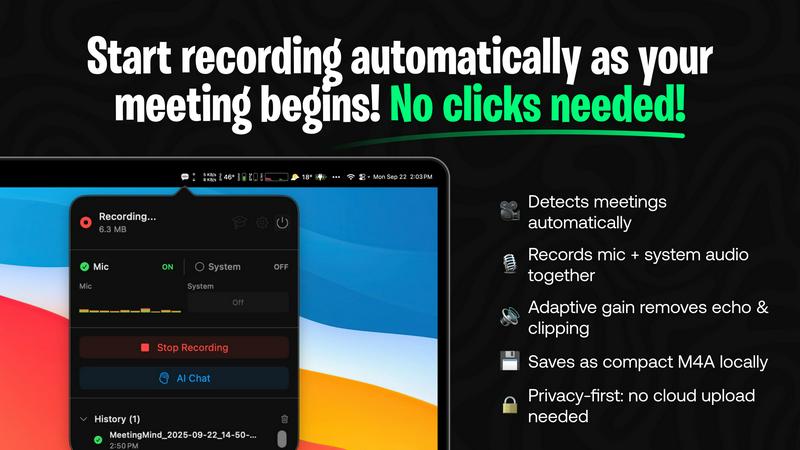
MeetingMind automatically records and summarizes your Zoom meetings, ensuring you never miss a detail while keeping it.
Last updated: February 26, 2026

The no-nonsense task manager that actually helps you get things done. No clutter. No complexity. Just you and your tasks.
Visual Comparison
MeetingMind
Tickari

Overview
About MeetingMind
Are you tired of juggling your role as a participant in meetings while also trying to capture every important detail? Say hello to MeetingMind, your ultimate co-pilot for all your Zoom calls! This isn't just another recording tool; it's a game-changing AI-powered assistant designed exclusively for macOS. MeetingMind automatically detects when you're in a meeting, kicking into action without you lifting a finger. It captures crystal-clear audio from both your microphone and system, delivering an intelligent, speaker-attributed transcript in markdown format before you can even say "let's wrap it up." With its embedded AI, the app highlights key takeaways, tracks action items, and even lets you interact with the discussion in real-time. Built with a privacy-first ethos, MeetingMind processes everything locally on your Apple Silicon, ensuring that your sensitive information never leaves your device. For those who crave even more, you can connect your AI models via Ollama or OpenRouter for unparalleled processing power. It's designed for professionals, leaders, and teams who are done missing details and ready to elevate their productivity. Reclaim your focus, and let MeetingMind ensure you never miss another crucial insight again.
About Tickari
Tickari is a deliberately minimal, no-nonsense task manager designed for people who are tired of overcomplicated productivity tools and just want to get things done. Instead of overwhelming you with features like complex boards, AI-generated suggestions, or endless customization, Tickari focuses on a simple, frictionless workflow: write a task, tick it off, and move on.
The product embraces a “less but better” philosophy—eliminating clutter, reducing cognitive overhead, and removing the need for onboarding tutorials or setup processes. There are no distractions, no unnecessary decisions, and no feature bloat—just a clean interface that works instantly the moment you open it. This makes it particularly effective for users who feel stuck organizing tasks instead of actually completing them.