
LuxSign vs SupaSidebar
Side-by-side comparison to help you choose the right AI tool.

LuxSign lets you securely sign and manage documents online in minutes, all while staying GDPR compliant and EU hosted.
Last updated: February 28, 2026
SupaSidebar
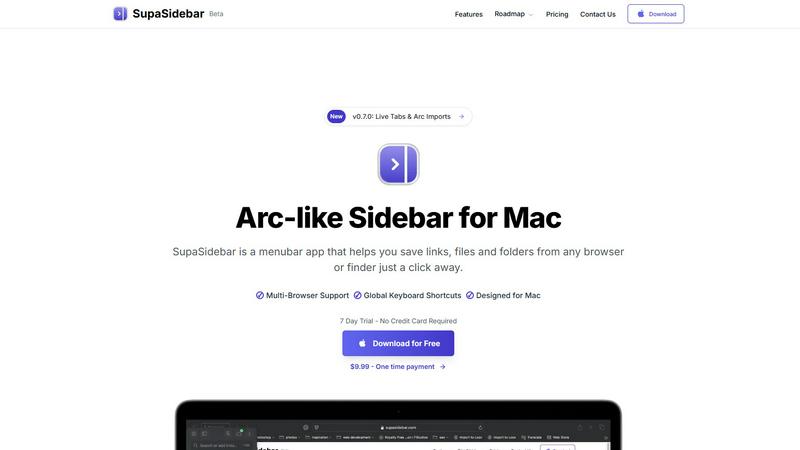
SupaSidebar turns your Mac into a powerful command hub, saving links and files with a click for instant access.
Last updated: February 26, 2026
Visual Comparison
LuxSign

SupaSidebar
Feature Comparison
LuxSign
Multiple Signature Methods
Ditch the old-school pen and paper! LuxSign allows you to sign documents in your own style. Whether you want to draw your signature, type it out, or upload an image, you've got options. Custom initials are also supported for those quick sign-offs, making your signing experience as unique as your brand.
PDF & Office Documents
No more format headaches! LuxSign is compatible with PDF, DOC, and DOCX files, automatically converting them for ease of use. You can upload documents up to 10MB without breaking a sweat, making it easy to manage all your essential files in one place.
Advanced Security
When it comes to security, LuxSign does not play around. With industry-standard encryption and secure storage in EU data centers, your documents are locked down tighter than Fort Knox. Detailed audit trails ensure you can track every step of the signing process, giving you peace of mind and compliance.
Collaboration Workspaces
Teamwork makes the dream work, and LuxSign gets that! Create collaboration workspaces to share documents, manage access, and streamline signing workflows with your team. Organize your files in folders and keep everything tidy, so you can focus on what really matters—getting those signatures!
SupaSidebar
Instant Saving with Keyboard Shortcuts
Saving your favorite links or files has never been easier. With SupaSidebar, use the CMD CTRL S shortcut to save anything instantly, or press CMD CTRL C to copy the current website link straight to your sidebar. This feature streamlines your workflow, allowing you to focus on what truly matters—creating and innovating without distractions.
Real-Time Live Tabs
Lost in a sea of tabs? SupaSidebar's Live Tabs feature acts as your guiding light, letting you find your work in a snap. The Recents function tracks every website you've visited in the last 48 hours, making retrieval effortless. No more endless scrolling through browser histories; your most recent activity is always at your fingertips.
Fast Search Functionality
Switching between apps can kill your vibe. SupaSidebar addresses this with a lightning-fast search feature. Just hit CMD CTRL K, type in what you're looking for, and watch as it pulls up any file, folder, website, or app in milliseconds. This feature enhances your productivity, ensuring you never waste time searching again.
Pinned Favorites for Quick Access
Keep your essentials close with SupaSidebar's pinned items feature. Your favorite links and files are always displayed at the top of the list, allowing for quick access whenever you need them. Say goodbye to repetitive searches; your most-used resources are just a click away.
Use Cases
LuxSign
Startups and Entrepreneurs
For startups navigating the fast-paced world of business, LuxSign is a game changer. Quickly sign NDAs, contracts, and partnership agreements without the hassle of printing and scanning, enabling you to move faster and get deals done.
Remote Teams
In today's remote working environment, keeping everyone on the same page is crucial. LuxSign facilitates seamless document signing for teams spread across different locations, allowing everyone to sign from the comfort of their home office.
Real Estate Transactions
Real estate deals can be complex and time-sensitive. LuxSign simplifies the signing of contracts, leases, and disclosures, ensuring that all parties can sign documents swiftly and securely, making the process smoother for agents and clients alike.
Legal and Compliance Departments
For legal professionals, document integrity and compliance are non-negotiable. LuxSign's advanced security features and complete audit trails provide the necessary documentation to validate processes and ensure compliance with regulations, protecting your firm from potential liabilities.
SupaSidebar
Streamlining Research Projects
If you're deep in research, SupaSidebar is your best ally. You can save articles, papers, and web pages directly into your sidebar, allowing you to organize and access your resources effortlessly. No more tab clutter—just a clean, organized interface that keeps your focus sharp.
Enhancing Creative Workflows
For creators, time is everything. SupaSidebar allows you to save inspirations, links, and files as you browse, ensuring that your creative process is uninterrupted. With instant access to your favorite tools and resources, you can let your creativity flow without the hassle of searching through a mountain of tabs.
Simplifying Development Tasks
Developers can significantly benefit from SupaSidebar's features. Store documentation, tutorials, and critical links in one accessible location. The fast search function lets you quickly find the resources you need, making coding sessions smoother and more efficient.
Daily Productivity Boost
Multitaskers will appreciate SupaSidebar's ability to streamline daily tasks. Whether you're managing projects, attending meetings, or just browsing for information, having all your links and files organized in one sidebar lets you focus on getting things done faster and with less stress.
Overview
About LuxSign
LuxSign is not just another electronic signature platform; it's your digital fortress for signing documents with unparalleled security and compliance. Designed for businesses that demand the highest standards, LuxSign is rooted in the heart of Luxembourg, ensuring that every document is encrypted end-to-end and stored on local servers, making it a champion of GDPR compliance. Whether you're a startup hustling for contracts or an established enterprise managing sensitive agreements, LuxSign provides the legal validity you need across the entire European Union, adhering to eIDAS SES standards. With features like seamless signing workflows, intuitive drag-and-drop signature placements, and automated notifications, LuxSign transforms a potentially tedious process into a swift, efficient, and secure experience. Plus, advanced tiers unlock powerful tools like audit trails, collaboration workspaces, and custom branding to elevate your document signing game. Get ready to sign smarter, not harder.
About SupaSidebar
Tired of the chaos that comes with juggling multiple tabs, endless bookmarks, and a cluttered digital workspace? Say hello to SupaSidebar, your new digital command center designed specifically for Mac users. This isn’t just another app; it's a beautifully crafted sidebar that draws inspiration from the sleek aesthetics of Arc. Whether you're a researcher, creator, developer, or multitasker, SupaSidebar is built to cater to your fast-paced lifestyle, providing instant access to everything you need without disrupting your flow. Nestled quietly in your menubar, it only makes its presence known when you summon it with a slick keyboard shortcut. Its core superpower? Unifying your entire digital workspace into one gorgeous, distraction-free sidebar. Save links, files, and folders from any browser or Finder in seconds, and effortlessly access them from any major browser, including Safari, Chrome, Firefox, and Brave. SupaSidebar is lightweight, native, and ensures that all your data remains securely on your Mac. Ditch the chaos and embrace the command of your workflow with SupaSidebar.
Frequently Asked Questions
LuxSign FAQ
How does LuxSign ensure document security?
LuxSign employs industry-standard encryption for documents during upload, storage, and transmission, ensuring that your sensitive information remains secure at all times.
Is LuxSign compliant with GDPR?
Absolutely! LuxSign is fully compliant with GDPR and Luxembourg data protection laws, ensuring that your data privacy is a top priority.
Can I use LuxSign for international agreements?
Yes! LuxSign provides legal validity for contracts across the entire European Union, making it an ideal solution for businesses engaging in international transactions.
What types of documents can I sign with LuxSign?
You can sign various document types including PDF, DOC, and DOCX files. Plus, we simplify the process with automatic conversions, so you never have to worry about format issues.
SupaSidebar FAQ
Is SupaSidebar a browser extension?
No, SupaSidebar is a standalone menubar application designed for Mac. It operates independently of your browser, allowing seamless integration with multiple browsers like Safari, Chrome, and Firefox.
Which browsers does SupaSidebar work with?
SupaSidebar supports all major browsers, including Safari, Chrome, Firefox, Arc, and Brave. You can save links and files from any of these browsers directly into your sidebar.
What macOS version do I need?
SupaSidebar requires macOS 13 or newer to ensure optimal performance and compatibility. Always keep your system updated for the best experience.
Where is my data stored?
All data saved with SupaSidebar remains securely on your Mac. The app is designed to prioritize your privacy, ensuring that nothing leaves your device without your permission.
Alternatives
LuxSign Alternatives
LuxSign is your go-to electronic signature platform, designed for those who take security and compliance seriously. As a digital fortress rooted in Luxembourg, it not only helps you sign documents but also ensures they are managed with the utmost security standards, making it a must-have for businesses across the European Union. However, many users find themselves on the hunt for alternatives due to factors like pricing, specific feature requirements, or the need for integrations that better suit their workflow. When searching for an alternative to LuxSign, consider what features are non-negotiable for your operations. Are you looking for advanced security measures, seamless collaboration tools, or specific document format compatibility? Understanding your organization's unique needs will help you navigate the landscape of electronic signature solutions and find the perfect fit that keeps your signing process efficient and compliant.
SupaSidebar Alternatives
SupaSidebar is your all-in-one digital command center for Mac, designed to streamline your workflow by providing instant access to your links, files, and folders. As a productivity and management tool, it creates a sleek, distraction-free sidebar that integrates seamlessly with your macOS experience. This beautiful, Arc-inspired interface is perfect for anyone who juggles multiple tasks and needs a fast, efficient way to organize their digital life. However, users often seek alternatives to SupaSidebar for various reasons. Some may find themselves drawn to different pricing structures, while others might be looking for specific features that align more closely with their workflow needs. When searching for an alternative, it's crucial to consider compatibility with your preferred platforms, the ease of use, and the ability to integrate with your existing tools to ensure a smooth transition and continued productivity.