Looktara vs poseup
Side-by-side comparison to help you choose the right AI tool.

Looktara
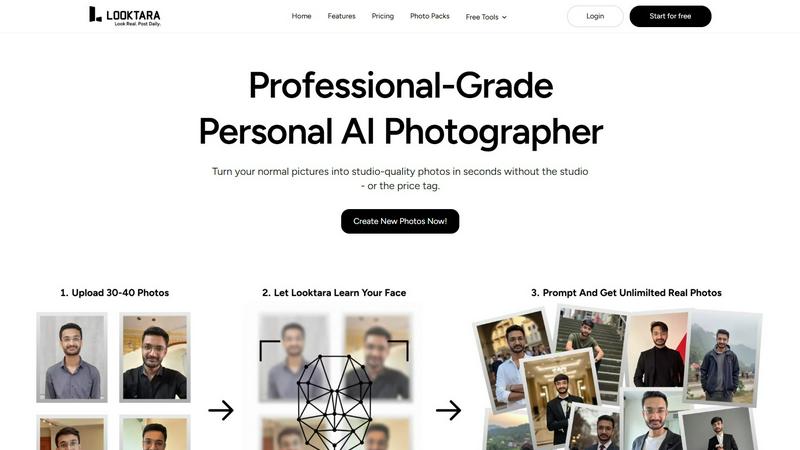
Looktara is your ultimate AI photographer, delivering stunning, genuine photos that vibe with your style in minutes.
Last updated: February 26, 2026

poseup
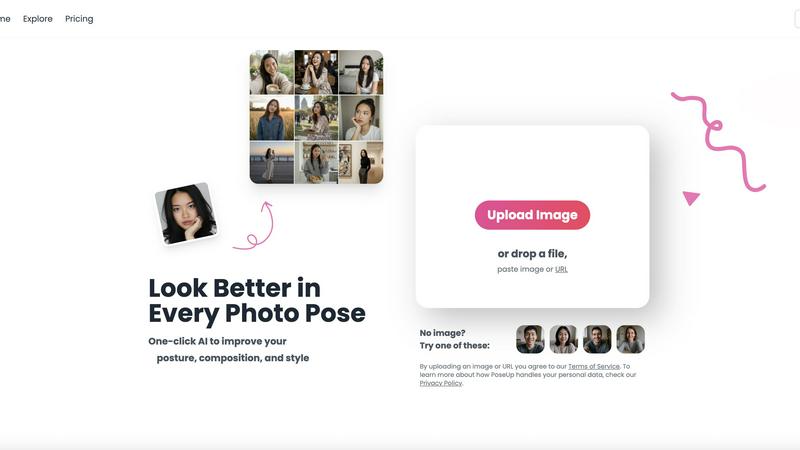
Elevate your photos instantly with PoseUp's AI, enhancing posture, composition, and style for stunning results every.
Last updated: February 26, 2026
Visual Comparison
Looktara
poseup
Feature Comparison
Looktara
Personal AI Model
Your journey starts with just 30 photos. Looktara creates a personalized AI model that understands you, capturing your individual look and vibe. This model is private and encrypted, ensuring that your essence is kept safe and sound while delivering images that feel like you.
Quick Turnaround
Need a fresh look on the fly? Looktara generates high-quality photos in about 5 seconds. Whether you’re rushing for a meeting or need a last-minute social media post, the speed of Looktara ensures you never miss a beat.
Versatile Styling
With Looktara, you get photos that fit your unique style and context. Whether it’s a professional headshot, a casual behind-the-scenes shot, or something more creative, you can prompt the AI, and it’ll deliver exactly what you need.
Authentic Expressions
Forget the awkward poses and plastic-like skin. Looktara captures genuine expressions that reflect your personality. The result? Natural, relatable photos that resonate with your audience and maintain your professional image.
poseup
One-Click Pose Enhancement
Transform your photography with our intuitive one-click enhancement feature. Simply upload your image, and watch as PoseUp automatically analyzes and improves your posture and composition. It's like having a personal photography coach at your fingertips!
Intelligent Posture Correction
Our advanced AI technology doesn't just stop at enhancing poses; it also corrects bad posture. Whether you're slouching or misaligned, PoseUp suggests the best positioning to ensure you look your absolute best, making every shot a winner.
Versatile Use Cases
PoseUp is versatile enough to cater to all your photography needs. Whether you're snapping a casual lifestyle shot, a professional headshot, or a fun group photo, our tool adapts to various styles and scenarios, ensuring you achieve stunning results every time.
Support for Multiple Formats
No need to worry about file types! PoseUp supports a range of image formats including JPG, PNG, WEBP, and HEIC, with a maximum file size of 5MB. This means you can enhance your images without any hassle, regardless of how you captured them.
Use Cases
Looktara
Professional Headshots
Need to stand out on LinkedIn? Looktara helps you create polished, professional headshots that convey confidence and approachability without the hassle of a traditional photoshoot.
Social Media Content
For creators looking to maintain a consistent brand image, Looktara delivers stunning visuals tailored to your aesthetic. Just type in your prompt, and in seconds, you have eye-catching content ready for your channels.
Marketing Materials
Whether you’re crafting a digital flyer, a newsletter, or a client presentation, Looktara provides high-quality images that align with your message. Stand out from the crowd with visuals that speak to your brand.
Personal Projects
From blog posts to personal websites, Looktara enables you to showcase your personality through authentic images. Create visuals that reflect who you are, connecting with your audience on a deeper level.
poseup
Perfect Selfies for Social Media
Want to up your selfie game? PoseUp helps you capture the perfect angle and posture, making your selfies pop with confidence and style. Say goodbye to the struggle of finding the right pose and hello to eye-catching images that will light up your feed.
Family Photos Made Easy
Family gatherings can be chaotic, and getting everyone to pose perfectly is often a challenge. With PoseUp, you can simplify the process. Upload your group shots, and let AI enhance the composition, ensuring everyone looks great without the stress of constant retakes.
Professional Portrait Enhancement
Looking to make a lasting impression with your professional headshots? PoseUp’s AI-driven features ensure you present yourself in the best light, optimizing your posture and composition for that polished, professional look that employers and clients will appreciate.
Fitness and Wellness Shots
Whether you're showcasing your workout routine or promoting a healthy lifestyle, PoseUp helps you capture dynamic fitness shots with perfect posture and energy. Enhance your images effortlessly, making your fitness content more inspiring and engaging.
Overview
About Looktara
Tired of the same old AI photos that feel like they were generated in a factory? Looktara is here to change the game. This isn’t just another generic photo editor; it’s your personal AI photographer, designed exclusively for you. Whether you're an entrepreneur, a content creator, or a professional hustling to make an impression, Looktara gets you. By uploading just 30 of your favorite photos, Looktara crafts a unique, encrypted model that embodies your essence—your true smile, your distinctive style, and the subtle glint in your eye. In just about 10 minutes, it’s ready to roll. Need a professional headshot that screams confidence for LinkedIn? Or a candid shot that tells a story? Just type what you need, and in a lightning-fast 5 seconds, Looktara delivers a studio-grade photo that’s unmistakably YOU. No fake skin, no weird stares—just authentic visuals that nail your brand. Say goodbye to endless photoshoots and hello to consistency and confidence across all platforms with Looktara.
About poseup
Welcome to PoseUp, your ultimate sidekick in the quest for picture-perfect photography! This innovative AI tool is a game-changer, revolutionizing the way you approach photo poses and compositions. Imagine effortlessly enhancing your selfies, family gatherings, or professional portraits with just a single click. PoseUp harnesses the power of cutting-edge artificial intelligence to analyze your photos, correcting awkward poses, optimizing posture, and dramatically improving overall composition. It's not just for professional photographers; this tool is designed for everyone—from casual shooters snapping weekend adventures to social media influencers aiming for that flawless aesthetic. With PoseUp, you can say goodbye to the stress of posing and hello to captivating images that leave a lasting impression. Get ready to elevate your photography game and turn those ordinary shots into stunning masterpieces that will make your audience stop scrolling and start admiring!
Frequently Asked Questions
Looktara FAQ
How does Looktara create my personal AI model?
After you upload 30 of your photos, Looktara uses advanced algorithms to analyze your facial features and style. This process creates a unique model tailored to you, ensuring all generated images reflect your true self.
Can I customize the photos Looktara generates?
Absolutely! You can type prompts that specify the type of photo you want, including context, style, and mood. Looktara’s versatility allows you to tailor each image to fit your needs perfectly.
Is my data secure with Looktara?
Yes! Looktara prioritizes your privacy. Your photos and the resulting AI model are kept private and encrypted, ensuring that your personal data is never shared or compromised.
How quickly can I get my photos?
Once your personal AI model is set up, Looktara can generate high-quality images in about 5 seconds. This means you can have professional-grade visuals ready to go whenever you need them.
poseup FAQ
How does PoseUp improve my photos?
PoseUp uses advanced AI technology to analyze your photos for posture, composition, and lighting. It then suggests enhancements that correct bad poses and optimize visual appeal, all with just one click.
Is PoseUp suitable for beginners?
Absolutely! PoseUp is designed for everyone, from casual photographers to seasoned pros. You don't need any professional training to achieve stunning results—just upload your photo and let the AI do the work!
What file formats does PoseUp support?
PoseUp supports multiple file formats, including JPG, PNG, WEBP, and HEIC, with a maximum image size of 5MB. This ensures you can enhance your images without worrying about compatibility issues.
Can PoseUp help with group photos?
Yes! PoseUp is perfect for enhancing group photos. Simply upload your image, and the AI will optimize the composition to ensure everyone looks fantastic, making your family gatherings or events memorable.
Alternatives
Looktara Alternatives
Looktara is your go-to private AI photographer, redefining the game in the generative art category. With a focus on capturing the real you, it crafts personalized photos that scream authenticity, eliminating the typical "fake" vibe often associated with AI-generated images. Users flock to alternatives for various reasons, such as pricing, feature sets, or specific platform compatibility. It's essential to consider not only the quality of images produced but also the level of customization, ease of use, and the overall experience when searching for the right alternative. When you're on the hunt for alternatives, think about what matters most to you. Are you looking for a platform that offers diverse styles? Or do you need something that can seamlessly integrate with your existing tools? Prioritize features that align with your unique needs, ensuring that the alternative you choose can deliver authentic visuals that resonate with your personal brand or professional image.
poseup Alternatives
PoseUp is an innovative AI-driven tool designed to transform your photography game by enhancing poses, posture, and overall composition in your images. This game-changing software falls under the image and photo category, making it perfect for everyone from casual shutterbugs to social media influencers. Users often seek alternatives to PoseUp due to various reasons like pricing, specific features needed for unique photography styles, or compatibility with different platforms and devices. When searching for alternatives, it’s essential to consider the key features that matter most to you, such as ease of use, AI capabilities, and any additional enhancements that can elevate your photos. Also, think about pricing plans—whether monthly subscriptions, one-time purchases, or free trials. The right alternative should not only fit your budget but also meet your specific photography needs, ensuring you still achieve those picture-perfect shots without breaking a sweat.