
Imgezy vs seedream 5
Side-by-side comparison to help you choose the right AI tool.

Imgezy
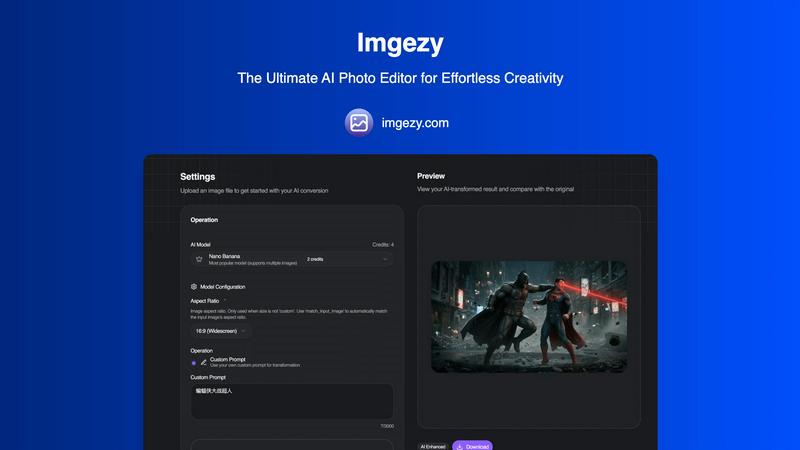
Transform your photos effortlessly with Imgezy, the AI tool that removes objects and changes backgrounds in seconds.
Last updated: February 26, 2026

seedream 5
Unleash your creativity with Seedream 5, delivering stunning 4K images and smart editing at lightning speed.
Last updated: February 28, 2026
Visual Comparison
Imgezy
seedream 5
Feature Comparison
Imgezy
Object Removal
Imgezy's object removal feature is like having a magic wand at your fingertips. Whether it's a photobomber sneaking into your shot or a stray power line ruining your perfect landscape, Imgezy uses cutting-edge AI to identify and eliminate unwanted elements seamlessly. The advanced algorithms reconstruct the background with pixel-perfect accuracy, ensuring your image remains flawless and untouched. Say goodbye to distractions and hello to pristine visuals!
Background Replacement
Why settle for ordinary backgrounds when you can have extraordinary? With Imgezy’s background replacement feature, you can instantly change the scenery of your photos. Whether you want to swap a dull backdrop for a vibrant beach or add a dreamy sunset, this tool makes it as simple as typing your request. The AI processes the changes in seconds, giving your images a fresh new look that’s sure to impress.
Photo Enhancement
Elevate your photos from good to breathtaking with Imgezy’s photo enhancement capabilities. This feature automatically adjusts colors, lighting, and sharpness, making your images pop like never before. You don’t need to be a photo editing expert; just upload your picture and watch as Imgezy turns it into a masterpiece with vibrant details and stunning clarity. Your shots are about to become Instagram-ready in no time!
Batch Processing
Time is money, and Imgezy knows it. With the batch processing feature, you can edit multiple photos at once, saving you a ton of time on projects. Whether you're prepping images for a product launch or curating a social media feed, this tool allows you to apply edits to numerous files simultaneously. It’s efficiency at its finest, ensuring you can focus on what truly matters—your creativity.
seedream 5
Native 4K Quality
Seedream 5.0 outputs images at a stunning native 4K resolution, ensuring exceptional texture fidelity and detail. Forget about post-upscaling—this tool delivers true high-definition images directly suited for professional print and digital applications.
Lightning-Fast Generation
Experience mind-blowing speeds with Seedream 5.0, generating professional-quality images in seconds. Its powerful engine provides up to 10 times faster image creation, allowing creatives to meet tight deadlines without sacrificing quality.
Smart Background Replacement
Transform your images effortlessly with Seedream 5.0's AI-driven background replacement feature. With just one click, you can add or remove elements, change environments, and adjust lighting, all while maintaining a hyper-realistic look.
Multi-Image Consistency
Maintain the same character designs and brand elements effortlessly across multiple images. Seedream 5.0 ensures visual coherence, making it a vital tool for webcomics, storyboards, advertising campaigns, and any serialized content requiring consistent aesthetics.
Use Cases
Imgezy
Social Media Creators
If you’re a social media creator looking to craft the perfect feed, Imgezy is your best friend. With its fast and effortless editing capabilities, you can enhance your photos, remove unwanted distractions, and swap backgrounds to align with your aesthetic—all in a snap. Your followers will be amazed at your professional-looking images, and you’ll have more time to create engaging content.
E-commerce Sellers
For e-commerce sellers, product photography can make or break a sale. Imgezy allows you to present your products in the best light possible. Remove blemishes, swap out backgrounds for a clean, professional look, and enhance colors to make your items pop. With Imgezy, you can produce high-quality images that attract buyers and drive sales, all without the hassle of traditional editing software.
Event Planners
Are you an event planner capturing precious moments at weddings or parties? Imgezy has your back! Use it to remove unwanted guests from your photos or change backgrounds to enhance the setting. Make every image a timeless memory that reflects the beauty of the occasion, allowing you to showcase your planning skills through stunning visuals.
Everyday Users
Not a professional? No problem! Imgezy is designed for everyday users who want to enhance their personal photos. Whether it's a vacation snapshot or a family gathering, you can easily remove unwanted elements and improve the overall quality of your images. With Imgezy, everyone can be a photo editing pro, making sure every memory is picture-perfect.
seedream 5
Comic and Graphic Novel Creation
Artists can utilize Seedream 5.0 to create consistent character designs across comic panels. The tool’s multi-image consistency feature ensures that characters' appearances remain coherent, enhancing storytelling and visual engagement.
Marketing and Branding
Marketers can generate eye-catching visuals for campaigns, social media, and promotional materials. With high-precision text rendering, Seedream 5.0 allows for the swift creation of marketing posters and banners that stand out and effectively communicate brand messages.
Concept Art and Prototyping
Game developers and filmmakers can speed up their creative processes by using Seedream 5.0 for concept art and visual prototypes. The ability to quickly generate high-quality images allows teams to visualize ideas and iterate rapidly.
Personalized Artwork
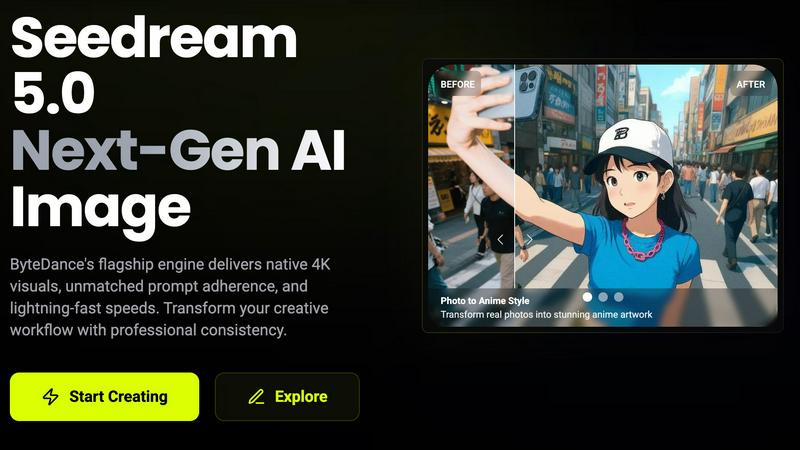
Whether for gifts or personal projects, users can transform real photos into unique anime-style artwork or day-to-night scene transformations, showcasing the versatility of Seedream 5.0 in creating personalized visual experiences.
Overview
About Imgezy
Imgezy is a revolutionary AI-powered photo editor that redefines the way we think about image editing. Gone are the days of wrestling with complex software and intricate tools. Imgezy empowers users—whether you're a budding social media influencer, an e-commerce entrepreneur, or simply someone looking to enhance personal memories—to create stunning visuals with unparalleled ease. Just type in what you want, and let the advanced AI do the heavy lifting. With features designed to remove distractions, swap backgrounds, and enhance images, Imgezy delivers pro-quality results in seconds. It's perfect for anyone who craves creativity without the technical headache and is here to transform your photos into visual masterpieces. Join over 200,000 satisfied users who have already discovered the magic of Imgezy, and unleash your inner artist today.
About seedream 5
Seedream 5.0 is the powerhouse AI image generation tool from ByteDance that’s taking the creative world by storm. Designed for artists, designers, marketers, and anyone who craves stunning visuals at lightning speed, Seedream 5.0 delivers native 4K quality images in mere seconds. With advanced prompt adherence and superior output consistency, this tool revolutionizes the creative workflow, allowing users to transform concepts into breathtaking visuals effortlessly. Whether you are looking to create captivating marketing materials, stunning artwork, or detailed character designs, Seedream 5.0 provides the professional-grade quality you need. It’s not just about images; it’s about pushing the boundaries of creativity, making it the ultimate tool for those who want to stand out in a visually saturated world.
Frequently Asked Questions
Imgezy FAQ
How does Imgezy work?
Imgezy uses advanced AI technology to simplify photo editing. You simply upload your image, describe the desired edits in plain English, and the AI processes your request, delivering professional-quality results within seconds.
Do I need any photo editing skills to use Imgezy?
Absolutely not! Imgezy is designed for everyone, regardless of skill level. Just type what you want to change, and let the AI handle the rest. It’s that easy!
What file formats does Imgezy support?
Imgezy supports all major image formats, including JPG, PNG, and WebP. You can easily drag and drop your files or select them from your device to get started.
Is there a limit on how many images I can edit?
Yes, depending on your chosen pricing plan, there will be a monthly credit limit on how many images you can edit. However, Imgezy offers different plans that cater to various needs, ensuring you can find one that fits your editing requirements.
seedream 5 FAQ
What is Seedream 5.0?
Seedream 5.0 is an advanced AI image generation tool by ByteDance that creates native 4K quality images quickly, offering features like smart background replacement and multi-image consistency for professional creatives.
How fast can Seedream 5.0 generate images?
Seedream 5.0 can produce professional-quality images in seconds, boasting a generation speed that is up to ten times faster than previous versions, making it ideal for time-sensitive projects.
Can I edit images after they are generated?
Yes! Seedream 5.0 allows for multi-turn conversational editing, enabling users to refine and adjust images through text instructions without starting over, ensuring a smooth and efficient editing process.
Is there a free trial available for Seedream 5.0?
Yes, Seedream 5.0 offers a free trial, allowing users to explore its features and capabilities before committing to a paid plan, making it accessible for everyone to experience its potential.
Alternatives
Imgezy Alternatives
Imgezy is your go-to AI photo editor that revolutionizes the way you handle image editing, allowing users to remove objects and swap backgrounds with a wave of digital magic. It belongs to the image and photo category, specifically designed for creators who crave pro-level edits without the learning curve. Users often seek alternatives due to factors like pricing, specific feature sets, or compatibility with their preferred platforms. When on the hunt for an alternative, it's crucial to consider usability, the range of features offered, and how well the tool aligns with your editing needs and style. In a world where visual storytelling reigns supreme, finding the right photo editing tool can make or break your creative flow. Whether you're a social media maven or an e-commerce aficionado, the perfect alternative should empower you to express your vision effortlessly. Look for intuitive interfaces, advanced AI capabilities, and flexible usage options that cater to your unique editing requirements and help you unleash your inner creative genius.
seedream 5 Alternatives
Seedream 5 is a cutting-edge AI image generation tool from ByteDance that fits squarely in the realm of creative technology. Designed to unleash the artistic potential of users—whether they're artists, marketers, or designers—Seedream 5 delivers breathtaking 4K images with lightning-fast generation speeds. However, users often seek alternatives for various reasons, including pricing, specific feature sets, or compatibility with different platforms and workflows. When searching for an alternative, it’s essential to consider factors like image quality, speed, ease of use, and the range of creative options available, ensuring that the tool aligns with your unique creative needs. --- [{"question": "What is seedream 5?", "answer": "Seedream 5 is an AI image generation tool that produces stunning 4K images rapidly, ideal for creatives in various fields."}, {"question": "Who is seedream 5 for?", "answer": "Seedream 5 is designed for artists, designers, marketers, and anyone looking to create high-quality visuals quickly and efficiently."}, {"question": "Is seedream 5 free?", "answer": "The pricing structure for Seedream 5 may vary, and users should check the official site for the most current information."}, {"question": "What are the main features of seedream 5?", "answer": "Key features of Seedream 5 include native 4K output, lightning-fast image generation, smart background replacement, and multi-image consistency."}]