
Gleem.AI Studio vs Image Text Editor
Side-by-side comparison to help you choose the right AI tool.

Gleem.AI Studio
Gleem.AI Studio is your all-in-one creative hub to generate, edit, and personalize stunning visuals effortlessly.
Last updated: February 28, 2026

Image Text Editor
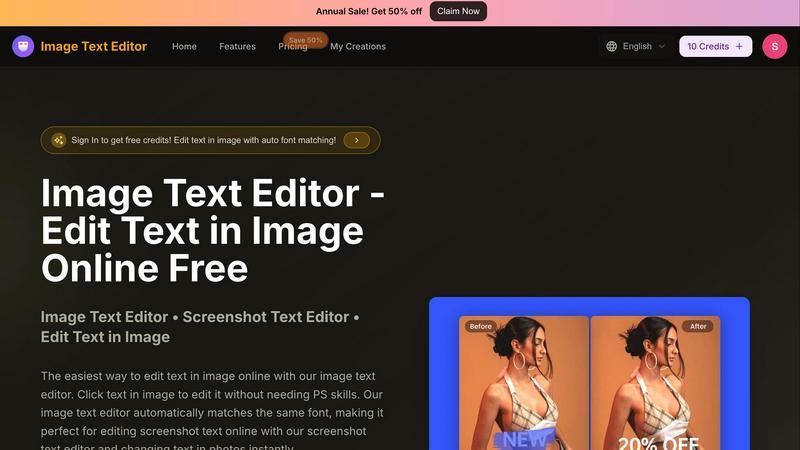
Effortlessly edit any image text with AI that auto-matches fonts, no skills needed, and grab free credits today!.
Last updated: February 26, 2026
Visual Comparison
Gleem.AI Studio

Image Text Editor
Feature Comparison
Gleem.AI Studio
Text to Image Generator
Transform your wildest ideas into breathtaking visuals with the powerful text-to-image generator. Just type in your vision, choose your desired size, and let Gleem’s Prompt Enhance feature refine your words into stunning images that capture your imagination. It's fast, it's creative, and it's all about making your thoughts visual!
AI Image Editing
Unleash your inner artist with Gleem's intuitive AI image editing capabilities. Whether you want to add or remove elements, adjust poses, or apply funky filters, you can do it all in one place. No more hopping between apps; just simple, natural prompts that let you edit like a pro without the learning curve!
AI Avatars
Bring your digital persona to life with Gleem's AI Avatar feature. Generate and personalize your own avatar, then seamlessly integrate it into any scene. Want to try on new outfits or strike a different pose? No problem. This feature lets you do it all without the hassle of a photoshoot. It's your digital self, ready for any creative adventure!
Projects That Keep You Organized
Stay on top of your creative game with dedicated project spaces that keep everything organized. Each idea gets its own hub, complete with saved prompts, edits, and versions. With easy access to version history and the ability to iterate quickly, you can build on your ideas without starting from scratch. Keeping your creativity organized has never been this effortless!
Image Text Editor
Auto Font Matching
Say goodbye to the headache of matching fonts manually. Our auto font matching feature scans your image and seamlessly matches the original font style, size, and color when you edit text. This ensures that your changes appear natural and professional, making it perfect for any visual content.
Click to Edit
Editing has never been easier. With our click-to-edit functionality, you can simply click on the text in your image to start editing. No complicated menus or layers—just instant access to the text you want to change. It's as simple as clicking and typing, making it accessible for everyone.
Edit Screenshot Text
Got a screenshot that needs a quick update? Our screenshot text editor is designed specifically for this purpose. Whether it's app screenshots, web captures, or social media graphics, you can edit text in images online with ease, all while maintaining the original look and feel.
Fast and Free
Who says quality editing has to come with a hefty price tag? Image Text Editor is completely free to use, with no hidden fees or subscription models. Plus, new users get free credits upon registration, allowing you to dive right into editing without worrying about costs.
Use Cases
Gleem.AI Studio
Marketing Assets
Marketers can effortlessly create stunning visuals for campaigns, social media, and advertisements using Gleem.AI Studio. With the AI image generator and editing tools combined, crafting eye-catching marketing assets becomes a breeze, allowing for faster turnaround times and creative freedom.
Social Media Visuals
Make your social media pop with unique images generated and edited all in one space. Gleem.AI Studio allows creators to produce visuals that stand out in crowded feeds, engage audiences, and elevate brand presence. Say goodbye to basic stock images and hello to tailor-made content!
Product Images
E-commerce entrepreneurs can enhance their product visuals with Gleem.AI Studio’s AI editing features. From removing backgrounds to adjusting lighting, this tool makes it easy to create professional-quality product images that attract customers and drive sales.
Creative Variations
Testing different creative variations is a breeze with Gleem.AI Studio. Whether you're brainstorming ideas or refining existing visuals, the platform’s seamless workflow lets you iterate quickly and effectively. It's perfect for teams looking to explore various concepts without the stress of complicated tools.
Image Text Editor
Social Media Updates
Perfect for social media managers, our tool allows you to quickly update promotional graphics or memes without the need for complex software. Change the text in seconds to keep your content fresh and engaging, ensuring you stay ahead in the fast-paced world of social media.
Academic Projects
Students can leverage Image Text Editor to tweak screenshots of research materials or presentations. Whether you need to correct a typo or update a date, this tool makes it easy to enhance your academic visuals without the hassle of design software.
Marketing Materials
Marketers can use our platform to create eye-catching promotional graphics. With the ability to edit text seamlessly, you can quickly adapt your marketing materials to reflect current offers or updates, giving your campaigns a professional edge.
Personal Projects
Whether you're creating a meme for fun or editing a family photo, Image Text Editor caters to your personal editing needs. Instantly make changes to any image without needing advanced design skills, empowering you to express your creativity effortlessly.
Overview
About Gleem.AI Studio
Gleem.AI Studio is your one-stop creative powerhouse, designed for anyone who craves seamless image creation without the techy hassle. Forget the days of juggling multiple tools and drowning in settings; Gleem.AI Studio brings everything together in one slick, unified workspace. Whether you're a marketer looking to whip up eye-catching visuals, a creator crafting stunning graphics, or a small team in need of rapid iterations, this platform has got your back. With AI-driven image generation and editing at your fingertips, you can focus on what truly matters: your creative vision. Say goodbye to fragmented workflows and hello to a streamlined process that lets your ideas shine. Gleem.AI Studio is built for speed, simplicity, and a seriously intuitive user experience, making it the ultimate tool for anyone who wants to create, not configure.
About Image Text Editor
Welcome to Image Text Editor, the game-changer in the world of image editing! This revolutionary tool is designed for anyone tired of the clunky interfaces of traditional software like Photoshop. Imagine being able to edit text in any image with just a few clicks, all from your browser and without spending a dime. Our AI-powered platform allows you to effortlessly change dates on screenshots or fix typos in memes. Whether you're a content creator, marketer, or just someone who needs a quick edit, this tool is your best friend. It performs a forensic analysis of the original text, ensuring that your edits match the style, color, and texture of the surrounding area. No more complex design skills needed; just upload your image, click on the text, and let the magic unfold. Get started today and unlock the power of professional-quality editing right at your fingertips!
Frequently Asked Questions
Gleem.AI Studio FAQ
What is Gleem.AI Studio?
Gleem.AI Studio is an all-in-one AI image workspace that combines generation, editing, and avatar creation, making it ideal for marketers, creators, and small teams seeking a streamlined creative process.
How does the text-to-image generator work?
Simply input your ideas in plain language, select your desired image size, and let Gleem’s Prompt Enhance feature refine those words into visually stunning images. It’s as easy as typing what you envision!
Can I edit images after generating them?
Absolutely! Gleem.AI Studio allows you to edit your generated images using intuitive prompts, so you can make adjustments like adding or removing elements, applying filters, and enhancing overall quality—all in one place.
Is there a beta version available?
Yes! You can join the waitlist for the private beta to get early access to Gleem.AI Studio and start exploring its features before the official launch. Don't miss out on the chance to be one of the first to try it out!
Image Text Editor FAQ
How does Image Text Editor work?
Image Text Editor uses advanced AI technology to analyze your image. It detects the text you want to edit and automatically matches the font, color, and style to ensure your edits look seamless and professional.
What image formats does the tool support?
Our image text editor supports JPG, PNG, and WEBP formats, allowing you to upload a variety of images for editing. Just ensure your image is under 5MB for optimal performance.
Do I need design skills to use Image Text Editor?
Absolutely not! Image Text Editor is designed for everyone, regardless of design experience. With its intuitive interface and click-to-edit functionality, you can easily make changes without any prior knowledge.
Is there a cost associated with using Image Text Editor?
Nope! Image Text Editor is completely free to use. New users even receive free credits upon registration, allowing you to start editing without any financial commitment.
Alternatives
Gleem.AI Studio Alternatives
Gleem.AI Studio is your ultimate creative playground, designed for generating, editing, and personalizing visuals with effortless flair. This all-in-one platform caters to marketers, creators, and small teams eager to streamline their design process and unleash their creativity without the techy headaches. Users often seek alternatives to Gleem.AI Studio due to varying needs like pricing, feature sets, or specific platform requirements that better suit their workflows. When searching for an alternative, consider factors like ease of use, the range of features, and how well the platform integrates into your existing creative ecosystem, ensuring your ideas shine as bright as they can.
Image Text Editor Alternatives
Image Text Editor is your go-to AI-powered tool for effortlessly editing text in images without the hassle of complex design software. It belongs to the design tools category, making graphic editing as easy as pie. Users often seek alternatives to Image Text Editor due to various reasons like pricing, feature sets, or platform compatibility. Whether you're a budget-conscious creator or need specific functionalities that align with your workflow, exploring alternatives can help you find the perfect fit. When searching for an alternative, consider factors such as ease of use, the ability to match original fonts and styles, and whether it's accessible directly in your browser. Look for tools that cater to your creative needs while also fitting your budget, ensuring you don’t compromise on quality or efficiency.