GenSong vs Video to Text
Side-by-side comparison to help you choose the right AI tool.

GenSong
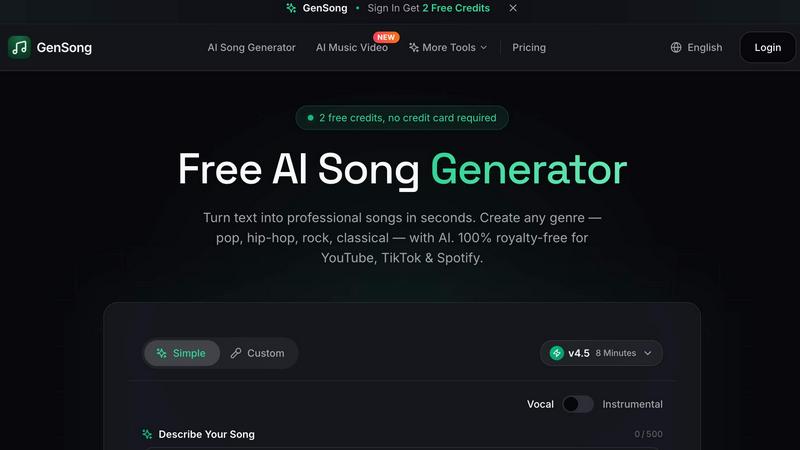
GenSong transforms your text into pro-quality, royalty-free songs in any genre, ready for instant download and use on all platforms.
Last updated: March 11, 2026

Video to Text
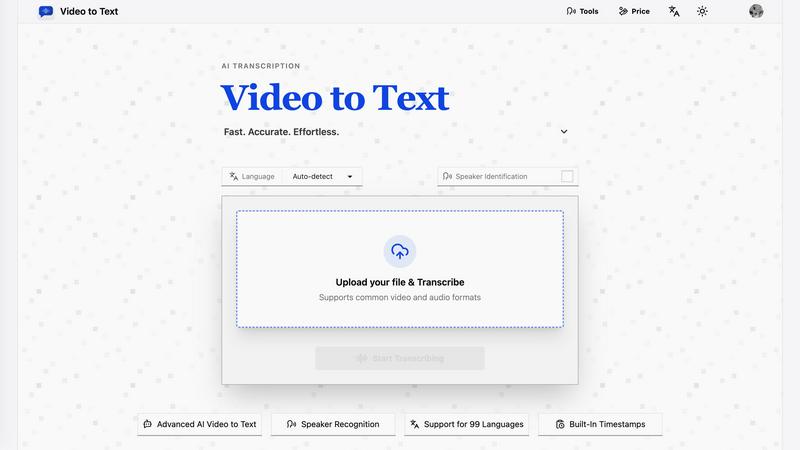
Unlock your video's voice with AI-powered transcription that turns any audio into clean, accurate text in minutes.
Last updated: April 13, 2026
Visual Comparison
GenSong
Video to Text
Feature Comparison
GenSong
Free AI Song Generator
GenSong equips you with a free AI song generator that allows you to create songs without any upfront costs. No credit card is required to start making your music, so you can dive right in and unleash your creativity instantly.
Lightning-Fast Generation
Say goodbye to long waits! GenSong generates professional-quality tracks in under a minute. This lightning-fast generation means you can quickly iterate on song ideas, perfecting your sound without wasting time.
100% Royalty-Free Music
Every track you create with GenSong is yours to keep. The music is cleared for streaming, monetization, and commercial use worldwide, so you can confidently share your work across various platforms without the fear of copyright issues.
Multiple Song Styles
From hip-hop to classical, GenSong supports a plethora of musical genres. No matter your taste or project requirements, you can create any style of music you desire, allowing for a rich and varied sonic palette.
Video to Text
99-Language Powerhouse
This isn't your basic, one-trick-pony translator. Video to Text's AI is fluent in 99 languages, from global powerhouses like English and Spanish to niche dialects. It even auto-detects the language for you, so you don't have to guess. Got a recording with multiple languages mixed in? No sweat. The multi-language recognition feature handles that chaos like a pro, making it perfect for international interviews, diverse team meetings, or global content.
Speaker-Aware Diarization
Trying to figure out "who said what" in a group recording is a nightmare. Our speaker diarization feature cuts through the noise, intelligently identifying and labeling each unique speaker in your file. It transforms a confusing audio blob into a clear, organized conversation transcript. This is a game-changer for interviewers, journalists, and anyone dealing with multi-person calls or panels, making review and quoting a total breeze.
Built-In Timestamps for Precision
Every transcribed word comes with a precise timestamp. This isn't just a nice-to-have; it's essential for serious video editors, content creators, and researchers. Need to jump straight to a specific quote in a 2-hour interview? Done. Creating subtitles (SRT/VTT files) for your YouTube video? The timestamps are baked right in. It adds a layer of searchability and editability that turns a static transcript into a dynamic, interactive tool.
Flexible Export & Format Freedom
Your workflow, your rules. Video to Text doesn't lock you into one format. Once your transcript is ready, export it exactly how you need it: as a clean TXT file for notes, a structured CSV for data analysis, or as ready-to-burn SRT/VTT subtitle files for your videos. It supports all the common video (MP4, MOV, MKV) and audio (MP3, WAV, M4A) formats, so you can upload straight from your camera, phone, or editing suite without conversion hassles.
Use Cases
GenSong
Content Creation
Podcasters, YouTubers, and social media influencers can use GenSong to generate catchy jingles and background music for their projects. This tool saves time and money, enabling creators to focus on their content without compromising on sound quality.
Game Development
Indie game developers can turn to GenSong for unique soundtracks that fit their game’s theme. With the ability to generate multiple tracks quickly, developers can enhance the gaming experience without hiring a full-time composer.
Music Education
Music teachers and students can utilize GenSong as a learning tool, experimenting with different genres and styles. This hands-on approach allows learners to understand composition and song structure in an engaging way.
Commercial Use
Businesses can leverage GenSong to craft original music for commercials, advertisements, and promotional videos. With 100% royalty-free tracks, companies can enhance their brand identity with custom audio that resonates with their audience.
Video to Text
Content Creator's Caption Engine
YouTubers, course creators, and social media gurus, listen up. Stop leaving your audience in the silent scroll. Upload your video, and in minutes, you've got perfectly timed SRT or VTT subtitle files. This boosts accessibility, SEO, and watch time like crazy. Repurpose that audio into blog posts, show notes, or quotes for promo graphics without typing a single word yourself. It's the ultimate content multiplier.
Meeting & Interview Alchemist
Turn endless, rambling meetings and interviews into searchable, actionable gold. Upload the recording of your Zoom call, webinar, or journalist interview. Video to Text spits out a clear transcript with speakers identified, so you can easily extract key decisions, action items, and killer quotes. No more frantic note-taking. Just share the transcript with your team or use it to write a flawless summary.
Academic & Learning Accelerator
Students and researchers, this is your study hack. Upload recorded lectures, online lessons, or research interviews. Now you have a text-based study guide you can search, highlight, and annotate. It's perfect for non-native speakers to follow along or for anyone who absorbs information better by reading. Transform hours of spoken material into a compact, reviewable resource in seconds.
Team Documentation Dynamo
For remote teams, freelancers, and agencies, clear documentation is everything. Use Video to Text to transcribe client calls, brainstorming sessions, or feedback recordings. It creates a single source of truth that's easily shareable and referenceable, eliminating "he said/she said" confusion and ensuring everyone is aligned. It's like giving your team's collective memory a massive upgrade.
Overview
About GenSong
GenSong is the ultimate AI song generator that transforms your creative ideas into professional-quality music in a matter of seconds. Whether you're a budding musician, a content creator, or a business seeking unique audio branding, GenSong has got you covered. With its powerful AI technology, you can simply input a text description detailing the genre, mood, tempo, and even lyrics, and watch as it crafts a complete track just for you. The platform supports a wide range of genres from pop and rock to jazz and classical, making it a versatile tool for any music lover. Best of all, every song generated is 100% royalty-free, meaning you can use your creations on platforms like YouTube, TikTok, and Spotify without any legal hassles. Dive into a world of endless musical possibilities with GenSong and unleash your creativity like never before!
About Video to Text
Stop wasting hours manually transcribing. Video to Text is the AI-powered transcription beast that instantly converts your video and audio files into clean, exportable text. It's built for creators, teams, and solo hustlers who need fast, accurate speech-to-text without the headache of building their own complex pipeline. Think of it as your digital scribe on steroids. Just upload your file, kick back, and let the advanced AI work its magic. It handles everything from speaker identification to nailing timestamps, delivering a polished transcript ready for your workflow. Whether you're a podcaster drowning in raw audio, a marketer repurposing content, or a student trying to decode a lecture, this tool is your secret weapon for turning spoken gold into written treasure. The value proposition is simple: insane accuracy, support for a ton of languages and formats, and a pay-as-you-go model that doesn't lock you into a subscription. Get your ideas out of the cloud and onto the page, effortlessly.
Frequently Asked Questions
GenSong FAQ
Is GenSong really free to use?
Yes! GenSong offers a free AI song generator that allows you to create songs without any upfront costs. No credit card is required to start creating your music.
What genres can I create with GenSong?
GenSong supports a wide range of genres, including pop, rock, hip-hop, classical, jazz, electronic, and more. You can explore various styles and find the perfect sound for your project.
How long does it take to generate a song?
GenSong is designed for speed. You can generate professional-quality tracks in under a minute, allowing you to quickly experiment with different ideas and styles.
Can I use songs created with GenSong for commercial purposes?
Absolutely! Every song created with GenSong is 100% royalty-free, meaning you can use your tracks freely on platforms like YouTube, TikTok, Spotify, and in any commercial project without worrying about copyright issues.
Video to Text FAQ
What is Video to Text?
Video to Text is your AI-powered transcription sidekick. It's a web-based tool that uses cutting-edge artificial intelligence to automatically convert your video and audio files into accurate, editable text, complete with speaker labels and timestamps. It's designed to be fast, accurate, and ridiculously easy to use, eliminating the need for manual typing or expensive human transcription services.
What file formats do you support?
We support all the major players to fit right into your workflow. For video, we handle MP4, MOV, MKV, WEBM, and M4V. For audio, we take MP3, WAV, M4A, FLAC, OGG, AAC, and OPUS. Basically, if you can record it or export it, chances are we can transcribe it without you needing to convert it first.
How accurate is the transcription?
Our AI is built for high-accuracy transcription, leveraging state-of-the-art speech recognition models. Accuracy is top-tier for clear audio with standard accents and can handle a variety of dialects and specialized vocabulary. For the best results, ensure your recording has clear speech and minimal background noise. You also get 30 free minutes as a new user to test the accuracy for yourself.
How do I get my transcript?
The process is stupidly simple. First, upload your file to our platform. Second, select your language (or use auto-detect) and let our AI engine process the audio. Once it's done, you'll be presented with the full transcript in our online editor. Finally, you can download it directly in your preferred format: plain text (TXT), subtitles (SRT/VTT), or a spreadsheet (CSV). That's it. No complicated software, no waiting days.
Alternatives
GenSong Alternatives
GenSong is an innovative AI song generator that transforms your text prompts into royalty-free tracks across any genre. This cutting-edge tool has captured the attention of creators, musicians, and content makers looking to generate original music quickly and effortlessly. However, users often seek alternatives due to factors like pricing structures, varying features, platform compatibility, or personal preferences in the creative process. When hunting for an alternative to GenSong, consider what features are essential for your music creation journey. Look for platforms that offer user-friendly interfaces and customization options, as well as the ability to produce high-quality audio tracks. It's also wise to check for pricing plans that fit your budget and whether the service provides a free trial to test out its capabilities before committing.
Video to Text Alternatives
Video to Text is your go-to AI sidekick in the Audio & Music and Video space, slinging clean transcripts from any video or audio file in minutes. It’s the no-fuss, high-accuracy engine for creators and teams who need to turn talk into text, fast. But let’s keep it real—sometimes you gotta shop around. Maybe the pricing doesn’t vibe with your budget, or you need a specific feature it doesn’t have. Perhaps you’re locked into a different platform ecosystem or just want to see what else is cooking in the transcription world. When you’re scoping out other options, don’t just chase the shiny object. Peep the accuracy, especially with accents or background noise. Check the processing speed and if it handles your favorite file types. Security is key—your content is yours. And finally, see if the workflow and export options actually fit into your grind, or if it’s just another clunky tool.