
FilexHost vs MeetingMind
Side-by-side comparison to help you choose the right AI tool.

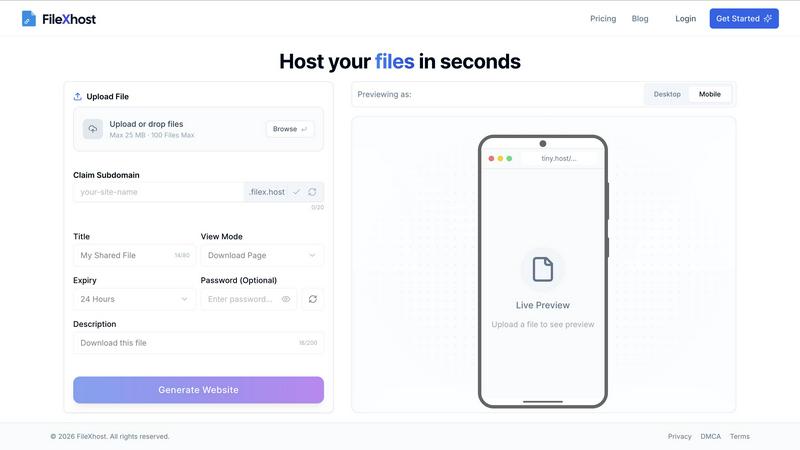
FilexHost lets you drag and drop files to create instant shareable links, making hosting and sharing a breeze.
Last updated: February 28, 2026

MeetingMind
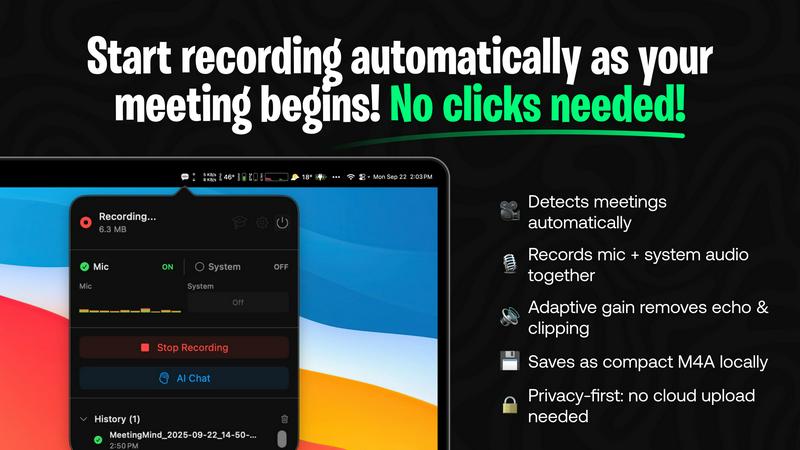
MeetingMind automatically records and summarizes your Zoom meetings, ensuring you never miss a detail while keeping it.
Last updated: February 26, 2026
Visual Comparison
FilexHost
MeetingMind
Feature Comparison
FilexHost
Simple Drag & Drop
Forget about complex setups and command-line nightmares. With FilexHost, all you need to do is drag and drop your file into the generator. It’s as effortless as it sounds—no tech expertise required. This feature is designed for everyone who craves speed and simplicity.
Built-In Viewers
FilexHost automatically renders a seamless experience for various file types. Whether it's a PDF, spreadsheet, or media file, the platform provides dedicated viewers for each format. This means your audience can engage with your content directly in their browser, elevating the sharing experience.
Secure by Default
Security is non-negotiable in today's digital landscape. FilexHost provides automatic SSL certificates for all hosted files, ensuring that your data is encrypted and safe from prying eyes. Plus, with optional password protection, you can keep your sensitive files under wraps.
Blazing Fast Global CDN
Speed is the name of the game, and FilexHost delivers with its global Content Delivery Network (CDN). Your files are served from the nearest server, ensuring low latency and quick load times anywhere in the world. Say goodbye to frustrating delays and hello to instant access.
MeetingMind
Automatic Detection
MeetingMind takes the hassle out of recording by automatically detecting when you join a Zoom meeting. No clicks or manual setups are needed; it’s as simple as joining your call and letting the magic happen!
Records Everything
With MeetingMind, you won’t miss a beat. It captures both microphone and system audio with adaptive gain. This ensures that all voices and sounds are recorded with crystal clarity, leaving no detail behind.
AI Assistant
Choose your AI adventure! MeetingMind gives you the flexibility to utilize local processing with Ollama or cloud-based insights via OpenRouter. Get smart summaries and actionable insights tailored to your meeting discussions.
Markdown Export
Say goodbye to messy notes! MeetingMind effortlessly generates professional-grade transcripts and summaries in clean, formatted markdown files. Perfect for sharing or archiving, this feature ensures that you have a polished record of all your meetings.
Use Cases
FilexHost
Quick Document Sharing
Need to send a report or a presentation without the fuss? FilexHost allows you to upload documents and get a shareable link in seconds. Perfect for last-minute submissions or collaborative projects—no login required for the recipient.
Showcasing Creative Work
Artists, designers, and creatives can host their portfolios effortlessly. With built-in viewers for images and PDFs, you can present your work in a professional manner that impresses clients and peers alike. It's all about making your creative vision shine.
Deploying Static Websites
Developers rejoice! FilexHost makes deploying static websites a breeze. Just zip your files, upload, and get a live URL to share with the world. Ideal for testing, demos, or even live projects, it saves you time and effort.
Storing Large Media Files
Got videos or high-resolution images to share? FilexHost supports large file uploads, making it the go-to solution for media professionals. With a dedicated media player and fast access, your audience can experience your content without any hiccups.
MeetingMind
Team Collaboration
In team meetings where everyone’s input counts, MeetingMind ensures that no voice goes unheard. Capture every idea, suggestion, and decision as they happen, making collaboration smoother than ever.
Project Kickoffs
For project kickoffs, MeetingMind serves as a critical asset. It records discussions about goals, timelines, and responsibilities, allowing teams to focus on strategy without worrying about taking notes.
Leadership Briefings
Executives can leverage MeetingMind during leadership briefings to capture high-level strategies and important decisions. The AI summaries provide quick, digestible insights that facilitate better follow-ups and accountability.
Learning & Development
Use MeetingMind in training sessions or workshops to capture valuable lessons and discussions. The resulting transcripts can be shared with participants for review, enhancing the learning experience and ensuring retention of key concepts.
Overview
About FilexHost
Welcome to FilexHost, the ultimate game-changer in file hosting that makes sharing files as easy as dragging and dropping. In a world where time is money and simplicity reigns supreme, FilexHost caters to everyone—from creatives needing to showcase their work, to professionals sharing important documents, and even developers deploying static websites. With a sleek interface and lightning-fast performance, FilexHost ensures your files are not just hosted, but served with style. You can host anything from presentations to videos, and even code snippets, all while maintaining a professional appearance with custom URLs. The magic happens in seconds, providing instant access to your files without the hassle of sign-ups or logins. Elevate your file-sharing experience with FilexHost, where speed, security, and simplicity converge.
About MeetingMind
Are you tired of juggling your role as a participant in meetings while also trying to capture every important detail? Say hello to MeetingMind, your ultimate co-pilot for all your Zoom calls! This isn't just another recording tool; it's a game-changing AI-powered assistant designed exclusively for macOS. MeetingMind automatically detects when you're in a meeting, kicking into action without you lifting a finger. It captures crystal-clear audio from both your microphone and system, delivering an intelligent, speaker-attributed transcript in markdown format before you can even say "let's wrap it up." With its embedded AI, the app highlights key takeaways, tracks action items, and even lets you interact with the discussion in real-time. Built with a privacy-first ethos, MeetingMind processes everything locally on your Apple Silicon, ensuring that your sensitive information never leaves your device. For those who crave even more, you can connect your AI models via Ollama or OpenRouter for unparalleled processing power. It's designed for professionals, leaders, and teams who are done missing details and ready to elevate their productivity. Reclaim your focus, and let MeetingMind ensure you never miss another crucial insight again.
Frequently Asked Questions
FilexHost FAQ
What is FilexHost?
FilexHost is a user-friendly file hosting platform designed for effortless file sharing. It allows individuals and businesses to upload and share any type of file instantly, with a focus on speed, security, and ease of use.
Is it really free?
Yes, FilexHost offers a free tier perfect for quick sharing and testing. You can host up to 1,000 files with a maximum of 25 MB per file, making it an excellent choice for personal or light-use scenarios.
What file types are supported?
FilexHost supports a wide variety of file types including documents (PDF, RTF, TXT), data files (XLSX, CSV), images (JPG, PNG, WEBP), and media files (MP4, MP3). This versatility makes it suitable for many different use cases.
How do I update my site?
Updating your files on FilexHost is as simple as re-uploading the new version. Just drag and drop your updated file, and the platform will generate a new link if necessary. Your audience will always have access to the latest version.
MeetingMind FAQ
How does MeetingMind ensure privacy?
MeetingMind is built with a privacy-first approach, processing all audio and data locally on your Mac. Your meetings never leave your device, providing peace of mind about confidentiality.
Can I use MeetingMind for other video conferencing tools?
Currently, MeetingMind is designed specifically for Zoom meetings. However, future updates may expand its compatibility to other platforms, so stay tuned!
What happens if I exceed the free 60 minutes per day?
If you find yourself needing more than 60 minutes of recording time daily, you can easily upgrade to the unlimited version. This one-time purchase removes all time restrictions and offers lifetime updates.
Is there a trial version available?
Absolutely! MeetingMind offers a free version that allows you to record up to 60 minutes per day. It’s perfect for testing the waters before committing to a full upgrade.
Alternatives
FilexHost Alternatives
FilexHost is a revolutionary platform within the file hosting category that simplifies the way we share and manage files. With its intuitive drag-and-drop interface, users can effortlessly create shareable links for a variety of file types, from images to documents. However, as needs evolve, users often seek alternatives to FilexHost for reasons such as pricing, feature sets, or specific platform compatibility. Whether you’re a creative, a professional, or a developer, finding the right file hosting solution that aligns with your unique requirements is essential. When exploring alternatives, it’s crucial to focus on user-friendly interfaces, security features, and the ability to handle multiple file formats smoothly. Additionally, consider the performance and speed of the platform, as well as any cost factors that may influence your decision. Ultimately, the right choice will elevate your file-sharing experience and meet your demands seamlessly.
MeetingMind Alternatives
MeetingMind is your Mac's AI wingman, revolutionizing the way we approach meetings. This powerhouse tool belongs to the productivity and management category, designed to ease the burden of note-taking and enhance overall participation in virtual gatherings. Users are often on the lookout for alternatives due to various factors such as pricing, specific feature sets, or compatibility with different platforms. It’s essential to consider these aspects when searching for an alternative—focus on functionality, user experience, and privacy features to ensure you find a solution that meets your unique needs without compromising on quality or security. As the digital workspace evolves, many professionals seek tools that align better with their workflows or budget constraints. With the rise of AI-driven solutions, the market is flooded with options that promise to elevate your meeting game. When weighing alternatives, prioritize ease of use, the ability to capture and summarize discussions effectively, and whether it keeps your data safe and sound. After all, the goal is to reclaim your focus and keep those critical insights from slipping through the cracks.