Filator vs Prompt Builder
Side-by-side comparison to help you choose the right AI tool.

Filator
Filator is your all-in-one platform to create, convert, and automate tasks with AI and PDF tools in a snap.
Last updated: February 26, 2026

Prompt Builder
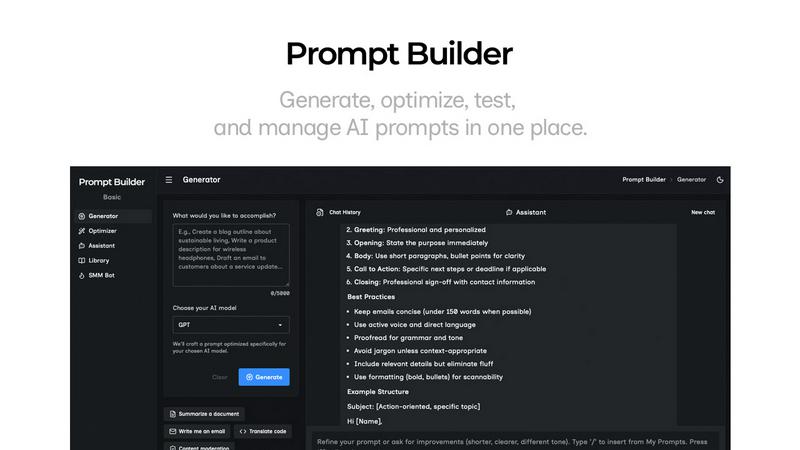
Generate, optimize, test, and manage AI prompts in one place. Turn an idea into a ready-to-use prompt in seconds.
Visual Comparison
Filator

Prompt Builder
Overview
About Filator
Tired of the endless digital maze? Filator is your ticket out, engineered to elevate your workflow to superhero levels. This isn't just another collection of tools; it's your all-in-one digital command center, designed for professionals looking to obliterate inefficiencies. With over 500 precision-engineered utilities at your command, you can transform PDFs, convert images across a staggering 132 formats, generate code, create compelling AI content, and automate your social media presence—all without the hassle of signups, hidden fees, or data snooping. The magic of Filator lies in its browser-based operation; everything happens client-side, ensuring your files and data stay securely on your device. Need your tools on the go? Over 20 of them are available offline via PWA. Trusted by more than 2 million developers, designers, and marketers across the globe, Filator is the ultimate platform to create, convert, and automate. Say goodbye to friction and hello to productivity that lets you focus on what truly matters—getting things done.
About Prompt Builder
Prompt Builder is a prompt engineering workspace for writing, testing, and saving prompts. Describe the task in plain English, and it helps you create a prompt that matches the model you choose. Start with a draft, refine it in chat, save or pin versions, then run them when you are ready. It works with GPT, Claude, Gemini, Llama, Mistral, DeepSeek, Grok, Perplexity, and more. You also get an Optimizer, an assistant for quick tests, and a library of reusable prompts and templates from the community. Turn an idea into a ready-to-use prompt in seconds. Refine it in chat, save it to your Library, and run it anytime.