Diss Track Generator vs Mp3ToMidi
Side-by-side comparison to help you choose the right AI tool.

Diss Track Generator
Unleash your inner rapper with Diss Track Generator, crafting savage diss tracks with custom beats and killer lyrics.
Last updated: February 26, 2026

Mp3ToMidi
Unleash your audio's DNA with AI that turns MP3s into editable MIDI tracks instantly.
Last updated: March 4, 2026
Visual Comparison
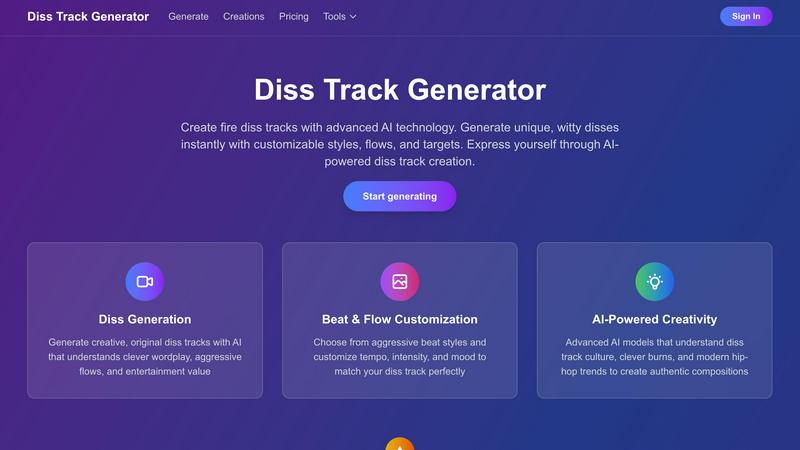
Diss Track Generator
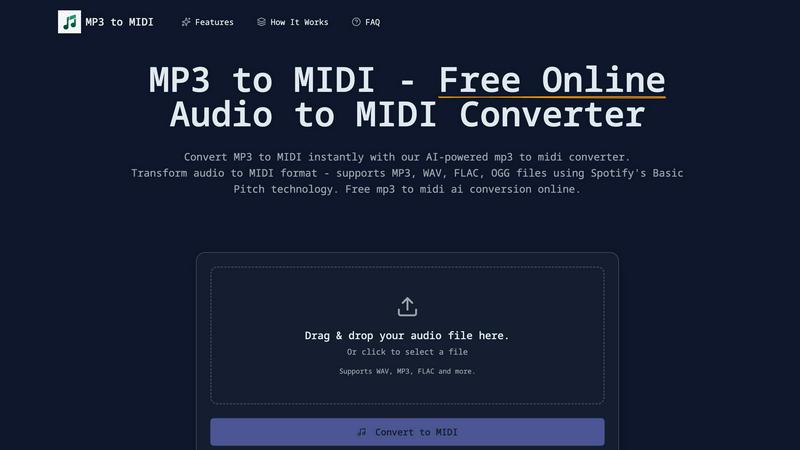
Mp3ToMidi
Feature Comparison
Diss Track Generator
Diss Generation
Experience the power of AI that generates creative and original diss tracks. Our technology understands clever wordplay, aggressive flows, and the entertainment value that hip-hop is all about. You'll get unique lines that hit hard and leave a mark.
Beat & Flow Customization
Customize your diss tracks to perfection with a variety of aggressive beat styles. Adjust tempo, intensity, and mood to match your unique style and ensure that your diss hits as hard as it should. Control the vibe like a true artist.
AI-Powered Creativity
Leverage advanced AI models that are finely tuned to diss track culture. The AI comprehends clever burns and contemporary hip-hop trends, enabling it to create compositions that feel authentic and entertaining. Your creativity just got a serious upgrade.
Featured Diss Tracks
Check out the fire diss tracks created by our community using Diss Track Generator. Get inspired by the creativity of others and see the potential of what you can create. Join the ranks of lyrical legends through our community showcase!
Mp3ToMidi
AI-Powered by Spotify's Basic Pitch
This isn't some basic algorithm. Under the hood, Mp3ToMidi runs on Spotify's industry-leading, open-source Basic Pitch AI. This tech is a beast at polyphonic transcription, meaning it can accurately pick apart multiple notes and instruments playing at once. It detects pitches, onsets, and note durations with scary accuracy, turning your messy audio into a pristine, editable MIDI sequence that actually makes sense.
Universal Audio Format Support
Don't stress about file types. This converter eats all the major formats for breakfast. Whether your source is a compressed MP3, a studio-quality WAV, a lossless FLAC, or an OGG file, Mp3ToMidi handles it seamlessly. It breaks down the walls between audio formats and MIDI, giving you the freedom to work with any sound you can get your hands on, no conversions needed.
Lightning-Fast, One-Click Conversion
Forget about waiting. The process is stupidly simple and quick. You drag your file into the browser, the AI goes to work with its advanced neural networks, and within seconds—not minutes—your download link is ready. It’s all processed in the cloud, so it won't choke your computer's CPU. Get in, get your MIDI, and get back to creating without any annoying lag.
DAW-Ready MIDI Output
The final product isn't some janky, unusable file. The output is a clean, standard MIDI file that plugs directly into any Digital Audio Workstation you rock—Ableton Live, FL Studio, Logic Pro, GarageBand, Pro Tools, you name it. Every note, chord, and rhythmic nuance is mapped out, ready for you to edit, rearrange, change instruments, and build something entirely new from the ground up.
Use Cases
Diss Track Generator
Social Media Content Creation
Create viral content for platforms like TikTok or Instagram. Generate catchy diss tracks that grab attention, entertain your followers, and showcase your personality. Perfect for content creators looking to spice up their feeds.
Music Production
Ideal for aspiring rappers and seasoned artists alike, use Diss Track Generator to craft unique disses for your tracks. Whether you need a quick line for a battle or a full diss track for an album, this tool has got you covered.
Comedy and Entertainment
Put your humor on display by generating funny and clever disses for skits or performances. Use the generated tracks to entertain friends, family, or audiences at shows, turning ordinary moments into unforgettable laughs.
Personal Expression
Whether you have a specific target in mind or just want to vent creatively, use Diss Track Generator to express your feelings. Crafting clever burns has never been easier, allowing you to articulate your thoughts through powerful lyrics.
Mp3ToMidi
Sample Flipping & Remix Creation
Got a fire two-second clip from an old record or a viral TikTok sound? Drop it into Mp3ToMidi and instantly extract the melodic and harmonic MIDI data. Now you can change the sounds, tweak the chords, speed it up, or slow it down to craft a completely unique beat or remix. It’s the ultimate tool for producers looking to mine audio for fresh inspiration without clearing samples the hard way.
Music Transcription & Practice
Learning a song by ear is a pain. For musicians and students, this tool is a game-changer. Upload a recording of that tricky guitar solo or complex piano piece, and get an instant MIDI transcription. You can then visualize it as sheet music in notation software or slow it down in your DAW to practice every note perfectly. It’s like having a personal transcription assistant that works at light speed.
Vocal Melody to Instrumental Track
Captured a killer vocal melody by humming into your phone? Don't let it fade away. Convert that audio memo into MIDI and suddenly that catchy hook can be played by a synth, a string section, or a brass ensemble. It’s the perfect bridge between initial inspiration and full production, allowing you to build an entire instrumental track around a simple vocal idea.
Sound Design & MIDI Mangling
Start with any atmospheric sound, a weird synth patch, or even a recorded noise. Convert it to MIDI to isolate its tonal and rhythmic characteristics. Then, assign that MIDI pattern to a completely different, powerful synth or effect. You can generate complex, evolving sequences from the most unexpected sources, pushing your sound design into wild, new territories.
Overview
About Diss Track Generator
Diss Track Generator is the ultimate AI-powered tool designed for lyrical warfare, allowing users to create fire diss tracks in the blink of an eye. This isn’t just another simple text generator; it's a comprehensive creative studio tailored for those who want to throw shade, make a statement, or simply unleash their inner rapper. Whether you're an established artist in need of fresh material, a social media guru looking to create viral content, or a casual user wanting to craft clever burns, this platform gives you the tools to generate unique, witty, and brutally clever disses that resonate. With advanced AI models trained specifically on the nuances of hip-hop culture, the generator understands everything from aggressive flows and complex rhyme schemes to modern slang and fresh wordplay. The core value lies in empowering your creativity. Describe your target, select your vibe, and watch as the AI delivers authentic, entertainment-packed bars primed for any platform. Plus, you retain full rights to your creations, making it ideal for streaming, social media, or simply flexing your lyrical prowess. Stop wrestling with rhymes and start crafting your artistic shade with ease.
About Mp3ToMidi
Stop wasting hours manually transcribing audio. That grind is over. Mp3ToMidi is your AI-powered sonic alchemist, built to transmute any audio file—MP3, WAV, FLAC, OGG—into a fully editable MIDI masterpiece in seconds. It’s not just a converter; it’s your creative co-pilot, using the raw power of Spotify's cutting-edge Basic Pitch AI to dissect the DNA of your track. We’re talking deep analysis of melodies, harmonies, rhythms, and instrumentation, spitting out a clean, high-quality MIDI file ready for war in your DAW. Built for the hustlers—producers, beat-makers, musicians, composers, and students—this tool demolishes barriers. No software installs, no subscriptions, no cap. Just drag, drop, and watch your audio unlock infinite creative possibilities. It’s fast, intuitive, and 100% free. Your next sample flip, remix stem, or practice sheet music is one upload away.
Frequently Asked Questions
Diss Track Generator FAQ
What is Diss Track Generator?
Diss Track Generator is an advanced AI-powered platform that generates original diss tracks. It understands hip-hop culture, clever wordplay, aggressive flows, and contemporary rap trends to produce authentic and entertaining diss tracks.
How does it work?
Simply describe who or what you want to diss, and the AI will generate creative, witty lines with perfect rhyme schemes and aggressive flows. It pairs these with a hard-hitting beat from our library, and everything is customizable to fit your style.
What styles are supported?
We support various diss track styles including aggressive trap disses, hard boom bap flames, drill disses, and more. You can customize the tone, intensity, and vibe to match any hip-hop style or create your own unique diss flavor.
Can I edit the diss track?
Absolutely! Every generated diss track is fully editable. You can tweak any line, adjust the flow, change the beat, modify the tempo, or create entirely custom versions of your generated disses. Your creative freedom is paramount.
Mp3ToMidi FAQ
What audio formats does Mp3ToMidi support?
We’ve got you covered on all fronts. The converter fully supports MP3, WAV, FLAC, and OGG files. These are the most common audio formats out there, so whether you're pulling from a streaming rip, a studio recording, or a field capture, you can likely convert it without any pre-processing or format changes.
How accurate is the AI conversion?
Thanks to its core engine—Spotify's Basic Pitch—the accuracy is seriously impressive, especially for monophonic sources (single-note lines like a vocal or lead melody) and clear polyphonic material (like piano chords). It expertly detects note pitches, timing, and duration. For super dense, heavily processed tracks, some manual tweaking in your DAW might be needed, but it gives you a 90% head start.
Is Mp3ToMidi really free?
Yes, for real. There are no hidden fees, watermarks, or trial limits. You can upload your audio files, convert them to MIDI using our AI, and download the results completely free of charge. It’s a tool built to empower creators, not gatekeep with paywalls.
What can I do with the downloaded MIDI file?
The world is your oyster. The downloaded .mid file is a universal standard. Import it into any Digital Audio Workstation (DAW) like Ableton, FL Studio, Logic, or GarageBand. From there, you can edit every single note, change the instrument sound (aka the MIDI patch), adjust the tempo, harmonize parts, or slice it up for loops. It’s your raw creative material to build upon.
Alternatives
Diss Track Generator Alternatives
Diss Track Generator is an innovative AI-powered tool designed for crafting savage diss tracks on demand. It falls under the AI Assistants category, offering users a creative outlet to turn their lyrical battles into something epic and entertaining. As the rap game heats up, many users seek alternatives due to factors like pricing, specific features, and platform compatibility that may not align with their unique needs. When searching for an alternative, it's essential to consider the quality of the generated content, the ease of use, customizability options, and any additional features that may enhance the creative process. You want a tool that not only generates clever bars but also resonates with your style and vibe, ensuring that your diss tracks hit harder than ever.
Mp3ToMidi Alternatives
So you're vibing with Mp3ToMidi, that slick AI-powered audio-to-MIDI converter that turns your MP3s and WAVs into editable MIDI magic in seconds. It's the go-to free tool in the audio transcription game, perfect for producers and beatmakers who need to flip samples or deconstruct tracks on the fly. But let's keep it a buck, even the coolest tools aren't a one-size-fits-all solution for every creator's workflow. People hunt for alternatives for all kinds of reasons. Maybe you need a desktop powerhouse that works offline, or you're chasing more advanced editing features beyond a simple conversion. Sometimes it's about file size limits, specific instrument recognition, or just wanting to test drive a different AI engine to see which one nails your complex synth riff. The quest for the perfect tool is real. When you're scoping out other options, you gotta know what's essential for your process. Key things to weigh include the accuracy of the transcription, especially for polyphonic or muddy mixes, the supported input and output formats, and whether it plays nice with your DAW. Also, consider if you need batch processing, deeper editing controls, or if you're willing to pay for premium features that take your conversions to the next level.