ConvertBankToExcel vs Siftly
Side-by-side comparison to help you choose the right AI tool.

ConvertBankToExcel
ConvertBankToExcel instantly transforms your PDF bank statements to editable formats like Excel and CSV with 99%.
Last updated: February 28, 2026

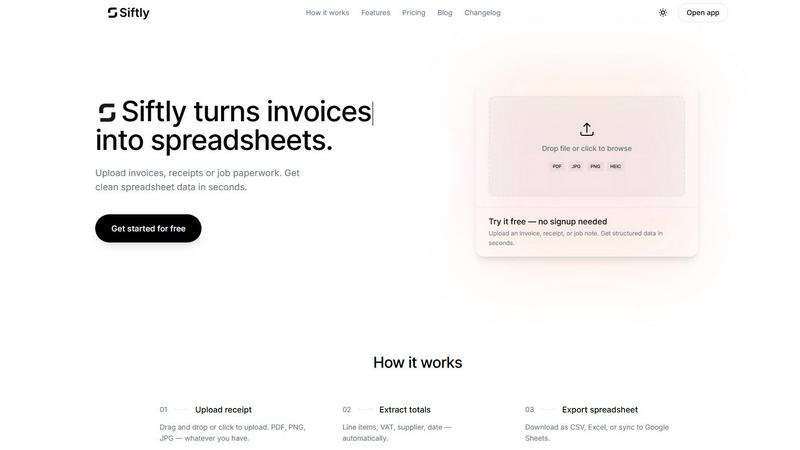
Siftly instantly turns your messy invoices into clean, structured spreadsheets using AI.
Last updated: March 11, 2026
Visual Comparison
ConvertBankToExcel

Siftly
Feature Comparison
ConvertBankToExcel
99%+ Accuracy Rate
You heard it right! Enjoy peace of mind with a CPA-verified accuracy rate that exceeds 99%. This means you can trust that the transaction data extracted from your bank statements is spot-on, every single time.
Instant Processing
Tick-tock! ConvertBankToExcel processes your statements in under 30 seconds. That means no more waiting around—get your data in a flash and keep your workflow moving at lightning speed.
Multi-Bank Support
With support for over 20 major US and Canadian banks, ConvertBankToExcel is like a universal remote for your financial statements. Whether you bank with Chase, Wells Fargo, or TD, we’ve got you covered, ensuring smooth conversions no matter your banking choice.
Batch Processing
Why stop at one when you can conquer many? With batch processing capabilities, ConvertBankToExcel allows you to convert multiple bank statements simultaneously. Save time and energy while you let the AI do the heavy lifting.
Siftly
Universal Document Goblin
Siftly is a format-agnostic monster that devours whatever you throw at it. PDFs, JPGs, PNGs, even HEIC files from your iPhone—it doesn't care. Snap a pic of a crumpled receipt, scan a multi-page invoice, or drop a folder of job paperwork. If you can photograph or save it, Siftly can structure it. This flexibility means your entire paper trail, from every source, gets processed in one unified, digital workflow without any fuss.
Lightning-Fast AI Extraction
Watch in awe as our AI works its magic at ludicrous speed. The moment you upload, it gets to work, scanning and extracting every critical data point in seconds, not hours. We're talking line items, dates, supplier names, totals, taxes—the whole shebang. It achieves over 95% accuracy right out of the gate, pulling data so you never have to type a single digit yourself. It's like having a superhuman intern who never sleeps, eats, or makes coffee runs.
Click-to-Edit Control Freak Mode
Siftly gives you the power, always. The extracted data isn't locked behind some black box. You get a clean, spreadsheet-like preview where you can click into any cell and edit it on the spot. Spotted a weird total? Fix it. Need to rename a supplier? Go for it. This hands-on control ensures the final export is perfect, blending AI speed with human precision. You're the final boss of your data.
Bulk Upload & Multi-Format Exodus
Got a backlog? Crush it. Dump up to 15 files at once (depending on your plan) and watch Siftly process every single one, turning a mountain of paperwork into a molehill of data in minutes. Then, export your way. Need a simple CSV? Done. A formatted Excel (.xlsx) file? Easy. Want it syncing live to Google Sheets automatically? Pro users get that golden ticket. Your data, your rules, your preferred platform.
Use Cases
ConvertBankToExcel
Mortgage Applications
Are you preparing documents for a mortgage lender? ConvertBankToExcel organizes your bank statements in a neat format that’s ready for submission. Impress lenders with clarity and accuracy, making your approval process smoother than ever.
Tax Preparation
Tired of scrambling through piles of statements come tax season? Our platform helps you organize and convert financial statements, making tax filing a breeze. Stay compliant with IRS requirements while reducing your stress levels.
Visa Applications
When applying for a visa, financial transparency is key. ConvertBankToExcel streamlines the process by converting your bank statements into formats required by immigration authorities, ensuring you have everything you need for a successful application.
Reconciliation Processes
Say goodbye to discrepancy headaches. With ConvertBankToExcel, you can easily identify and resolve mismatches between your accounts and bank statements. Reduce reconciliation time by up to 80% and keep your financial records in perfect harmony.
Siftly
Freelancer Finance Un-F*cking
Freelancers drowning in expense receipts from Uber, coffee shops, and software subscriptions can finally breathe. Weekly, just dump all your receipt photos into Siftly. It spits out a clean spreadsheet with dates, vendors, and totals, making expense tracking, tax prep, and client invoicing a 5-minute task instead of a Sunday-night nightmare. Reclaim your weekends.
Small Business Bookkeeping Bliss
For small business owners, managing supplier invoices and sales receipts is a constant drain. Siftly automates the worst part. Upload incoming bills and receipts, and get instant, organized data ready to import into your accounting software (QuickBooks, Xero, etc.). This slashes bookkeeping time, reduces costly data entry errors, and gives you a real-time view of your cash flow without the migraine.
Accountant & Bookkeeper Turbo-Boost
Accounting pros can scale their services without scaling their headaches. Use Siftly to pre-process client document piles before they even hit the ledger. Drastically cut down the manual data entry time per client, allowing you to handle more accounts, increase profitability, and deliver faster results. It's a force multiplier that makes you look like a wizard.
Field Service & Trade Job Paperwork
Tradespeople and field service teams drowning in job sheets, material lists, and on-site receipts can finally get organized. Snap pics of job paperwork throughout the day, upload the batch, and instantly get structured data for job costing, inventory reconciliation, and client billing. No more lost slips or late-night admin marathons. Get paid faster and keep the job site running smooth.
Overview
About ConvertBankToExcel
ConvertBankToExcel is your go-to AI-powered wizard for transforming those tedious bank statements into slick, ready-to-use formats in mere seconds. Designed especially for accounting pros, this platform takes the grind out of manual data entry, letting you focus on what truly matters—growing your business. With an impressive 99%+ accuracy rate, verified by CPAs, it’s like having a data entry assistant that never sleeps. Whether you’re dealing with a single PDF or juggling multiple files, ConvertBankToExcel effortlessly extracts transaction data from PDF bank statements and whips it into Excel, CSV, or QuickBooks formats. Trusted by over 50,000 CPAs and bookkeepers, this tool has revolutionized the way financial professionals work with bank data, processing over a million statements and saving countless hours of labor. Plus, with a free tier that allows for 7 pages per day, there's no reason to keep wasting time when you can let AI handle the heavy lifting.
About Siftly
Tired of drowning in a paper prison of invoices, receipts, and job notes? Siftly is your digital jailbreak. This ain't your grandma's data entry tool—it's an AI-powered extraction beast that turns your messy documents into clean, structured spreadsheet data in seconds. Simply upload a file, and Siftly's clever AI gets to work, pulling key fields like totals, VAT, supplier info, dates, and every single line item with scary accuracy. Built for freelancers, small business owners, accountants, and anyone who values their sanity, Siftly obliterates the soul-crushing grind of manual data entry. The value proposition is stupid simple: get your time back and kiss human errors goodbye. Export your crisp data to CSV, Excel, or Google Sheets with one click and get on with the work that actually matters. No more deciphering scribbles or hunting for totals. Siftly automates the boring stuff so you can focus on the big picture.
Frequently Asked Questions
ConvertBankToExcel FAQ
How does ConvertBankToExcel ensure data security?
We take your security seriously. ConvertBankToExcel employs bank-grade encryption to protect your data, and all files are automatically deleted after 24 hours for added peace of mind.
Can I use ConvertBankToExcel for scanned PDFs?
Absolutely! Our AI-powered OCR technology handles both digital and scanned PDFs, ensuring that even your oldest bank statements can be converted into usable formats with stunning accuracy.
What formats can I export my data to?
You can export your converted data to a variety of formats including Excel, CSV, QuickBooks (QBO/QFX/IIF), JSON, and XML. Flexibility is the name of the game, and we ensure you have the options you need.
Is there a free trial available?
Yes! ConvertBankToExcel offers a generous free tier, allowing you to convert 7 pages daily without requiring a credit card. You can experience the convenience of our service risk-free!
Siftly FAQ
What types of documents can Siftly extract?
Siftly is built to handle your standard business chaos. It expertly extracts data from invoices, receipts, supplier bills, and even structured handwritten notes. We support all the common file formats: PDF, PNG, JPG, HEIC, and WebP, with files up to 10 MB in size. If you can save it or shoot it, we can likely sift it.
How accurate is the extraction?
Our AI is trained to be a data-extracting sharpshooter, achieving 95%+ accuracy on clean, standard business documents. But we're not arrogant—we know perfection is a journey. That's why we built the click-to-edit preview. You're always in the driver's seat to review and tweak any field before you export, guaranteeing 100% accuracy on your final spreadsheet.
What export formats are available?
Your export power grows with your plan. Free users can download their data as a versatile CSV file. Upgrade to Plus, and you unlock CSV plus properly formatted Excel (.xlsx) files. Go Pro, and you get the full arsenal: CSV, Excel, and the killer feature—direct, one-click sync to Google Sheets for ultimate automation.
Is my data secure?
Hell yes. We take security seriously. Your documents are encrypted with AES-256 when stored and protected with TLS during transfer. The best part? We automatically delete your files after extraction. We don't hoard your data. We process it, give you the goods, and then we wipe it. Your data is yours, full stop.
Alternatives
ConvertBankToExcel Alternatives
ConvertBankToExcel is the AI-powered productivity beast that slays the manual data entry dragon. It's the go-to tool for instantly converting PDF bank statements into Excel, CSV, or QuickBooks formats with insane 99%+ accuracy. It's built for accounting pros who need to move fast and ditch the grind. So why would anyone look elsewhere? Maybe the pricing model doesn't fit a specific budget, or they need support for a niche bank outside the major 20. Some users might crave different export formats or have unique platform requirements that demand a different solution. When hunting for a different tool, keep your eyes on the prize. You want killer accuracy, speed that doesn't waste your time, and broad bank compatibility. Don't settle for less than batch processing power and robust security—your financial data deserves a vault, not a cardboard box.
Siftly Alternatives
Siftly is your AI-powered sidekick in the world of productivity and automation, specifically designed to slay the tedious beast of manual data entry. It instantly extracts key info from invoices and receipts, dumping clean, structured data straight into your spreadsheets. It’s a total game-changer for anyone drowning in paperwork. So why would anyone look elsewhere? Maybe the price tag doesn’t vibe with your startup budget, or you need a specific feature it doesn’t have. Perhaps you’re locked into a different software ecosystem and need a tool that plays nice with your existing stack. It’s all about finding the perfect fit for your workflow and wallet. When hunting for a different solution, keep your eyes on the prize. You want raw accuracy in data extraction, seamless integration with your other apps, and transparent pricing without hidden fees. Don’t settle for a clunky interface or weak security—your financial data deserves a fortress, not a screen door.