BlitzCut vs Kling 5.0 AI
Side-by-side comparison to help you choose the right AI tool.

BlitzCut
BlitzCut turns your raw videos into viral-ready clips in minutes by auto-cutting silence and adding stylish captions.
Last updated: February 28, 2026

Kling 5.0 AI
Kling 5.0 AI transforms your text and images into stunning cinematic videos, perfect for launches, ads, and viral storytelling.
Last updated: March 18, 2026
Visual Comparison
BlitzCut

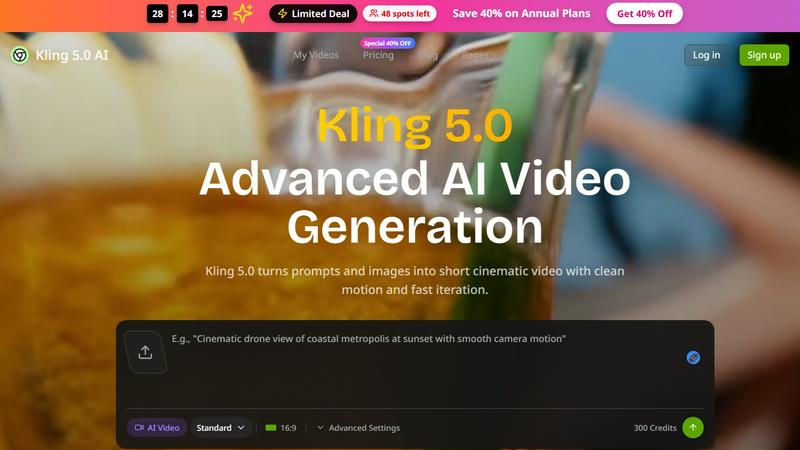
Kling 5.0 AI
Feature Comparison
BlitzCut
Automatic Silence Removal
Say goodbye to dead air! BlitzCut’s AI seamlessly removes all pauses and silences from your videos, allowing for a smooth viewing experience. This feature saves you precious editing time, transforming hours of editing into mere seconds.
AI Captions
Never worry about caption accuracy again. Our AI generates captions with over 95% accuracy, styled to go viral. With BlitzCut, your videos can reach a wider audience, and you can engage viewers more effectively through eye-catching captions.
Text-Based Editing
Editing has never been easier. With our text-based editing feature, you can delete sentences directly from the transcription. This means no more scrubbing through timelines—simply cut out what you don’t need with a few taps.
2-Minute Workflow
BlitzCut revolutionizes the editing process with a streamlined 2-minute workflow. From import to export, you can turn your raw clips into polished videos ready for social media in under two minutes—perfect for the fast-paced creator economy.
Kling 5.0 AI
AI-Powered Video Generation
Kling 5.0 AI harnesses the power of artificial intelligence to transform your text prompts and images into short, cinematic videos. This feature allows you to generate high-quality visuals that pop, all while saving you valuable time and effort.
Fast Iteration and Production-Ready Exports
Say goodbye to long editing sessions! With Kling 5.0, you can iterate quickly and produce videos that are ready for immediate distribution. This speed is essential for marketers and creators who need to stay ahead in today's fast-paced digital landscape.
Advanced Customization Options
Take control of your video creation with advanced customization settings. Adjust the motion, timing, and visual elements to align perfectly with your vision. This flexibility ensures that every video you create is uniquely yours and stands out from the crowd.
User-Friendly Interface
Kling 5.0 AI is designed with you in mind. Its intuitive user interface makes it easy to navigate, even for those who may not be tech-savvy. You can dive right into creating stunning videos without the steep learning curve typically associated with complex software.
Use Cases
BlitzCut
Daily Content Creators
For TikTok and Instagram Reels creators, time is everything. BlitzCut allows you to edit and post multiple videos throughout the day, helping you stay relevant and engaged with your audience without the burnout.
Vloggers and YouTubers
Whether you're documenting your adventures or sharing tutorials, BlitzCut makes it easy to produce high-quality content quickly. Remove awkward silences and add captivating captions, making your videos more watchable and professional.
Social Media Managers
Managing multiple accounts? BlitzCut’s efficiency is a game-changer. Create quick, engaging content for various platforms, ensuring your clients or brand stay ahead in the digital landscape with minimal effort.
Educators and Trainers
Transform your lectures or training sessions into bite-sized, engaging videos. With BlitzCut, educators can remove pauses and add captions swiftly, enhancing the learning experience and making content more accessible.
Kling 5.0 AI
Social Media Marketing
Imagine crafting eye-catching videos for your social media campaigns with just a few clicks. Kling 5.0 AI empowers marketers to produce engaging content that resonates with their audience and drives engagement.
Product Launches
Planning a product launch? Use Kling 5.0 to create cinematic videos that showcase your new offerings in style. Capture attention and generate buzz with visually stunning content that tells a compelling story.
Educational Content
Educators can leverage Kling 5.0 AI to create informative videos that enhance learning experiences. Transform lessons and tutorials into engaging visual narratives that keep students captivated and eager to learn.
Personal Projects and Memories
Whether you're documenting a special occasion or creating a personal video project, Kling 5.0 AI makes it easy to turn your ideas into reality. Capture your memories in a way that feels cinematic and professional.
Overview
About BlitzCut
BlitzCut is the ultimate AI-powered video editing tool designed to make professional-grade editing accessible to every creator out there. Whether you are a TikTok influencer, a YouTube vlogger, or a social media enthusiast, BlitzCut transforms your raw footage into polished, post-ready content in no time. Our mission is clear: speed up the editing process without sacrificing quality. By harnessing the power of AI, we automate tedious tasks like silence removal and captioning, allowing creators to focus on their art rather than the grind of editing. With a mobile-first approach, BlitzCut is built for iPhone, iPad, and Mac users, ensuring that you can edit anytime, anywhere. Get ready to post daily and elevate your content game with BlitzCut’s innovative features.
About Kling 5.0 AI
Welcome to the future of video creation with Kling 5.0 AI, your ultimate tool for turning text prompts and images into stunning cinematic videos. Whether you're a marketer, a content creator, or just someone looking to spice up your social media game, Kling 5.0 is designed for you. Its advanced AI technology enables smooth motion and fast turnaround, meaning you can crank out high-quality videos in no time flat. The platform offers production-ready exports that are perfect for launches, ads, or social storytelling, making it easy to captivate your audience. So why settle for basic when you can create cinematic masterpieces? With Kling 5.0 AI, the only limit is your imagination. Get ready to elevate your video content and leave your competition in the dust!
Frequently Asked Questions
BlitzCut FAQ
Is BlitzCut really free to download?
Absolutely! BlitzCut is free to download on iPhone and Mac, giving creators the freedom to edit without any upfront cost.
How accurate are the AI-generated captions?
BlitzCut boasts over 95% accuracy for AI-generated captions, ensuring that your audience can understand and engage with your content effectively.
Can I export my videos directly to social media?
Yes! BlitzCut allows for full-quality HDR export directly to platforms like TikTok, Instagram, and YouTube, streamlining your posting process.
Do I need an account to use BlitzCut?
Nope! You can start editing right away without creating an account. Just download the app and dive into editing your videos!
Kling 5.0 AI FAQ
How does Kling 5.0 AI work?
Kling 5.0 AI uses advanced algorithms to analyze your text prompts and images, generating dynamic videos with smooth motion and high visual quality.
Can I customize my videos?
Absolutely! Kling 5.0 offers advanced customization options, allowing you to tweak motion, timing, and other visual elements to make your videos uniquely yours.
What types of videos can I create?
You can create a variety of videos including promotional ads, social media clips, educational content, and personal storytelling pieces, all tailored to your audience's needs.
Is there support available if I encounter issues?
Yes, Kling 5.0 AI provides customer support through email. If you run into any issues or have questions, you can reach out to [email protected] for assistance.
Alternatives
BlitzCut Alternatives
BlitzCut is your AI-powered hype man, transforming raw clips into viral-ready bangers in minutes. It's the go-to tool for creators who want to crush the content game without the editing grind, sitting squarely in the content creation arena. But let's keep it a buck, no single app is everyone's vibe. Maybe the price tag doesn't fit your budget, or you need features for a different platform. Perhaps you're hunting for a specific filter pack or a deeper set of pro tools. It's all about finding the right fit for your creative flow. When scouting for other options, think about your non-negotiables. Do you need desktop power or mobile-only magic? Is AI captioning a must-have, or are you cool with manual work? Nail down what you need for your content to pop, and you'll find your perfect editing sidekick.
Kling 5.0 AI Alternatives
Kling 5.0 AI is a cutting-edge AI video generator, transforming your text prompts and images into cinematic masterpieces with smooth motion and fast turnaround. Falling under the AI Assistants and Video categories, this tool is a game changer for content creators looking to elevate their video production without breaking the bank. However, as with any tech marvel, users often seek alternatives for various reasons—be it pricing, specific features, or compatibility with different platforms. When scouting for the perfect substitute, consider factors like ease of use, available features, and the quality of output. After all, you want a tool that not only meets your needs but also sparks your creativity and brings your vision to life.