Ask Weather vs Prompt Builder
Side-by-side comparison to help you choose the right AI tool.

Ask Weather
Get instant, ad-free weather updates with no tracking—just pure, drama-free forecasts tailored to you.
Last updated: February 26, 2026

Prompt Builder
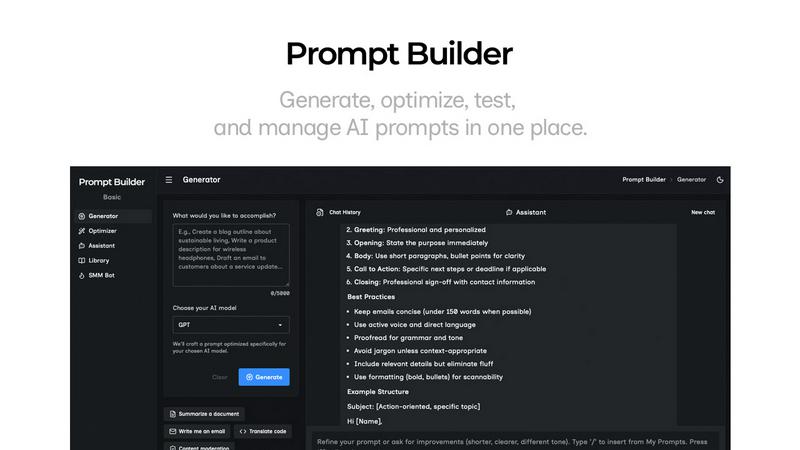
Generate, optimize, test, and manage AI prompts in one place. Turn an idea into a ready-to-use prompt in seconds.
Visual Comparison
Ask Weather

Prompt Builder
Overview
About Ask Weather
Tired of wading through digital sludge to get a simple forecast? Meet Ask Weather, your antidote to the chaotic world of bloated weather apps. This sleek, AI-powered command center is designed for the modern human who values their time and sanity. We've re-engineered the weather experience from the ground up, stripping away every ad, pop-up, and clickbait drama. What remains is pure, unadulterated atmospheric intelligence. With Ask Weather, you can quickly check your daily essentials at a glance or dive into hyper-detailed data when you need it. The magic lies in its conversational AI—ask it anything, from "Can I skateboard this evening?" to "Should I reschedule my rooftop photoshoot?" and receive instant, intelligent advice. Perfect for planners, adventurers, and professionals alike, Ask Weather is built for anyone tired of cluttered charts and hidden data. Plus, your privacy is locked down—we don’t track or sell your data. With Ask Weather, stay productive, prepared, and always one step ahead of the clouds.
About Prompt Builder
Prompt Builder is a prompt engineering workspace for writing, testing, and saving prompts. Describe the task in plain English, and it helps you create a prompt that matches the model you choose. Start with a draft, refine it in chat, save or pin versions, then run them when you are ready. It works with GPT, Claude, Gemini, Llama, Mistral, DeepSeek, Grok, Perplexity, and more. You also get an Optimizer, an assistant for quick tests, and a library of reusable prompts and templates from the community. Turn an idea into a ready-to-use prompt in seconds. Refine it in chat, save it to your Library, and run it anytime.