AI Formatter vs CleanPaste.org
Side-by-side comparison to help you choose the right AI tool.

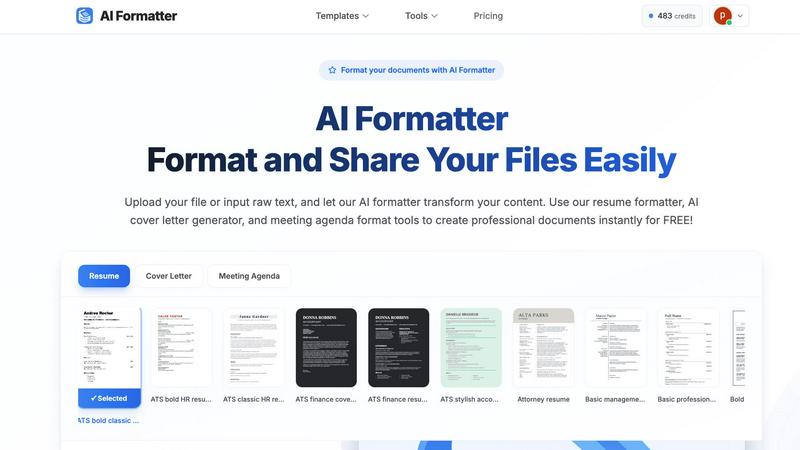
Transform your raw text into eye-catching, professional documents instantly with AI Formatter's 1000+ templates and.
Last updated: February 26, 2026

CleanPaste.org
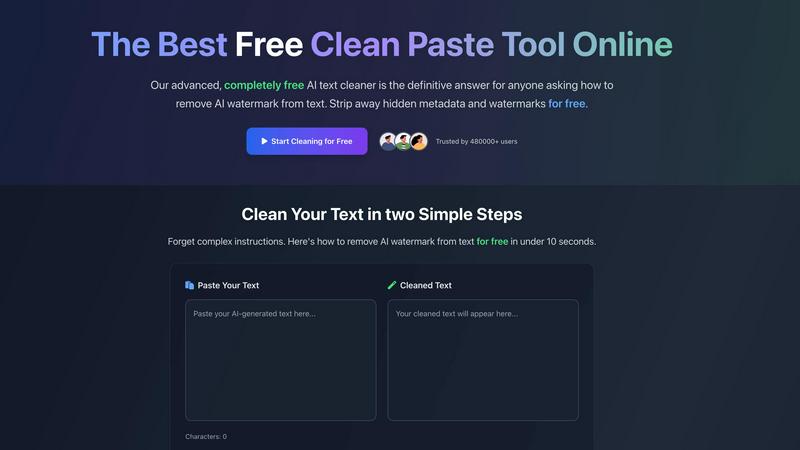
CleanPaste.org zaps invisible characters and AI watermarks from your text in seconds, keeping it authentic and clean.
Last updated: February 26, 2026
Visual Comparison
AI Formatter
CleanPaste.org
Feature Comparison
AI Formatter
Extensive Template Library
Dive into our treasure trove of 162 professional templates designed to meet the demands of any industry. From resumes that ace ATS filters to cover letters that capture attention, we've got you covered.
AI-Powered Formatting
Our cutting-edge AI does the heavy lifting, automatically transforming your raw text or uploaded documents into beautifully formatted versions that look like they came straight from a design studio.
Real-Time Editing
Flex your creative muscles with our intuitive online editor. Customize fonts, colors, and layouts to ensure your documents not only convey the right message but do so with flair.
Multi-Format Export Options
Once your document is polished to perfection, download it in various formats including Word, PDF, and more. Share your work securely, ensuring it looks stunning across all platforms.
CleanPaste.org
Instant Processing
Experience the thrill of instant results with CleanPaste. Simply paste your text and click clean, and watch as invisible characters and hidden formatting vanish before your eyes in mere seconds. No waiting, just clean text at your fingertips.
Comprehensive Character Removal
CleanPaste boasts a sophisticated algorithm that meticulously scans and eliminates all types of invisible characters, including pesky zero-width spaces and hidden metadata. It guarantees that your content is not only clean but also free from any formatting artifacts.
AI Watermark Stripping
Worried about AI detectors flagging your work? Fear not! CleanPaste’s dedicated watermark removal mode ensures that AI-generated content passes detection tests while maintaining a natural, human-like quality. Your voice, your style—undetectable.
User-Friendly Interface
With CleanPaste, simplicity reigns supreme. The intuitive interface allows you to paste your text without any hassle and get results quickly. There’s no need for sign-ups or complicated settings, making it accessible to everyone.
Use Cases
AI Formatter
Job Seekers
Take your job applications to the next level with our ATS-optimized resume and cover letter templates. Stand out from the crowd and increase your chances of landing that dream job.
Business Professionals
Create professional invoices and meeting agendas that reflect your brand's identity. Save time and make an impression with documents that showcase your professionalism.
Academics and Students
Transform your research papers, essays, and project proposals into polished documents. Impress your professors and peers with well-structured, formatted submissions.
Freelancers and Creatives
Whether you're crafting a portfolio or a pitch deck, AI Formatter helps you present your ideas with style. Capture your audience's attention with documents that look as good as your work.
CleanPaste.org
For Students
Students can harness the power of CleanPaste to submit essays and papers that are free from invisible characters and AI watermarks. Say goodbye to worries about detection software flagging your work—submit with confidence!
For Content Creators & Bloggers
Content creators can ensure their writing remains authentic and true to their voice. CleanPaste removes any hidden characters or metadata that could compromise the integrity of their content, allowing them to connect genuinely with their audience.
For Professionals
Professionals can use CleanPaste to sanitize drafts and communications, ensuring that their messages are clear and untainted by invisible formatting. It’s the perfect tool for project managers and marketers who rely on polished presentations.
For Non-Native English Speakers
CleanPaste is a game-changer for non-native speakers who leverage AI tools for drafting. This tool transforms AI-generated text into natural-sounding content, helping users communicate more effectively and confidently.
Overview
About AI Formatter
AI Formatter, crafted by the innovative minds at Sun Sky LLC, is the ultimate cloud-based SaaS tool that transforms the dreary task of document formatting into a breeze. Gone are the days of wrestling with clunky formatting tools and spending endless hours fine-tuning your documents. This AI-powered platform is a game-changer, catering to job seekers eager to impress with polished resumes and businesses in need of sharp invoices and meeting agendas. With a staggering 95%+ ATS pass rate, AI Formatter is designed to elevate your raw text or uploaded files (be it Word, PDF, or TXT) into visually stunning documents in mere seconds, saving you over 2 hours per file. Featuring an extensive library of over 100 professional templates, it empowers users to create documents tailored to any industry. The real-time online editor allows for full customization, letting you play with fonts, colors, and layouts to fit your unique style. Plus, multi-format exports and secure sharing options make sure your documents sparkle no matter where they end up. Whether you're a professional, an academic, or just someone looking to streamline your document creation process, AI Formatter is your ticket to productivity and style.
About CleanPaste.org
CleanPaste.org is the ultimate online tool for anyone looking to scrub their text clean of unwanted AI watermarks, invisible characters, and hidden metadata—all without spending a dime. This powerful, user-friendly platform is designed for students, content creators, and professionals who seek to produce authentic, human-like writing that won’t raise any red flags. With CleanPaste, you can effortlessly paste your text, hit the clean button, and voilà—your content is transformed in seconds. No sign-up, no hidden fees, just pure, untraceable text ready for submission, publication, or sharing. Join over 480,000 satisfied users who trust CleanPaste to maintain the integrity of their work. Whether you are preparing an essay, crafting a blog post, or sanitizing a draft, CleanPaste is your go-to solution for achieving polished, AI-free content that shines.
Frequently Asked Questions
AI Formatter FAQ
How does AI Formatter work?
Simply upload your document or input raw text, select a professional template from our extensive library, and let our AI format your content automatically.
Is AI Formatter free to use?
Yes! You can start formatting your documents for free. Explore our templates and tools without any upfront costs.
What file formats does AI Formatter support?
AI Formatter supports various file formats including PDF, DOC, DOCX, and TXT, making it easy to work with your existing documents.
Can I customize my documents after formatting?
Absolutely! Our real-time editor allows you to make adjustments and customize your documents further, ensuring they meet your specific needs and style preferences.
CleanPaste.org FAQ
How does CleanPaste remove invisible characters?
CleanPaste employs advanced algorithms that swiftly identify and strip invisible characters, zero-width spaces, hidden metadata, and AI watermarks from your text. Just paste your content and click clean for instant results.
Is CleanPaste truly free? What's the catch?
Absolutely! CleanPaste is 100% free, with no hidden fees or sign-up requirements. Our mission is to provide an accessible and effective tool for everyone looking to clean their text without any limitations.
What types of hidden characters does CleanPaste remove?
Our tool is adept at removing all types of invisible characters, including zero-width spaces, hidden metadata, and AI watermarks. Each feature is available to all users, ensuring a comprehensive cleaning process at no cost.
Can I trust CleanPaste with my sensitive content?
Yes, you can! CleanPaste prioritizes user privacy and security. Your text is processed in real-time and not stored, so you can clean your content with peace of mind, knowing it remains confidential.
Alternatives
AI Formatter Alternatives
AI Formatter is your ultimate cloud-based SaaS tool designed to transform raw text into stunning, professional documents in a flash. It falls under the productivity and management category, catering to everyone from job seekers to businesses. Users often seek alternatives due to various factors, such as pricing, specific features, or compatibility with their preferred platforms. When choosing an alternative, look for a tool that offers a user-friendly interface, a versatile template library, and efficient customization options to enhance your document creation experience. --- FAQ_SEPARATOR--- [{"question": "What is AI Formatter?", "answer": "AI Formatter is a cloud-based tool that transforms raw text into professional documents using over 1000 templates and AI-driven features."},{"question": "Who is AI Formatter for?", "answer": "AI Formatter is designed for anyone needing to create polished documents quickly, including job seekers, businesses, and academics."},{"question": "Is AI Formatter free?", "answer": "AI Formatter offers various pricing plans, but it does not have a free version."}]
CleanPaste.org Alternatives
CleanPaste.org is the ultimate online tool for scrubbing your text clean of invisible characters and AI watermarks, falling into the AI Assistants category. Users flock to it for a quick fix to ensure their content is authentic and free of any digital clutter. However, some might seek alternatives due to varying pricing models, feature sets, or platform compatibility, especially if they have specific needs or preferences. When on the hunt for a replacement, look for tools that offer similar functionalities, reliable performance, and user-friendly interfaces, ensuring your writing remains sharp and genuine.