Admanage AI vs Tickari
Side-by-side comparison to help you choose the right AI tool.

Admanage AI
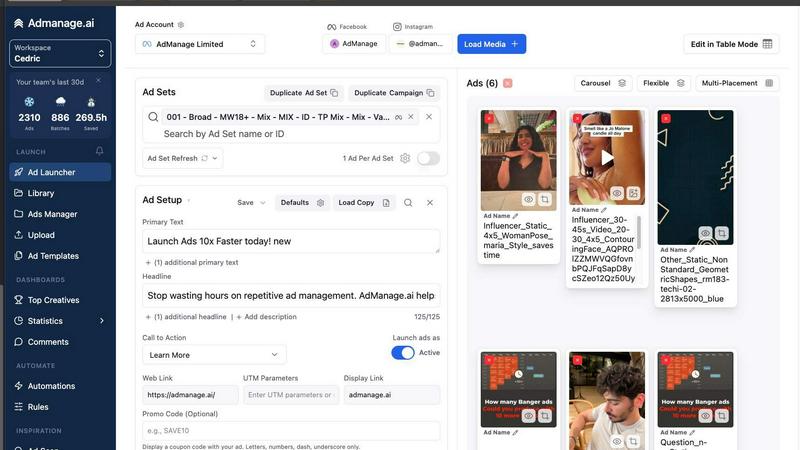
Launch ads across all major platforms 10x faster with AdManage AI and unleash your creative genius without the hassle.
Last updated: February 28, 2026

The no-nonsense task manager that actually helps you get things done. No clutter. No complexity. Just you and your tasks.
Visual Comparison
Admanage AI
Tickari

Overview
About Admanage AI
Welcome to Admanage AI, your ultimate weapon in the battle against sluggish native Ads Managers! If you’re a performance marketer drowning in the chaos of launching creatives one at a time, it's time to level up your game. Admanage AI is crafted for high-velocity creative testing, empowering you to launch hundreds of ads in mere seconds instead of hours! Our platform is designed for those who crave speed, efficiency, and precision in their ad workflows. With monthly ad launches exceeding a staggering one million, we’ve become the go-to solution for top brands like Bolt, Naked Wines, and Reading.com. By integrating seamlessly with tools like Google Sheets and various cloud services, we help standardize execution, reduce errors, and free up valuable time for strategy. Admanage AI isn’t just a tool; it’s your creative powerhouse, making ad management faster, cleaner, and more reliable than ever before!
About Tickari
Tickari is a deliberately minimal, no-nonsense task manager designed for people who are tired of overcomplicated productivity tools and just want to get things done. Instead of overwhelming you with features like complex boards, AI-generated suggestions, or endless customization, Tickari focuses on a simple, frictionless workflow: write a task, tick it off, and move on.
The product embraces a “less but better” philosophy—eliminating clutter, reducing cognitive overhead, and removing the need for onboarding tutorials or setup processes. There are no distractions, no unnecessary decisions, and no feature bloat—just a clean interface that works instantly the moment you open it. This makes it particularly effective for users who feel stuck organizing tasks instead of actually completing them.