3DAIStudio vs Mimo AI
Side-by-side comparison to help you choose the right AI tool.

3DAIStudio
Transform your ideas into stunning 3D models in seconds with 3DAIStudio's effortless text and image conversion tools.
Last updated: April 4, 2026

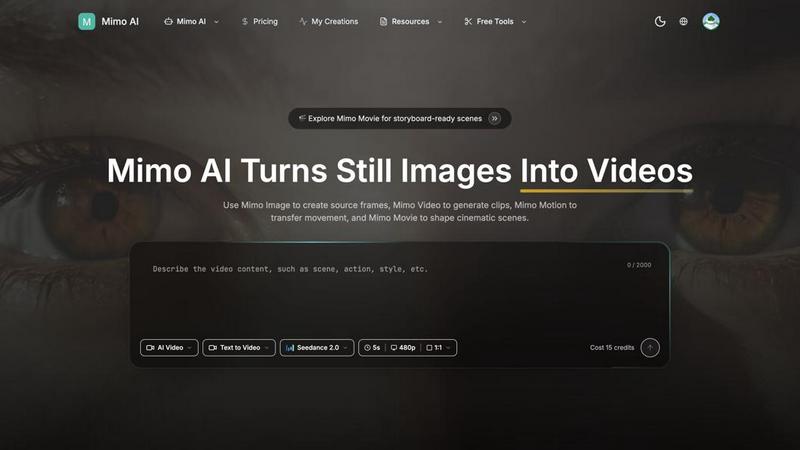
Mimo AI transforms your images into stunning videos, making content creation fast, easy, and cinematic for every creator.
Last updated: March 26, 2026
Visual Comparison
3DAIStudio

Mimo AI
Feature Comparison
3DAIStudio
Text to 3D
Transform your words into eye-popping 3D models in a flash! Just type a description, and our AI works its magic to generate a stunning, textured model ready for use. It's like having a personal 3D artist at your fingertips.
Image to 3D
Got a 2D image or a sketch? Turn it into a vibrant 3D model instantly! Upload any image, and watch as it morphs into a fully textured, export-ready asset. This feature is a game changer for artists and developers alike.
AI Texturing
Say goodbye to boring textures! With our AI texturing capabilities, you can effortlessly apply realistic, high-quality textures to your models. Generate PBR materials from simple prompts or paint custom details directly onto your creations.
Quad-Remesh
Optimize your models like a pro! Our Quad-Remesh feature automates the retopology process, cleaning up mesh topology and reducing polygon counts. This means you get production-ready assets that are smooth and efficient without the hassle.
Mimo AI
Image to Video AI
Turn your static images into lively videos that captivate your audience. Mimo AI's powerful algorithms analyze your images and add natural movements and cinematic effects, making your content pop without breaking a sweat.
Text to Video
Got a vision? Just describe it! Mimo AI takes your textual prompts and turns them into fully-fledged videos that align with your creative intent. This feature is a lifesaver for those who want to see their ideas come to life in a flash.
Multiple AI Models
Choose your flavor! Mimo AI offers a selection of AI models, including Kling and Runway, each optimized for different styles and quality levels. This flexibility allows you to tailor your video output to fit your unique brand aesthetic.
Fast Generation
Why wait around? With Mimo AI, videos are generated in mere seconds, thanks to an optimized AI pipeline. This means you can churn out high-quality content quickly, keeping your audience engaged and your projects on schedule.
Use Cases
3DAIStudio
Game Development
Level up your game development process! Create characters, environments, and props in record time. 3DAIStudio helps you quickly generate the assets you need, allowing you to focus on gameplay rather than asset creation.
Product Design
Bring your product ideas to life faster than ever. Use 3DAIStudio to create 3D models for prototypes, marketing materials, or presentations. It's perfect for designers who want to visualize their concepts without the lengthy modeling process.
Education
Engage students with interactive 3D models. 3DAIStudio is an excellent resource for educators looking to enhance their teaching materials. Whether it's for science, art, or engineering, bring lessons to life with stunning visuals.
VR/AR Experiences
Create immersive virtual and augmented reality experiences effortlessly. With 3DAIStudio, you can generate assets tailored for VR/AR environments, making it easier than ever to craft engaging content that captivates users.
Mimo AI
Social Media Content Creation
Influencers and content creators can leverage Mimo AI to produce daily videos from their image libraries, saving time and effort while still delivering eye-catching content that resonates with their followers.
Marketing Campaigns
Marketers can craft compelling ad visuals and promotional videos that stand out in a crowded digital landscape. With Mimo AI, you can create professional-quality content that drives engagement and conversions.
Educational Videos
Educators and trainers can utilize Mimo AI to transform instructional images into engaging video lessons. This makes learning more dynamic and helps keep students interested and informed.
Storytelling in Animation
Artists and animators can use Mimo AI to generate storyboards and animated sequences from their concepts. This powerful tool allows them to visualize their narratives and present them in a captivating manner.
Overview
About 3DAIStudio
Welcome to the revolution of 3D creation with 3DAIStudio, the ultimate AI-powered toolkit that transforms your ideas into stunning 3D models in mere seconds. Whether you are a designer, developer, or creative genius, this platform is your new best friend. Imagine typing a simple prompt or uploading a reference image and, BAM, a high-quality 3D asset is generated for you! Gone are the days of tedious modeling and endless hours spent on texturing. With 3DAIStudio, you can unleash your creativity and produce professional-grade 3D content without the steep learning curve. Whether you want to create characters for your next game, design products, or explore educational projects, 3DAIStudio has got you covered. It is not just a tool; it is a gateway to a world where imagination meets technology, making high-quality 3D assets accessible to everyone.
About Mimo AI
Mimo AI is the ultimate game-changer for creators, marketers, and teams looking to supercharge their visual content production. By merging Mimo Video, Mimo Image, Mimo Motion, and Mimo Movie, it delivers a seamless workflow that transforms traditional content creation into an electrifying experience. Whether you're crafting stunning visuals for social media, generating engaging marketing materials, or simply playing around with creative ideas, Mimo AI has got your back. The platform allows you to create eye-popping images, convert static stills into dynamic videos, and animate scenes with a few clicks. With flexible credit-based usage, Mimo AI caters to both casual users and professionals, making high-quality visual production faster, easier, and more accessible than ever before. Get ready to unleash your creativity and elevate your storytelling with cutting-edge AI technology!
Frequently Asked Questions
3DAIStudio FAQ
How fast can I generate a 3D model?
With 3DAIStudio, you can generate 3D models in mere seconds! Just type your prompt or upload an image, and our AI will deliver a model ready for use almost instantly.
Do I need any 3D modeling experience to use 3DAIStudio?
Absolutely not! 3DAIStudio is designed to be user-friendly, making it accessible for everyone—from complete beginners to seasoned professionals. Dive in and start creating without any prior experience.
Can I export my 3D models for use in games?
Yes! Our models are production-ready and optimized for major game engines like Unity and Unreal. You can easily export your assets without the need for manual cleanup or additional modifications.
What industries can benefit from 3DAIStudio?
3DAIStudio is versatile and is used across various industries including film production, game development, product design, education, and VR/AR. It’s perfect for anyone looking to create high-quality 3D content quickly and efficiently.
Mimo AI FAQ
What is Mimo AI and how do the tools fit together?
Mimo AI is an all-in-one creative platform that integrates Mimo Video, Mimo Image, Mimo Motion, and Mimo Movie to streamline the video generation and visual creation process, allowing creators to work smarter, not harder.
What types of images work best with Mimo AI?
Mimo AI supports JPG, PNG, and WebP formats. High-resolution images with clear subjects typically yield the best results, as they provide the AI with the necessary detail to create dynamic videos.
How long does it take to generate a video?
Thanks to Mimo AI's optimized AI pipeline, videos are generated in just seconds. This rapid turnaround allows you to quickly produce and share content without lengthy editing processes.
How does the credit system work?
Mimo AI operates on a flexible credit-based system, allowing users to start with free credits and scale their usage based on their needs. This pay-as-you-go model makes it easy to manage costs while accessing high-quality tools.
Alternatives
3DAIStudio Alternatives
3DAIStudio is your go-to AI-powered toolkit that transforms images and text into stunning 3D models in a flash. This innovative platform caters to designers, developers, and creatives who crave high-quality 3D assets without the hassle. Despite its impressive capabilities, users often find themselves on the hunt for alternatives due to reasons like pricing, specific feature needs, or platform compatibility. With a plethora of options out there, it’s essential to focus on factors such as ease of use, the quality of output, and the flexibility of the tool when scouting for the perfect substitute. When choosing an alternative to 3DAIStudio, consider the specific features that align with your creative vision. Look for platforms that offer intuitive interfaces, robust customization options, and seamless integration into your existing workflows. Whether you're a hobbyist or a seasoned pro, finding the right tool can elevate your 3D modeling game to new heights. Don't settle for less; explore your options and unleash your creativity with the perfect 3D modeling solution.
Mimo AI Alternatives
Mimo AI is an innovative powerhouse in the realm of content creation, merging advanced capabilities in image-to-video conversion, AI image generation, motion transfer, and cinematic storytelling. This slick platform is a creative’s best friend, designed for anyone from solo designers to bustling marketing teams who crave efficient visual production at their fingertips. With its all-in-one workflow, Mimo AI takes the guesswork out of crafting compelling visuals, making it a go-to tool for those in the design and video realms. However, users often find themselves on the hunt for alternatives to Mimo AI, driven by factors like pricing, specific feature sets, or platform compatibility. The landscape of AI tools is ever-evolving, and what works for one project might not fit another’s vibe or budget. When seeking an alternative, it's crucial to consider factors such as user-friendliness, the breadth of features offered, and how well the platform integrates with existing workflows. Emphasizing flexibility and capability will guide you toward the right fit in your creative journey.