

zipitweb
Zipitweb rips code, tokens, colors, and media from any site instantly, then saves and organizes it all in the cloud for you to remix with AI.
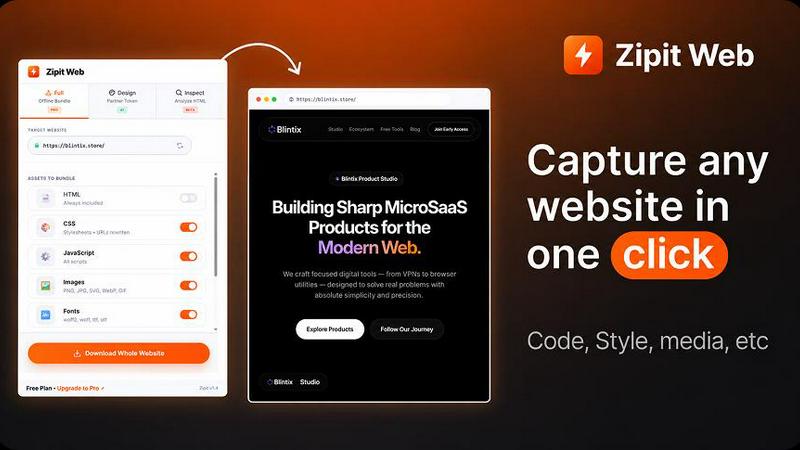
About zipitweb
Zipitweb is a next-generation web extraction tool that lets developers, designers, product teams, and AI builders rip apart any website in seconds. No installs. No CLI. No config. Just paste a URL and watch the magic happen. This isn't your grandpa's scraper—it's a full-blown extraction engine that pulls down HTML, CSS, JavaScript, images, fonts, media, design tokens, and even accessibility audits all from one clean interface. Zipitweb operates in three powerful modes: Full Download Mode for grabbing complete website bundles, Design Mode for converting any site into a reusable design system with colors, typography, spacing, and CSS variables, and Inspect Mode for live element inspection, real-time style editing, and exporting production-ready code. It also saves everything to the cloud, so your ZIPs, assets, design tokens, components, and exports live in a dedicated dashboard. You can organize projects with collections and reusable workspaces, revisit previous extractions without losing context, and export AI-ready outputs like Markdown, structured JSON, prompts, and design system files. Built for the modern web professional who wants to learn, clone, analyze, and reuse web experiences faster than ever, Zipitweb is the Swiss Army knife of web extraction—bold, fast, and ridiculously easy to use.
Features of zipitweb
Full Download Mode
Extract complete websites with all their guts—HTML, CSS, JavaScript, images, fonts, and assets—in one click. This mode packages everything into a clean ZIP file that includes offline support for browsing without an internet connection. You can queue multiple pages or entire sites for batch extraction, making it perfect for migrating old sites, archiving content, or grabbing reference projects. The output is production-ready and neatly organized, so you can drop it straight into your local dev environment without any cleanup. No converters, no extra tools, no headaches.
Design Token Extraction
Zipitweb rips out every design token from any website—colors, fonts, spacing values, CSS variables, and media assets—and exports them as JSON, CSS variables, or Figma-ready tokens. This is a game-changer for designers and developers who want to reverse-engineer a site's design system without manually inspecting every pixel. You get a complete palette of colors, a full typography stack, and all spacing values organized and ready to drop into Tailwind, CSS, or your design tool of choice. It's like having X-ray vision for design.
Live Inspect Mode
Click any element on a live page and Zipitweb instantly shows you its styles, dimensions, structure, and accessibility properties. You can edit styles in real time, export production-ready code and components, copy elements as Figma layers, or generate AI prompts for tools like Cursor, Claude, v0, and Lovable. This mode is built for developers who need to understand how a component works under the hood without diving into the source code. It's the ultimate learning and debugging tool for modern web development.
Cloud Save and Dashboard
Every extraction you make gets saved to the cloud with a dedicated dashboard that organizes your ZIPs, assets, design tokens, components, and exports. You can create collections and reusable workspaces to keep everything tidy, revisit previous extractions without losing context, and regenerate designs with your favorite AI tools. The dashboard syncs automatically across devices, so your library follows you everywhere. No more losing work or hunting through local folders—everything lives in one place, ready to use.
Use Cases of zipitweb
Reverse Engineering Design Systems
Designers and developers can extract the complete design system from any website in seconds. Grab colors, typography, spacing, CSS variables, and UI components, then export them to Tailwind, CSS, JSON, or Design.md. This is perfect for understanding competitor design patterns, rebuilding a site with a new framework, or creating a consistent design language across projects. You get the entire visual identity without manually inspecting a single CSS rule.
AI-Powered Code Generation
Export clean Markdown, structured JSON, and AI prompts from any website extraction. Feed this data into tools like Cursor, Claude, v0, or Lovable to regenerate components, create variations, or build entirely new interfaces based on existing designs. Zipitweb structures the output so AI models can understand context, styles, and relationships—making it the fastest way to bootstrap AI-assisted development projects.
Complete Website Archiving and Migration
Download entire websites as offline bundles that work without an internet connection. This is invaluable for archiving client sites before redesigns, migrating content between platforms, or preserving web experiences for offline reference. The batch extraction feature lets you queue multiple pages or entire domains, and the organized ZIP output makes it easy to deploy or share the archived site.
Accessibility and SEO Auditing
Run full WCAG accessibility audits on any page to get critical and moderate issues, contrast ratios, missing ARIA labels, and actionable fixes. Simultaneously, Zipitweb parses meta tags, Open Graph data, heading structure, robots rules, and sitemaps for SEO analysis. Both audits come with scores and detailed reports, making it easy to identify problems and fix them fast. Perfect for developers who need to ensure their sites meet compliance standards.
Frequently Asked Questions
Do I need to install anything to use Zipitweb?
No installs, no extensions, no CLI, and no configuration required. Zipitweb works entirely in your browser. Just paste a URL into the web interface and start extracting instantly. The entire process is cloud-based, so you don't need to download or set up any software. It's designed to work in seconds from any device with an internet connection.
What types of files can Zipitweb extract from a website?
Zipitweb extracts everything a website is made of: HTML, CSS, JavaScript, images, fonts, media files, design tokens (colors, typography, spacing), CSS variables, UI components, accessibility audit data, and SEO metadata. You can export these as ZIP files, JSON, CSS variables, Figma-ready tokens, Markdown, structured JSON, and AI prompts. The extraction is comprehensive and production-ready.
Can I save my extractions and come back to them later?
Yes, absolutely. Zipitweb saves everything to the cloud with a dedicated dashboard. Your ZIPs, assets, design tokens, components, and exports are stored in collections and reusable workspaces. You can revisit, reuse, and regenerate previous extractions without losing any context. The dashboard syncs automatically across devices, so your library follows you wherever you work.
How does Zipitweb handle AI integration and prompts?
Zipitweb exports AI-ready outputs including Markdown, structured JSON, prompts, and design system files that are formatted for tools like Cursor, Claude, v0, Lovable, and others. The Inspect Mode lets you generate AI prompts directly from any selected element on a live page. This means you can extract a component, describe it in an AI prompt, and regenerate it with modifications—all without leaving the Zipitweb interface.
Pricing of zipitweb
Zipitweb offers a free tier that lets you try all three extraction modes without any account or payment. For users who need more power, there are paid plans that unlock cloud save, batch extraction, offline bundles, and priority support. Specific pricing details for paid tiers are available on the Zipitweb pricing page, but the free version is fully functional for single-page extractions and basic use cases. No credit card required to get started.
Explore more in this category:
Similar to zipitweb


BankBridge
Let your AI agent answer questions about your real bank data. Read-only access, $5/mo per connected bank, cancel any time.

Enhance My Photo
Online AI photo enhancer that sharpens portraits, products, scenery, pets and text images and exports JPEG/PNG/WebP without watermarks.

LaunchIntel
Your AI agent picks relevant directories, submits your product in your browser and tracks every step. One-time purchase.


ToolVerified
A hand-tested directory of new AI tools and SaaS apps. Real people check every link, and community votes decide the daily charts.

ImageAgent
Create and edit AI images through conversation, using text or reference images and refining results in chat.

Engineering on Web
Free CAD, FEA simulation and SPC statistics in your browser, with an AI assistant that builds CAD features.