

ytskim
ytskim turns any YouTube video into a crisp transcript and summary, so you can skip the fluff and grab the gold.
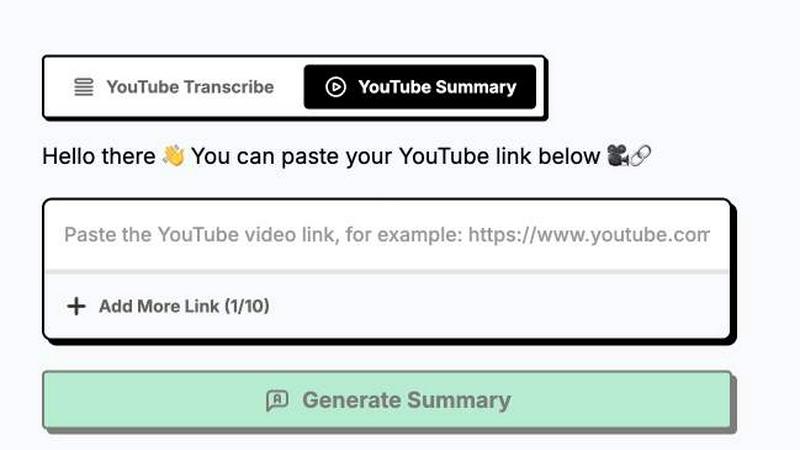
About ytskim
ytskim is a blazing fast AI tool that rips accurate transcripts and structured summaries from any YouTube video in seconds. No more sitting through hours of content or manually taking notes. You drop a YouTube link, and ytskim instantly spits back a clean, timestamped transcript alongside a tight, organized summary that cuts through the noise. This is built for content creators, researchers, students, marketers, and developers who need to extract the core information from videos without wasting time. Whether you are repurposing a podcast into a blog post, pulling quotes for a research paper, or quickly skimming a tutorial for key steps, ytskim handles the heavy lifting. The AI does not just transcribe words; it understands context, identifies key points, and structures them into a readable format. It is about speed and accuracy. You get exactly what you need, when you need it, without the fluff. No subscriptions, no friction, just pure utility. For anyone who consumes video content daily, ytskim is the shortcut you have been waiting for. It turns hours of viewing into seconds of reading, freeing you up to actually do the work that matters. The tool is designed for the modern workflow, where time is the most valuable asset you have. Stop watching, start skimming.
Features of ytskim
Instant Transcript Extraction
ytskim pulls down the full transcript from any YouTube video in a matter of seconds. No more waiting for buffering or manual timestamp hunting. The AI grabs every spoken word with high accuracy, even handling multiple speakers and background noise. You get a clean, raw text file that you can copy, paste, or export directly. This is perfect for fact-checking, quoting, or creating closed captions for your own content. The speed is the killer feature here, turning a 30 minute video into a 30 second download.
AI Powered Structured Summaries
Beyond just transcribing, ytskim uses advanced language models to analyze the entire transcript and produce a structured, bullet point summary. It identifies the main themes, key arguments, action items, and conclusions. You do not have to read the whole transcript to get the gist. The summary is designed to be scannable and actionable, giving you the core takeaways in a fraction of the time. This is ideal for busy professionals who need to digest multiple videos a day without losing their mind.
Timestamp Linked Navigation
Every line of the transcript and every point in the summary is linked back to the exact moment in the video. Click on a timestamp, and ytskim opens the video right at that spot. This is a game changer for editing, research, and review. You can jump directly to the most relevant parts without scrubbing through the timeline. It turns a flat transcript into an interactive navigation tool, saving you minutes of manual searching.
Clean Export and Copy Options
ytskim gives you full control over your output. You can copy the transcript or summary to your clipboard with one click, or export it as a plain text file. There is no proprietary format, no lock in, and no fuss. The text is clean, without timestamps cluttering the copy unless you want them. This makes it easy to drop the content straight into your notes, your blog editor, or your research database. It works exactly how you expect it to, with zero friction.
Use Cases of ytskim
Content Repurposing for Creators
You film a 20 minute YouTube tutorial or podcast. Instead of watching it again to write show notes or a blog post, you drop the link into ytskim. Within seconds, you have a full transcript and a structured summary. You can pull quotes, outline the key steps, and write a blog post in minutes. This turns one piece of content into multiple assets, saving you hours of editing and writing time every week.
Academic Research and Study
Students and researchers can use ytskim to quickly digest lecture recordings, conference talks, or documentary videos. Instead of rewatching a 45 minute lecture to find one specific point, you get the entire transcript and a summary. You can search the text for keywords, jump to timestamps, and extract citations. It makes studying more efficient and helps you retain the core concepts without the time sink.
Market Research and Competitor Analysis
Marketers and analysts need to keep tabs on competitor webinars, product launches, and industry talks. ytskim lets you skim through hours of video content in minutes. You get the key announcements, featured benefits, and strategic messaging without watching the whole thing. This gives you a competitive edge by letting you monitor the landscape faster and more effectively.
Meeting and Interview Transcription
Professionals can use ytskim to transcribe recorded meetings, client calls, or interviews that are hosted on YouTube. Instead of taking notes during the call, you get a perfect record afterward. The structured summary highlights action items and decisions. This is invaluable for project managers, sales teams, and journalists who need to keep accurate records without the manual labor.
Frequently Asked Questions
Is ytskim free to use?
The core functionality of ytskim is designed to be accessible. You can start extracting transcripts and summaries immediately without needing a credit card. There are usage limits to ensure fair access for everyone, but the basic tier is free. For heavy users who need bulk processing or advanced features, there will be a premium plan available.
How accurate are the transcripts?
ytskim uses state of the art speech recognition models that are highly accurate, especially for clear, well recorded audio. Accuracy depends on the original video quality, background noise, and speaker accents. For standard YouTube content with clear dialogue, you can expect near perfect transcription. The AI also handles multiple speakers and technical jargon better than most tools on the market.
Can I use ytskim on any YouTube video?
Yes, you can use ytskim on any public YouTube video. It works with standard links, shortened links, and even embedded videos. The tool does not work on private or unlisted videos that you do not have access to. As long as the video is publicly available on YouTube, ytskim can process it in seconds.
What formats can I export the transcript in?
Currently, ytskim allows you to copy the transcript and summary directly to your clipboard or export them as a plain text file. This keeps the process simple and universal. You can then paste the text into any document editor, note taking app, or content management system. There are no proprietary formats or hidden restrictions.
Explore more in this category:
Similar to ytskim

@fuck.it - email with attitude
Private email. Pure. Secure. Exclusive. No ads, no tracking, no data selling. GDPR compliant, EU-hosted.

xfiles
PDFs, images and audio. No uploads. No account. No added watermarks.

FreeVideoGenerator
Free AI video generator: turn text prompts and photos into video clips with Sora 2, Veo 3.1, Wan and more. Free starter credits, no watermark download


VidhyaGen - Image Converter
All-in-one web platform for fast image conversion, compression, editing, and essential digital file utilities in one easy interface.

Flip a Coin
Free online coin flip, yes/no, dice, spin wheel & random number tools. No signup, truly random, works instantly on any device.

sakuttoAI
A free suite of online tools for everyday tasks like PDF compression, image conversion, text diff and CSV to Excel.

Zalcro
The pre-build planning tool for vibe coders and AI builders. Start with a conversation about your idea, get paste-ready prompts for your coding tool