

Very Good Calendar Sync
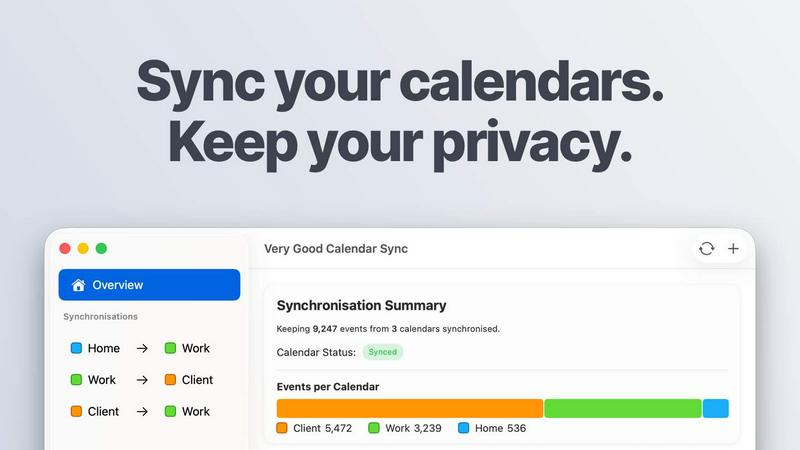
Very Good Calendar Sync quietly merges your work, personal, and client calendars on your Mac without linking accounts or exposing sensitive data.
About Very Good Calendar Sync
Very Good Calendar Sync is a macOS-native application that solves one of the most annoying problems in modern work life: keeping multiple calendars in sync without selling your soul or your data to a third party. This app runs entirely on your Mac, connects directly to macOS Calendar.app, and synchronizes your work, personal, and client calendars automatically in the background. No accounts to link, no cloud servers to trust, no credentials to share with strangers on the internet. You set it up once in about two minutes, then forget it exists while it quietly monitors your calendars and pushes changes in real time. Every new meeting on your work calendar appears on your personal calendar automatically. Every rescheduled client call updates everywhere instantly. The app supports Google Calendar, Microsoft Outlook, Apple iCloud, and any CalDAV account that shows up in Calendar.app. You control exactly what gets synchronized: specific weekdays, daily hours, start dates, and whether to share full event details or just block out time as busy. This is built for consultants managing client calendars, employees balancing work and personal schedules, freelancers juggling multiple projects, and anyone tired of the calendar chaos that comes with modern life. Your calendar data never leaves your Mac. No analytics, no data collection, no middleman. Just your Mac talking directly to your calendars. The first sync is completely free, and pricing starts at £1.99 per month for unlimited synchronizations across all your Macs.
Features of Very Good Calendar Sync
Clone or Redact
Share your availability without sharing your entire life story. This feature lets you decide exactly how much information each synchronized event reveals. Clone mode copies the full event details including title, description, and location so both calendars show the complete picture. Redact mode strips everything down to a simple busy block, hiding sensitive details while still keeping your schedule accurate. Perfect for when your personal dentist appointment needs to show up on your work calendar as busy without explaining why you are unavailable at 2 PM on a Tuesday.
Stays Out of the Way
This app lives quietly in your menu bar and does its job without demanding attention or constant configuration. Set up your syncs once, then forget about it entirely. The app runs automatically whenever your calendars change, pushing updates in the background while you focus on actual work. No popups, no reminders, no notifications begging for your attention. It synchronizes silently and efficiently, only making noise when something actually breaks. This is the kind of tool that earns its keep by being invisible.
No Accounts to Link
Your Google, Microsoft, and Apple credentials stay exactly where they belong: safely locked inside macOS Internet Accounts. Very Good Calendar Sync never asks for your passwords, never redirects you to a third-party login page, and never stores your authentication tokens on some random cloud server. The app uses your Macs native calendar access permissions, which means you grant it access through the same system settings you already trust. No logins on third-party websites, no shady OAuth flows, no data leaving your machine.
Filter by Day and Time
Stop synchronizing your entire life and start synchronizing only what matters. This feature lets you create granular rules for each synchronization pair. Choose to sync only weekdays and skip weekends entirely. Set a daily time range like 9 AM to 6 PM so your personal appointments outside work hours never clutter your professional calendar. Pick specific days of the week for different synchronization rules. Each sync gets its own configuration, so you can have work calendars syncing weekdays only while client calendars sync seven days a week. Total control, zero compromises.
Use Cases of Very Good Calendar Sync
Consultants Managing Client Calendars
Consultants live and die by their availability, and nothing kills a consulting practice faster than double-booking two clients or missing a meeting because you forgot to update one calendar. Very Good Calendar Sync keeps every client calendar in perfect alignment with your master schedule without requiring you to share your Google login credentials with anyone. Set up one sync per client, choose redact mode so they only see when you are busy not why, and let the app handle the rest. Your calendar always shows the truth, and your clients always see accurate availability.
Employees Balancing Work and Personal Schedules
The classic nightmare scenario: your team schedules an all-hands meeting right when you have a dentist appointment, and nobody knows until someone spots you leaving the office. Very Good Calendar Sync eliminates this chaos by keeping your personal calendar visible on your work calendar in redacted mode. Your team sees busy blocks instead of dentist appointment details, but they know not to schedule over that time. No awkward conversations, no missed meetings, no double-booking because your personal life is invisible to your coworkers.
Freelancers Juggling Multiple Projects
Freelancers often maintain separate calendars for each client or project, which creates a logistical nightmare when trying to figure out if you are actually available for new work. Very Good Calendar Sync lets you aggregate all your project calendars into one master view without exposing sensitive client information between projects. Each client sees only their own events plus busy blocks from your other commitments. You see everything unified on your end. New project comes in? Add another calendar and sync it with your master schedule in two minutes.
Agencies and Cross-Functional Teams
Agencies deal with the unique hell of balancing internal team meetings against client-facing calendar obligations. Internal standups, client calls, brainstorming sessions, and review meetings all need to coexist without chaos. Very Good Calendar Sync lets agency teams keep internal calendars synchronized with client-facing calendars while maintaining appropriate privacy boundaries. Everyone sees the same real-time availability across the entire organization. No more guessing whether Sarah is actually free or just forgot to update her client calendar.
Frequently Asked Questions
Do you store any of my calendar data?
Absolutely not. Very Good Calendar Sync runs entirely on your Mac with no servers of its own, no data collection, no analytics on your calendar events, and no cloud storage whatsoever. The app uses your Macs native calendar access to read and write events directly from macOS Calendar.app. Nothing is transmitted externally, no credentials are shared with third parties, and no copies of your data exist anywhere except on your own machine. This is on-device synchronization done right.
Which calendar providers are supported?
Any calendar that shows up in macOS Calendar.app works with Very Good Calendar Sync. This includes Google Calendar, Microsoft Outlook and Exchange, Apple iCloud, and any CalDAV account you can configure. No extra setup required, no third-party access needed, no additional apps to install. If your calendar appears in Calendar.app, the app can sync it. This covers essentially every major calendar provider on the planet.
Does it sync when my Mac is off or asleep?
No. Very Good Calendar Sync runs on your Mac and requires your Mac to be awake and running to perform synchronization. When your Mac goes to sleep or shuts down, the app pauses its monitoring and will resume syncing automatically when your Mac wakes back up. This is a natural limitation of on-device software that does not rely on cloud servers to do its work. The tradeoff is worth it for the privacy and security of keeping your data entirely on your machine.
Is this app available for Windows or iOS?
Currently, Very Good Calendar Sync is a macOS-only application. It is designed specifically to work with macOS Calendar.app and takes advantage of macOS native calendar access features that do not exist on Windows or iOS. The app is built for people who use a Mac as their primary computer and want to keep their calendars synchronized without relying on cloud services. Windows and iOS versions are not available and there are no announced plans to develop them.
Pricing of Very Good Calendar Sync
One synchronization between two calendars is completely free with no payment required. When you are ready for more, choose from three flexible plans. The Monthly plan costs £1.99 per month with flexible month-to-month billing and cancel anytime. The Annual plan costs £19.99 per year, saving over 15 percent compared to monthly billing. The Lifetime plan costs £39.99 as a one-time payment that covers the app forever with all future updates included. All plans include unlimited synchronizations, support for all calendar providers, and email support. The license is per-user for all your Macs. Download for free and choose your plan inside the app.
Explore more in this category:
Similar to Very Good Calendar Sync

Panzoe
Panzoe is an all-in-one AI platform for personal productivity, business automation, AI assistants, content creation, and custom AI solutions.

PromptMafia
Real AI prompts from founders, with the result

Novastart
Novastart brings apps and files onto an infinite canvas where people and AI agents can work together.

AUTOMATER.ai
A tray helper for every AI coding tool: sessions, alerts and usage in one place

Leads Reddit
LeadsReddit helps founders, marketers, and sales teams find people on Reddit who are actively looking for what they sell. Instead of scrolling through

AI Email Filter
AI Email Filter sorts incoming mail into folders using plain-language prompts you write. Works with any IMAP mailbox; bring your own LLM if you want.

Memwyre
Memwyre is an AI memory platform that gives every AI tool, agent, and conversation a persistent, shared memory you can search and reuse.

Kody Tools
Free collection of online developer utilities, code formatters, and digital converters designed to streamline your daily workflow.