

SoniqTools
SoniqTools is your private audio lab in the browser, letting you analyze, convert, and edit files without ever uploading a thing.
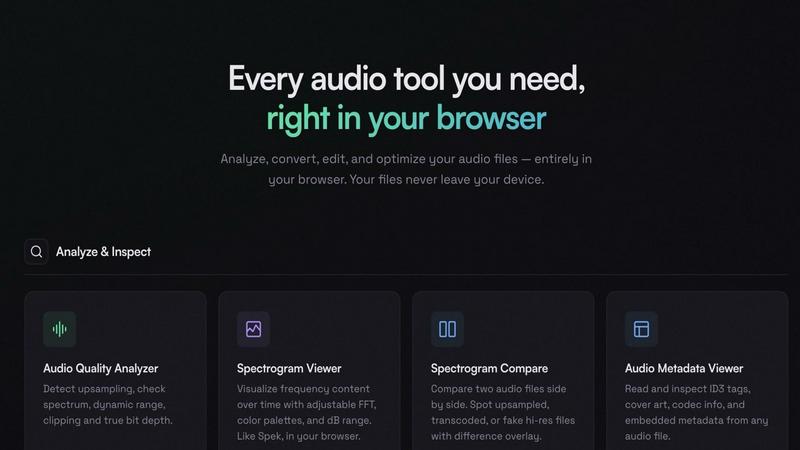
About SoniqTools
Stop the upload-and-wait grind. SoniqTools is your new audio command center, a free suite of 18 powerhouse tools that live right in your browser tab. Built for the discerning ears of DJs, producers, and audiophiles who value speed, privacy, and precision, it cuts out the bloat and gets straight to the point. Need to analyze a track's true quality, spot a fake hi-res file, convert a batch of samples, or master a quick mix? This is your one-stop shop. The magic—and the core promise—is that everything runs locally on your machine. Your files never get uploaded to a sketchy server; they never leave your device. That means zero privacy headaches, no mandatory sign-ups, and no clunky installs. Just pure, unadulterated audio processing power that works on any device, in 9 languages. Open a tab, drop your file, and get to work. Your studio just went fully portable.
Features of SoniqTools
Audio Quality Analyzer
This is your track's truth serum. Go beyond the file extension and see what's really under the hood. It detects upsampling scams, reveals the true bit depth, checks for nasty clipping, and maps out the dynamic range and frequency spectrum. No more guessing if that "24-bit" download is actually a pumped-up MP3. Get the forensic details instantly, all processed in your browser for total confidentiality.
Spectrogram Compare
Spot the difference like a pro. Drag and drop two audio files for a side-by-side visual showdown. This tool overlays their spectrograms so you can instantly identify upsampled tracks, lossy transcodes, or any sneaky alterations. It's the ultimate weapon for verifying audio quality before a purchase or settling debates about source material. See the truth, don't just hear it.
All-Local Audio Converter
Convert files on your terms, without the cloud middleman. Seamlessly switch between high-quality formats like WAV, AIFF, FLAC, and compressed ones like MP3, OGG, and AAC. Everything happens locally with a clean, fast interface. Perfect for prepping samples for your DAW, creating DJ-friendly formats, or archiving projects—all with the certainty that your original masters never touch the internet.
Audio Looper & Merger
Craft seamless mixes and loops without ever opening your DAW. The looper lets you create perfect, endless loops with professional crossfades, fade options, or reverse transitions for creative effects. The merger is your go-to for stitching tracks, podcasts, or samples together with buttery-smooth transitions. Set it, forget it, and build your sets or edits with studio-grade precision in minutes.
Use Cases of SoniqTools
The DJ's Gig Prep Toolkit
Rushing to prep for a set? Quickly convert a last-minute track to a reliable format, trim a long intro, normalize the loudness across your playlist so your transitions hit hard, and even generate a quick sine wave tone for room testing. All from your laptop in the green room, with no software installs. Your workflow stays agile and your files stay yours.
The Audiophile's Quality Inspector
Before you buy that expensive hi-res album, drop a sample track into SoniqTools. Use the Audio Quality Analyzer and Spectrogram Compare to verify it's genuine high-resolution and not an upscaled fake. Inspect the dynamic range and check for clipping to ensure you're getting the master-quality audio you paid for. Be your own quality control expert.
The Podcast Producer's Edit Suite
Need to edit a remote interview? Extract the audio from a video call recording, trim out the awkward silences, merge the host's intro with the guest audio, normalize the loudness to podcast standards, and add professional fade-ins and outs. Complete the entire edit chain privately in your browser and export a polished file, ready for publishing.
The Sample Hunter's Creative Lab
Found a killer vintage sample in a weird format? Convert it to WAV instantly. Use the splitter to chop it by detected silence into individual hits. Generate custom sine sweeps or noise layers for sound design. Analyze the frequency content to see where it sits in the mix. It's the ultimate portable toolkit for curating and preparing your unique sound library.
Frequently Asked Questions
Is SoniqTools really free and private?
Absolutely, 100%. There are no hidden fees, no premium tiers, and no "pro" version paywall. Every one of the 18 tools is completely free to use. More importantly, the privacy is baked into the tech: all processing happens locally in your browser using WebAssembly. Your audio files are never uploaded to our servers or anyone else's. They never leave your computer. No accounts, no tracking, just tools.
What audio formats do you support for conversion?
The converter is a format-swapping powerhouse. It handles lossless royalty like WAV, AIFF, and FLAC, and compresses down to MP3, OGG, and AAC. You can also extract audio from video files in MP4, WebM, MOV, and other common formats. Whether you're prepping for a DAW, a DJ software, or a portable device, we've got the codec you need.
Can I use it on my phone or tablet?
Yes! SoniqTools is built to be fully responsive and works on any modern device with a capable browser, including smartphones and tablets. The interface adapts, and the powerful local processing works the same way. Your mobile device becomes a pocket-sized audio studio. Just remember that processing very large files on mobile might be slower depending on your device's processor.
How does the "no install" part work?
There's nothing to download or update manually. SoniqTools is a Progressive Web App (PWA) that runs directly in your browser tab. You can even "install" it to your desktop or home screen for an app-like experience if you want, but it's not required. Just bookmark the site. All the tool code loads in your browser once and then operates independently, which is how it keeps your files offline and your workflow instant.
Similar to SoniqTools


AIdeaFlow - AI Podcast Generator
AI podcast generator: turn any text into a 2-host show

AI Rap Generators
Create 15-second AI rap videos from photos with original beats and verses—no filming, lyrics, or editing needed.

AI Rap
AI rap generator that turns two portraits, or one photo of two people, into a short English duet rap video with original lyrics, vocals, and music.

Tiny Desk AI Video Maker
Create a vertical Tiny Desk-style concert video from up to three photos with original music.

GenX
All-in-one AI workspace to generate images, videos, and audio with multiple leading AI models.

FastH3 Omni
Run FastH3 Omni in your browser. Up to 9 reference images plus 3 audio references become a 5–15s clip with synced audio. No install, no GPU.

Speakeroo
AI speaking coach for English practice, pronunciation and public speaking, with feedback on pace, clarity and filler words.