

Phishly
Phishly crushes phishing emails with AI scans, keeping your inbox locked down with just one click.
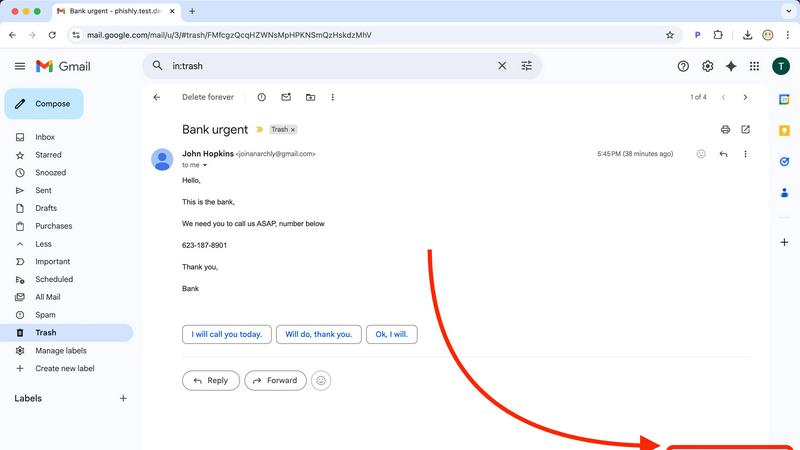
About Phishly
Phishly is your ultimate digital bodyguard, expertly designed to navigate the treacherous waters of phishing attacks. This AI-powered powerhouse operates as a slick Chrome extension for Gmail and a versatile web tool, ensuring that top-notch protection is just a click away. Whether you're an individual trying to keep your personal information safe or a small business owner looking to shield your organization from cyber threats, Phishly has your back. With its lightning-fast scanning capabilities, this tool analyzes emails for red flags like sketchy domains, alarming language, and forged sender identities. It provides an easy-to-understand risk assessment—Safe, Medium Risk, or High Risk—so you can swiftly decide if that email is trustworthy or a trap. Phishly cuts through the corporate jargon, delivering straightforward phishing protection that everyone can understand. We prioritize your privacy by only analyzing the emails you choose to scan, ensuring your data stays yours. Plus, it’s free to use, making it an essential tool for anyone who wants to navigate their inbox safely and confidently.
Features of Phishly
Instant Email Scanning
With just a click, Phishly scans any email in your Gmail inbox or suspicious messages pasted on our site. It quickly identifies potential threats, giving you peace of mind in seconds.
AI-Powered Threat Detection
Phishly harnesses the power of advanced AI technology to detect phishing attempts effectively. From dodgy domains to classic social engineering tactics, our system spots the sneaky signs that other tools might miss.
User-Friendly Risk Assessment
No tech jargon here! Phishly delivers clear risk assessments: Safe, Medium Risk, or High Risk. This straightforward approach helps you make informed decisions about your email without the headache.
Privacy-Centric Analysis
Your privacy is our priority. Phishly only analyzes the emails you choose to scan, meaning your sensitive data stays in your hands. We respect your space and keep your information confidential.
Use Cases of Phishly
Personal Email Protection
Every day, individuals face phishing attempts in their inboxes. With Phishly, users can quickly identify potential scams, protecting their personal information and keeping their digital lives secure.
Small Business Security
Small businesses are prime targets for phishing attacks. Phishly equips business owners with the tools needed to safeguard their communications, ensuring that their operations run smoothly without falling prey to scams.
Quick Email Verification
When in doubt about an email's legitimacy, Phishly comes to the rescue. Simply paste the message or click on it to receive an instant analysis, saving users time and anxiety over fraudulent communications.
Cyber Awareness Education
Phishly serves as a practical tool for educating users about phishing tactics. By providing real-time analysis and clear risk assessments, it helps users learn to recognize red flags in emails, fostering a more cyber-aware community.
Frequently Asked Questions
What is Phishly and how does it work?
Phishly is an AI-powered tool designed to protect users from phishing attacks. It scans emails for signs of scams and provides a risk assessment based on its findings.
Is Phishly free to use?
Yes! Phishly is completely free, allowing anyone to access its powerful phishing protection without any hidden fees or subscriptions.
How does Phishly ensure my privacy?
Phishly respects your privacy by only analyzing the emails you choose to scan. Your data remains yours, and we do not access or store any personal information.
Can Phishly be used on non-Gmail accounts?
Currently, Phishly is designed primarily as a Chrome extension for Gmail. However, users can also paste suspicious emails into the web tool for analysis, making it versatile for different email scenarios.
Explore more in this category:
Similar to Phishly

AI Email Filter
AI Email Filter sorts incoming mail into folders using plain-language prompts you write. Works with any IMAP mailbox; bring your own LLM if you want.

Memwyre
Memwyre is an AI memory platform that gives every AI tool, agent, and conversation a persistent, shared memory you can search and reuse.

Kody Tools
Free collection of online developer utilities, code formatters, and digital converters designed to streamline your daily workflow.

Map to GPS
Free GPX generator — draw a route on a map in your browser.

HomeAnswerBook
Practical, independent guides to home repairs, maintenance, costs, troubleshooting, and everyday fixes.

BlazePDF
Highlight faster. Study in flow with custom shortcuts and a workflow built around you. Print smarter, or turn any page into a tiled poster.


AI STL Generator
The fastest AI STL generator to turn prompts and images into 3D printable STL files.