

MCP Playground Online
MCP Playground Online lets you build, test, and deploy AI agents in your browser with zero setup and real-time debugging.
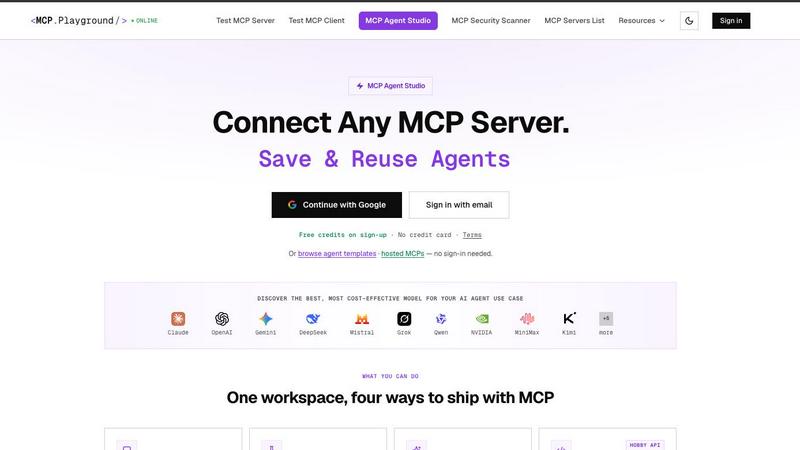
About MCP Playground Online
MCP Playground Online is a browser-based, no-install platform for building, testing, and deploying AI agents powered by the Model Context Protocol (MCP). It is a free, developer-focused playground that lets you connect to any remote MCP server, explore tools, prompts, and resources, and debug with real-time JSON-RPC logs. You can browse over 10,000 servers including Supabase, Playwright, Figma, and GitHub, all from one place with no credit card needed. The platform supports multiple transport protocols like HTTP, SSE, Streamable HTTP, and local stdio/CLI processes, allowing you to connect up to four servers at once in a single chat with tools merged automatically. MCP Playground Online also includes the Agent Studio, which is the fastest way to build, test, and ship MCP-powered AI agents. You can compare over 40 leading AI models head-to-head, run one prompt across up to four models in parallel, and see winner ribbons for the fastest, cheapest, and most accurate results. Every tool call is inspectable live with full request/response JSON, per-call latency, and credit cost, so there are no black boxes. You can export any agent as a production-ready API with a stable endpoint and bearer auth. With 50+ ready-to-run templates and one-click hosted server deployment, MCP Playground Online eliminates the need to install SDKs or manage infrastructure. It is designed for developers, AI engineers, and QA testers who want to accelerate their MCP workflow without any setup friction.
Features of MCP Playground Online
Test Any Remote MCP Server or Client Instantly
Connect to any remote MCP server directly from your browser with zero setup. Enter any MCP server URL and instantly explore its tools, prompts, and resources. You can execute tool calls, get prompts, and read resources while seeing full request/response logs in real-time. This feature supports HTTP, SSE, and Streamable HTTP transports, so you can test any implementation without installing a single thing. It is perfect for validating protocol compliance and debugging server behavior on the fly.
Compare 40+ AI Models Head-to-Head
Run one prompt across up to four models simultaneously and compare their performance side-by-side. The platform automatically computes winner ribbons for the fastest, cheapest, and most accurate results. You can test models like Claude Sonnet 4.5, GPT-5.4 nano, and many others. This feature gives you instant insight into which model delivers the best balance of speed, cost, and accuracy for your specific use case, helping you make data-driven decisions without guesswork.
Live JSON Inspector for Every Tool Call
No more black boxes. Every tool call is fully transparent with live inspection of request/response JSON, per-call latency, and credit cost. You can see exactly what data was sent, what the server returned, and how long each step took. This feature is invaluable for debugging complex agent workflows, identifying bottlenecks, and ensuring your AI agents are performing as expected. It gives you complete visibility into the inner workings of your MCP interactions.
Export Agents as Production-Ready APIs
Once you have built and tested your agent, you can export it as a stable, production-ready API with a single click. The platform saves your servers, model selection, and system prompt, then provides a stable endpoint with bearer auth and a server-side locked prompt. This means you can take your prototype directly to production without rewriting any code. It is the fastest path from experimentation to deployment for MCP-powered AI agents.
Use Cases of MCP Playground Online
Rapid Prototyping of AI Agents for Business Tools
Developers can quickly build AI agents that interact with business tools like Stripe, PostgreSQL, GitHub, and Slack. Using the 50+ ready-to-run templates, you can wire up a server, select the best model, and start testing in minutes. For example, you can create an agent that queries your Stripe account for recent transactions or checks open issues on GitHub. The live JSON inspector helps you debug tool calls instantly, and the export feature lets you deploy the agent as a production API without any infrastructure management.
Comparing AI Model Performance for Specific Tasks
AI engineers can use the head-to-head model comparison feature to evaluate which model is best suited for a particular task. Run the same prompt across up to four models simultaneously and see which one returns the fastest response, the cheapest cost, or the most accurate result. This is ideal for tasks like data extraction, summarization, or code generation, where model choice directly impacts application performance and cost. The winner ribbons make it easy to pick the right model for your use case.
Debugging MCP Server Implementations
MCP server developers can use the platform to test and debug their implementations without needing a full client setup. Connect your server via HTTP, SSE, or Streamable HTTP, and explore all available tools, prompts, and resources. The real-time JSON-RPC logs show every interaction, making it easy to spot protocol violations, missing endpoints, or unexpected responses. This accelerates the development cycle and ensures your server is compliant and robust before going live.
Teaching and Learning MCP Protocol
Educators and learners can use MCP Playground Online as a hands-on tool to understand the Model Context Protocol. The platform provides tutorials, recipes, and a config generator to help newcomers get started. You can test sample servers, browse the 10,000+ server registry, and experiment with different transport protocols. The free, no-install nature means anyone can start learning immediately without technical barriers. It is an excellent resource for workshops, hackathons, and self-paced learning.
Frequently Asked Questions
Do I need to install anything to use MCP Playground Online?
No, absolutely not. MCP Playground Online is entirely browser-based. You do not need to install any SDKs, manage any infrastructure, or sign up for a credit card. Just open your browser, enter a server URL, and start testing. It works on any modern browser with internet access. This zero-setup approach is designed to get you from zero to testing in seconds, making it perfect for quick experiments and prototyping.
Can I connect local MCP servers using stdio or CLI?
Yes, you can. MCP Playground Online supports local stdio and CLI processes alongside remote HTTP, SSE, and Streamable HTTP transports. You can run local MCP tools using npx or uvx and inject environment variables for authentication without leaving the UI. This feature allows you to test and debug local servers in the same environment as remote ones, giving you a unified testing experience for all your MCP implementations.
How does the model comparison feature work?
The model comparison feature lets you run one prompt across up to four different AI models simultaneously. The platform then shows the results side-by-side, including latency, cost in credits, and accuracy. Winner ribbons are automatically computed and displayed for the fastest, cheapest, and most accurate models. You can then pick a winner and use that model for your agent. This feature supports over 40 models, including Claude and GPT variants, and is designed to help you make informed decisions quickly.
Can I export my agent as a production API?
Yes, absolutely. MCP Playground Online includes a one-click export feature that turns your agent into a production-ready API. When you export, the platform saves your server configurations, selected model, and system prompt. You receive a stable endpoint with bearer authentication and a server-side locked prompt. This means you can deploy your prototype directly to production without any additional coding or infrastructure setup. It is the fastest way to ship MCP-powered agents.
Pricing of MCP Playground Online
MCP Playground Online is completely free to use for testing MCP servers and clients. There is no credit card required and no time limit on the free tier. The Agent Studio feature offers free credits upon sign-up, with no credit card needed. You can build, test, and compare models using these free credits. There is no paid subscription or tier mentioned in the provided content. All core features, including server testing, model comparison, and agent building, are accessible with free credits. For any advanced or high-volume usage, you should check the platform for future pricing updates.
Explore more in this category:
Similar to MCP Playground Online

dreamina ai
Make any images possible — generate, edit, and transform images with AI models like GPT Image and Gemini in seconds.

AIVideoAgent
Turn text ideas or reference images into videos through conversation, with agent-assisted prompts and a choice of video models.


explint.com
Install the ExpLint MCP to flag inconsistencies, missing metrics, and anti-patterns across your A/B test backlog.

BankBridge
Let your AI agent answer questions about your real bank data. Read-only access, $5/mo per connected bank, cancel any time.

LaunchIntel
Your AI agent picks relevant directories, submits your product in your browser and tracks every step. One-time purchase.


ToolVerified
A hand-tested directory of new AI tools and SaaS apps. Real people check every link, and community votes decide the daily charts.