About Daily
Daily is your brain's chill zone, a digital sanctuary for the beautifully overwhelmed. It's not another productivity drill sergeant screaming at you to optimize every second. Forget that noise. Daily is the anti-hustle to-do list, built for anyone whose mental RAM is maxed out. It's for the creative with a million tabs open, the founder juggling chaos, the student drowning in deadlines, and anyone who just needs to hit the mental reset button. Its core value proposition is radical simplicity and psychological relief. Instead of forcing you to categorize and prioritize the second a thought hits, Daily gives you permission to just dump it all. Unload every task, reminder, and random "oh yeah" thought into a digital holding pen. Then, when you're ready to face the day, you switch to the Today view—a ruthlessly clean space that shows only what deserves your attention now. This isn't about doing more; it's about seeing clearly. It helps you separate the urgent whispers from the background noise, letting you gently release what doesn't matter and carry forward what does, without guilt or complexity. Daily is your tool for reclaiming focus and starting your day from a place of calm clarity, not chaotic pressure.
Features of Daily
The Brain Dump
This is your permission slip to stop organizing and start unloading. The moment a task, idea, or reminder pops into your crowded head, you throw it into Daily. No categories, no due dates, no priority flags—just a pure, cathartic download of everything cluttering your mental space. It's the first step to quieting the internal noise, capturing everything before it gets lost in the shuffle, so you can literally clear your mind.
The Today View
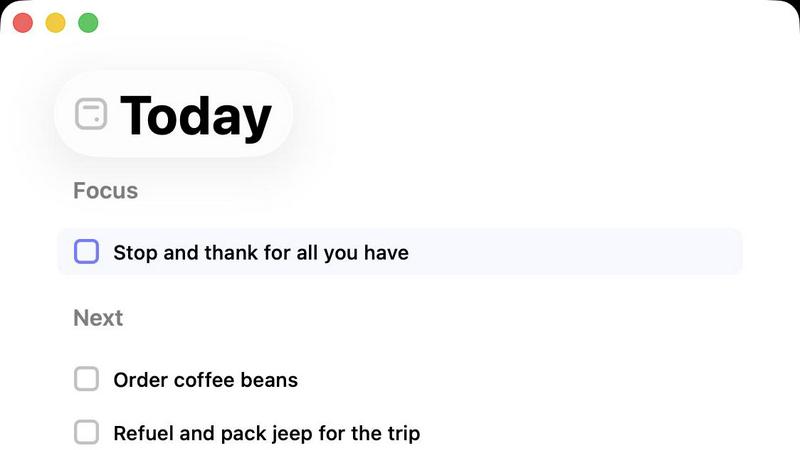
This is where the magic happens and where Daily earns its name. The Today view is your focused, minimalist command center for the present. It deliberately hides the overwhelming master list, showing you only the handful of items you've consciously chosen to tackle today. This laser-focused interface cuts through the fog of "everything you could do" and shows you "what you will do," helping you start with intention and maintain a grounded, calm sense of progress.
Gentle Carry-Forward
Tasks don't scream at you here. If something on your Today list doesn't get done, it doesn't turn red or blast notifications. Daily handles it with a quiet, understanding nudge. Unfinished items gently and automatically roll over to the next day's list. This removes the guilt and pressure of a missed deadline, reframing your to-do list as a fluid, supportive guide rather than a harsh judge. It's productivity without the panic.
Purposefully Simple Design
Daily is ruthlessly minimalist by design. There are no complex project boards, no convoluted tagging systems, and no endless settings to tweak. The interface is clean, intuitive, and stripped of any feature that could create complexity or pressure. This intentional constraint is the product's superpower—it provides just enough structure to support you, without ever becoming another thing you have to manage or figure out.
Use Cases of Daily
For the Overwhelmed Creative
When your mind is buzzing with a million ideas for projects, sketches, client work, and admin tasks, it's paralyzing. Daily lets you capture every fleeting creative thought and logistical task in the Brain Dump. Then, each morning, you curate your Today view with just 1-3 key creative actions. This process silences the chaos, allowing you to protect your creative energy and dive deep into your work without the background mental static.
For the Recovering Perfectionist
If you freeze up because you feel you need to plan the "perfect" day or complete every single task, Daily is your therapy. It breaks the all-or-nothing cycle. You learn to accept that not everything will get done today, and that's okay. The Gentle Carry-Forward feature reinforces this, showing you that tasks can wait without the world ending. It helps you build the habit of sustainable progress over perfect, unrealistic execution.
For the Mental Load Manager
This is for anyone juggling the invisible labor of life—meal planning, scheduling appointments, remembering to buy gifts, and managing household tasks. Daily becomes the single source of truth outside your brain. Dump every "someone should..." thought in here. Then, use the Today view to pick just one or two of those items to actually execute, preventing the mental load from spilling over and ruining your entire day.
For Morning Clarity Ritual
Transform your morning from a stressful scramble into a centered ritual. Instead of checking a chaotic, overwhelming list, you open Daily to a clean Today view that you set the night before. You begin your day with immediate clarity and direction, knowing exactly what your focus is. This simple act builds a foundation of calm and control, setting a productive and intentional tone for the hours ahead.
Frequently Asked Questions
How is Daily different from other to-do apps?
Most to-do apps are built on a philosophy of "more"—more features, more organization, more optimization. They often add to the feeling of overwhelm. Daily is built on a philosophy of "less." It's designed first for mental relief, not feature-checkboxes. The core difference is the separation between the chaotic Brain Dump and the serene Today view, and the gentle, pressure-free way it handles unfinished tasks. It's a wellness tool disguised as a planner.
What happens to tasks I don't put in the Today view?
They hang out safely in your master list, completely out of sight and out of mind. The Today view is a curated selection. Tasks that aren't chosen simply stay in the background reservoir until you decide they're a priority for a future day. This allows you to capture everything without letting everything demand your attention all at once. You are in control of what comes to the forefront.
Can I use Daily for team or project management?
Honestly, no—and that's on purpose. Daily is intentionally designed for individual mental management and personal clarity. It lacks collaborative features, shared lists, or complex project hierarchies because adding those would violate its core principle of simplicity. For team-based task management, you'd need a different tool. Daily is your personal thinking space.
Is there a learning curve to using Daily?
Virtually zero. If you can open an app and type text, you can use Daily. The entire design ethos is immediate intuitiveness. There are no complex workflows to learn, no hidden menus, and no setup required. You download it, start dumping thoughts into the main list, and then begin pulling items into your Today view. It's meant to feel obvious and effortless from the very first use.
You may also like:
Who Fixed It
WhoFixedIt helps you track issues, assign ownership, and verify fixes—so problems get solved fast and stay solved.
Session Stacker
Session Stacker helps side hustlers stay focused by setting their next task before closing their laptop. Pick up exactly where you left off.
Vibrantsnap
Record your screen, get a polished product demo. AI auto-edits, adds voiceover & captions in minutes. Free for Mac & Windows.