

ComicsMaker
ComicsMaker turns your raw ideas into polished comic panels online, letting you plan beats, generate art, and add dialogue right in your browser.
About ComicsMaker
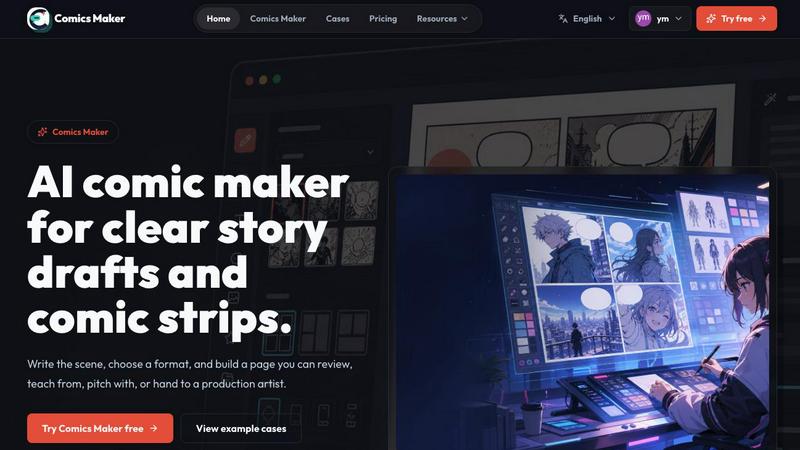
ComicsMaker is the AI-powered comic generator that flips the script on traditional visual storytelling. It is designed for creators, marketers, educators, and storytellers who want to blast past the blank page and turn raw ideas into polished comic pages without the soul-crushing complexity of drawing. This tool is a full-on creative workflow engine, not just a toy. It lets you plan the beats, generate consistent panels, add dialogue, and arrange your page directly in your browser. Forget wrestling with art software or waiting for inspiration; you start with a single scene, name the character, setting, action, and change, and let the AI handle the heavy lifting. Whether you are crafting a webcomic, a manga-style concept, a storyboard for a pitch, a visual lesson for a classroom, or a branded social post, ComicsMaker gives you the firepower to generate shareable comic artwork faster than you can say "starting from scratch." It is built to take a raw scene brief, shape it into a structured panel layout, and keep the visual direction locked down so every panel feels like it belongs to the same world. The value proposition is simple: stop staring at the canvas and start building the story.
Features of ComicsMaker
Scene to Panel Planning
This is the engine room of the operation. Instead of guessing where the story goes, you write the scene in plain language, and ComicsMaker helps you shape it into a clear comic structure. You define the character, the setting, the visible action, and the change that happens in the scene. From there, you can pick your page format, whether it is a single panel, a three-panel strip, a 2x2 grid, or a vertical flow. The AI then plans the beats, breaking your raw idea into four distinct panels with a defined reading order. It keeps the panel count, pacing, shot type, and layout decisions visible before you waste time on polish. This feature turns a vague concept into a structured draft that you can actually work with, making sure every panel has one clear job to do.
Consistent Style Locking
Nothing kills a comic faster than a wild swing in art style from panel to panel. ComicsMaker solves this by letting you lock the visual direction before you generate a single image. You use style notes, character details, and reference language to create a consistent world. The system reuses character and environment notes across all panels, so the protagonist looks the same in panel one as they do in panel four. This feature is a lifesaver for creators who want to maintain a unified aesthetic without manually tweaking every output. You can set the mood, the tone, and the visual cues, and the AI respects those constraints, generating drafts that an artist or a teammate can easily understand and continue working with. It is about building a coherent visual language from the jump.
Intuitive Layout Studio
The studio is where you make the hard layout decisions without the headache. It is a clean, middle panel interface that keeps the panel count, pacing, shot type, and reading order visible and controllable. You get simple controls for adjusting the size of each panel, the overall tone of the scene, and any production notes you need to add. The canvas starts empty by default, ready for the next idea, but it is fully equipped to handle single-panel, 3-panel strip, 2x2 page, and vertical flow formats. This structure ensures you are not just generating random images; you are building a page with narrative intent. You can drag, drop, and rearrange until the flow feels right, all before committing to the final generation. It is a sandbox for comic structure.
Editable Dialogue and Caption Integration
A comic is nothing without the words, and ComicsMaker makes sure the text is baked into the workflow. After the panels are generated, you can add dialogue, captions, and sound effects directly into the layout. The system keeps the text close to the panel plan, so you are not guessing where the speech bubbles go. This feature is critical for checking story clarity and pacing before you invest in a longer production pass. You can review whether the dialogue fits the scene, if the captions drive the narrative forward, and if the visual direction matches the written intent. It turns the generated draft into a reviewable, editable comic page that you can hand off to an artist, a client, or a teammate. The words and the art are locked in a tight, collaborative dance.
Use Cases of ComicsMaker
Webcomic and Manga Prototyping
For creators looking to launch a webcomic or a manga-style series, ComicsMaker is the ultimate prototyping tool. You can take a raw concept, like a cyber detective on a rainy rooftop, and turn it into a four-panel beat sheet in minutes. This allows you to test story ideas, character dynamics, and pacing before committing to a full chapter. You can generate multiple variations of a scene, tweak the mood from dramatic to lighthearted, and see which layout works best for your narrative flow. It is about getting the story out of your head and onto a page where you can actually see if it works, saving you weeks of wasted effort on a story that does not land.
Marketing and Social Media Campaigns
Marketers can use ComicsMaker to create branded comic content that cuts through the noise. Instead of a static ad, you can generate a short comic strip for a product reveal, a customer success story, or a brand narrative. The tool lets you define the scene, the characters, and the action, ensuring the visual style matches your brand guidelines. You can export shareable comic artwork for Instagram, Twitter, or a landing page, turning a simple product moment into a clear, engaging comic sequence. It is a fast, scalable way to produce visual content that tells a story, builds brand affinity, and drives engagement without needing a full art department.
Educational and Visual Lessons
Educators and trainers can leverage ComicsMaker to create visual lessons that are way more engaging than a bullet-pointed slide deck. You can take a complex concept, like a scientific process or a historical event, and break it down into a clear, four-panel comic. The tool helps you plan the beats, name the characters and settings, and define the visible action and change. This makes abstract ideas concrete and accessible for students. You can generate a consistent visual style for an entire lesson series, reuse character and environment notes, and export drafts that a teaching assistant or curriculum designer can review. It is about turning learning into a visual narrative that sticks.
Storyboarding for Film and Animation
For filmmakers, animators, and game developers, ComicsMaker is a rapid storyboarding tool that closes the gap between a script and a visual plan. You can input a scene from your screenplay, define the key beats, and generate a 2x2 page layout that shows the shot types, character blocking, and emotional tone. This gives you a reviewable comic page that you can use to check story clarity, panel order, and dialogue space before you invest in a longer production pass. It is perfect for pitching ideas to a team or a client, as it provides a clear, low-cost visual representation of the narrative flow. The JSON project export also means you can hand off the data to an artist or a director for the next stage of production.
Frequently Asked Questions
How does ComicsMaker turn a scene into a comic page?
You start by writing a scene in plain language, naming the character, setting, visible action, and change. The AI then plans the beats, breaking your raw idea into a structured panel layout based on your chosen format, like a 2x2 grid or a three-panel strip. You can then generate the panels, add dialogue and captions, and arrange the page in your browser. The tool keeps the visual direction consistent by reusing your style notes and character details across all panels, so the final draft is a coherent, editable comic page.
Can I control the art style and character consistency?
Absolutely. ComicsMaker lets you lock the visual direction before you generate anything. You provide style notes, character descriptions, and reference language to define the world. The system then reuses these notes across all panels, ensuring the protagonist looks the same in every shot. You can set the mood, tone, and specific visual cues, so every panel belongs to the same unified aesthetic, making it easy to hand off a coherent draft to an artist or teammate.
What page formats and layouts are available?
The tool supports a range of formats to fit different storytelling needs. You can choose from single panel, three-panel strip, 2x2 page, and vertical flow layouts. The studio interface keeps the panel count, pacing, shot type, and reading order visible, so you can make layout decisions before you generate the final images. This flexibility makes it suitable for everything from a quick social media post to a more complex storyboard or webcomic page.
Is there a free plan to test the tool?
Yes, the free plan includes 10 starter credits for testing image generation. This allows you to take a scene, plan the beats, and generate a draft to see if the workflow fits your needs. Paid plans mainly increase your monthly credits, but the core editor and JSON project export follow the same workflow across all tiers. You can start small and upgrade when the creative workflow becomes a regular part of your process.
Pricing of ComicsMaker
ComicsMaker offers a tiered pricing structure designed to scale with your creative output. The free plan gives you 10 starter credits to test the image generation and workflow. The Creator plan costs $15 per month and is for creators making comic strips, lessons, and social campaigns every week. The Studio plan costs $39 per month and is for teams producing brand comics, campaigns, and classroom content. All paid plans increase your monthly credits, while the core editor and JSON project export features remain consistent across the board.
Explore more in this category:
Similar to ComicsMaker

Try OC Maker
Create OCs from text or images, customize their look, and turn them into animated videos with AI.

xfiles
PDFs, images and audio. No uploads. No account. No added watermarks.

FreeVideoGenerator
Free AI video generator: turn text prompts and photos into video clips with Sora 2, Veo 3.1, Wan and more. Free starter credits, no watermark download

Favore AI
AI images, videos, and editing in one creative workspace

VidhyaGen - Image Converter
All-in-one web platform for fast image conversion, compression, editing, and essential digital file utilities in one easy interface.

Turbotools
Free online web tools: PDF converter, image compressor, word counter, text reverse, JSON formatter & generator. 100% free with no sign-ups!

Leadeon
AI growth tool for X and LinkedIn: write posts in your voice, schedule at your best times, find leads on X and see what works.

Artcraft AI
AI image and video studio in your browser: generate and edit images, turn photos into videos, edit clips by sentence.