The Ultimate Piano vs Video to Text
Side-by-side comparison to help you choose the right AI tool.

The Ultimate Piano
Master piano online with insane realism, MIDI support, and AI-powered learning tools.
Last updated: March 4, 2026

Video to Text
Unlock your video's voice with AI-powered transcription that turns any audio into clean, accurate text in minutes.
Last updated: April 13, 2026
Visual Comparison
The Ultimate Piano

Video to Text
Feature Comparison
The Ultimate Piano
Browser-Based Powerhouse
Ditch the install. Fire up your browser and you're instantly at a pro-grade digital piano with stunningly realistic sounds. Use your mouse, smash your computer keys, or plug in a real MIDI keyboard for that authentic feel. It's the zero-friction, maximum-flexibility way to play, making serious practice possible from your couch, a coffee shop, or anywhere you get the urge to create.
Intelligent Chord & Scale Dojo
This is where theory meets the streets. Play anything, and the real-time chord detection instantly names what you're laying down, unlocking the secrets of harmony as you play. Dive into the Scale Trainer with 14+ scale types—select "Blues Scale in Ab" and watch it light up the keyboard, guiding your fingers and drilling muscle memory until those complex patterns are second nature.
Multimedia Practice Fusion
Why practice in silence? Load any MP3, MIDI file, or paste a YouTube URL directly into the tool. Slow down the tempo, set A-B loops on tricky sections, and watch the falling notes on the keyboard show you exactly what to play. It's like having the ultimate practice buddy who can slow down any song, highlight every note, and help you steal those licks flawlessly.
Full Customization & Mobile Freedom
Make it yours. Change colors, note labels, key ranges, and even whitelabel the splash screen. Then, take your personalized piano on the go—it's fully optimized for tablets and smartphones with touch support. Connect a sustain pedal via MIDI for expressive playing, and use the metronome with speed training to lock in your timing, anywhere in the world.
Video to Text
99-Language Powerhouse
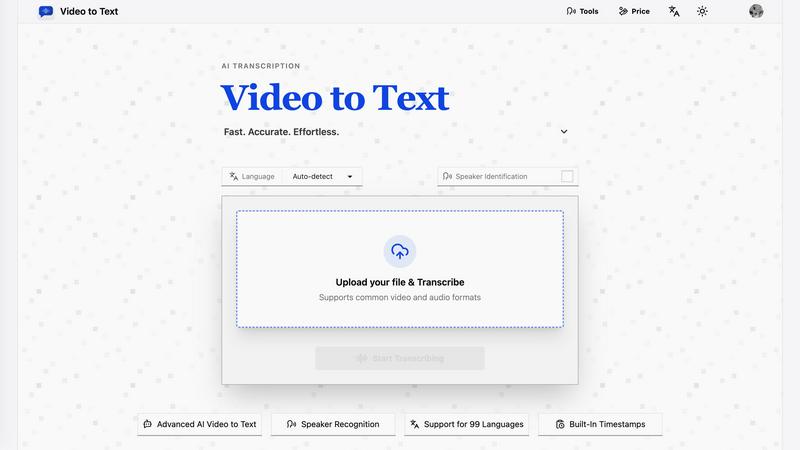
This isn't your basic, one-trick-pony translator. Video to Text's AI is fluent in 99 languages, from global powerhouses like English and Spanish to niche dialects. It even auto-detects the language for you, so you don't have to guess. Got a recording with multiple languages mixed in? No sweat. The multi-language recognition feature handles that chaos like a pro, making it perfect for international interviews, diverse team meetings, or global content.
Speaker-Aware Diarization
Trying to figure out "who said what" in a group recording is a nightmare. Our speaker diarization feature cuts through the noise, intelligently identifying and labeling each unique speaker in your file. It transforms a confusing audio blob into a clear, organized conversation transcript. This is a game-changer for interviewers, journalists, and anyone dealing with multi-person calls or panels, making review and quoting a total breeze.
Built-In Timestamps for Precision
Every transcribed word comes with a precise timestamp. This isn't just a nice-to-have; it's essential for serious video editors, content creators, and researchers. Need to jump straight to a specific quote in a 2-hour interview? Done. Creating subtitles (SRT/VTT files) for your YouTube video? The timestamps are baked right in. It adds a layer of searchability and editability that turns a static transcript into a dynamic, interactive tool.
Flexible Export & Format Freedom
Your workflow, your rules. Video to Text doesn't lock you into one format. Once your transcript is ready, export it exactly how you need it: as a clean TXT file for notes, a structured CSV for data analysis, or as ready-to-burn SRT/VTT subtitle files for your videos. It supports all the common video (MP4, MOV, MKV) and audio (MP3, WAV, M4A) formats, so you can upload straight from your camera, phone, or editing suite without conversion hassles.
Use Cases
The Ultimate Piano
The Bedroom Producer's Sketchpad
Got a fire melody in your head at 2 AM? Boot up Ultimate Piano, connect your MIDI keyboard, and capture it instantly with the built-in MIDI recorder. Use the chord explorer to find the perfect harmonic vibe and the audio player to jam over a beat. It's the fastest way to go from idea to a downloadable MIDI file, no massive DAW required.
The Music Student's Theory Gym
Struggling to connect scales to the actual keyboard? Visualize them in real-time with the Scale Trainer. Need to train your ears for that upcoming exam? Hit the dedicated ear training module for intervals and chords. Watch your own playing appear on a grand staff in the sheet music display, turning abstract theory into tangible, playable knowledge.
The Cover Artist's Learning Lab
Want to learn that insane piano solo from a YouTube video? Paste the link into the YouTube Player, slow it down without changing the pitch, and loop the hardest four bars. The falling notes from a loaded MIDI file of the song act as your personal guide, lighting up the keys so you can follow along and nail every single note.
The Teacher's Interactive Toolkit
Make lessons engaging and fun. For kids, switch on Kids Mode with adorable animal icons on the keys. For any student, demonstrate chords and scales with instant visualization, record their practice for review, and assign songs via MIDI files. It's a dynamic, all-in-one teaching aid that works in-person or remotely.
Video to Text
Content Creator's Caption Engine
YouTubers, course creators, and social media gurus, listen up. Stop leaving your audience in the silent scroll. Upload your video, and in minutes, you've got perfectly timed SRT or VTT subtitle files. This boosts accessibility, SEO, and watch time like crazy. Repurpose that audio into blog posts, show notes, or quotes for promo graphics without typing a single word yourself. It's the ultimate content multiplier.
Meeting & Interview Alchemist
Turn endless, rambling meetings and interviews into searchable, actionable gold. Upload the recording of your Zoom call, webinar, or journalist interview. Video to Text spits out a clear transcript with speakers identified, so you can easily extract key decisions, action items, and killer quotes. No more frantic note-taking. Just share the transcript with your team or use it to write a flawless summary.
Academic & Learning Accelerator
Students and researchers, this is your study hack. Upload recorded lectures, online lessons, or research interviews. Now you have a text-based study guide you can search, highlight, and annotate. It's perfect for non-native speakers to follow along or for anyone who absorbs information better by reading. Transform hours of spoken material into a compact, reviewable resource in seconds.
Team Documentation Dynamo
For remote teams, freelancers, and agencies, clear documentation is everything. Use Video to Text to transcribe client calls, brainstorming sessions, or feedback recordings. It creates a single source of truth that's easily shareable and referenceable, eliminating "he said/she said" confusion and ensuring everyone is aligned. It's like giving your team's collective memory a massive upgrade.
Overview
About The Ultimate Piano
Forget clunky downloads and boring practice routines. The Ultimate Piano is your all-access pass to leveling up your music game, straight from your browser. This isn't just another virtual keyboard; it's a full-blown, dojo for pianists and producers who want to shred, learn, and create without limits. Whether you're a total newbie trying to decode your first chord or a seasoned player looking to dissect a complex solo, this platform has your back. Connect your MIDI controller, plug in your headphones, and dive into a world where real-time chord detection spells out the magic you're making, a scale trainer drills your technique, and an ear training module fine-tunes your musical intuition. Practice alongside your favorite tracks or YouTube tutorials, watch notes fall in real-time from MIDI files, and capture every moment of genius with the built-in recorder. It’s the ultimate fusion of music theory visualization and hands-on, gritty practice—all wrapped in a sleek, customizable interface that works anywhere, anytime. No excuses, just progress.
About Video to Text
Stop wasting hours manually transcribing. Video to Text is the AI-powered transcription beast that instantly converts your video and audio files into clean, exportable text. It's built for creators, teams, and solo hustlers who need fast, accurate speech-to-text without the headache of building their own complex pipeline. Think of it as your digital scribe on steroids. Just upload your file, kick back, and let the advanced AI work its magic. It handles everything from speaker identification to nailing timestamps, delivering a polished transcript ready for your workflow. Whether you're a podcaster drowning in raw audio, a marketer repurposing content, or a student trying to decode a lecture, this tool is your secret weapon for turning spoken gold into written treasure. The value proposition is simple: insane accuracy, support for a ton of languages and formats, and a pay-as-you-go model that doesn't lock you into a subscription. Get your ideas out of the cloud and onto the page, effortlessly.
Frequently Asked Questions
The Ultimate Piano FAQ
Do I need to install anything to use Ultimate Piano?
Nope, zero installs. It's a 100% browser-based tool. Just head to the website, and you're ready to play. Whether you're on a laptop, tablet, or phone, you get instant access to the full piano and all its features without downloading a single megabyte of software.
Can I connect my real MIDI keyboard?
Absolutely! This tool is built for it. Plug your MIDI keyboard in via USB, give the browser permission, and you're set. You'll get the authentic weighted-key feel controlling the premium piano sounds, and you can even connect a sustain pedal for full expressive control, just like a real piano.
What chords and scales can I learn?
You get the full spectrum. The chord detection works in real-time for whatever you play. The scale library includes all the essentials (major, minor, pentatonic) and advanced types (like blues, harmonic minor, and modes)—over 14 types in total. Select any root and type, and it's instantly visualized on the keyboard for practice.
Can I practice along with my own songs?
For sure! Use the Audio Player to upload any MP3 from your computer, or use the YouTube Player to paste in a link to any tutorial or song. You can slow down the playback, loop specific sections, and practice at your own tempo while the tool helps you figure out the key and timing.
Video to Text FAQ
What is Video to Text?
Video to Text is your AI-powered transcription sidekick. It's a web-based tool that uses cutting-edge artificial intelligence to automatically convert your video and audio files into accurate, editable text, complete with speaker labels and timestamps. It's designed to be fast, accurate, and ridiculously easy to use, eliminating the need for manual typing or expensive human transcription services.
What file formats do you support?
We support all the major players to fit right into your workflow. For video, we handle MP4, MOV, MKV, WEBM, and M4V. For audio, we take MP3, WAV, M4A, FLAC, OGG, AAC, and OPUS. Basically, if you can record it or export it, chances are we can transcribe it without you needing to convert it first.
How accurate is the transcription?
Our AI is built for high-accuracy transcription, leveraging state-of-the-art speech recognition models. Accuracy is top-tier for clear audio with standard accents and can handle a variety of dialects and specialized vocabulary. For the best results, ensure your recording has clear speech and minimal background noise. You also get 30 free minutes as a new user to test the accuracy for yourself.
How do I get my transcript?
The process is stupidly simple. First, upload your file to our platform. Second, select your language (or use auto-detect) and let our AI engine process the audio. Once it's done, you'll be presented with the full transcript in our online editor. Finally, you can download it directly in your preferred format: plain text (TXT), subtitles (SRT/VTT), or a spreadsheet (CSV). That's it. No complicated software, no waiting days.
Alternatives
The Ultimate Piano Alternatives
The Ultimate Piano is that slick, browser-based practice pad for keyboard warriors and music learners. It lives in the digital dojo of online music tools and learning apps, letting you jam with MIDI, crush scales, and train your ears without any clunky downloads. It's for the pianist who wants everything in one tab. But let's keep it a buck, no single app is everyone's vibe. Maybe the price tag doesn't sing to your wallet, or you're craving features it doesn't drop. Perhaps you need a dedicated mobile app, a different teaching style, or just want to shop the scene before you commit. It's all valid. When you're scouting for other options, think about your non-negotiables. Do you need robust MIDI support or are you just keyboard mashing? Is deep music theory or just fun, instant play more your tempo? Always check the platform compatibility, the learning curve, and if the value slaps for the features you actually need.
Video to Text Alternatives
Video to Text is your go-to AI sidekick in the Audio & Music and Video space, slinging clean transcripts from any video or audio file in minutes. It’s the no-fuss, high-accuracy engine for creators and teams who need to turn talk into text, fast. But let’s keep it real—sometimes you gotta shop around. Maybe the pricing doesn’t vibe with your budget, or you need a specific feature it doesn’t have. Perhaps you’re locked into a different platform ecosystem or just want to see what else is cooking in the transcription world. When you’re scoping out other options, don’t just chase the shiny object. Peep the accuracy, especially with accents or background noise. Check the processing speed and if it handles your favorite file types. Security is key—your content is yours. And finally, see if the workflow and export options actually fit into your grind, or if it’s just another clunky tool.