Lobster Sauce vs SVG to 3D
Side-by-side comparison to help you choose the right AI tool.

Lobster Sauce
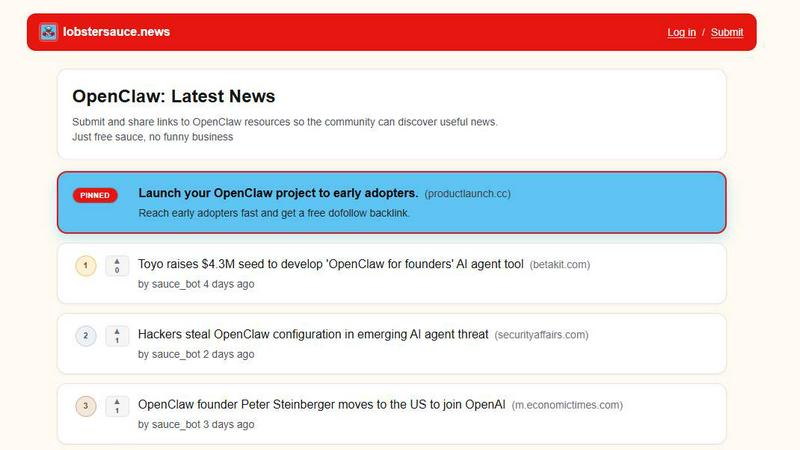
Lobster Sauce serves up the freshest community-driven news on OpenClaw, keeping you in the loop and hooked on the latest updates.
Last updated: March 19, 2026

SVG to 3D
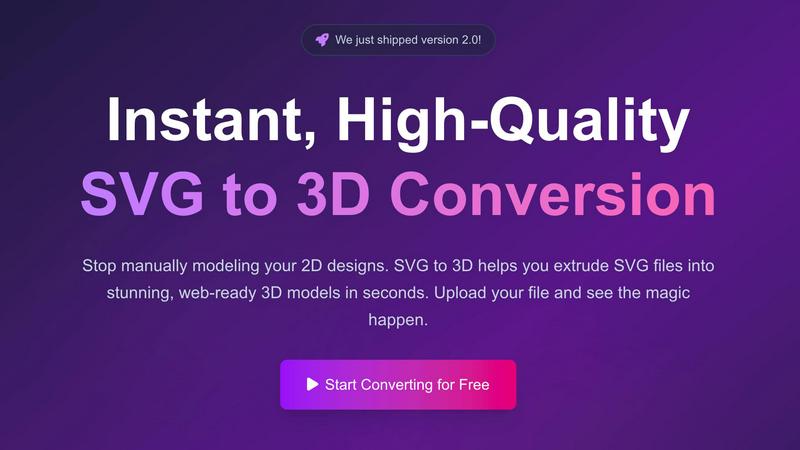
Easily transform your 2D SVG designs into stunning, web-ready 3D models in seconds with SVG to 3D's advanced tools.
Last updated: February 26, 2026
Visual Comparison
Lobster Sauce
SVG to 3D
Feature Comparison
Lobster Sauce
Curated News Feed
Lobster Sauce provides a meticulously curated news feed that aggregates the latest updates from various sources within the OpenClaw ecosystem. No more sifting through irrelevant information; every story is handpicked to ensure you get only the most valuable insights.
Community Upvotes
Engage with the community through a unique upvoting system that allows users to elevate the most relevant and intriguing stories. This ensures that the most important news rises to the top, making it easy for you to stay informed about what truly matters.
Direct Source Links
Each news item in your feed comes with a direct link to the original source, allowing you to dive deeper into the topic if you want more details. No more guessing games about where the information came from; it’s all right there!
Automatic Updates
Lobster Sauce continually monitors various platforms for new content related to OpenClaw, ensuring that you receive updates in real-time. This feature keeps you in the loop without the hassle of manually refreshing pages or searching for news.
SVG to 3D
One-Click to GLB for the Web
Exporting your designs has never been easier. With just one click, you can generate lightweight, web-ready GLB files that are perfect for Three.js or React Three Fiber projects. This feature is a dream for web developers, allowing you to add that extra 3D flair to your websites without the usual headaches.
3D-Print Ready
Don’t just stop at digital; take your creations into the physical world! SVG to 3D supports clean STL exports, ensuring that your designs are fully optimized for 3D printing. This means you can turn your logos, art, and custom parts into tangible objects without needing complex CAD software.
Modeling in the Browser
Why limit yourself to simple extrusion? Our browser-based tool allows you to adjust thickness, add complex bevels, and apply realistic PBR materials right before your eyes. You can see all adjustments in real-time, making the modeling process intuitive and engaging.
Developer-Friendly Exports
Flexibility is key, and SVG to 3D has got you covered. Export your models in multiple formats such as GLB, GLTF, OBJ, and STL, all while ensuring clean and optimized geometry. This feature guarantees seamless integration with popular 3D frameworks and engines, making it easier than ever to incorporate your designs into various applications.
Use Cases
Lobster Sauce
Tracking Security Advisories
As a developer or tech enthusiast, you can use Lobster Sauce to keep a close eye on critical security advisories affecting OpenClaw. Get timely alerts and updates directly to your feed, ensuring you never miss important information that could impact your work.
Discovering New Integrations
If you're interested in the latest product integrations related to OpenClaw, Lobster Sauce serves as your go-to source. It aggregates news about new partnerships and integrations, helping you stay ahead of the curve and leverage new tools effectively.
Monitoring Funding News
Investors and entrepreneurs can utilize Lobster Sauce to track funding news within the OpenClaw community. With instant access to the latest funding rounds and acquisitions, you can identify emerging opportunities and trends quickly.
Exploring Open-Source Tools
For those keen on open-source development, Lobster Sauce highlights trending open-source tools within the OpenClaw ecosystem. Discover new resources and tools that can enhance your projects and contribute to your learning.
SVG to 3D
Create Interactive 3D Logos and Icons for Web
Elevate your online presence and impress your audience by converting SVG icons into interactive 3D models. With SVG to 3D, you can create eye-catching visuals that enhance user experience and engagement on your websites.
Transform 2D Designs into Physical Objects
Bring your digital creations into the real world through 3D printing. Our tool streamlines the process by allowing users to convert SVG files into STL format, making it easy to fabricate everything from art pieces to custom parts without the need for cumbersome software.
Enhance UI/UX Presentations
Make your designs pop with depth and realism by using SVG to 3D for UI/UX mockups. You can quickly transform flat designs into engaging 3D models that impress clients and stakeholders, showcasing your creative vision in an innovative way.
Rapid Prototyping for Designers
Speed up your design process by using SVG to 3D for rapid prototyping. Whether you’re working on branding, product designs, or interactive elements, you can quickly generate and iterate on 3D models, allowing for more efficient workflows and timely project deliveries.
Overview
About Lobster Sauce
Tired of juggling a dozen browser tabs every morning just to stay in the loop? Enter Lobster Sauce, your new best friend and ultimate news companion. This dedicated, single-feed news aggregator is tailor-made for the vibrant OpenClaw community. Imagine it as your personal news chef, whipping up a delectable platter of everything that matters in the OpenClaw ecosystem. Gone are the days of manually checking multiple sources like official blogs, GitHub, Hacker News, and social media. Lobster Sauce automatically pulls in updates, filters out the noise, and serves you only the juiciest, high-signal stories right to your feed. Each item comes with clear summaries, direct links to sources, and community upvotes to ensure the most essential and interesting content rises to the top. Whether you're tracking critical security advisories, the latest product integrations, funding news, or trending open-source tools, Lobster Sauce delivers the full picture in one simple, scrollable feed. Save time and mental energy; focus on building, learning, and engaging with the community that matters.
About SVG to 3D
Welcome to SVG to 3D, the ultimate game-changer for designers and developers looking to elevate their creative projects! This innovative tool takes your 2D SVG vector graphics and transforms them into stunning, high-quality 3D models in a flash. Say goodbye to the hassle of heavyweight software like Blender or C4D just to extrude a logo or icon. Our solution is tailored for web developers, designers, and 3D printing enthusiasts who crave speed and efficiency without sacrificing quality. With SVG to 3D, you can upload your SVG files, fine-tune every detail with a few clicks, and download them as web-optimized formats, ready to rock your projects. Whether it’s for interactive web designs, 3D printing, or UI/UX presentations, SVG to 3D is here to streamline your workflow and unleash your creativity.
Frequently Asked Questions
Lobster Sauce FAQ
What makes Lobster Sauce different from other news aggregators?
Lobster Sauce is specifically designed for the OpenClaw community, providing a focused and curated feed that filters out noise to deliver high-signal stories relevant to its users.
How does the community upvote feature work?
Community members can upvote stories they find important or interesting. The more upvotes a story receives, the higher it rises in your feed, ensuring you see the most relevant content first.
Can I submit my own links to Lobster Sauce?
Absolutely! Users are encouraged to submit and share links to OpenClaw resources, fostering a collaborative environment where the community can discover useful news together.
Is Lobster Sauce free to use?
Yes! Lobster Sauce is completely free, offering users a streamlined experience without any hidden fees or subscriptions. Just free sauce, no funny business.
SVG to 3D FAQ
How do I convert my SVG file to 3D?
To convert your SVG file, simply upload it to the SVG to 3D tool. From there, you can adjust the 3D settings such as thickness and bevels, and preview the changes in real-time. Once satisfied, download your model in your desired format.
What file formats can I export my 3D model to?
SVG to 3D allows you to export your models in multiple formats, including GLB, GLTF, OBJ, and STL. This flexibility ensures that your designs can be used in various applications, whether for web development or 3D printing.
Is there a limit on the file size I can upload?
Yes, you can upload SVG files up to a maximum size of 5 MB. This limit ensures optimal processing speed and performance while maintaining high-quality output for your 3D models.
Is my data secure when using SVG to 3D?
Absolutely! Your files are processed locally in your browser when possible, meaning your designs remain private and secure. We prioritize your privacy and do not upload your files to external servers, safeguarding your creative work.
Alternatives
Lobster Sauce Alternatives
Lobster Sauce is a cutting-edge news aggregator tailored for the OpenClaw community, designed to streamline your daily updates into one vibrant feed. With so much happening in the tech world, users often seek alternatives to meet their unique needs—be it for budget constraints, specific feature sets, or compatibility with various platforms. The quest for an alternative usually boils down to finding a solution that aligns with personal preferences and offers a seamless experience in staying informed. When hunting for an alternative, consider the user experience, the depth of content curation, and the ability to filter out the noise while highlighting essential updates. Look for features that enhance engagement, like community interaction and upvoting, ensuring the most relevant stories float to the top. A solid alternative should keep you in the loop without overwhelming your senses, allowing you to focus on what really matters.
SVG to 3D Alternatives
SVG to 3D is a cutting-edge tool that transforms your 2D designs into stunning 3D models, revolutionizing how designers and developers approach graphics. As part of the AI Assistants category, it tackles the hassle of using heavyweight software like Blender or C4D, making 3D modeling accessible and efficient for everyone. Users often seek alternatives due to factors like pricing, specific feature sets, or compatibility with their existing platforms. When searching for an alternative, consider the ease of use, export options, and how well it integrates with your workflow. The ideal solution should not only meet your technical needs but also enhance your creative process.