Imgezy vs Pixel Art Village
Side-by-side comparison to help you choose the right AI tool.

Imgezy
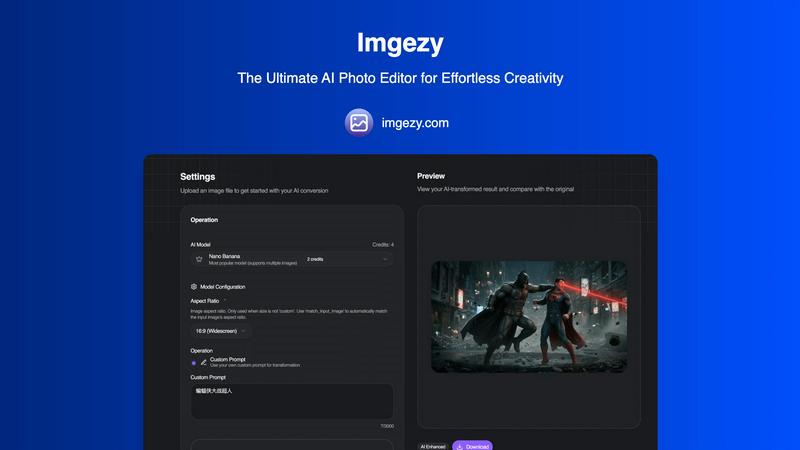
Transform your photos effortlessly with Imgezy, the AI tool that removes objects and changes backgrounds in seconds.
Last updated: February 26, 2026

Pixel Art Village
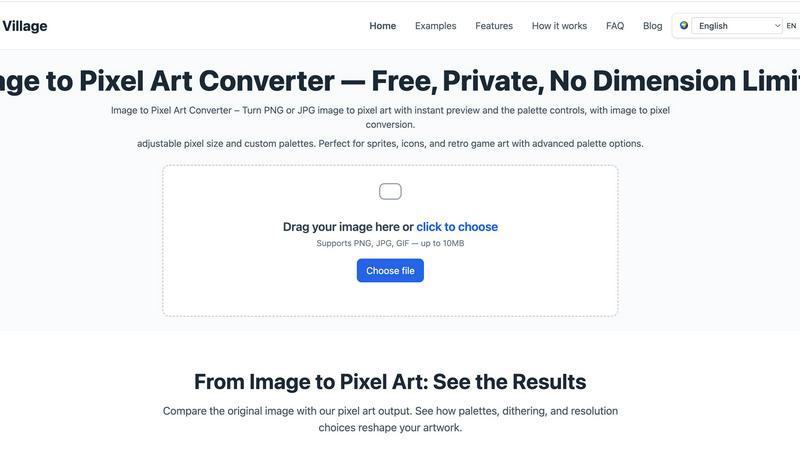
Transform your pics into retro pixel art masterpieces with live preview and total creative control, all in your browser.
Last updated: March 18, 2026
Visual Comparison
Imgezy
Pixel Art Village
Feature Comparison
Imgezy
Object Removal
Imgezy's object removal feature is like having a magic wand at your fingertips. Whether it's a photobomber sneaking into your shot or a stray power line ruining your perfect landscape, Imgezy uses cutting-edge AI to identify and eliminate unwanted elements seamlessly. The advanced algorithms reconstruct the background with pixel-perfect accuracy, ensuring your image remains flawless and untouched. Say goodbye to distractions and hello to pristine visuals!
Background Replacement
Why settle for ordinary backgrounds when you can have extraordinary? With Imgezy’s background replacement feature, you can instantly change the scenery of your photos. Whether you want to swap a dull backdrop for a vibrant beach or add a dreamy sunset, this tool makes it as simple as typing your request. The AI processes the changes in seconds, giving your images a fresh new look that’s sure to impress.
Photo Enhancement
Elevate your photos from good to breathtaking with Imgezy’s photo enhancement capabilities. This feature automatically adjusts colors, lighting, and sharpness, making your images pop like never before. You don’t need to be a photo editing expert; just upload your picture and watch as Imgezy turns it into a masterpiece with vibrant details and stunning clarity. Your shots are about to become Instagram-ready in no time!
Batch Processing
Time is money, and Imgezy knows it. With the batch processing feature, you can edit multiple photos at once, saving you a ton of time on projects. Whether you're prepping images for a product launch or curating a social media feed, this tool allows you to apply edits to numerous files simultaneously. It’s efficiency at its finest, ensuring you can focus on what truly matters—your creativity.
Pixel Art Village
Browser-Based & Private Processing
Your images go nowhere. Zero uploads, zero cloud storage, zero chance of your data being snooped. All the heavy computational lifting happens locally on your device inside your browser. This means blazing-fast conversions and ironclad privacy. You can pixelate that top-secret project sprite or your personal photos with absolute confidence that they're staying put.
Live Preview & Pixel Size Control
See your masterpiece evolve in real-time. The live preview window is your crystal ball, showing exactly how your image transforms with every adjustment. Dial the pixel size up for a chunky, abstract vibe or down for finer, more detailed artwork. This instant feedback loop lets you experiment fearlessly and nail the perfect look without any annoying guesswork or waiting.
Customizable & Curated Color Palettes
Ditch the bland, auto-generated colors. Take full command of your palette with advanced color management. Choose from a selection of curated retro palettes for instant authenticity, or go full artiste and customize every single hue. Reduce colors to get that true limited-palette, classic console feel, or tweak them to match your project's specific vibe perfectly.
Dedicated Workflow Tools
It's not a one-trick pony. Beyond the main editor, Pixel Art Village offers specialized tools for specific jobs. Jump directly to optimized converters for photos, PNGs, JPGs, GIFs, sprites, and 8-bit graphics. This streamlined approach cuts out the clutter and gets you from idea to perfect pixel asset in record time, making it a versatile hub for all things pixelated.
Use Cases
Imgezy
Social Media Creators
If you’re a social media creator looking to craft the perfect feed, Imgezy is your best friend. With its fast and effortless editing capabilities, you can enhance your photos, remove unwanted distractions, and swap backgrounds to align with your aesthetic—all in a snap. Your followers will be amazed at your professional-looking images, and you’ll have more time to create engaging content.
E-commerce Sellers
For e-commerce sellers, product photography can make or break a sale. Imgezy allows you to present your products in the best light possible. Remove blemishes, swap out backgrounds for a clean, professional look, and enhance colors to make your items pop. With Imgezy, you can produce high-quality images that attract buyers and drive sales, all without the hassle of traditional editing software.
Event Planners
Are you an event planner capturing precious moments at weddings or parties? Imgezy has your back! Use it to remove unwanted guests from your photos or change backgrounds to enhance the setting. Make every image a timeless memory that reflects the beauty of the occasion, allowing you to showcase your planning skills through stunning visuals.
Everyday Users
Not a professional? No problem! Imgezy is designed for everyday users who want to enhance their personal photos. Whether it's a vacation snapshot or a family gathering, you can easily remove unwanted elements and improve the overall quality of your images. With Imgezy, everyone can be a photo editing pro, making sure every memory is picture-perfect.
Pixel Art Village
Indie Game Development
Forge the heart and soul of your indie game. Rapidly prototype and create character sprites, environment tiles, explosive effects, and iconic items. The ability to tweak pixel size and palettes on the fly makes it perfect for establishing a consistent and captivating retro visual style that makes your game stand out in a crowded marketplace.
Digital Art & Social Media Content
Make your social feeds pop with unique, eye-catching pixel art. Transform your photos into shareable artwork, create custom pixel portraits, or design avatars and banners with a nostalgic twist. It’s the perfect tool for artists and content creators looking to add a layer of edgy, retro-futuristic flair to their online presence.
Icon & Asset Design for Designers
UI/UX and graphic designers, listen up. Craft perfectly pixelated icons, logos, and interface elements for websites, apps, or presentations. The precision control ensures your assets are crisp at any size, while the custom palettes let you match your client's brand guidelines or personal design system with pinpoint accuracy.
Education & Creative Hobby Projects
A fantastic gateway into the world of digital art and game design fundamentals. Students and hobbyists can learn about color theory, resolution, and art styles by playing with real-time conversions. It's an engaging, low-barrier tool for school projects, DIY crafts, or just having fun transforming everyday images into something magical and pixelated.
Overview
About Imgezy
Imgezy is a revolutionary AI-powered photo editor that redefines the way we think about image editing. Gone are the days of wrestling with complex software and intricate tools. Imgezy empowers users—whether you're a budding social media influencer, an e-commerce entrepreneur, or simply someone looking to enhance personal memories—to create stunning visuals with unparalleled ease. Just type in what you want, and let the advanced AI do the heavy lifting. With features designed to remove distractions, swap backgrounds, and enhance images, Imgezy delivers pro-quality results in seconds. It's perfect for anyone who craves creativity without the technical headache and is here to transform your photos into visual masterpieces. Join over 200,000 satisfied users who have already discovered the magic of Imgezy, and unleash your inner artist today.
About Pixel Art Village
Welcome to the digital atelier where your photos get a radical retro reboot. Pixel Art Village isn't just another filter; it's a full-blown, browser-based pixel forge. This powerhouse tool lets you instantly transmute your standard PNGs and JPGs into crispy, authentic pixel art. Forget clunky software or sketchy uploads—everything happens right in your browser, on your machine. Your images never leave your device, making privacy and speed its default superpowers. Whether you're a game dev crafting the next indie hit, a designer hunting for that perfect 8-bit aesthetic, or just an art enthusiast wanting to vaporwave your vacation pics, this is your command center. With sliders for pixel size, a whole arsenal of customizable color palettes, and a live preview that updates as you tweak, you have total creative dominion. It’s the ultimate tool for generating sprites, icons, and visual assets that scream retro cool without the archaic workflow.
Frequently Asked Questions
Imgezy FAQ
How does Imgezy work?
Imgezy uses advanced AI technology to simplify photo editing. You simply upload your image, describe the desired edits in plain English, and the AI processes your request, delivering professional-quality results within seconds.
Do I need any photo editing skills to use Imgezy?
Absolutely not! Imgezy is designed for everyone, regardless of skill level. Just type what you want to change, and let the AI handle the rest. It’s that easy!
What file formats does Imgezy support?
Imgezy supports all major image formats, including JPG, PNG, and WebP. You can easily drag and drop your files or select them from your device to get started.
Is there a limit on how many images I can edit?
Yes, depending on your chosen pricing plan, there will be a monthly credit limit on how many images you can edit. However, Imgezy offers different plans that cater to various needs, ensuring you can find one that fits your editing requirements.
Pixel Art Village FAQ
Is my image data kept private?
Absolutely, 100%. Pixel Art Village runs entirely in your browser. Your image file is processed locally on your computer or phone and is never uploaded to any server. Once you close the tab, the data is gone. Your privacy is the core architecture, not an afterthought.
What image formats does it support?
The tool is built to handle the most common formats. You can drag and drop or upload PNG, JPG, and GIF files. There's a size limit (up to 10MB) to ensure the browser-based processing remains swift and smooth, so your workflow never hits a lag spike.
Do I need to install any software?
Nope, zero installation required. Pixel Art Village is a web app that works directly in your modern browser (like Chrome, Firefox, or Edge). Just navigate to the site and start pixelating. It's all about instant access and no commitment.
Is Pixel Art Village really free to use?
Yes, the core image-to-pixel-art conversion tool is completely free to use with all its main features—live preview, pixel sizing, and palette customization. The site may use cookies for operation and, if enabled, to display ads, which you can manage or reject at any time.
Alternatives
Imgezy Alternatives
Imgezy is your go-to AI photo editor that revolutionizes the way you handle image editing, allowing users to remove objects and swap backgrounds with a wave of digital magic. It belongs to the image and photo category, specifically designed for creators who crave pro-level edits without the learning curve. Users often seek alternatives due to factors like pricing, specific feature sets, or compatibility with their preferred platforms. When on the hunt for an alternative, it's crucial to consider usability, the range of features offered, and how well the tool aligns with your editing needs and style. In a world where visual storytelling reigns supreme, finding the right photo editing tool can make or break your creative flow. Whether you're a social media maven or an e-commerce aficionado, the perfect alternative should empower you to express your vision effortlessly. Look for intuitive interfaces, advanced AI capabilities, and flexible usage options that cater to your unique editing requirements and help you unleash your inner creative genius.
Pixel Art Village Alternatives
Pixel Art Village is your go-to browser-based wizard for transforming any image into crisp, retro pixel art. It lives in the image-to-pixel-art converter category, a digital workshop for game devs and artists craving that classic 8-bit vibe. It’s the tool you hit when you need instant magic without the upload anxiety. But let's keep it a buck—no single app rules them all. People hunt for alternatives for all kinds of reasons. Maybe they need a desktop powerhouse, a different price tag, or a feature set that hits different. It’s all about matching the tool to your specific creative grind and workflow demands. When you're scoping out other options, you gotta know what's non-negotiable. Peep the core specs: does it process locally to keep your art secure? Can you tweak pixel size and crush the color palette? Nail down what you need, and you’ll find your perfect pixel-perfect sidekick.