Funboxie vs Pixel Art Village
Side-by-side comparison to help you choose the right AI tool.

Funboxie
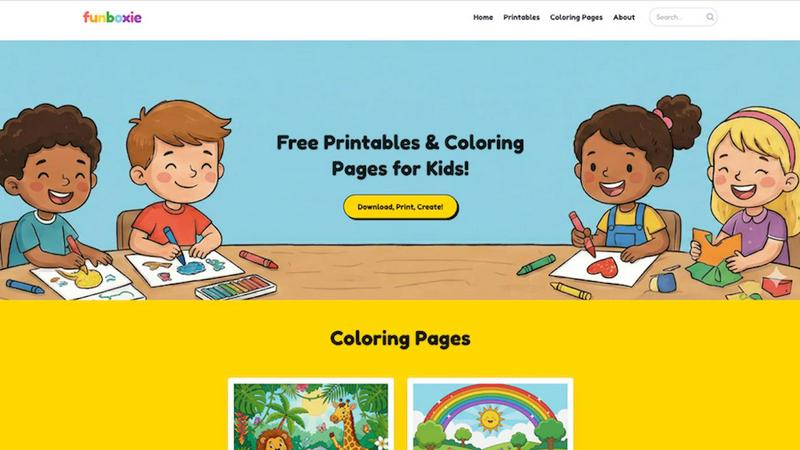
Unlock endless creative vibes with Funboxie's totally free, print-ready coloring pages and crafts for kids.
Last updated: March 18, 2026

Pixel Art Village
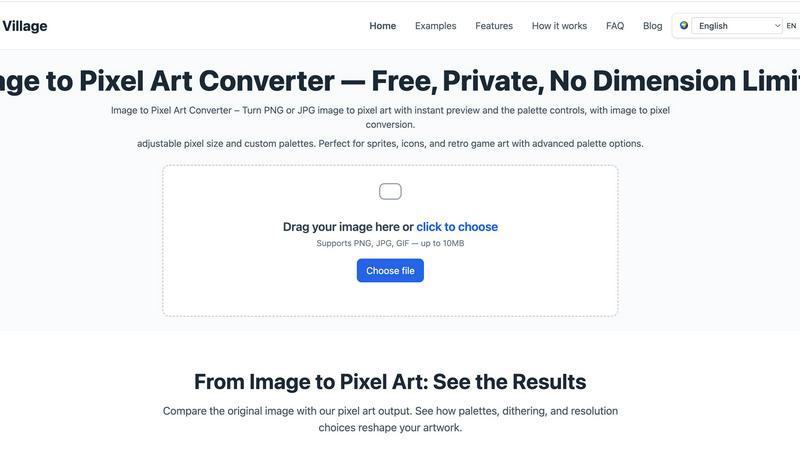
Transform your pics into retro pixel art masterpieces with live preview and total creative control, all in your browser.
Last updated: March 18, 2026
Visual Comparison
Funboxie
Pixel Art Village
Feature Comparison
Funboxie
The Forever-Free Vault
This isn't a trial. This is the real deal. Every single coloring page, worksheet, and craft template in our massive library is 100% free to download and print, forever. No hidden subscriptions, no "premium" paywalls, and no limits on how much you can grab. We believe top-tier creative and educational resources should be accessible to every kid, parent, and teacher, no questions asked and no credit card required.
Print-Ready, No-Fuss Files
We've done the techy stuff so you don't have to. Every single design on Funboxie is pre-optimized for standard home printers. Just hit download, send it to your printer, and get perfect results every time with clean lines, proper margins, and crisp letter-sized pages. No weird cropping, no pixelated junk. It's plug-and-play creativity, designed for maximum impact with minimal effort.
The Constantly Evolving Library
Static is boring. Our collection is alive and kicking, with fresh drops hitting the site every single week. From seasonal themes like Pesach and Women's History Month to the latest pop-culture crazes like Poppy Playtime and Monster Jam, we're always adding new heat. This means there's always something new to discover, keeping the creative spark lit and kids coming back for more.
Edu-Tainment Engine
This is where fun meets fundamentals. Beyond just coloring, our worksheets are stealth learning tools crafted with educational value. Think alphabet tracing, number skills, reading comprehension, and kindergarten readiness activities all disguised as engaging play. We support cognitive development and fine motor skills, turning screen time into dream time with paper and crayons.
Pixel Art Village
Browser-Based & Private Processing
Your images go nowhere. Zero uploads, zero cloud storage, zero chance of your data being snooped. All the heavy computational lifting happens locally on your device inside your browser. This means blazing-fast conversions and ironclad privacy. You can pixelate that top-secret project sprite or your personal photos with absolute confidence that they're staying put.
Live Preview & Pixel Size Control
See your masterpiece evolve in real-time. The live preview window is your crystal ball, showing exactly how your image transforms with every adjustment. Dial the pixel size up for a chunky, abstract vibe or down for finer, more detailed artwork. This instant feedback loop lets you experiment fearlessly and nail the perfect look without any annoying guesswork or waiting.
Customizable & Curated Color Palettes
Ditch the bland, auto-generated colors. Take full command of your palette with advanced color management. Choose from a selection of curated retro palettes for instant authenticity, or go full artiste and customize every single hue. Reduce colors to get that true limited-palette, classic console feel, or tweak them to match your project's specific vibe perfectly.
Dedicated Workflow Tools
It's not a one-trick pony. Beyond the main editor, Pixel Art Village offers specialized tools for specific jobs. Jump directly to optimized converters for photos, PNGs, JPGs, GIFs, sprites, and 8-bit graphics. This streamlined approach cuts out the clutter and gets you from idea to perfect pixel asset in record time, making it a versatile hub for all things pixelated.
Use Cases
Funboxie
The Rainy Day Rescue Mission
When weather ruins outdoor plans and "I'm bored" becomes the soundtrack of your day, Funboxie is your emergency broadcast system. Dive into the library, print out a stack of new animal coloring pages or an intricate ocean scene, and watch chaos transform into focused, quiet creation. Instant activity, zero cleanup, total parent win.
Classroom & Homeschool HQ
Teachers and homeschooling warriors, this is your resource depot. Source engaging, curriculum-adjacent worksheets for math practice, literacy skills, or thematic units (hello, Women's History Month!). Print coloring pages for art class, fine motor development, or as a rewarding brain break. It's a limitless supply of supplemental material that doesn't blow your budget.
The Personalized Party Starter
Birthdays, playdates, or just because? Level up the fun with personalized activities. Use our templates to create custom name coloring pages for the guest of honor, or print themed packs (dinosaurs, princesses, sports) to serve as both entertainment and party favors. It adds a unique, thoughtful touch that store-bought kits can't match.
Skill-Building On The Sly
Tackle learning hurdles with a side of fun. Use our tracing worksheets to help a kiddo struggling with letter formation, or our number pages to reinforce counting. The engaging designs lower frustration barriers, making practice feel like play. It's targeted skill development disguised as a colorful good time.
Pixel Art Village
Indie Game Development
Forge the heart and soul of your indie game. Rapidly prototype and create character sprites, environment tiles, explosive effects, and iconic items. The ability to tweak pixel size and palettes on the fly makes it perfect for establishing a consistent and captivating retro visual style that makes your game stand out in a crowded marketplace.
Digital Art & Social Media Content
Make your social feeds pop with unique, eye-catching pixel art. Transform your photos into shareable artwork, create custom pixel portraits, or design avatars and banners with a nostalgic twist. It’s the perfect tool for artists and content creators looking to add a layer of edgy, retro-futuristic flair to their online presence.
Icon & Asset Design for Designers
UI/UX and graphic designers, listen up. Craft perfectly pixelated icons, logos, and interface elements for websites, apps, or presentations. The precision control ensures your assets are crisp at any size, while the custom palettes let you match your client's brand guidelines or personal design system with pinpoint accuracy.
Education & Creative Hobby Projects
A fantastic gateway into the world of digital art and game design fundamentals. Students and hobbyists can learn about color theory, resolution, and art styles by playing with real-time conversions. It's an engaging, low-barrier tool for school projects, DIY crafts, or just having fun transforming everyday images into something magical and pixelated.
Overview
About Funboxie
Forget the subscription traps and the endless toy aisles. Funboxie is the ultimate, no-cost creative arsenal for the modern parent, teacher, or anyone wrangling a kid with energy to burn. This is your digital treasure trove, packed to the brim with thousands of free, print-ready activities designed to spark imagination and shut down boredom on demand. We're talking a constantly refreshed library of killer coloring pages featuring everything from epic Naruto scenes to adorable Super Kitties, plus next-level worksheets and craft templates that actually make learning feel like a win. Whether you're prepping a classroom, surviving a rainy afternoon, or just need a quiet moment, Funboxie delivers premium-quality, educator-approved content straight to your printer. Zero fees. Zero sign-ups. Just pure, unadulterated creative fuel for young minds, ready to download and unleash at a moment's notice. Your secret weapon for childhood engagement is here.
About Pixel Art Village
Welcome to the digital atelier where your photos get a radical retro reboot. Pixel Art Village isn't just another filter; it's a full-blown, browser-based pixel forge. This powerhouse tool lets you instantly transmute your standard PNGs and JPGs into crispy, authentic pixel art. Forget clunky software or sketchy uploads—everything happens right in your browser, on your machine. Your images never leave your device, making privacy and speed its default superpowers. Whether you're a game dev crafting the next indie hit, a designer hunting for that perfect 8-bit aesthetic, or just an art enthusiast wanting to vaporwave your vacation pics, this is your command center. With sliders for pixel size, a whole arsenal of customizable color palettes, and a live preview that updates as you tweak, you have total creative dominion. It’s the ultimate tool for generating sprites, icons, and visual assets that scream retro cool without the archaic workflow.
Frequently Asked Questions
Funboxie FAQ
Is Funboxie actually, literally free?
Yes, for real. There is no catch, no fine print, and no future billing date. Every PDF, every image, every worksheet on Funboxie is completely free to download and print. You can come back daily and print a hundred pages without ever seeing a price tag. We're funded by passion, not your wallet.
Can I use these printables in my classroom or daycare center?
Absolutely, and we encourage it! Educators, daycare providers, librarians, and coaches are welcome to use our printables for any non-commercial, educational purpose. They're perfect for whole-class activities, learning centers, homework packets, or after-school programs. Just print and teach.
What age group is this stuff good for?
We've got the whole squad covered, from tiny toddlers to cool elementary kids. Our range includes super-simple designs with big shapes for the 2-4 year olds, all the way up to detailed, complex pages for 8-10 year olds who want a challenge. There's a perfect match for every developmental stage.
What's the best way to print these files?
Keep it simple: use standard 8.5" x 11" letter paper. For the best results with coloring pages, a slightly heavier paper (like 32 lb. bond) makes colors pop and prevents bleed-through. All our files are pre-formatted, so just ensure your printer margins are set to "minimum" or "none" for full-page art. Download, print, create!
Pixel Art Village FAQ
Is my image data kept private?
Absolutely, 100%. Pixel Art Village runs entirely in your browser. Your image file is processed locally on your computer or phone and is never uploaded to any server. Once you close the tab, the data is gone. Your privacy is the core architecture, not an afterthought.
What image formats does it support?
The tool is built to handle the most common formats. You can drag and drop or upload PNG, JPG, and GIF files. There's a size limit (up to 10MB) to ensure the browser-based processing remains swift and smooth, so your workflow never hits a lag spike.
Do I need to install any software?
Nope, zero installation required. Pixel Art Village is a web app that works directly in your modern browser (like Chrome, Firefox, or Edge). Just navigate to the site and start pixelating. It's all about instant access and no commitment.
Is Pixel Art Village really free to use?
Yes, the core image-to-pixel-art conversion tool is completely free to use with all its main features—live preview, pixel sizing, and palette customization. The site may use cookies for operation and, if enabled, to display ads, which you can manage or reject at any time.
Alternatives
Funboxie Alternatives
Funboxie is your go-to hub for free, printable kids' content, sitting squarely in the Education & Learning space. It's the ultimate creativity cheat code, dropping a constant stream of coloring pages and craft projects to keep young minds buzzing. But let's keep it a hundred—no single platform is everyone's perfect match. You might be hunting for alternatives because you need more advanced features, a different vibe, or content tailored for specific platforms. Maybe you're building a curriculum and need deeper educational tools, or perhaps you're just craving a fresh aesthetic for your mini-makers. When scouting for other options, don't just swipe right on the first pretty template you see. Dig into the library size, the quality of the downloads, and whether the content actually sparks joy and learning. Check if it aligns with your kid's age and interests, and always, always verify the real cost—because "free" often has a sneaky catch.
Pixel Art Village Alternatives
Pixel Art Village is your go-to browser-based wizard for transforming any image into crisp, retro pixel art. It lives in the image-to-pixel-art converter category, a digital workshop for game devs and artists craving that classic 8-bit vibe. It’s the tool you hit when you need instant magic without the upload anxiety. But let's keep it a buck—no single app rules them all. People hunt for alternatives for all kinds of reasons. Maybe they need a desktop powerhouse, a different price tag, or a feature set that hits different. It’s all about matching the tool to your specific creative grind and workflow demands. When you're scoping out other options, you gotta know what's non-negotiable. Peep the core specs: does it process locally to keep your art secure? Can you tweak pixel size and crush the color palette? Nail down what you need, and you’ll find your perfect pixel-perfect sidekick.