Cybersecurity Readiness Game vs SupaSidebar
Side-by-side comparison to help you choose the right AI tool.

Cybersecurity Readiness Game
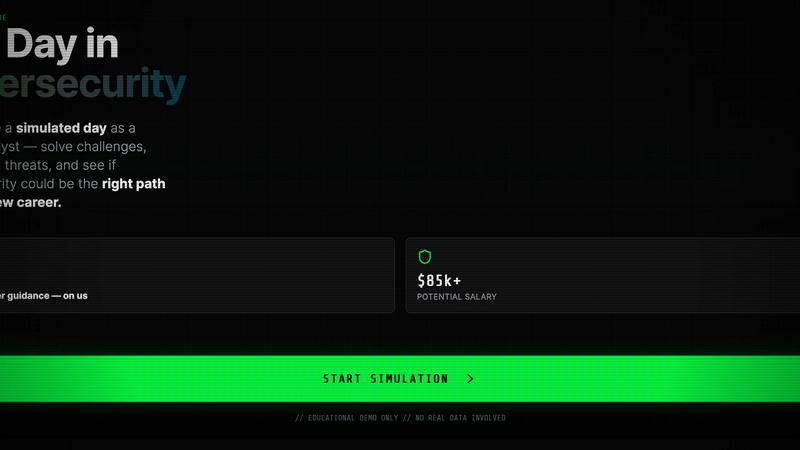
Level up your team's cyber skills with immersive breach simulations that sharpen decision-making and boost readiness against real threats.
Last updated: March 18, 2026

SupaSidebar
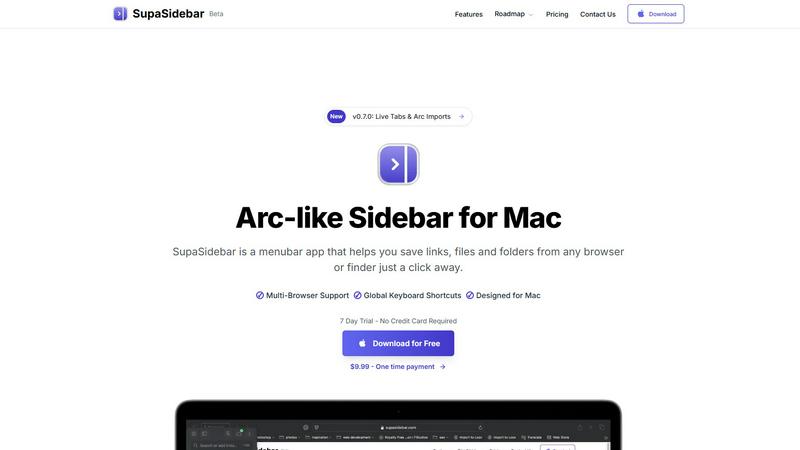
SupaSidebar turns your Mac into a powerful command hub, saving links and files with a click for instant access.
Last updated: February 26, 2026
Visual Comparison
Cybersecurity Readiness Game
SupaSidebar
Feature Comparison
Cybersecurity Readiness Game
Real-World Scenarios
Dive into immersive, authentic scenarios that mimic actual cybersecurity threats. Experience the pressure of decision-making in real time, enhancing your ability to respond effectively to incidents.
No Registration Required
Forget tedious sign-ups and get straight to the action! This game is 100% free and requires no registration, making it accessible for anyone looking to sharpen their cybersecurity skills without barriers.
Performance Insights
Receive detailed feedback on your decisions and actions throughout the game. These performance metrics pinpoint your strengths and highlight areas for improvement, ensuring continuous growth in your cybersecurity readiness.
Scenario-Based Learning
Engage in hands-on problem-solving with scenario-based challenges. This approach not only reinforces knowledge but also builds practical skills that are essential for navigating the cybersecurity landscape.
SupaSidebar
Instant Saving with Keyboard Shortcuts
Saving your favorite links or files has never been easier. With SupaSidebar, use the CMD CTRL S shortcut to save anything instantly, or press CMD CTRL C to copy the current website link straight to your sidebar. This feature streamlines your workflow, allowing you to focus on what truly matters—creating and innovating without distractions.
Real-Time Live Tabs
Lost in a sea of tabs? SupaSidebar's Live Tabs feature acts as your guiding light, letting you find your work in a snap. The Recents function tracks every website you've visited in the last 48 hours, making retrieval effortless. No more endless scrolling through browser histories; your most recent activity is always at your fingertips.
Fast Search Functionality
Switching between apps can kill your vibe. SupaSidebar addresses this with a lightning-fast search feature. Just hit CMD CTRL K, type in what you're looking for, and watch as it pulls up any file, folder, website, or app in milliseconds. This feature enhances your productivity, ensuring you never waste time searching again.
Pinned Favorites for Quick Access
Keep your essentials close with SupaSidebar's pinned items feature. Your favorite links and files are always displayed at the top of the list, allowing for quick access whenever you need them. Say goodbye to repetitive searches; your most-used resources are just a click away.
Use Cases
Cybersecurity Readiness Game
Team Training Sessions
Use the Cybersecurity Readiness Game for team-building exercises that elevate your team's collective skills. Foster collaboration and critical thinking as team members tackle challenges together.
Individual Skill Development
Perfect for individuals looking to break into cybersecurity or advance their careers. The game provides a platform to practice decision-making skills and gain actionable insights into personal readiness.
Organizational Assessment
Organizations can leverage the game to assess their overall cybersecurity posture. Identify knowledge gaps among employees and tailor training programs to enhance readiness and resilience.
Recruitment Tool
Employers can utilize the game during the hiring process to evaluate candidates' decision-making abilities in realistic scenarios, ensuring they select individuals who can perform under pressure in the cybersecurity realm.
SupaSidebar
Streamlining Research Projects
If you're deep in research, SupaSidebar is your best ally. You can save articles, papers, and web pages directly into your sidebar, allowing you to organize and access your resources effortlessly. No more tab clutter—just a clean, organized interface that keeps your focus sharp.
Enhancing Creative Workflows
For creators, time is everything. SupaSidebar allows you to save inspirations, links, and files as you browse, ensuring that your creative process is uninterrupted. With instant access to your favorite tools and resources, you can let your creativity flow without the hassle of searching through a mountain of tabs.
Simplifying Development Tasks
Developers can significantly benefit from SupaSidebar's features. Store documentation, tutorials, and critical links in one accessible location. The fast search function lets you quickly find the resources you need, making coding sessions smoother and more efficient.
Daily Productivity Boost
Multitaskers will appreciate SupaSidebar's ability to streamline daily tasks. Whether you're managing projects, attending meetings, or just browsing for information, having all your links and files organized in one sidebar lets you focus on getting things done faster and with less stress.
Overview
About Cybersecurity Readiness Game
Step into the heat of the moment with the Cybersecurity Readiness Game, the ultimate training tool for aspiring and seasoned cybersecurity professionals alike! This cutting-edge simulation drops you into real-world threat scenarios, allowing you to make critical decisions that could mean the difference between safeguarding data and facing a breach. No registration? No problem! Just jump right in and engage with authentic challenges designed to shake off complacency. Analyze your choices and their impacts while gaining clear performance insights that guide your growth. This game is not just about theory; it's about closing the human error gap, honing vital skills, and gaining a practical understanding of your cybersecurity readiness status. With cybercrime costs projected to hit a staggering $10.5 trillion annually, this tool is your frontline defense against the evolving landscape of digital threats. Get ready to empower your team and elevate your organization's resilience!
About SupaSidebar
Tired of the chaos that comes with juggling multiple tabs, endless bookmarks, and a cluttered digital workspace? Say hello to SupaSidebar, your new digital command center designed specifically for Mac users. This isn’t just another app; it's a beautifully crafted sidebar that draws inspiration from the sleek aesthetics of Arc. Whether you're a researcher, creator, developer, or multitasker, SupaSidebar is built to cater to your fast-paced lifestyle, providing instant access to everything you need without disrupting your flow. Nestled quietly in your menubar, it only makes its presence known when you summon it with a slick keyboard shortcut. Its core superpower? Unifying your entire digital workspace into one gorgeous, distraction-free sidebar. Save links, files, and folders from any browser or Finder in seconds, and effortlessly access them from any major browser, including Safari, Chrome, Firefox, and Brave. SupaSidebar is lightweight, native, and ensures that all your data remains securely on your Mac. Ditch the chaos and embrace the command of your workflow with SupaSidebar.
Frequently Asked Questions
Cybersecurity Readiness Game FAQ
What is cybersecurity readiness?
Cybersecurity readiness refers to an organization’s ability to prepare for, respond to, and recover from cyber threats. It encompasses training, awareness, and incident response strategies.
Why is cybersecurity readiness important?
With global cybercrime costs projected to soar, robust cybersecurity readiness mitigates risks and limits potential financial losses, protecting both data and reputation.
How can I start using the Cybersecurity Readiness Game?
Simply choose a scenario and begin your assessment session. No registration is needed, allowing you to dive right into the action and start learning!
What skills can I develop through this game?
Participants enhance decision-making, strategic thinking, and risk assessment skills. The practical experience gained prepares you for real-world cybersecurity challenges, making you more effective in your role.
SupaSidebar FAQ
Is SupaSidebar a browser extension?
No, SupaSidebar is a standalone menubar application designed for Mac. It operates independently of your browser, allowing seamless integration with multiple browsers like Safari, Chrome, and Firefox.
Which browsers does SupaSidebar work with?
SupaSidebar supports all major browsers, including Safari, Chrome, Firefox, Arc, and Brave. You can save links and files from any of these browsers directly into your sidebar.
What macOS version do I need?
SupaSidebar requires macOS 13 or newer to ensure optimal performance and compatibility. Always keep your system updated for the best experience.
Where is my data stored?
All data saved with SupaSidebar remains securely on your Mac. The app is designed to prioritize your privacy, ensuring that nothing leaves your device without your permission.
Alternatives
Cybersecurity Readiness Game Alternatives
In the realm of cybersecurity training, the Cybersecurity Readiness Game stands tall as an innovative tool that immerses users in the heart of real-world threat scenarios. This experience belongs to the Productivity & Management category, specifically designed to sharpen decision-making skills during potential breaches. Users often scout for alternatives driven by factors like pricing, unique features, or specific platform requirements that better align with their team's needs. When searching for an alternative, look for solutions that deliver engaging simulations, actionable insights, and the ability to adapt to your organization’s specific cybersecurity challenges.
SupaSidebar Alternatives
SupaSidebar is your all-in-one digital command center for Mac, designed to streamline your workflow by providing instant access to your links, files, and folders. As a productivity and management tool, it creates a sleek, distraction-free sidebar that integrates seamlessly with your macOS experience. This beautiful, Arc-inspired interface is perfect for anyone who juggles multiple tasks and needs a fast, efficient way to organize their digital life. However, users often seek alternatives to SupaSidebar for various reasons. Some may find themselves drawn to different pricing structures, while others might be looking for specific features that align more closely with their workflow needs. When searching for an alternative, it's crucial to consider compatibility with your preferred platforms, the ease of use, and the ability to integrate with your existing tools to ensure a smooth transition and continued productivity.