Blueberry vs DevUtilX
Side-by-side comparison to help you choose the right AI tool.

Blueberry
Blueberry unites your editor, terminal, and browser into one seamless workspace for effortless web app development.
Last updated: February 28, 2026

DevUtilX
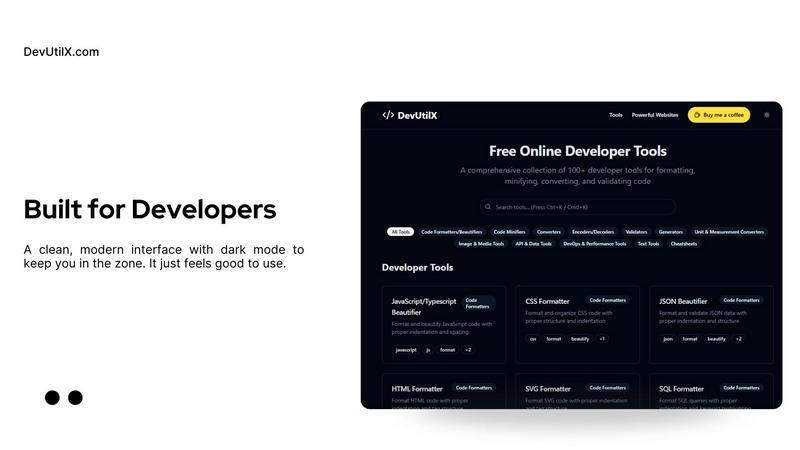
DevUtilX is your all-in-one dev powerhouse, offering 100+ free tools to format, minify, and validate your code.
Last updated: February 26, 2026
Visual Comparison
Blueberry

DevUtilX
Feature Comparison
Blueberry
Unified Workspace
Blueberry combines a terminal, code editor, and preview browser into a single workspace, allowing you to build and ship without the hassle of switching between multiple applications. This integrated approach fosters a seamless development experience, enabling you to focus on what matters most—your code.
AI-Powered Context
With Blueberry's built-in MCP, your chosen AI model can see your entire workspace. This means it can leverage real-time context from your editor, terminal output, and browser to offer precise assistance, making your coding sessions more productive and less chaotic.
Multi-Device Preview
Preview your web apps on desktop, tablet, and mobile devices all within Blueberry. This feature ensures you can see exactly what your users will experience, without having to leave your workspace. It’s like having a personal QA team right at your fingertips.
Pinned Apps Integration
Keep essential tools like GitHub, Linear, Figma, and PostHog docked within your Blueberry workspace. These pinned apps load alongside your project and share live context with your AI, allowing for a more cohesive workflow that keeps everything you need in one place.
DevUtilX
Comprehensive Tool Collection
DevUtilX boasts a massive collection of over 100 developer tools that encompass everything from code formatting to data validation. No matter what you need, whether it's a quick JSON beautifier or a complex regex tester, this suite has got you covered. With tools categorized for easy navigation, you're guaranteed to find exactly what you need without the hassle.
Instant Browser Access
Leave behind the days of cluttered desktops and endless downloads. DevUtilX runs directly in your browser, meaning you can access your favorite utilities from anywhere. Whether you're on a desktop, tablet, or laptop, your toolkit is just a click away. This instant access allows you to focus on what really matters: your code.
Secure and Private Environment
Your data's safety is a top priority with DevUtilX. All operations are performed locally on your machine, ensuring that your sensitive information never leaves your device. This makes it one of the most secure and private developer toolkits available today, giving you peace of mind while you work.
Lightweight and Customizable Interface
DevUtilX is designed with performance in mind. Its sleek interface is not only lightweight but also theme-friendly, allowing you to customize the look and feel to suit your preferences. The user experience is optimized for speed and efficiency, making it easy to navigate through tools without any friction.
Use Cases
Blueberry
Streamlined Development
Developers can use Blueberry to streamline their coding process by accessing everything they need from one place. With integrated tools and AI assistance, you can focus more on writing high-quality code rather than managing multiple applications.
Collaborative Projects
For teams working collaboratively, Blueberry serves as a centralized hub where all project members can access the same tools. This unified workspace fosters better communication and coordination, enhancing overall productivity.
Rapid Prototyping
Blueberry is perfect for designers and developers who need to quickly prototype web applications. The ability to see live changes in real-time while coding allows for rapid iterations and faster feedback loops.
Learning and Experimentation
New developers and students can greatly benefit from Blueberry’s integrated environment, where they can learn coding in a practical setting. Having AI context helps them understand the code better and resolve issues more efficiently as they learn.
DevUtilX
Rapid Code Formatting
Need to clean up your code quickly? DevUtilX provides essential formatting tools for various programming languages like JavaScript, CSS, and HTML. With just a few clicks, you can ensure your code is beautifully structured and adheres to best practices, making it easier to read and collaborate on.
Data Conversion on the Fly
Whether you are converting XML to JSON or compressing a large JSON file, DevUtilX makes data conversion a breeze. The suite’s conversion tools handle various formats seamlessly, saving you valuable time and reducing the chance of errors during the conversion process.
Efficient Code Comparison
When you are working with multiple code versions, being able to compare them side-by-side is crucial. The built-in Code Diff Tool allows you to track changes, highlight differences, and merge revisions with clarity, ensuring your codebase stays organized and error-free.
Streamlined API Development
For developers working with APIs, DevUtilX is an indispensable tool. From validating JSON responses to testing API endpoints, this suite covers all your backend needs. You can quickly format, convert, and validate data, allowing you to focus on building robust applications without the hassle.
Overview
About Blueberry
Blueberry is your ultimate macOS companion, redefining the way modern product builders create web applications. Gone are the days of chaotic window juggling; Blueberry merges your editor, terminal, and browser into one streamlined workspace. It's designed for developers, designers, and innovators who crave efficiency and focus. By connecting with AI models like Claude, Codex, or Gemini through Blueberry's cutting-edge MCP, you can have your files, terminal outputs, and live previews all visible in one place. This integration not only eliminates the tedious task of copy-pasting context but also enhances your coding experience. With a sleek interface that empowers you to build, test, and ship delightful web apps, Blueberry is the go-to tool for anyone looking to elevate their product development process. And the best part? It's currently in beta and completely free, making it accessible to everyone eager to innovate and create.
About DevUtilX
DevUtilX is the ultimate digital workshop that revolutionizes the way developers work. Forget about the tab chaos and endless tool-hopping; this powerhouse suite packs over 100 essential developer utilities into a single, sleek, and lightning-fast interface. Built for coders, DevOps engineers, and tech enthusiasts, DevUtilX is your all-in-one sidekick that prioritizes speed, privacy, and productivity. Imagine having instant access to a treasure trove of tools—code beautifiers, minifiers, converters, validators, encoders, and more—right in your browser. No downloads, no setup, and your data stays local for maximum security. Whether you need to clean up a messy JSON blob, convert XML to YAML in a crunch, or quickly format SQL, DevUtilX is your go-to solution. This toolkit is designed for the modern developer who craves performance without compromise, providing a lightweight, customizable experience that fits seamlessly into your workflow. Welcome to your command center for code craftsmanship.
Frequently Asked Questions
Blueberry FAQ
What operating system does Blueberry support?
Blueberry is currently available exclusively for macOS, optimized to deliver the best experience on Apple devices.
Is Blueberry really free during the beta phase?
Yes, Blueberry is 100% free during its beta phase. Users can download and use the app without any charges, making it accessible for everyone eager to enhance their development process.
Can I use my favorite AI models with Blueberry?
Absolutely! Blueberry allows you to connect with various AI models like Claude, Gemini, or Codex through its built-in MCP, giving you the flexibility to choose the AI that best suits your needs.
How does Blueberry enhance collaborative workflows?
Blueberry enhances collaborative workflows by allowing multiple team members to work within the same unified workspace. Pinned apps and shared live context ensure that everyone stays on the same page, boosting productivity and teamwork.
DevUtilX FAQ
What types of tools are included in DevUtilX?
DevUtilX includes a wide range of tools for formatting, minifying, converting, and validating code. You'll find utilities for JavaScript, CSS, HTML, JSON, XML, and much more, catering to various development needs.
Is there a need to download anything to use DevUtilX?
Nope! DevUtilX runs entirely in your web browser, which means you don't need to download or install anything. Just open the site, and you're ready to dive into your coding tasks with instant access to all tools.
How does DevUtilX ensure data privacy?
DevUtilX prioritizes security by processing all operations locally on your machine. This means that your data never leaves your device, providing a safe environment for your development activities.
Can I use DevUtilX on different devices?
Absolutely! Since DevUtilX operates in the browser, you can access it from any device—desktop, laptop, or tablet. This flexibility allows you to carry your entire toolkit with you wherever you go.
Alternatives
Blueberry Alternatives
Blueberry is the ultimate tool for modern product builders, combining your editor, terminal, and browser into one slick workspace designed specifically for web app development. As developers and designers dive into their projects, they often find themselves tangled in the chaos of switching between apps, which can stifle creativity and slow down productivity. This is where the search for alternatives comes in. Users commonly look for other solutions due to factors like pricing, specific feature sets, or compatibility with their preferred platforms. When considering an alternative to Blueberry, it's crucial to evaluate the integration capabilities of the workspace, how well it supports your development workflow, and whether it provides the tools you need for a smooth coding experience. A solid alternative should enhance your productivity and keep your creative flames burning bright, without the hassle of jumping through hoops to connect different applications.
DevUtilX Alternatives
DevUtilX is your ultimate digital toolbox, bursting with over 100 free tools designed to streamline the coding process. This powerhouse suite caters to developers, DevOps engineers, and tech enthusiasts who crave speed and efficiency in their workflows. With features like code beautifiers, minifiers, and validators all housed in a sleek interface, it's the go-to command center for modern coding. However, users often seek alternatives to DevUtilX for various reasons, such as specific feature requirements, pricing, or platform compatibility. When hunting for the perfect alternative, consider factors like user interface, tool variety, ease of access, and security measures. The ideal choice should match your coding style and enhance your productivity without sacrificing privacy or performance.